The MiniPWZ-2 is usually not used as a stand-alone device but in combination with other circuit parts. For example, an additional transformer for stepping down medium voltage is connected upstream, or there are additional switching stages on the output side. These additional circuit parts can affect the phase position and the propagation times of the switching signals. To compensate for this influence, you can store individual delay times for each channel in the MiniPWZ-2.
6.1Procedure
6.1.1Step 1: Prepare the Measurement
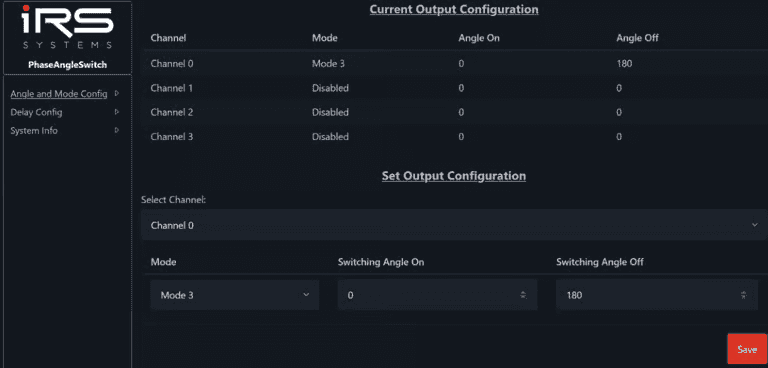
To measure the delay times, we recommend configuring the MiniPWZ-2 with Mode4, Angle On = 0° and Angle Off = 180°.
6.1.2Step 2: Measure the Delay Times
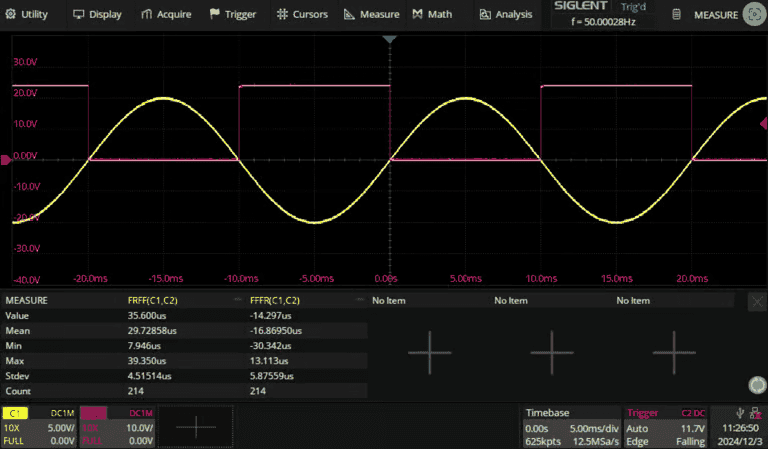
The measurement differs depending on the design of the input and output circuits. In the following example, a test signal from a function generator was fed into the 50 Hz input of the MiniPWZ-2 (yellow), and the output signal was measured with an oscilloscope (red). Note that the output signal is inverted because of the open-drain circuit of the output board used (24 V = "Off", 0 V = "On"). With more complex setups, the measurement can be considerably more complicated. The delay time for switching on ("On") was measured as the time between the first rising edge of the input signal and the first falling edge of the output signal (FRFF(C1,C2)). The delay time for switching off ("Off") was measured as the time between the first falling edge of the input signal and the first rising edge of the output signal (FFFR(C1,C2)). The measurement methods chosen can differ depending on the setup.
6.1.3Step 3: Set the Delay Times
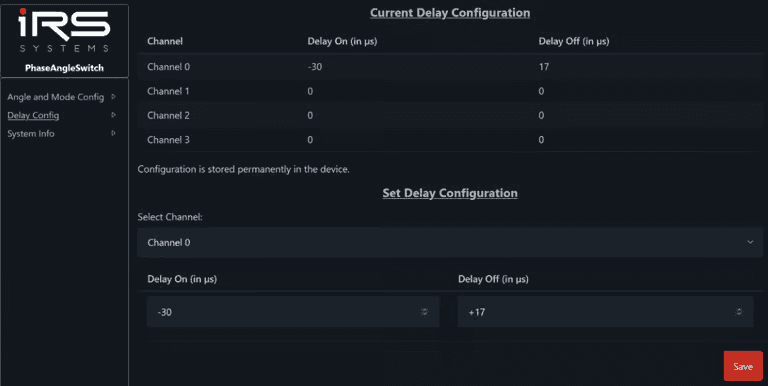
You can configure the delay times on the "Delay Config" page for each channel, separately for switching on and switching off. The values are stored permanently in the MiniPWZ-2 and are retained after a restart. In the example, a delay time of 30 µs for switching on and -17 µs for switching off was measured in step 2. To compensate for these values, the delay times were set to -30 µs for switching on and +17 µs for switching off.
6.1.4Step 4: Check the Result
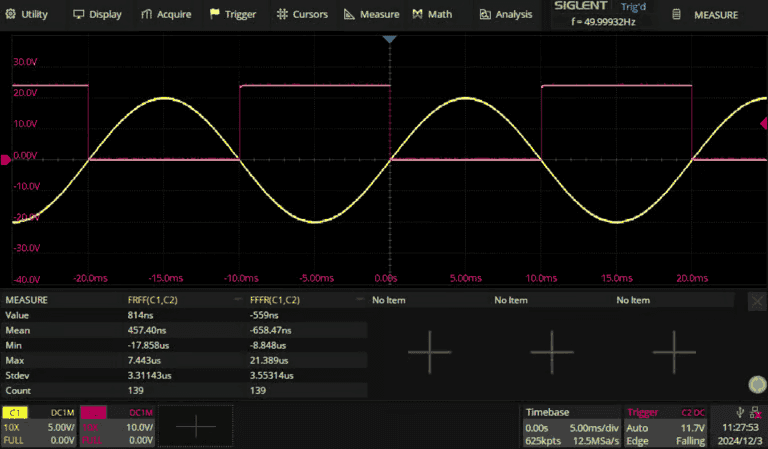
After you have set the delay times, you should repeat the measurement from step 2. The delay times should now be close to 0.
6.2Delays Greater Than One Period
The Mini PWZ II can compensate for delays in the range from -100 ms to +100 ms. The delay can therefore be greater than one period of the mains sine wave (20 ms at 50 Hz). The following section describes how delays for which this is the case are handled.
The Mini PWZ II samples the reference signal several times per mains period and always calculates the current period of the reference signal. Using the calculated period and the configured delays, it continuously adapts the switching times to the reference signal.
In simplified terms, the switching time is calculated as follows:

The module then checks whether the switching time is less than 0 or greater than the period. If this is the case, the period duration is added or subtracted until the switching time lies between 0 and the period duration, and this switching time is then stored.
This procedure ensures that switching takes place at the correct phase angle even with large delays in the output stage. However, two channels with significantly different delays (> 20 ms) can still switch in the same period. The following example explains this behavior. To simplify the calculations, a period of 20 ms is assumed.
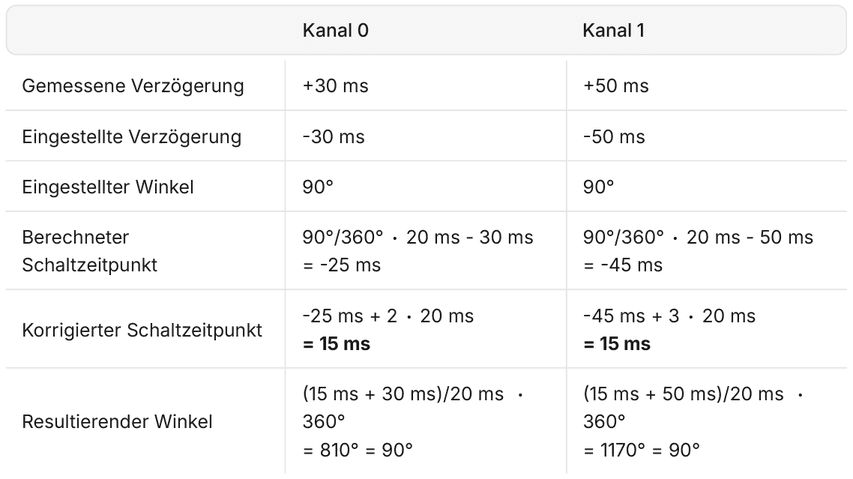
You can see that both delays lead to the correct switching angle. However, the output stages switch in different periods.
With delays greater than one period, the correct timing relationship between two channels is therefore not ensured in all cases.