An update of the microcontroller firmware can be necessary to provide new features. A PC application is available for this.
After you have installed and started the PC application, the update takes 5 simple steps.
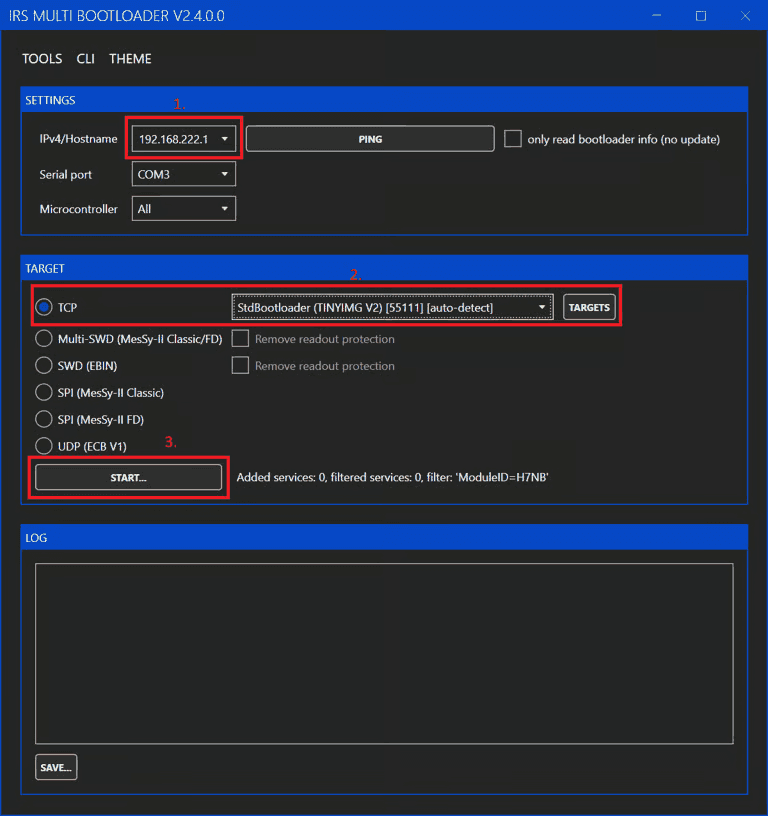
- Enter the IP address of the MiniPWZ-II.
- Select the bootloader type (TCP and StdBootloader) (these are the default settings).
- Click Start.
- In the file dialog that then appears, select the update file (you can obtain it from IRS Support).
- The update starts automatically; success is indicated by Update completed (in the log window). After the update, you can also check the firmware version via the WebServer.