The software for the real time system controls the device according to the values it gets from network interface (Shared Network Variables).
Note: It is also possible to control the FPGA without using the real time system. The user may design his own application.
3.1Network interface (Shared Network Variables)
To control the simulation the real time system is communicating with the host application by using a technique called “Shared Network Variables”. These are containers of variables which can be accessed by a special network address. The containers are located in the RT folders (“RT_ResSi” or “RT_RVDT”):
- ResSi_Variables.lvlib / RVDT_Variables.lvlib: Contains non channel related variables like FPGA version
- ResSi_Variables_x.lvlib / RVDT_Variables_x.lvlib: Contains channel related variables where x represents the channel number (each channel will have its own file).
3.1.1Access a variable from host computer
To access a variable from a remote system, the developer can use the VI “RT_PC_ResSi_NetVarPathGen.vi” (“RT_PC_RVDT_NetVarPathGen.vi” respectively) located in “RT_ResSi/Share” (“RT_RVDT/Share” respectively) together with a “Read Variable” or “Write Variable” control.
PC example for reading the actual angle and for writing a new angle in RVDT simulator mode:


- TargetIP: RIO ip address or hostname
- Angle_Actual / Angle: Name of the desired variable in “RVDT_Variables_x.lvlib”
- ChannelNb: Channel number -> x (if x = 255, access goes to “RVDT_Variables.lvlib”)
3.1.2Adding a new channel
Example for RVDT channel 1:
- If not done, add the new channel to the FPGA code (see FPGA – Adding a new channel)
- Create copy of “ResSi_Variables_0.lvlib” and rename to “ResSi_Variables_1.lvlib” (this step cannot be done in project explorer, instead use windows explorer)
- Update FPGA reference
- Open “RT_RVDT/RT_RVDT_Thread.vi”
- Right click on “RefnumIn” and select “Open Type Def.”
- Right click on “Reference” and choose “Configure FPGA VI Reference…”
- Click on “Import from bitfile…”, browse to the required bit file located in “FPGA Bitfiles” and open it
- Save everything
- Update build specification and rebuild
- Right click on “RIO-System/Build_Specification/RT_RVDT” -> Properties
- Select “Source Files” on right side
- Browse to “RT_RVDT/RVDT_Variables_1.lvlib” and add it to section “Always Included”
- Rebuild and flash (“Run as startup”)
3.2Resolver simulation (RT_ResSi)
Not described in manual V3.0. See Resolver Mode Software (from manual V2.2).
3.3RVDT simulation (RT_RVDT)
This section describes the real time system for RVDT simulation mode.
3.3.1Control interface (RVDT_Variables)
Like told in section Network interface the RVDT simulation will be controlled by network shared variables. The following table describes them:
| Variable | Type | Access | Description | Unit |
|---|---|---|---|---|
| FPGA_Version (common) | UInt32 | r | HEX coded FPGA compilation date: Format: 0xYYYYMMDD | |
| Angle | Double | r/w | Simulation angle in degree | ° |
| Angle_Actual | Double | r | Current simulation angle in degree | ° |
| Angle_DegreePerSec | Double | r/w | Moving speed to new angle position | °/sec |
| Angle_Max | Double | r/w | Maximum angle swing (absolute value): Angle where the difference output signal is at his maximum amplitude set up by “LUT_Amplitude” and PGA. | ° |
| LUT_Amplitude | Double | r/w | Maximum amplitude of the differential output signal relative to the excitation signal amplitude multiplied with PGA (see “LUT_Write”). | % |
| LUT_Calibration | CTL[1] | r/w | Calibration settings (see “LUT_Write”) | |
| LUT_Write | Boolean | r/w | Set to update the lookup tables with new data calculated with the values in “LUT_Amplitude” and “LUT_Calibration”. True: Start update process (set by user). False: Update process finished (set by RT) | |
| PGA | UInt8 | r/w | PGA setting (Range: 0…7): Û_OUT = 0.078125 * 2^PGA * Û_LUT | |
| SaveConfig | Boolean | r/w | Set to permanently save current configuration and angle setup in real time system flash memory (it will be loaded on every start up). True: Start saving process (set by user). False: Saving process finished (set by RT) |
CTL[1] -> RT_PC_RVDT_LUT_Calibration.ctl
| Variable | Type | Description | Unit |
|---|---|---|---|
| SineAmplitude_%, CosineAmplitude_% | Double | Amplitude correction factors for lookup table (see “LUT_Amplitude”): Amplitude_LUT = "LUT_Amplitude" * x | % |
| SineDCOffset_%, CosineDCOffset_% | Double | LUT DC offset correction amplitude relative to the excitation signal amplitude multiplied with PGA: Amplitude_LUT = "LUT_Amplitude" + x | % |
3.3.2RT_RVDT_Top.vi
Top vi of the real time system in RVDT simulation mode.

3.3.3RT_RVDT_Thread.vi
This vi is responsible for controlling the FPGA. It is called cyclic (100ms) from top vi for each available channel on FPGA (parallel as multi thread).
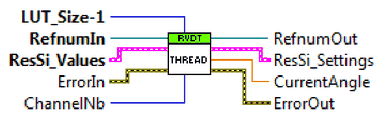
- LUT_Size-1: Last index of the lookup tables (get it from FPGA)
- ChannelNb: Channel number
- ResSi_Values: Connect to FPGA “ResSi_Values” array element at index defined by “ChannelNb”
- ResSi_Settings: Connect to FPGA “ResSi_Settings” array element at index defined by “ChannelNb”
3.3.4RT_RVDT_SaveCfg.vi & RT_RVDT_LoadCfg.vi
These are used for saving the current configuration to flash memory and for loading it again.
3.3.5RT_PC_RVDT_LUT_ValueWrite.vi
With this vi the update data for the lookup tables will be created. It takes the amplitude (LUT_Amplitude) and the calibration settings (LUT_Calibration) as input parameters and generates the lookup table data for both tables. The following diagram shows example data (LUT-Size = 1024; Max. Angle = +-30°; LUT_Amplitude = 100%):
