The following section describes the functionality of the internal measurement and every interface.
2.1Current measurement
2.1.1Measurement procedure
The current is measured internally at a sampling rate of 375kS/s, where 9 samples are averaged to 1 “external” sample. Thus, an “external” sampling rate of 41,667kS/s is achieved.
The current range is selected automatically, when CMM is switched on. Range selection does not influence the output voltage. Except large current changes of several amperes will result in short time voltage drops of few 100 mV. See Dynamic behavior for dynamic behavior.
For every interface (RS232, CAN, LVDS-SPI) an independent averaging is implemented, which starts averaging with every readout. Following figure illustrates the averaging.

I.e. if CAN sends its message every millisecond, around 42 external samples are averaged, which are already an average of 9 internal samples each.
Averaging from readout to readout does not influence the averaging on other interfaces. I.e., averaging is independent for
- RS232
- CAN
- LVDS-SPI
An overflow of the averaging may not occur even after a year of readout interval.
2.1.2Reverse current detection
Reverse currents can’t be measured, but a flag is signaled, when a current of several 100mA is applied in reverse direction. The output data on CAN or LVDS-SPI is an invalid number, exceeding the measurement range (0xEEEEEEEE in hexadecimal representation).
2.1.3Dynamic behavior
Switching between the ranges occurs very fast from low current range to high current ranges within less than 1µs (500ns typical) after the current range has been exceeded.
The following figure shows the typical behavior at a current step from some µA to more than 60 amps.
- yellow trace: current through the module
- Red trace: voltage drop over the module
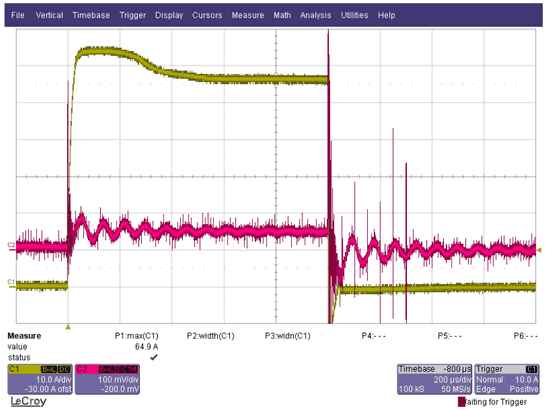
The ring at the voltage drop results from the inductive component of the applied load.
The following figure shows the zoom of positive and negative edge of the current step.
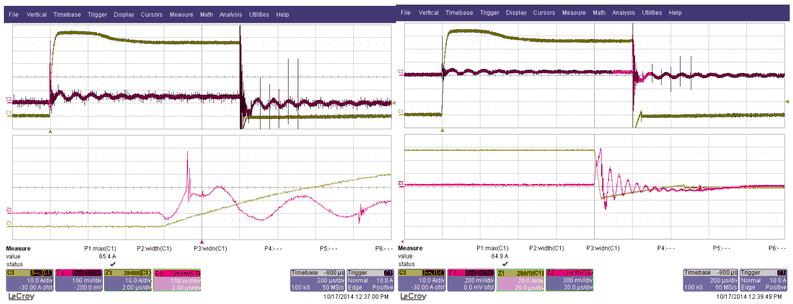
Conclusion: The voltage drop while switching occurs is well below 1V for a duration of some microseconds maximum.
2.2ON/Off control
CMM_III may be switched on or off by a hardware input or by software. The following parameters can be adjusted by configuration:
- Active level (high or low) of the hardware input
- Priority of hardware or software on/off-control
Configuration may be changed by the command ONMOD=x via RS232 or CAN using ISO-TP protocol, while x one of the following numbers 0…7:
| ID | Name | HW input | SW setting | Description |
|---|---|---|---|---|
| 0 | ONOFF_Mode_ExtHighActive | YES | NO | CMM is ON, when high level is applied at HW input, SW setting ignored |
| 1 | ONOFF_Mode_ExtLowActive | YES | NO | CMM is ON, when low level is applied at HW input, SW setting ignored |
| 2 | ONOFF_Mode_Int | NO | YES | CMM is only controlled by SW |
| 3 | ONOFF_Mode_ExtHighActiveAndInt | YES | YES | CMM is ON @ high level is at HW input AND SW setting is ON. |
| 4 | ONOFF_Mode_ExtLowActiveAndInt | YES | YES | CMM is ON @ low level is at HW input AND SW setting is ON. |
| 5 | ONOFF_Mode_ExtHighActiveOrInt | YES | YES | CMM is ON @ high level is at HW input OR SW setting is ON. |
| 6 | ONOFF_Mode_ExtLowActiveOrInt | YES | YES | CMM is ON @ low level is at HW input OR SW setting is ON. |
| 7 | ONOFF_Mode_AlwaysOn | NO | NO | CMM is always ON. |
2.3CAN data output
CAN data is sent cyclically on a specified CAN ID. This CAN ID is adjustable by RS232 configuration.
| Value | Min | Typical | Max | Unit | Remarks |
|---|---|---|---|---|---|
| CAN Type | - | High Speed | - | - | CAN Transceivers are always active. No sleep mode is applied. |
| CAN Termination | 117 | 120 | 123 | Ohm | Termination Resistor is R40 and may be removed if desired |
| CAN Baud rate | 50 | 1000 | 2000 | kBit/s | Default baud rate is 1MBit/s |
| CAN ID | 0x1C2 | Hex | Identifier may be adjusted by RS232 or CAN configuration | ||
| Extended ID | No | 11-Bit or 29-Bit Identifier may be adjusted by RS232 configuration | |||
| CAN transmit interval | 1 | 5 | 30000 | ms | Transmit interval may be adjusted by RS232 configuration |
| CAN data length | 5 | 4 Bytes for Current and 1 Byte for Range | |||
| CAN data resolution | 100 | nA | One bit of the returned current represents 100nA of real measured current |
Content of the transmitted CAN message is as follows:
| Byte | Content | Value |
|---|---|---|
| Byte 0 | Current Bit 0..7 | 0x00000000 … approx. 0x7270 E000 |
| Byte 1 | Current Bit 15..8 | 0x00000000 … approx. 0x7270 E000 |
| Byte 2 | Current Bit 23..16 | 0x00000000 … approx. 0x7270 E000 |
| Byte 3 | Current Bit 31..24 | 0x00000000 … approx. 0x7270 E000 |
| Byte 4 | Range | 0 … 6 |
Current is returned as 32 Bit unsigned long value in steps of 100nA split into the first 4 bytes of the CAN message.
When CMM_III is in off state, the returned value is 0xFFFFFFFF, which represents 429.4967295 A, which is no valid measurement value.
When CMM_III is in on state, but reverse current is applied, the returned value is 0xEEEEEEEE, which represents 400.8636142 A, which is no valid measurement value.
2.4LVDS-SPI data output
The measurement value can be read via an SPI-interface on LVDS level. SPI yields high data rates, while LVDS level yields low noise radiation and higher noise immunity, due to differential signaling.
The protocol for reading data of a single current measurement module is as follows:

When several modules are connected in daisy chain, the data from the previous module is forwarded to the output as following figure illustrates:

When En_In is asserted, the module sends out its current value during the next 32 clock cycles with MSB first. After 32 clock cycles the received data word is forwarded. En_In must be valid for 32 clock cycles, multiplied by number of CMMs in the chain. The current is returned as 32 Bit unsigned long value in steps of 100nA.
2.5RS232 data output
The measurement value is sent over RS232 in the interval of 100ms. The interval is adjustable via RS232 configuration. Connect the PC’s COM-Port to the RS232 at the front cover with a simple 1:1 Sub-D-Cable (no Null modem). Use a standard terminal program with the following settings:
- 9600 Baud
- No parity
- 1 Stop bit
- No Handshake
You will see the module’s output as following picture illustrates:

- R = Range
- I = average current in µA since last readout
- Min = minimum current in µA since last readout
- Max = maximum current in µA since last readout
Every Line is terminated by “Carriage Return / Line feed” to separate between new data.
2.6RS232 configuration
Configuration of the module using RS232 gives access to the CAN transmission configuration and the send interval for RS232-interface data output. Connect the PC’s COM-Port to the RS232 at the front cover with a simple 1:1 Sub-D-Cable (no Null modem).
Use a standard terminal software with the settings:
- 9600 Baud
- No parity
- 1 Stop bit
- No Handshake
You will see the module’s output as shown in RS232 data output.
By sending the commands of the following table the settings may be queried. Every Command must be finished with a carriage return / line feed (\r\n). I.e. every command string needs to have the following format similar to the following example: SINTV?\r\n
\ris ASCII character0x0D\nis ASCII character0x0A
| Command | Description | Response (Example) | Default | Remarks |
|---|---|---|---|---|
SINTV? | Queries the actual serial transmission interval in milliseconds | SINTV = 1000 ms | 100 ms | |
CINTV? | Queries the actual CAN transmission interval in milliseconds | CINTV = 10 ms | 1 ms | |
CANBD? | Queries the actual CAN baud rate in kBit/s | CANBD = 1000 | 1000 | |
CANID? | Queries the actual CAN ID | CANID=450 | 450 | CAN ID for cyclic messages (decimal) |
XTEND? | Queries Extended-ID-Flag of the actual CAN ID | XTEND=0 | 0 | 0 => 11-bit ID / 1 => 29-bit ID |
SWVER? | Queries software version | SWVER = VERSION | Software version – ASCII string | |
TEMPR? | Reads out current module temperature in °C | TEMPR = 23 | ||
GLVAL? | Queries the latest values min, max and average | R= 0\tI = 50.0 uA\tMin = 48.5 uA\tMax=51.5 uA | Same as shown in RS232 data output | |
ONMOD? | Queries the On/Off control configuration | ONMOD = 0 | 0 | See ON/Off control for description of ONMOD. Range: 0…7 |
CMMON? | Queries the state of the internal ON/Off state | CMMON = 0 | 0 | This is only the SW setting. The state of the hardware input is not regarded for this command. Volatile value. 0 => Off / 1 => On |
TPLID? | Queries local CAN-ID for ISO-TP | TPLID = 451 | 451 | CMM listens on Local ID (decimal) |
TPRID? | Queries remote CAN-ID for ISO-TP | TPRID = 2047 | 2047 | System listens on Remote ID (decimal) |
TPLXT? | Queries Extended-ID-Flag of local CAN ID for ISO-TP | TPLXT = 0 | 0 | 0 => 11-bit ID / 1 => 29-bit ID |
TPRXT? | Queries Extended-ID-Flag of remote CAN ID for ISO-TP | TPRXT = 0 | 0 | 0 => 11-bit ID / 1 => 29-bit ID |
SERNB? | Queries serial number string | SERNB = 23BG12345 | <none> | Firmware >= 1.2.7 |
CDATE? | Queries last calibration date | CDATE = 2023-08-01 | <none> | Firmware >= 1.2.7. Format: YYYY-MM-DD |
UTEXT? | Queries user defined string | UTEXT = TEXT | <none> | Firmware >= 1.3.0 |
MMASC? | Queries min. and max. current averaging samples count | MMASC = 10 | 1 | Firmware >= 1.3.0. Volatile value. 1 Sample = 24µs |
RCISC? | Queries count of samples to ignore after range changed | RCISC = 10 | 6 | Firmware >= 2.2.0. Volatile value. 1 Sample = 24µs |
MINRG? | Queries minimum range limit | MINRG = 3 | 0 | Firmware >= 2.2.0. Volatile value |
By sending the commands of the following table the settings may be set. Every Command must be finished with a carriage return / line feed (\n\r). I.e., every command string needs to have the following format like the following example: SINTV=100\n\r
| Command | Description | Response (Example) | Valid parameter range |
|---|---|---|---|
SINTV=n | sets the actual serial transmission interval in milliseconds | SINTV = 1000 ms | n = 100 … 12000 |
CINTV=n | Sets the actual CAN transmission interval in milliseconds | CINTV = 10 ms | n = 1 …12000 |
CANBD=n | Sets the actual CAN baud rate in kBit/s | CANBD = 1000 | n = 100, 125, 200, 250, 400, 500, 800, 1000 |
CANID=n | Sets the actual CAN ID | CANID = 450 | n = 0 … 2047 (11-bit ID); n = 0 ... 536870911 (29-bit ID) |
XTEND=b | Sets the Extended-ID-Flag of the actual CAN ID | XTEND = 0 | b = 0 / 1; 0 => 11-bit ID / 1 => 29-bit ID |
ONMOD=n | Sets the On/Off control configuration | ONMOD = 0 | See ON/Off control for description of ONMOD values n; n = 0 … 7 |
CMMON=b | Sets the internal ON/Off state | CMMON = 0 | b = 0 / 1; 0 => Off / 1 => On |
TPLID=n | Sets local CAN-ID for ISO-TP | TPLID = 451 | n = 0 … 2047 (11-bit ID); n = 0 ... 536870911 (29-bit ID) |
TPRID=n | Sets remote CAN-ID for ISO-TP | TPRID = 2047 | n = 0 … 2047 (11-bit ID); n = 0 ... 536870911 (29-bit ID) |
TPLXT=b | Sets Xtd-Flag of local CAN ID for ISO-TP | TPLXT = 0 | b = 0 / 1; 0 => 11-bit ID / 1 => 29-bit ID |
TPRXT=b | Sets Xtd-Flag of remote CAN ID for ISO-TP | TPRXT = 0 | b = 0 / 1; 0 => 11-bit ID / 1 => 29-bit ID |
UTEXT=s | Sets user defined string | UTEXT = TEXT | |
MMASC=n | Sets min. and max. current averaging samples count | MMASC = 10 | n = 1…65535 |
RCISC=n | Set count of samples to ignore after range changed | RCISC = 10 | n = 6…255 |
MINRG=n | Set minimum range limit | MINRG = 3 | n = 0…6 |
Furthermore, the following additional commands using RS232 are defined. The commands also must be finished with \r\n.
| Command | Description | Response |
|---|---|---|
DEFLT! | all configuration parameters will be set to their default values | DEFAULT SETTINGS RESTORED |
INITC! | initializes CAN interface | CAN INIT |
RESET! | Resets the CMM internal microcontroller | <none>. Restart with output of SW_Version. |
BOOTL! | Sets the CMM internal microcontroller to boot mode and resets the controller |
2.7CAN configuration
Configuration of CMM may be performed using the CAN interface. For this configuration ISO-TP protocol is applied, according to ISO 15765-2. Normal addressing mode is used.
Configuration is performed by sending commands to CMM. Every command is acknowledged by a response.
2.7.1ISO TP Header
Single frame commands
Most commands and responses fit into a single CAN message. I.e. single frames according to ISO-15765-2 may be used. The respective CAN message carries the following data:
| CAN ID | Data_1 | Data_2 | Data_3 | Data_4 | Data_5 | Data_6 | Data_7 | Data_8 |
|---|---|---|---|---|---|---|---|---|
| Command Header | Command Header | Command Header | Command Header | |||||
| TPLID (command), TPRID (response) | SF_N_PCI = Length 0x04…0x07 | Command | Action | Error-Code | Reserved | Command dependent data | Command dependent data | Command dependent data |
Multiple frame commands
If more than one message is necessary for a command, first frames, flow-control and consecutive frames are used in the following order from top to bottom:
| CAN ID | Data_1 | Data_2 | Data_3 | Data_4 | Data_5 | Data_6 | Data_7 | Data_8 |
|---|---|---|---|---|---|---|---|---|
| TPLID Command First Frame | FF_N_PCI ID+(Length MSB): 0x10 | FF_N_PCI (Length LSB): Length | Command Header: Command | Command Header: Action | Command Header: Error-Code | Command Header: Reserved | Command dependent data | Command dependent data |
| TPRID Response Flow control | FC_N_PCI: 0x30 | BS Block size = 0 | ST_min Separation time = 0 | |||||
| TPLID Command Consecutive frame | CF_N_PCI: 0x20 | Command dependent data | Command dependent data | Command dependent data | Command dependent data | Command dependent data | Command dependent data | Command dependent data |
| TPLID Command Consecutive frame | CF_N_PCI: 0x21 | Command dependent data | Command dependent data | Command dependent data | Command dependent data | Command dependent data | Command dependent data | Command dependent data |
| : | : | : | : | : | : | : | : | : |
If the multiple frame message is a response, exchange the CAN-IDs TPRID and TPLID.
Data Byte 1/2 xx_N_PCI
Data byte 1 contains frame type and data length information according to ISO 15765-2.
For single frames the values 0x04…0x07 are valid, which represent the number of following data bytes. 4 bytes minimum for Command, Action, Error-code, and Reserved - 7 bytes maximum including 3 command depending data bytes.
For first frames 0x10 in byte 1 is added to the command length, which can be found in byte 2.
For consecutive frames 0x20 is added to a message counter in byte 1.
2.7.2Command Header
Data Byte 2/3 Command
Byte 2 for single frames, byte 3 for multiple frames
| ID | Command | Description | Min. Firmware |
|---|---|---|---|
| 0x00 | NOOPR | No operation | |
| 0x01 | RESET | Resets the CMM internal microcontroller | |
| 0x02 | SWVER | reads out software version | |
| 0x03 | DEFLT | all configuration parameters will be set to their default values | |
| 0x04 | ONMOD | Queries or sets the On/Off control configuration | |
| 0x05 | CMMON | Queries or sets the state of the internal ON/Off state | |
| 0x06 | GLVAL | Queries the latest values min, max and average | |
| 0x07 | TEMPR | Reads out current module temperature in °C | |
| 0x08 | SINTV | Queries or sets the actual serial transmission interval in milliseconds | |
| 0x09 | CANBD | Queries or sets the actual CAN baud rate in kBit/s | |
| 0x0A | CIDIN | Queries or sets both CAN identifier and interval (combines commands CANBD and CANID of serial configuration) | |
| 0x0B | TPLID | Queries or sets both CAN identifier and Extended-flag of Identifier (combines commands TPLID and TPLXT of serial configuration) | |
| 0x0C | TPRID | Queries or sets both CAN identifier and Extended-flag of Identifier (combines commands TPLID and TPLXT of serial configuration) | |
| 0x0D | INITC | initializes CAN interface | |
| 0x0E | SERNB | Queries the serial number | 1.2.7 |
| 0x0F | CDATE | Queries the calibration date | 1.2.7 |
| 0x20 | UTEXT (User Text) | The user can permanently store a string of 64 Bytes in the CMMs storage | 1.3.0 |
| 0x21 | MMASC (Min. Max. Averaging Samples Count) | Queries or sets the count of samples used for averaging min. and max. current values for noise reduction (volatile value) | 1.3.0 |
| 0x22 | RCISC (Range changed ignore samples count) | Queries or sets count of samples to ignore after range changed (volatile value) | 2.2.0 |
| 0x23 | MINRG (Minimum range) | Queries or sets minimum range limit (volatile value) | 2.2.0 |
Data Byte 3/4 Action
Byte 3 for single frames, byte 4 for multiple frames
| ID | Action | Valid for Direction | Description |
|---|---|---|---|
| 0x00 | Get | Command to CMM | Read data from CMM |
| 0x01 | Set | Command to CMM | Write data to CMM |
| 0x02 | Execute | Command to CMM | Execute without data read or write. |
| 0x03 | Return | Response from CMM |
Data Byte 4/5 Error-code
Byte 4 for single frames, byte 5 for multiple frames
This data byte is only valid for responses from CMM. In commands to CMM this byte should always be 0x00 = No error.
| ID | Error | Description |
|---|---|---|
| 0x00 | NoError | Command has been successful, no error |
| 0x01 | HeaderLength | Header Bytes 1..4 were not complete |
| 0x02 | DataLength | Number of data bytes didn’t fit to command |
| 0x03 | UnknownCmd | Unknown command |
| 0x04 | Action | Action not supported for this command |
| 0x05 | VOOR | Value out of range (an invalid parameter has been passed) |
Data Byte 5/6 Reserved
Byte 5 for single frames, byte 6 for multiple frames. This byte is reserved for future use.
2.7.3Command overview
Following commands are available:
| Command | Length | Command Header: Command | Command Header: Action | Command Header: Error-code | Command Header: Reserved | Command dependent data |
|---|---|---|---|---|---|---|
| NOOPR | 4 | 0x00 | 0x02 (Exe) | 0x00 | 0x00 | |
| RESET | 4 | 0x01 | 0x02 (Exe) | 0x00 | 0x00 | |
| SWVER | 4 | 0x02 | 0x00 (Get) | 0x00 | 0x00 | |
| DEFLT | 4 | 0x03 | 0x02 (Exe) | 0x00 | 0x00 | |
| ONMOD | 4 | 0x04 | 0x00 (Get) | 0x00 | 0x00 | |
| ONMOD | 5 | 0x04 | 0x01 (Set) | 0x00 | 0x00 | On-Mode = 0…7 |
| CMMON | 4 | 0x05 | 0x00 (Get) | 0x00 | 0x00 | |
| CMMON | 5 | 0x05 | 0x01 (Set) | 0x00 | 0x00 | 0 / 1 |
| GLVAL | 4 | 0x06 | 0x00 (Get) | 0x00 | 0x00 | |
| TEMPR | 4 | 0x07 | 0x00 (Get) | 0x00 | 0x00 | |
| SINTV | 4 | 0x08 | 0x00 (Get) | 0x00 | 0x00 | |
| SINTV | 8 | 0x08 | 0x01 (Set) | 0x00 | 0x00 | Serial Interval [ms]: Bit 7…0, Bit 15..8, Bit 23…16, Bit 31…24 |
| CANBD | 4 | 0x09 | 0x00 (Get) | 0x00 | 0x00 | |
| CANBD | 8 | 0x09 | 0x01 (Set) | 0x00 | 0x00 | CAN Baud rate kBit/s: Bit 7…0, Bit 15..8 |
| INITC | 4 | 0x0D | 0x02 (Exe) | 0x00 | 0x00 |
Please note, that only command header and command dependent data is shown. ISO 15765 header must be added, and messages must be split into several messages, if necessary.
| Command | Length | Command Header: Command | Command Header: Action | Command Header: Error-code | Command Header: Reserved | Command dependent data |
|---|---|---|---|---|---|---|
| CIDIN | 4 | 0x0A | 0x00 (Get) | 0x00 | 0x00 | |
| CIDIN | 12 | 0x0A | 0x01 (Set) | 0x00 | 0x00 | Byte_1 … 4: CAN ID (Bit 7…0, Bit 15..8, Bit 23…16, Bit 30…24), Xtended = 0 / 1 (Bit 31); Byte 5…8: CAN Interval [ms] (0.. .. .. 31) |
| TPLID | 4 | 0x0B | 0x00 (Get) | 0x00 | 0x00 | |
| TPLID | 8 | 0x0B | 0x01 (Set) | 0x00 | 0x00 | CAN ID (Bit 7…0, 15..8, 23…16, 30…24), Extended ID (Bit 31) |
| TPRID | 4 | 0x0C | 0x00 (Get) | 0x00 | 0x00 | |
| TPRID | 8 | 0x0C | 0x01 (Set) | 0x00 | 0x00 | CAN ID (Bit 7…0, 15..8, 23…16, 30…24), Extended ID (Bit 31) |
| SERNB | 4 | 0x0E | 0x00 (Get) | 0x00 | 0x00 | |
| CDATE | 4 | 0x0F | 0x00 (Get) | 0x00 | 0x00 | |
| UTEXT | 4 | 0x20 | 0x00 (Get) | 0x00 | 0x00 | |
| UTEXT | 68 | 0x20 | 0x01 (Set) | 0x00 | 0x00 | Byte 0…63: User defined string (0-terminated) |
| MMASC | 4 | 0x21 | 0x00 (Get) | 0x00 | 0x00 | |
| MMASC | 6 | 0x21 | 0x01 (Set) | 0x00 | 0x00 | Min. and max. current averaging samples count (uint16): Bit 7…0, Bit 15..8 |
| RCISC | 4 | 0x22 | 0x00 (Get) | 0x00 | 0x00 | |
| RCISC | 5 | 0x22 | 0x01 (Set) | 0x00 | 0x00 | Count of samples to ignore after range changed (uint8) |
| MINRG | 4 | 0x23 | 0x00 (Get) | 0x00 | 0x00 | |
| MINRG | 5 | 0x23 | 0x01 (Set) | 0x00 | 0x00 | Minimum range limit (uint8) |
2.7.4Response overview
Every command is acknowledged by a response.
Most commands are executed first and send a response after execution. Exceptions from this rule are as follows:
- RESET:
- The response is sent immediately.
- Reset is performed afterwards.
- TPLID, TPRID:
- The response is sent with the previous CAN ID.
- Respective CAN ID for ISO-TP is changed after the response has been sent.
- CANBD:
- Baud rate is changed after response has been sent.
- Please note, that bus errors may occur after baud rate has changed. CMM should be restarted afterwards.
Negative Responses
Negative responses are returned when a failure occurred. I.e., the command was invalid and has been rejected.
| Response to command | Length | Response Header: Command | Response Header: Action | Response Header: Error-code | Response Header: Reserved |
|---|---|---|---|---|---|
| XXXXX | 4 | 0xXX | 0x03 (Ret) | 0xYY (see Data Byte 4/5 Error-code) | 0x00 |
Positive Responses
Positive responses to the respective commands are as follows. Please note, that only command header and command dependent data is shown. ISO-TP header must be added, and messages have to be split into several messages, if necessary.
| Response to Command | Length | Response Header: Command | Response Header: Action | Response Header: Error-code | Response Header: Reserved | Command dependent data |
|---|---|---|---|---|---|---|
| NOOPR | 4 | 0x00 | 0x03 (Ret) | 0x00 | 0x00 | |
| RESET | 4 | 0x01 | 0x03 (Ret) | 0x00 | 0x00 | |
| SWVER | 18 | 0x02 | 0x03 (Ret) | 0x00 | 0x00 | Byte 0…15: SW Version ASCII string |
| DEFLT | 4 | 0x03 | 0x03 (Ret) | 0x00 | 0x00 | |
| ONMOD | 5 | 0x04 | 0x03 (Ret) | 0x00 | 0x00 | OnMode = 0…7 |
| CMMON | 5 | 0x05 | 0x03 (Ret) | 0x00 | 0x00 | 0 / 1 |
| TEMPR | 4 | 0x07 | 0x03 (Ret) | 0x00 | 0x00 | Temperature [°C]: Bit 0…7, 8…15 |
| SINTV | 8 | 0x08 | 0x03 (Ret) | 0x00 | 0x00 | Serial Interval [ms]: Bit 7…0, 15..8, 23…16, 31…24 |
| CANBD | 8 | 0x09 | 0x03 (Ret) | 0x00 | 0x00 | CAN Baud rate kBit/s: Bit 7…0, 15..8 |
| INITC | 4 | 0x0D | 0x03 (Ret) | 0x00 | 0x00 | |
| GLVAL | 23 | 0x06 | 0x03 (Ret) | 0x00 | 0x00 | see following table |
| TPLID | 8 | 0x0B | 0x03 (Ret) | 0x00 | 0x00 | Byte 0…3: CAN ID (Bit 7…0, 15..8, 23…16, 30…24), Xtended = 0 / 1 (Bit 31) |
| TPRID | 8 | 0x0C | 0x03 (Ret) | 0x00 | 0x00 | Byte 0…3: CAN ID (Bit 7…0, 15..8, 23…16, 30…24), Xtended = 0 / 1 (Bit 31) |
| SERNB | 20 | 0x0E | 0x03 (Ret) | 0x00 | 0x00 | Byte 0…15: Serial number string (padded) |
| CDATE | 8 | 0x0F | 0x03 (Ret) | 0x00 | 0x00 | Byte 0…3: Year (uint16): Bit 7…0, Bit 15…8; Month (uint8): Bit 7…0; Day (uint8): Bit 7…0 |
| UTEXT | 68 | 0x20 | 0x03 (Ret) | 0x00 | 0x00 | Byte 0…63: User defined string (0-terminated) |
| MMASC | 6 | 0x21 | 0x03 (Ret) | 0x00 | 0x00 | Min. and max. current averaging samples count (uint16): Bit 7…0, Bit 15…8 |
| RCISC | 5 | 0x22 | 0x03 (Ret) | 0x00 | 0x00 | Count of samples to ignore after range changed (uint8) |
| MINRG | 5 | 0x23 | 0x03 (Ret) | 0x00 | 0x00 | Minimum range limit (uint8) |
Command dependent data of the GLVAL response:
| Byte | Content | Bits | Value |
|---|---|---|---|
| Byte_1 | CMMON | 0/1 | |
| Byte_2 | Negative | 0/1 | |
| Byte_3 | Range | 0…6 | |
| Byte_4…7 | Average [100nA steps] | Bit 7…0, 15..8, 23…16, 31…24 | |
| Byte 8…11 | Min [100nA steps] | 0.. .. .. 31 | |
| Byte 12…15 | Max [100nA steps] | 0.. .. .. 31 | |
| 16…19 | Nr Samples | 0.. .. .. 31 |
2.7.5Example CAN traces
The following CAN traces should help to understand the tables above. The command and responses are marked in the respective colors: Command / Response. Please note, that flow control frames are integrated in the respective command or response, but they are sent by the respective counterpart.
CMMON: switch ON
| Time | CAN ID | Data | Marked as |
|---|---|---|---|
| 2014.12.11 - 13:52:21.724 | 0x1C3 | 0x05 0x05 0x01 0x00 0x00 0x01 0x00 0x00 | Command |
| 2014.12.11 - 13:52:21.724 | 0x7FF | 0x04 0x05 0x03 0x00 0x00 0x00 0x00 0x00 | Response |
CMMON: switch OFF
| Time | CAN ID | Data | Marked as |
|---|---|---|---|
| 2014.12.11 - 13:52:29.924 | 0x1C3 | 0x05 0x05 0x01 0x00 0x00 0x00 0x00 0x00 | Command |
| 2014.12.11 - 13:52:29.924 | 0x7FF | 0x04 0x05 0x03 0x00 0x00 0x00 0x00 0x00 | Response |
SWVER (Read SW Version)
| Time | CAN ID | Data | Marked as |
|---|---|---|---|
| 2014.12.11 - 13:53:59.118 | 0x1C3 | 0x05 0x02 0x00 0x00 0x00 0x00 0x00 0x00 | Command |
| 2014.12.11 - 13:53:59.118 | 0x7FF | 0x10 0x12 0x02 0x03 0x00 0x00 0x43 0x4D | Response |
| 2014.12.11 - 13:53:59.122 | 0x1C3 | 0x30 0x00 0x00 0x00 0x00 0x00 0x00 0x00 | Response |
| 2014.12.11 - 13:53:59.122 | 0x7FF | 0x21 0x4D 0x5F 0x49 0x49 0x49 0x5F 0x56 | Response |
| 2014.12.11 - 13:53:59.122 | 0x7FF | 0x22 0x5F 0x31 0x5F 0x32 0x00 0x00 0x00 | Response |
SINTV (set serial interval)
| Time | CAN ID | Data | Marked as |
|---|---|---|---|
| 2014.12.11 - 13:56:46.436 | 0x1C3 | 0x10 0x08 0x08 0x01 0x00 0x00 0x80 0x00 | Command |
| 2014.12.11 - 13:56:46.437 | 0x7FF | 0x30 0x00 0x01 0x00 0x00 0x00 0x00 0x00 | Command |
| 2014.12.11 - 13:56:46.440 | 0x1C3 | 0x21 0x00 0x00 0x00 0x00 0x00 0x00 0x00 | Command |
| 2014.12.11 - 13:56:46.442 | 0x7FF | 0x04 0x08 0x03 0x00 0x00 0x00 0x00 0x00 | Response |
Documents and downloads
Further documents and files for your IRS product are available on myIRS.