This document describes and specifies the IRS measurement system for lifetime-testers, based on National Instruments’ Single-Board-RIO.
The measurement system includes analog voltage measurement modules, digital output and relay modules, CAN and serial communication modules. The purpose of the measurement system is the application in lifetime testers, especially for automotive control units.
In the following chapters the hardware of the measurement system is described both in general and for every functional module respectively. Additionally the software architecture and the API for accessing the hardware are explained.
Applicable documents
| Nr. | Document | Date | Remark |
|---|---|---|---|
| 1 | CurrentConverter_8x_Datasheet_V1.0.pdf | 04.02.2013 | |
| 2 | LDSA_MesSy_Guide_HW_V_1_1.docx | 05.02.2013 |
Table 3: Applicable documents
Abbreviations
| Abbreviation | Description | Remarks |
|---|---|---|
| LDSA | LebensDauerSimulationsAnlage | German word for life time tester |
| DUT | Device Under Test | |
| UPS | Uninterruptable Power Supply | |
| GUI | Generic User Interface | |
| MesSy | Measurement System | |
| API | Application Programmer’s Interface | |
| TSC | TestStand Controller | Software for running test procedure in TestStand |
| COTS | Component Off-The-Shelf | Standard component |
| FPGA | Field Programmable Gate Array | Programmable logic device |
| RT | Real Time | Software Part in the MesSy |
| GND | Ground | Voltage potential of 0V |
Table 4: Abbreviations
HW Description
1.1Block Diagram
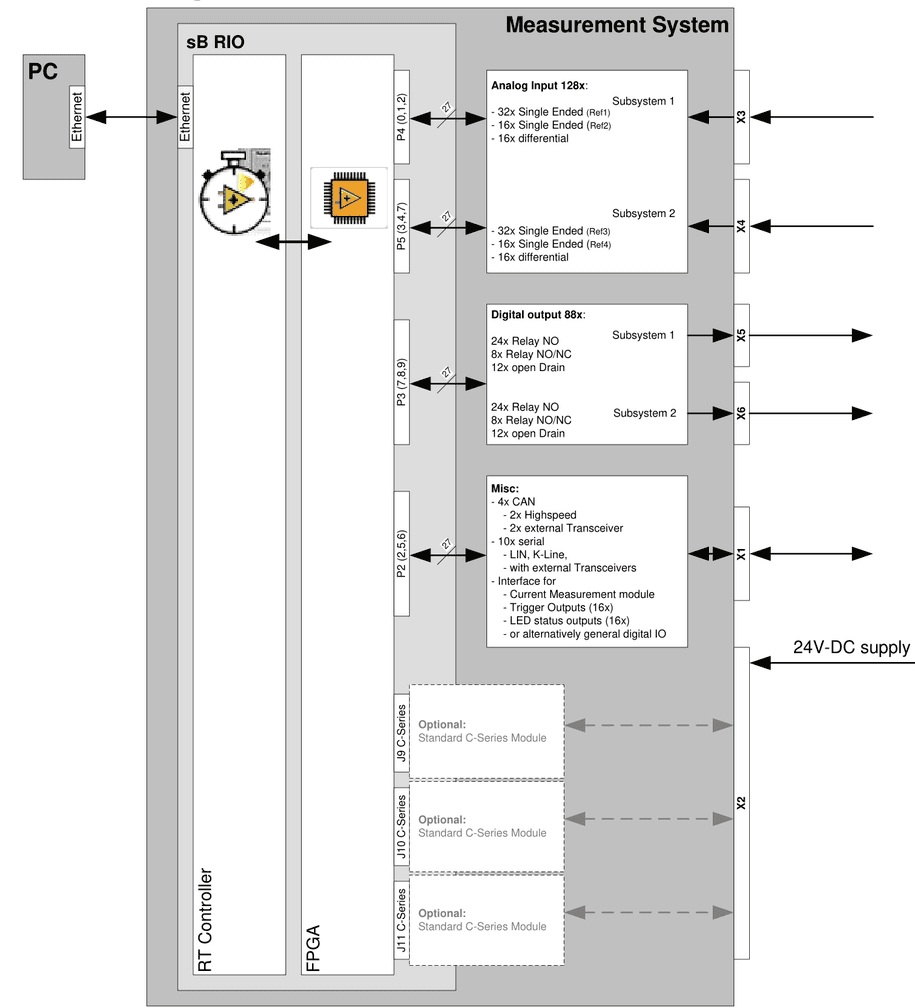
The Measurement system contains the following:
- NI Single-board-RIO sbRIO-9602 (COTS from National Instruments) including
- Processor with real-time Software (LabVIEW RT)
- FPGA for accessing other boards via digital IO and data processing (LabVIEW FPGA)
- 128x Analog inputs with the following configuration twice:
- 32 channels single ended (0…32V / 14Bit)
- 3kS/s parallel / 1,2MS/s single channel
- referenced to a GND node
- 16 channels single ended (0…32V / 14Bit )
- 6kS/s parallel / 1,2MS/s single channel
- referenced to an additional GND node
- 16 channels differential (+-48V / 14 Bit )
- 150kS/s parallel / 1,2MS/s single channel
- 32 channels single ended (0…32V / 14Bit)
- 88x digital outputs with the following configuration twice:
- 24 relays shutters
- 8 relays changeover
- 10 FET outputs referenced to system GND
- 2 FET outputs isolated for any reference GND
- 4x CAN
- 2x high speed with selectable termination resistor (None, 120 Ohm, 60 Ohm)
- 2x without transceiver to implement DUT specific Transceiver in the load-box for high speed, low speed, or special CAN (e.g. E-CAN for trucks)
- 10x serial
- without transceiver to implement DUT specific Transceiver in the load-box for K-Line, LIN, …
- LVDS interface (3x Out, 2x In) for up to 6 cascaded current measurement modules
- 16x open collector output for controlling status LEDs or general purpose output
- 6x digital input for high speed digital signal capturing
- 16x digital IO for low speed digital signal capturing or generation
1.2Power Supply
The Measurement system needs a single 24V DC supply at a current consumption of approx. 700mA in average, 1500mA maximum.
1.3Internal Interfaces
In the standard configuration the measurement system consists of an aluminium carrier which contains 4 printed circuit boards. These are:
- NI Single board RIO board sbRIO-9602 (COTS from National Instruments)
- Base and communication–board (board developed by IRS)
- Digital output board (board developed by IRS)
- Analogue Input board (board developed by IRS)
The following figure illustrates the 4 boards inside the measurement system
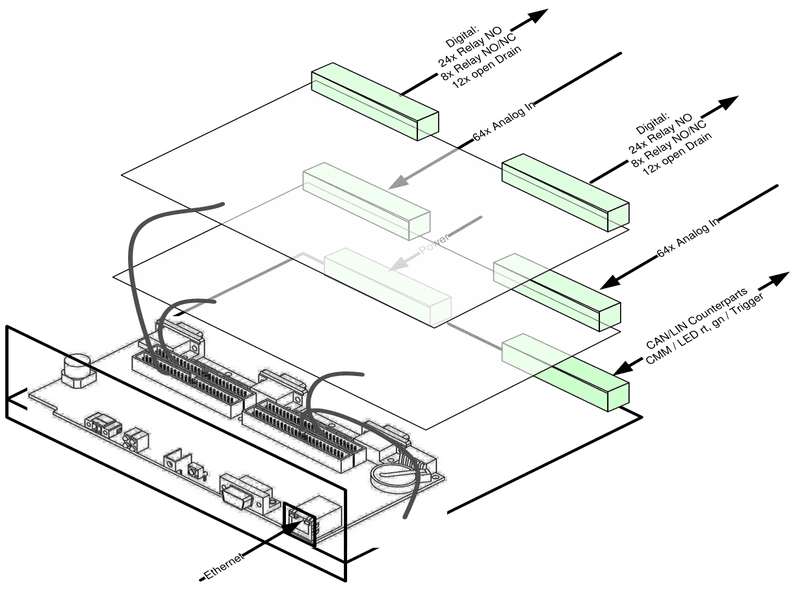
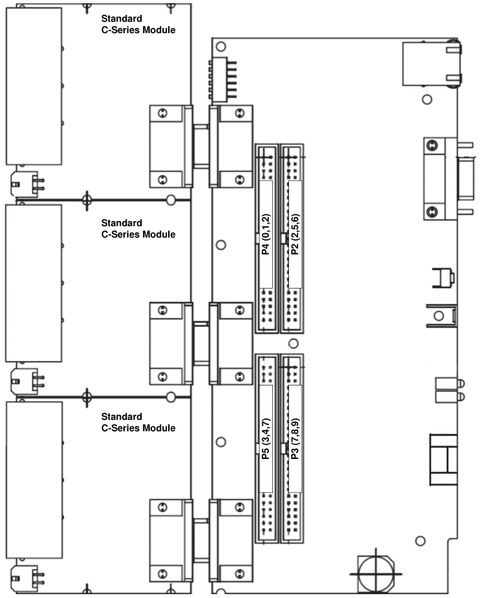
The boards are connected with ribbon cables to the headers P2, P3, P4, and P5 of the sbRIO device. Additionally up to three Compact-RIO c-Series modules can be attached according to the following picture.
For accessing the c-Series external signals the c-Series signals can be routed to a spare 96 pol. connector (DIN41612) on the base and communication board.
1.4External Interfaces
All external connections to the DUT and the load-box are established via 6x 96pol. VG connectors (DIN41612). I.e. the carrier can be plugged into the load-box without any other cabling. The connection for communication with the PC is the only additional cable, which is actually a common Ethernet connection with a standard Ethernet cable.
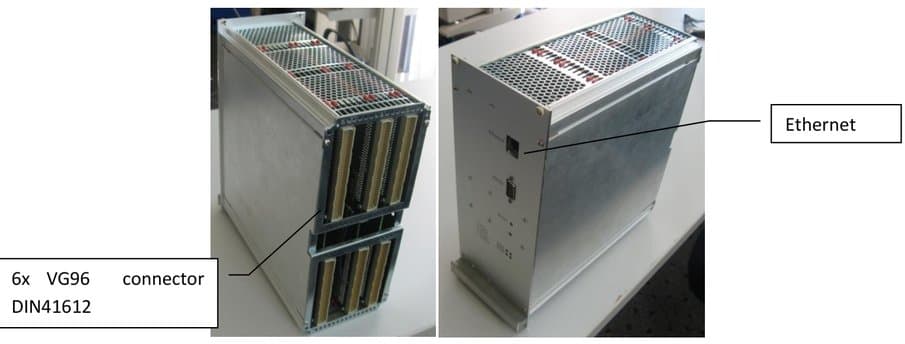
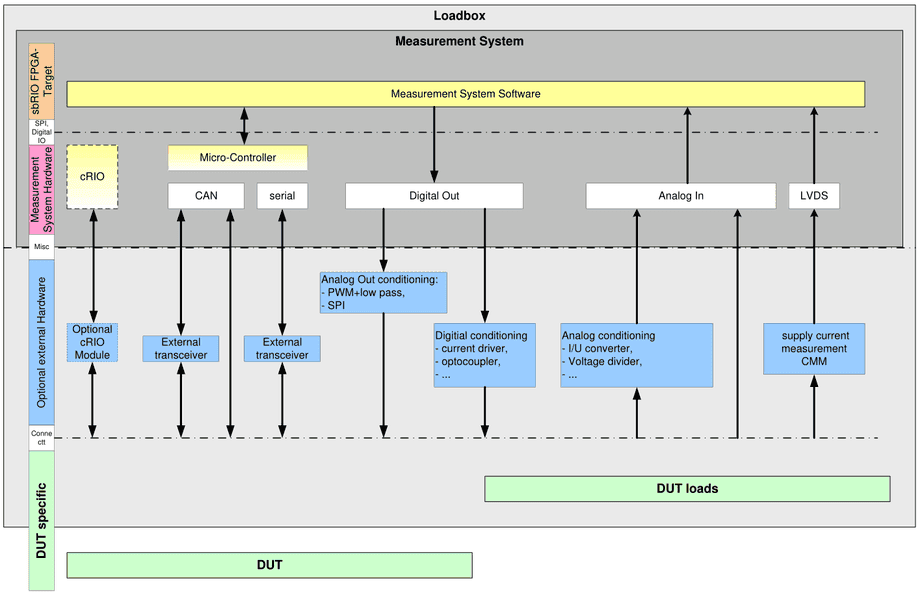
The following block diagram shows a typical setup of the measurement system within a lifetime tester, where additional signal conditioning can be applied for non-standard voltage ranges, load current measurements, analogue outputs, and communication transceivers.
1.5Load box design
The following figure illustrates the typical placement of the measurement system inside the load box from the side view:
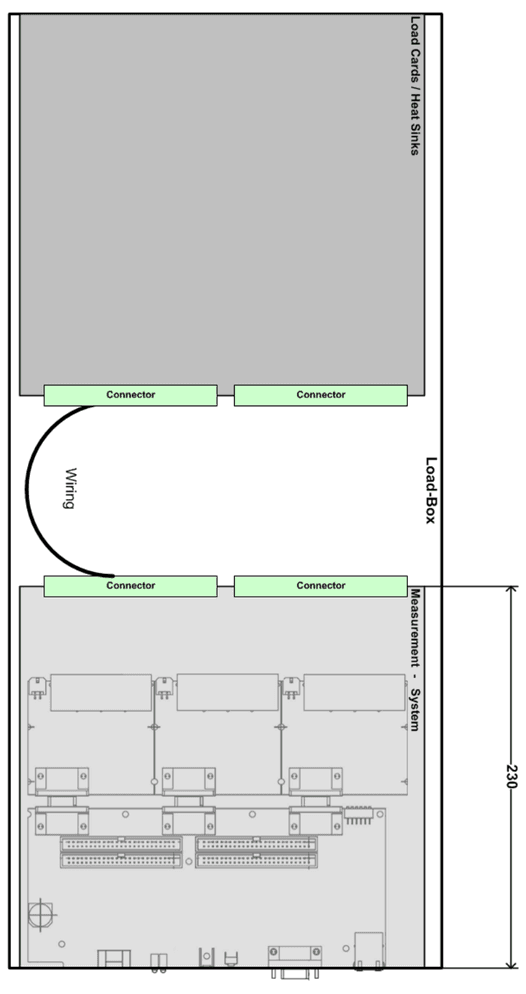
In the typical application of the measurement system the artificial and original loads of the DUT are placed in the front area of the load-box, mounted on heat sinks or other load cards. At the backside the measurement system should be placed with additional electronics like current measurement module, and the connectors to DUT and power supply.
The following figure illustrates the typical placement of the measurement system inside the load box from the top view:
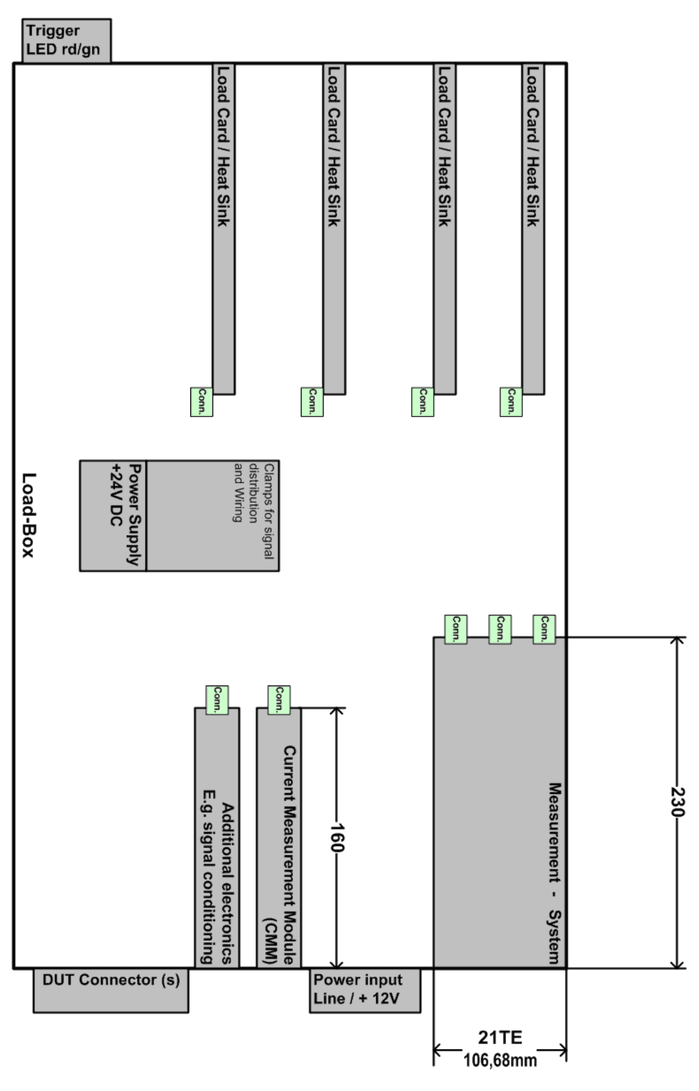
The following figure illustrates the typical placement of the measurement system inside the load box from the top view:
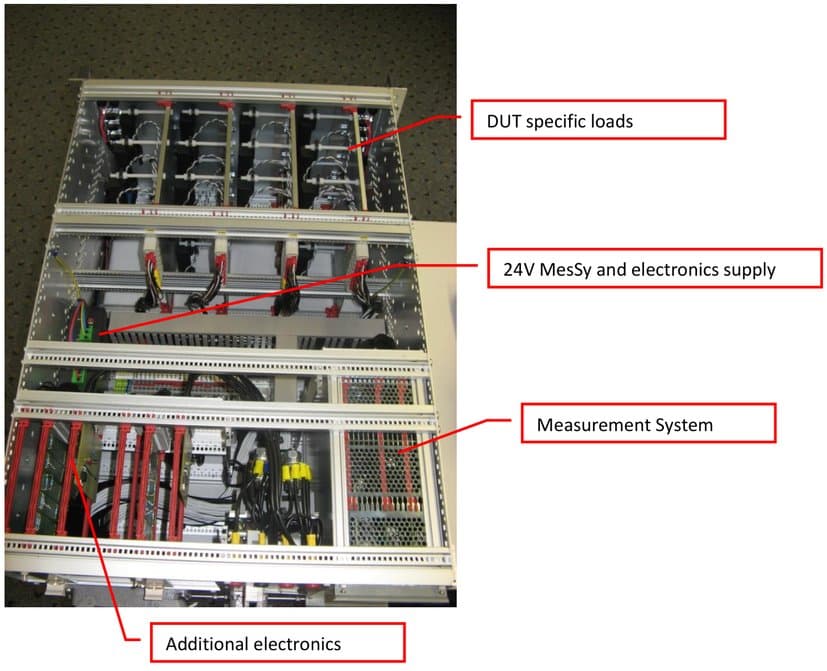
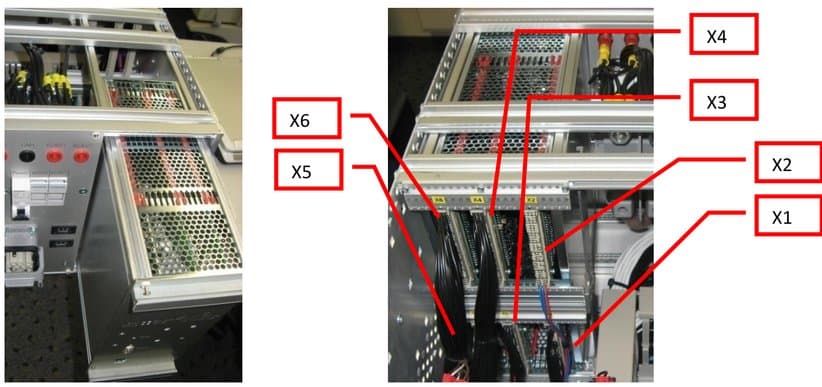
As illustrated in the following figures the measurement system can be plugged into the DUT specific load box
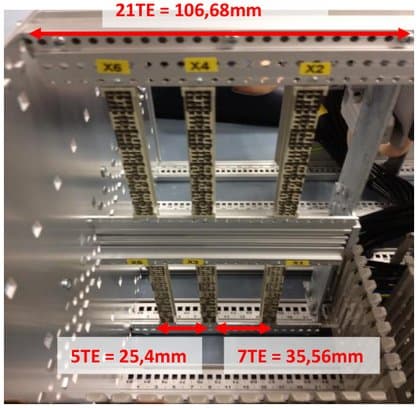
Following figure shows the alignment and dimensions of the VG-Connectors, where the correct placement may be found by counting “holes” on the mounting rail:
1.6GND Concept
One important issue is the GND concept, when running lifetime testers. MesSy provides a system GND, to which all internal signals and nearly all digital user channels refer to. For analog measurements additional GND reference inputs are available.
1.6.1Digital GND references
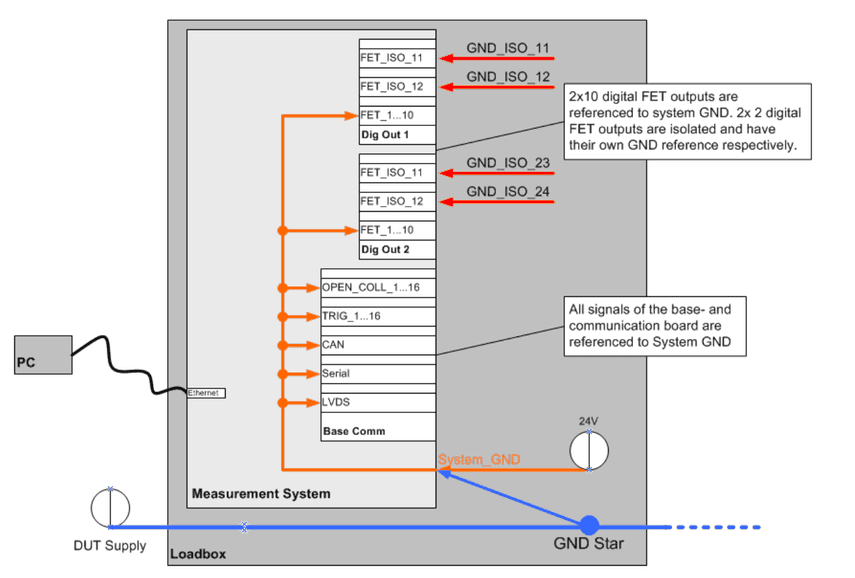
Nearly all digital signals are referenced to System-GND, which is determined by the 24V power supply. Voltage drops are usually less problematic for digital signals, but they should be taken into account.
Following figure illustrates the GND concept of the MesSy and its digital channels:
1.6.2Analog GND references for measurement
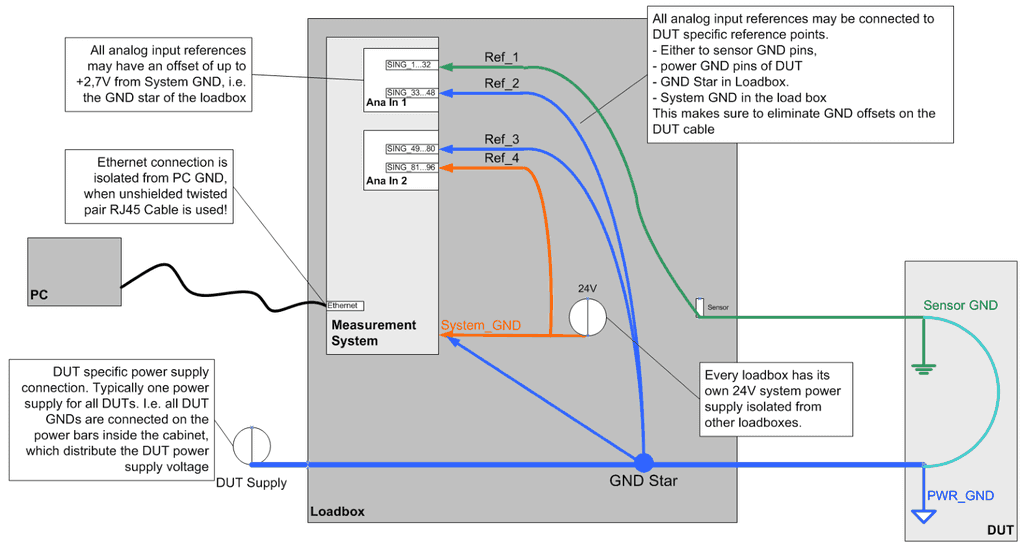
The GND references for analog measurements are an important issue, since voltages may vary due to voltage drop on the wiring harness. Because of this, analog inputs may be referenced to different voltage levels. These signal levels may vary up to 2,7V over the MesSy system GND, determined by the 24V power supply.
Different reference inputs may also be used to reference the voltage measurements to different DUTs or different GND Pins of one or more DUTs.
Note, that for differential inputs the reference inputs are not relevant, since every channel has its own reference.
1.7Base and communication board
The base and communication card was designed as a carrier and communication board for the sbRIO. Apart from the supply and mounting holes for the sbRIO, it provides
- a total of four CAN channels, with transceiver enable
- up to 10 serial interfaces, with transceiver enable
- 16 open-collector outputs,
- 16 TTL- and CMOS compatible general-purpose IOs,
- three LVDS outputs and two LVDS inputs for communication with the current measurement modules
- I²C interface for external electronic modules.
- 3 slots for extensions with NI Compact-RIO c-Series modules
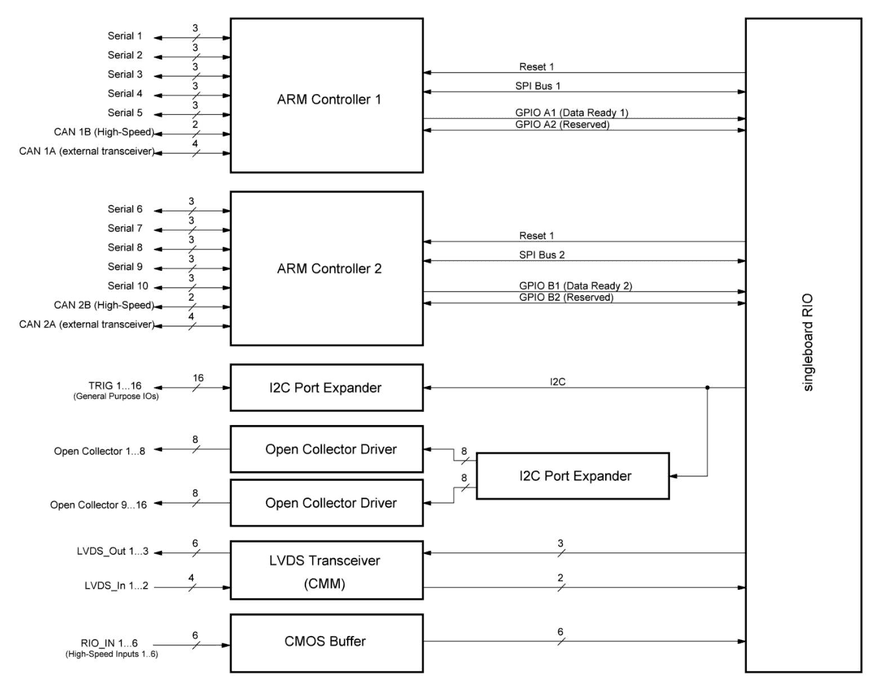
Two microcontrollers with ARM Cortex M3 core are used to provide CAN and serial interfaces; both are used in identical circuits and have separate communication busses as well as separate reset signals to the sbRIO. Deep FIFO buffers for transmission and reception on each interface make sure that no data is lost even when all interfaces are heavily used simultaneously.
1.7.1Block Diagram
1.7.2Specifications
| Item | Min | Typical | Max | Unit |
|---|---|---|---|---|
| Supply current including sbRIO @24V (without additional c-Series modules) | 160 | 240 | 300 | mA |
| Supply Voltage | 20 | 24 | 28 | VDC |
| Number of CAN channels | 4 | |||
| Number of serial interfaces | 10 | |||
| Number of open-collector outputs | 16 | |||
| Number of general-purpose low speed IOs | 16 | |||
| Number of LVDS inputs | 2 | |||
| Number of LVDS outputs | 3 | |||
| Number of general-purpose high speed inputs | 6 | |||
| Number of reserved microcontroller ports | 4 | |||
| Number of reserved c-Series slots | 3 |
CAN communication
For CAN communication there are 4 CAN channels on the board, distributed on two microcontrollers. One CAN channel of each controller is configured as high-speed and offers software-configurable termination (open/120 Ohm/60 Ohm) by means of reed relays. The other channel has to be connected externally to high- or low-speed transceivers with corresponding termination.
| Item | Min | Typical | Max | Unit |
|---|---|---|---|---|
| Supported baud rates | 125 | 1000 | kBit/s | |
| CAN V2.0 High-Speed channels | 2 | |||
| Configurable (high/low-speed) channels | 2 | |||
| Channels with configurable termination | 2 | |||
| Selectable Termination resistance | 60 | 120 | Open | Ohm |
Serial and CAN communication lines with external transceivers
For each of the serial interfaces, three pins are connected to the VG connector: RX, TX and Enable. This allows the external connection of transceiver ICs (RS232, LIN, K-Line, discrete level converters) which can be deactivated using the enable signal. All serial interface and CAN signals for external transceivers meet the following specification
| Item | Min | Typical | Max | Unit |
|---|---|---|---|---|
| Input Low Voltage | -0,5 | 0,4 | V | |
| Input High Voltage | 2,4 | 3,3 | V | |
| Input Current -0,5V < VIn < 3,3V | -1 | +1 | µA | |
| Input Resistance VIn >3,3V or VIn <-0,5V | 220 | Ohm | ||
| Max Output Low Current @VLow < 0,5V | 0 | 1 | mA | |
| Max Output High Current @VHigh > 2,0V | 0 | 1 | mA |
General Purpose IOs Trig 1…16
16 general purpose IOs are available via an I2C port expander. All IOs are protected with series resistors of 220 Ohm. The interrupt pin of the port expander is connected to the sbRIO to allow fast reaction to changing inputs. The general-purpose IOs are provided via an I²C port expander.
| Item | Min | Typical | Max | Unit |
|---|---|---|---|---|
| Input Low Voltage | -0,5 | 1,5 | V | |
| Input High Voltage | 3,5 | 5,5 | V | |
| Input Current -0,5V < VIn < 5,5V | -1 | +1 | µA | |
| Input Resistance VIn >5,5V or VIn <-0,5V | 220 | Ohm | ||
| Max Output Low Current @VLow < 0,5V | 0 | 8 | mA | |
| Max Output High Current @VHigh > 4,0V | 0 | 8 | mA |
Open Collector Outputs 1…16
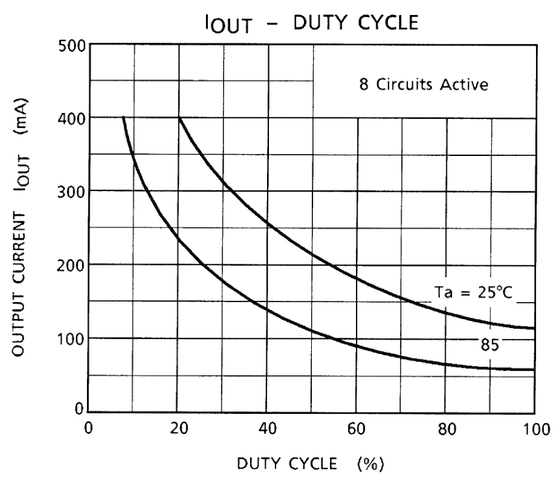
The open-collector outputs can sink currents up to 400mA each, limited by the maximum current carrying capacity of the copper traces.
| Item | Min | Typical | Max | Unit |
|---|---|---|---|---|
| Collector Current per Channel | 0 | 400 | mA | |
| Collector Current for 8 channels all over | See figure below |
If more than one pin per driver IC is used, the maximum allowable current decreases. The figure below shows the de-rating curve if all outputs are used: at 25°C, 125mA per pin are allowed, at 85°C about 60mA.
LVDS Interface for CMM
There are three TX lines and two RX lines available for interfacing with LVDS devices like the Current measurement module CMM_II. The copper traces have been routed with a differential impedance of approximately 100 Ohm and the RX lines are terminated with 100 Ohm resistors.
The copper traces have a width of 350µm and a thickness of 35µm. For epsilonr=4.2 and 475µm prepreg height, the characteristic impedance of a single trace is about 80 Ohm. A differentially routed pair of these traces with a distance of 150µm has a differential impedance of 103 Ohm.
| Item | Min | Typical | Max | Unit | |
|---|---|---|---|---|---|
| LVDS Input | voltage range | -0.2 | 2.7 | V | |
| LVDS Input | Termination | 100 | Ohm | ||
| LVDS Input | Differential input voltage range | 100 | 350 | 600 | mV |
| LVDS Input | Common mode input voltage range | 0.3 | 1.2 | 2.2 | V |
| LVDS Output | Differential output voltage range | 247 | 350 | 600 | mV |
| LVDS Output | Common mode output voltage range | 1.125 | 1.25 | 1.375 | V |
| Typical LVDS Interface Baud rate | 100 | 1250 | 20000 | kBit/s |
General purpose high speed inputs
Six TTL- and CMOS compatible inputs are available which are buffered with a high-speed CMOS buffer and can be used for the acquisition of fast digital signals. The 6 high-speed inputs are protected with a series resistance of 1 kOhm and double schottky diodes. A 100 kOhm pull-down resistor ensures a defined potential, if the inputs are left open. Signals with both 3.3V and 5V voltage level can be connected.
| Item | Min | Typical | Max | Unit |
|---|---|---|---|---|
| Input Low Voltage | -0,5 | 0,8 | V | |
| Input High Voltage | 2,0 | 5,5 | V | |
| Input Current -0,5V < VIn < 5,5V | -5 | +5 | µA | |
| Input Resistance VIn >5,5V | 1 | kOhm | ||
| TTL-compatible | yes | |||
| CMOS-compatible | yes |
I²C-Interface
The I²C can be used to control additional external electronic modules.
| Item | Min | Typical | Max | Unit |
|---|---|---|---|---|
| Input Low Voltage | 0 | 0,8 | V | |
| Input High Voltage | 2,0 | 5 | V | |
| I²C sink current (out direction) | 24 | mA | ||
| I²C input current (in direction) | 3 | mA |
C-Series modules
Three C-Series modules can be connected to the three Sub-D connectors of the sbRIO to add further functionality
Microcontroller Flash interface
This interface is used for flashing the Microcontrollers in the self test adapter. This interface is only for IRS internal use.
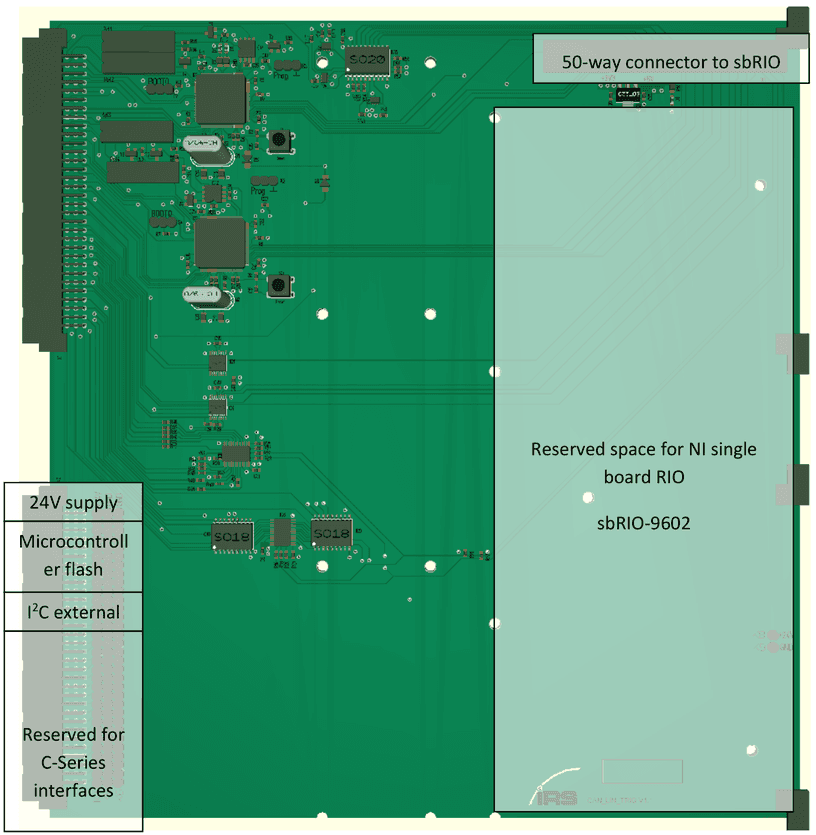
1.7.3Layout
1.7.4Connection to sbRIO
The communication board is connected to sbRIO header P2 via a 50 way connector with the following pin assignments.
| Pin number P2 | Name | Description |
|---|---|---|
| 1 | GND | |
| 2 | SDA | I²C Bus data (port expanders) |
| 3 | SCL | I²C Bus clock (port expanders) |
| 4 | RX1 | LVDS RX1 (Interface to CMM) |
| 5 | RX2 | LVDS RX1 (Interface to CMM) |
| 6 | +5V | |
| 7 | TX2 | LVDS TX2 (Interface to CMM) |
| 8 | GND | |
| 9 | TX1 | LVDS TX1 (Interface to CMM) |
| 10 | +5V | |
| 11 | TX3 | LVDS TX3 (Interface to CMM) |
| 12 | GND | |
| 13 | SPI CS (2) | SPI BUS Chip select (Microcontroller 2) |
| 14 | GND | |
| 15 | SPI CLK (2) | SPI BUS Clock (Microcontroller 2) |
| 16 | GND | |
| 17 | SPI MISO (2) | SPI BUS MISO (Microcontroller 2) |
| 18 | GND | |
| 19 | SPI MOSI (2) | SPI BUS MOSI (Microcontroller 2) |
| 20 | GND | |
| 21 | EXT_I2C_SDA | SDA for external I2C |
| 22 | GPIO_2_1 | GPIO pin connection to microcontroller 2 |
| 23 | RIO HIGH-SPEED IN 1 | High-Speed buffered input |
| 24 | GND | |
| 25 | RIO HIGH-SPEED IN 2 | High-Speed buffered input |
| 26 | GND | |
| 27 | RIO HIGH-SPEED IN 3 | High-Speed buffered input |
| 28 | GND | |
| 29 | RIO HIGH-SPEED IN 4 | High-Speed buffered input |
| 30 | GND | |
| 31 | RIO HIGH-SPEED IN 5 | High-Speed buffered input |
| 32 | GND | |
| 33 | RIO HIGH-SPEED IN 6 | High-Speed buffered input |
| 34 | GND | |
| 35 | SPI CS (1) | SPI BUS Chip select (Microcontroller 1) |
| 36 | GND | |
| 37 | SPI CLK (1) | SPI BUS Clock (Microcontroller 1) |
| 38 | GND | |
| 39 | SPI MISO (1) | SPI BUS MISO (Microcontroller 1) |
| 40 | GND | |
| 41 | SPI MOSI (1) | SPI BUS MOSI (Microcontroller 1) |
| 42 | GND | |
| 43 | GPIO_1_1 | GPIO pin connection to microcontroller 1 |
| 44 | GND | |
| 45 | EXT_I2C_SCL | SCL for external I2C |
| 46 | GND | |
| 47 | PRG_RST_1 | Reset microcontroller 1 |
| 48 | GND | |
| 49 | PRG_RST_2 | Reset microcontroller 2 |
| 50 | GND |
1.7.5Pinning VG connector X1 (external signals)
| Pin | Signal | Pin | Signal | Pin | Signal |
|---|---|---|---|---|---|
| a1 | OPEN_COLL_16 | b1 | OPEN_COLL_15 | c1 | OPEN_COLL_14 |
| a2 | OPEN_COLL_13 | b2 | OPEN_COLL_12 | c2 | OPEN_COLL_11 |
| a3 | OPEN_COLL_10 | b3 | OPEN_COLL_09 | c3 | OPEN_COLL_08 |
| a4 | OPEN_COLL_07 | b4 | OPEN_COLL_06 | c4 | OPEN_COLL_05 |
| a5 | OPEN_COLL_04 | b5 | OPEN_COLL_03 | c5 | OPEN_COLL_02 |
| a6 | OPEN_COLL_01 | b6 | RIO_IN_05 | c6 | n.c. |
| a7 | Trig_16 | b7 | Trig_15 | c7 | Trig_14 |
| a8 | Trig_13 | b8 | Trig_12 | c8 | Trig_11 |
| a9 | Trig_10 | b9 | Trig_09 | c9 | Trig_08 |
| a10 | Trig_07 | b10 | Trig_06 | c10 | Trig_05 |
| a11 | Trig_04 | b11 | Trig_03 | c11 | Trig_02 |
| a12 | Trig_01 | b12 | LVDS_IN1- | c12 | LVDS_IN1+ |
| a13 | RIO_IN_01 | b13 | LVDS_IN2- | c13 | LVDS_IN2+ |
| a14 | RIO_IN_02 | b14 | LVDS_OUT1+ | c14 | LVDS_OUT1- |
| a15 | RIO_IN_03 | b15 | LVDS_OUT2+ | c15 | LVDS_OUT2- |
| a16 | RIO_IN_04 | b16 | LVDS_OUT3+ | c16 | LVDS_OUT3- |
| a17 | Serial_EN_10 | b17 | Serial_EN_09 | c17 | Serial_EN_08 |
| a18 | Serial_EN_07 | b18 | Serial_EN_06 | c18 | Serial_RX_09 |
| a19 | Serial_TX_08 | b19 | Serial_RX_08 | c19 | Serial_TX_09 |
| a20 | Serial_TX_06 | b20 | Serial_TX_07 | c20 | Serial_RX_07 |
| a21 | Serial_RX_06 | b21 | GPIO_2_4 | c21 | GPIO_2_3 |
| a22 | CAN_STDBY_2A | b22 | RIO_IN_06 | c22 | n.c. |
| a23 | CAN_ENABLE_2A | b23 | CAN_H_2B | c23 | CAN_L_2B |
| a24 | Serial_EN_05 | b24 | CAN_TX_2A | c24 | CAN_RX_2A |
| a25 | Serial_EN_02 | b25 | Serial_EN_03 | c25 | Serial_EN_04 |
| a26 | Serial_TX_05 | b26 | Serial_RX_05 | c26 | Serial_EN_01 |
| a27 | Serial_RX_03 | b27 | Serial_TX_04 | c27 | Serial_RX_04 |
| a28 | Serial_TX_02 | b28 | Serial_RX_02 | c28 | Serial_TX_03 |
| a29 | GPIO1_4 | b29 | Serial_TX_01 | c29 | Serial_RX_01 |
| a30 | Serial_RX_10 | b30 | Serial_TX_10 | c30 | GPIO_1_3 |
| a31 | CAN_H_1B | b31 | CAN_TX_1A | c31 | CAN_STDBY_1A |
| a32 | CAN_L_1B | b32 | CAN_RX_1A | c32 | CAN_ENABLE_1A |
1.7.6Pinning VG connector X2 (Power supply, Microcontroller Flashing, Reserved)
| Pin | Signal | Pin | Signal | Pin | Signal |
|---|---|---|---|---|---|
| B23 | SCL_Ext | C23 | SDA_Ext | ||
| C24 | µC1_Boot | ||||
| C25 | µC1_PRG_RST | ||||
| C26 | µC1_RxD | ||||
| C27 | µC1_TxD | ||||
| C28 | µC2_Boot | ||||
| C29 | µC2_PRG_RST | ||||
| C30 | µC2_RxD | ||||
| C31 | µC2_TxD | ||||
| a32 | +24V | B32 | GND | C32 | GND |
Pins C24 to C31 are used for Microcontroller flashing. This procedure is only performed at IRS. Do not connect any signals to these pins.
Pins B23 and C23 are used for connection of additional external modules via I²C. For using the I²C-interface refer to chapter 4.5.
The rest of the second VG connector X2 is almost entirely reserved for future use, especially for the wiring to additional C-series modules, which can be attached to the RIO via three SUB-D connectors and their inputs can be wired to the VG connector. All of the VG connector’s pins have been routed to three 32-way headers for this purpose.
1.7.7Communication line relations
Note, that there are two microcontrollers, which handle both 2 CAN interfaces and 5 serial interfaces, respectively. The following communication lines are assigned to the two microcontrollers according to the following table:
| µC1 | µC2 |
|---|---|
| CAN_1A | CAN_2A |
| CAN_1B | CAN_2B |
| Serial_01 | Serial_06 |
| Serial_02 | Serial_07 |
| Serial_03 | Serial_08 |
| Serial_04 | Serial_09 |
| Serial_05 | Serial_10 |
1.7.8CMM connection
For connection of the CMM, please refer to chapter 4.1.
1.8Analog input board 128x
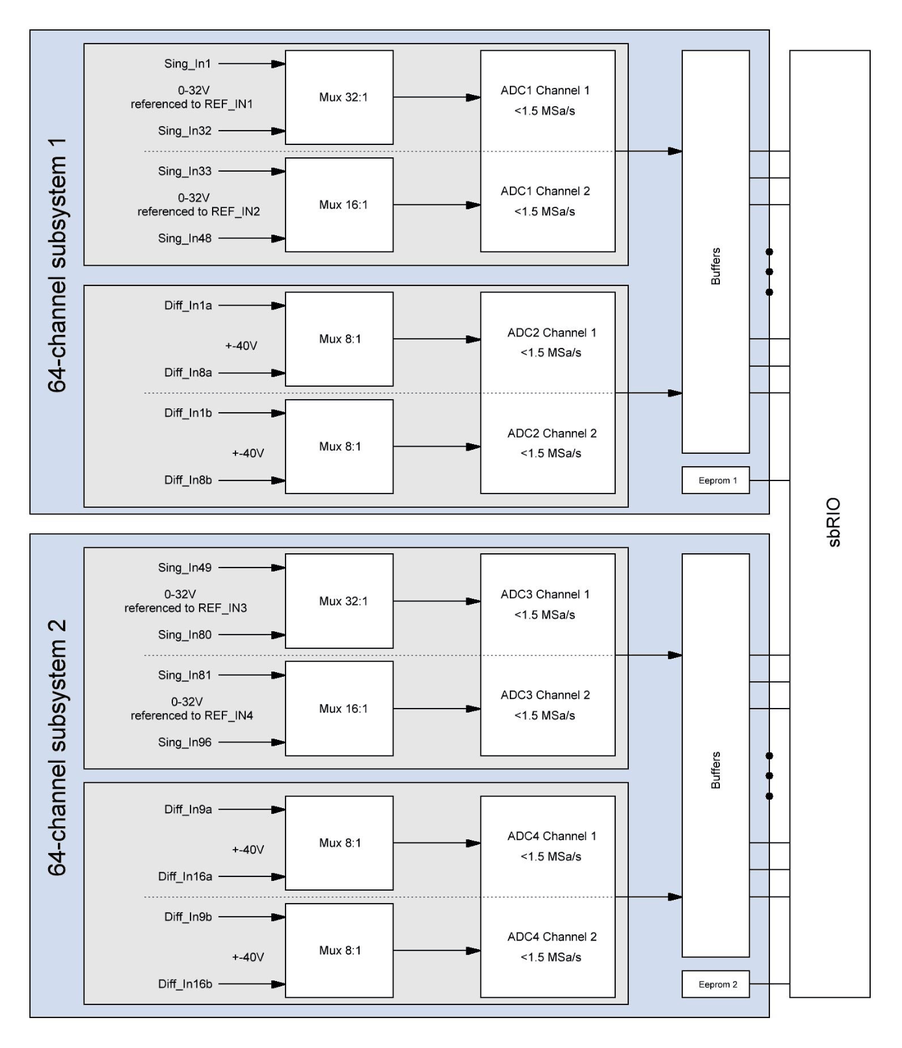
The analog input board provides 128 analog channels divided into two identical 64-channel subsystems with the following properties:
- 32 single-ended channels (external reference voltage 1), 0...32V @ 3 kS/s simultaneously
- 16 single-ended channels (external reference voltage 2) , 0...32V@ 6 kS/s simultaneously
- 16 differential channels, subdivided in simultaneously sampled groups of 8 channels each, -48...48V @ 150 kS/s in parallel.
To keep input currents as low as possible, no voltage divider was placed at the input of the single-ended channels. By connecting the signal directly to the non-inverting input of the input amplifier, very high input impedance is achieved. It should be noted that this open input causes the amplifiers to drift to the upper supply rail if no input voltage is connected. In this case, the ADCs return all ones (0x3FFF).
An EEPROM memory is provided that can be used to store calibration data, calibration values, an ID, the hardware revision and technical details (e.g. attenuation / gain of each channel).
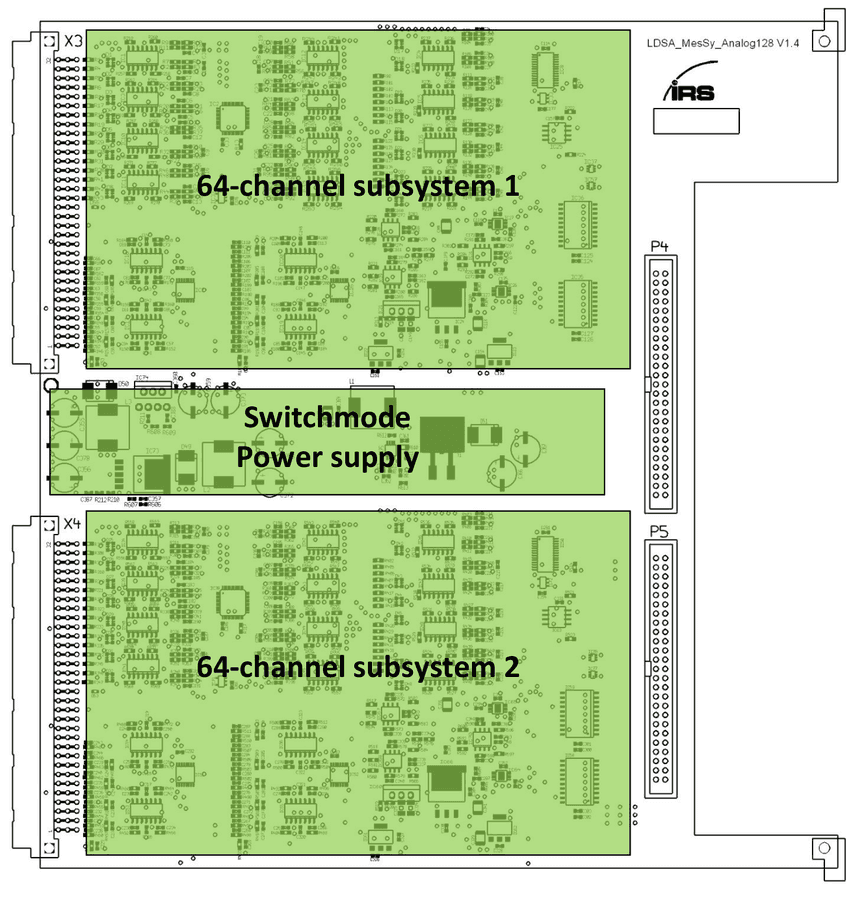
The analog input board is supplied by a single 24V DC supply as the whole measurement system. A switch mode power supply between the analog measurement subsystems generates positive and negative voltages and LDOs are used for linear regulation of these voltages to provide clean supply rails. Following figure illustrates the power supply unit of the analog input board.
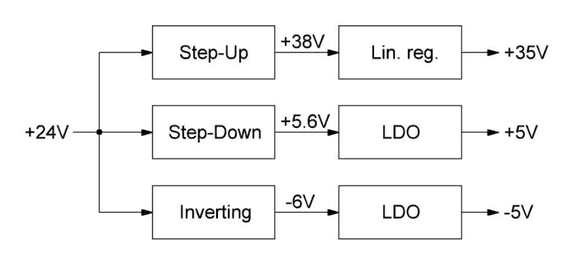
Soft start / power sequencing is included to reduce the inrush current at the moment the power supply is connected.
As shown in the following functional block diagram, the channels are multiplexed to ADCs with two channels each. 32 single-ended channels are handled by a 32:1 multiplexer with address lines ADR1_0 to ADR1_4, the remaining 16 single-ended channels are handled by a 16:1 multiplexer with address lines ADR2_0 to ADR2_3 and the differential channels are switched using two 8:1 multiplexers with shared address lines ADR3_0 to ADR3_2.
All address lines are buffered using high-speed CMOS buffers to reduce the load for the FPGA output drivers and to provide clean signals on the PCB.
1.8.1Block diagram
1.8.2Specifications
| Item | Min | Typical | Max | Unit |
|---|---|---|---|---|
| Supply current @24V | 400 | 440 | 500 | mA |
| Supply Voltage | 22 | 24 | 26 | VDC |
| Total number of channels | 128 | |||
| Number of single-ended channels | 96 | |||
| Number of differential channels | 32 |
All inputs are converted with a resolution of 14 bits.
The single-ended inputs can be sampled at a rate of 3kSa/s (channels 1-32 and 65-80) / 6kSa/s (channels 33-48 and 81 to 96) each, the differential inputs at more than 150kS/s.
If only one channel is measured, sampling rates of up to 1.2 MSa/s (possibly 1.5MSa) can be achieved.
The differential inputs are frequency-compensated for accurate waveform reproduction.
Specification of single-ended channels
| Item | Min | Typical | Max | Unit |
|---|---|---|---|---|
| Input voltage range (referenced to GND) | 0 | 32 | V | |
| Maximum sample rate (one channel) | 1.2 | MSa/s | ||
| Maximum sample rate (channel1-32, 49…80) | 3 | kSa/s | ||
| Maximum sample rate (channel 33-48, 81..96) | 6 | kSa/s | ||
| Voltage range of reference input vs. GND | -0.7 | 2.7 | V | |
| 3dB Bandwidth | 700 | kHz | ||
| Resolution | 14 | bit | ||
| Accuracy (not calibrated) | 1.0 | 2.0 | % Full scale | |
| Accuracy (after calibration) @ 5…30V | 0.1 | 0.3 | % of measured value | |
| Input Current @ 0 … 35V (current flows out of amplifier!) | 100 | 700 | nA | |
| Input resistance @ < 0V or >35V | 10 | kOhm |
Specification of differential channels
| Item | Min | Typical | Max | Unit |
|---|---|---|---|---|
| Input voltage range (differential) | -48 | 48 | V | |
| Input voltage range (common mode) | -60 | 60 | V | |
| Maximum sample rate (one channel) | 1.2 | MSa/s | ||
| Maximum sample rate (all diff. simultaneously) | 150 | kSa/s | ||
| 3dB Bandwidth | 1500 | kHz | ||
| Resolution | 14 | bit | ||
| Accuracy (not calibrated) | 2.0 | 4.0 | % Full scale | |
| Accuracy (after calibration) @ ±5…48V | 0.6 | 1.0 | % of measured value | |
| Input resistance (positive or negative input referenced to GND) | 400 | kOhm | ||
| Input resistance (positive and negative input differential) | 780 | kOhm |
1.8.3Layout
1.8.4Connection to sbRIO
The card is connected to sbRIO P4 and P5 via two 50 way connectors with the following pin assignment respectively
| Pin number P4 / P5 | Name | Description |
|---|---|---|
| 1…7 | n.c. | unused |
| 8 | GND | |
| 9 | ||
| 10 | ||
| 11 | SCL | Serial clock of on-board EEPROM |
| 12 | ||
| 13 | SDA | Serial data of on-board EEPROM |
| 14 | GND | |
| 15 | SDO2 | Serial Data of ADC2 |
| 16 | ||
| 17 | SDO | Serial data of ADC1 |
| 18 | GND | |
| 19 | ||
| 20 | GND | |
| 21 | Conv | Conversion start signal for ADCs |
| 22 | ||
| 23 | SCK | Serial clock for ADCs |
| 24 | ||
| 25 | ||
| 26 | ||
| 27 | Adr2_0 | Address line 1 of 16:1 multiplexer |
| 28 | ||
| 29 | Adr2_1 | Address line 2 of 16:1 multiplexer |
| 30 | ||
| 31 | Adr2_2 | Address line 3 of 16:1 multiplexer |
| 32 | ||
| 33 | Adr2_3 | Address line 4 of 16:1 multiplexer |
| 34 | ||
| 35 | Adr1_4 | Address line 5 of 32:1 multiplexer |
| 36 | ||
| 37 | Adr1_3 | Address line 4 of 32:1 multiplexer |
| 38 | ||
| 39 | Adr1_2 | Address line 3 of 32:1 multiplexer |
| 40 | ||
| 41 | Adr1_1 | Address line 2 of 32:1 multiplexer |
| 42 | ||
| 43 | Adr1_0 | Address line 1 of 32:1 multiplexer |
| 44 | ||
| 45 | Adr3_2 | Address line 3 of 8:1 multiplexers |
| 46 | GND | |
| 47 | Adr3_1 | Address line 2 of 8:1 multiplexers |
| 48 | ||
| 49 | Adr3_0 | Address line 1 of 8:1 multiplexers |
| 50 | GND |
1.8.5Pinning VG connector X3 (external signals Analog subsystem 1)
| Pin | Signal | Pin | Signal | Pin | Signal |
|---|---|---|---|---|---|
| a1 | Diff_In_3b+ | b1 | Diff_In_6a+ | c1 | Diff_In_1a+ |
| a2 | Diff_In_3b- | b2 | Diff_In_6a- | c2 | Diff_In_1a- |
| a3 | Diff_In_4b+ | b3 | Diff_In_7a+ | c3 | Diff_In_2a+ |
| a4 | Diff_In_4b- | b4 | Diff_In_7a- | c4 | Diff_In_2a- |
| a5 | Diff_In_5b+ | b5 | Diff_In_8a+ | c5 | Diff_In_3a+ |
| a6 | Diff_In_5b- | b6 | Diff_In_8a- | c6 | Diff_In_3a- |
| a7 | Diff_In_6b+ | b7 | Diff_In_1b+ | c7 | Diff_In_4a+ |
| a8 | Diff_In_6b- | b8 | Diff_In_1b- | c8 | Diff_In_4a- |
| a9 | Diff_In_7b+ | b9 | Diff_In_2b+ | c9 | Diff_In_5a+ |
| a10 | Diff_In_7b- | b10 | Diff_In_2b- | c10 | Diff_In_5a- |
| a11 | Diff_In_8b+ | b11 | GND | c11 | n.c. |
| a12 | Diff_In_8b- | b12 | GND | c12 | +24V |
| a13 | n.c. | b13 | n.c. | c13 | +24V |
| a14 | n.c. | b14 | n.c. | c14 | n.c. |
| a15 | REF_In_2 | b15 | n.c. | c15 | REF_In_1 |
| a16 | REF_In_2 | b16 | n.c. | c16 | REF_In_1 |
| a17 | Sing_In_48 | b17 | Sing_In_32 | c17 | Sing_In_16 |
| a18 | Sing_In_47 | b18 | Sing_In_31 | c18 | Sing_In_15 |
| a19 | Sing_In_46 | b19 | Sing_In_30 | c19 | Sing_In_14 |
| a20 | Sing_In_45 | b20 | Sing_In_29 | c20 | Sing_In_13 |
| a21 | Sing_In_44 | b21 | Sing_In_28 | c21 | Sing_In_12 |
| a22 | Sing_In_43 | b22 | Sing_In_27 | c22 | Sing_In_11 |
| a23 | Sing_In_42 | b23 | Sing_In_26 | c23 | Sing_In_10 |
| a24 | Sing_In_41 | b24 | Sing_In_25 | c24 | Sing_In_9 |
| a25 | Sing_In_40 | b25 | Sing_In_24 | c25 | Sing_In_8 |
| a26 | Sing_In_39 | b26 | Sing_In_23 | c26 | Sing_In_7 |
| a27 | Sing_In_38 | b27 | Sing_In_22 | c27 | Sing_In_6 |
| a28 | Sing_In_37 | b28 | Sing_In_21 | c28 | Sing_In_5 |
| a29 | Sing_In_36 | b29 | Sing_In_20 | c29 | Sing_In_4 |
| a30 | Sing_In_35 | b30 | Sing_In_19 | c30 | Sing_In_3 |
| a31 | Sing_In_34 | b31 | Sing_In_18 | c31 | Sing_In_2 |
| a32 | Sing_In_33 | b32 | Sing_In_17 | c32 | Sing_In_1 |
SING_In_1-SING_In_32 are referenced to REF_In_1, SING_In_33-SING_In_48 are referenced to REF_In_2.
1.8.6Pinning VG connector X4 (external signals Analog subsystem 2)
| Pin | Signal | Pin | Signal | Pin | Signal |
|---|---|---|---|---|---|
| a1 | Diff_In_11b+ | b1 | Diff_In_14a+ | c1 | Diff_In_9a+ |
| a2 | Diff_In_11b- | b2 | Diff_In_14a- | c2 | Diff_In_9a- |
| a3 | Diff_In_12b+ | b3 | Diff_In_15a+ | c3 | Diff_In_10a+ |
| a4 | Diff_In_12b- | b4 | Diff_In_15a- | c4 | Diff_In_10a- |
| a5 | Diff_In_13b+ | b5 | Diff_In_16a+ | c5 | Diff_In_11a+ |
| a6 | Diff_In_13b- | b6 | Diff_In_16a- | c6 | Diff_In_11a- |
| a7 | Diff_In_14b+ | b7 | Diff_In_9b+ | c7 | Diff_In_12a+ |
| a8 | Diff_In_14b- | b8 | Diff_In_9b- | c8 | Diff_In_12a- |
| a9 | Diff_In_15b+ | b9 | Diff_In_10b+ | c9 | Diff_In_13a+ |
| a10 | Diff_In_15b- | b10 | Diff_In_10b- | c10 | Diff_In_13a- |
| a11 | Diff_In_16b+ | b11 | GND | c11 | n.c. |
| a12 | Diff_In_16b- | b12 | GND | c12 | +24V |
| a13 | n.c. | b13 | n.c. | c13 | +24V |
| a14 | n.c. | b14 | n.c. | c14 | n.c. |
| a15 | REF_In_4 | b15 | n.c. | c15 | REF_In_3 |
| a16 | REF_In_4 | b16 | n.c. | c16 | REF_In_3 |
| a17 | Sing_In_96 | b17 | Sing_In_80 | c17 | Sing_In_64 |
| a18 | Sing_In_95 | b18 | Sing_In_79 | c18 | Sing_In_63 |
| a19 | Sing_In_94 | b19 | Sing_In_78 | c19 | Sing_In_62 |
| a20 | Sing_In_93 | b20 | Sing_In_77 | c20 | Sing_In_61 |
| a21 | Sing_In_92 | b21 | Sing_In_76 | c21 | Sing_In_60 |
| a22 | Sing_In_91 | b22 | Sing_In_75 | c22 | Sing_In_59 |
| a23 | Sing_In_90 | b23 | Sing_In_74 | c23 | Sing_In_58 |
| a24 | Sing_In_89 | b24 | Sing_In_73 | c24 | Sing_In_57 |
| a25 | Sing_In_88 | b25 | Sing_In_72 | c25 | Sing_In_56 |
| a26 | Sing_In_87 | b26 | Sing_In_71 | c26 | Sing_In_55 |
| a27 | Sing_In_86 | b27 | Sing_In_70 | c27 | Sing_In_54 |
| a28 | Sing_In_85 | b28 | Sing_In_69 | c28 | Sing_In_53 |
| a29 | Sing_In_84 | b29 | Sing_In_68 | c29 | Sing_In_52 |
| a30 | Sing_In_83 | b30 | Sing_In_67 | c30 | Sing_In_51 |
| a31 | Sing_In_82 | b31 | Sing_In_66 | c31 | Sing_In_50 |
| a32 | Sing_In_81 | b32 | Sing_In_65 | c32 | Sing_In_49 |
SING_In_1-SING_In_32 are referenced to REF_In_1, SING_In_33-SING_In_48 are referenced to REF_In_2.
The reference inputs are protected against signals of more than 2.7V above or 0.2V below ground but this range may only be exceeded for short periods of time!
The +24V supply will be connected to pins C12 & C13 of each VG-connector.
1.8.7Analog Accuracy
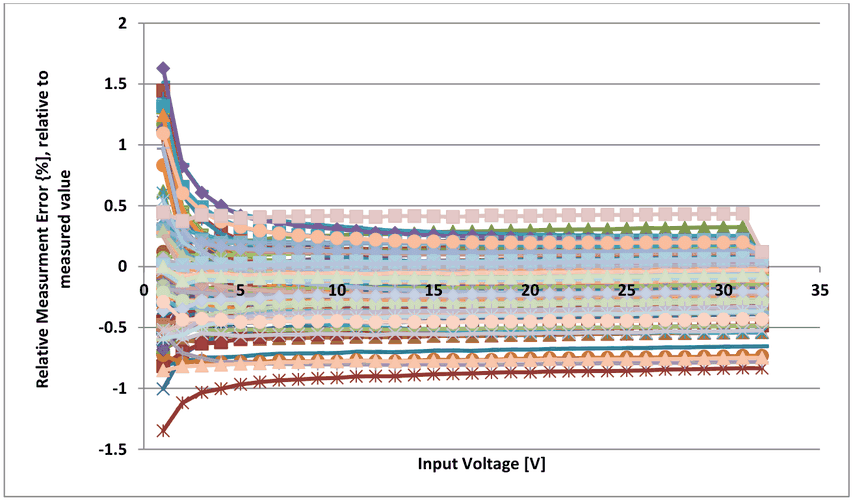
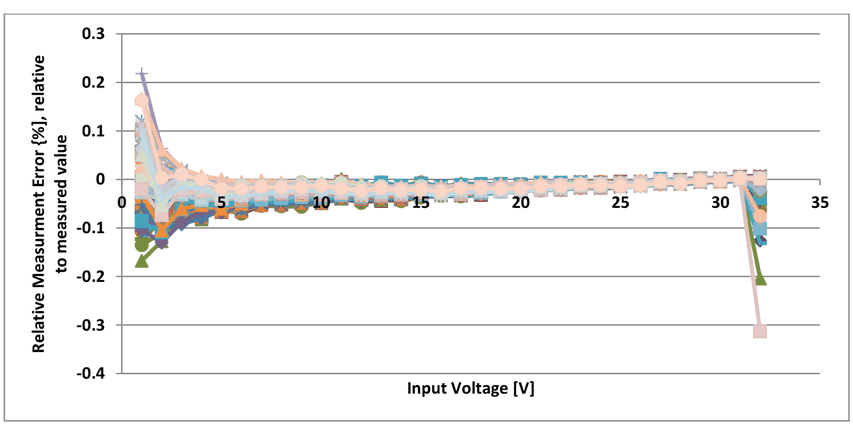
To obtain good accuracy a calibration procedure has to be performed. The gain and offset of every channel have to be determined after build-up. The gain and offset values are stored in the EEPROM of the analog input board. They are read at startup, and are used for every analog read out.
Single-ended channels
Following figure shows the typical accuracy of all 96 single ended channels not calibrated
Following figure shows the typical accuracy of all 96 single ended channels after calibration
Differential channels
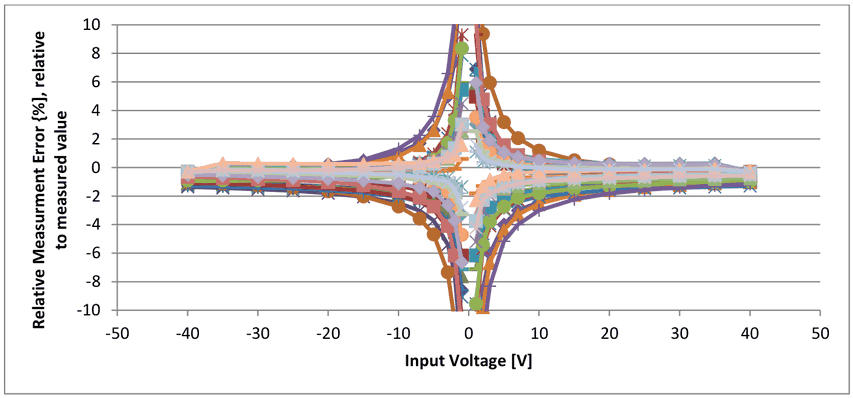
Following figure shows the typical accuracy of all 32 differential channels, not calibrated.
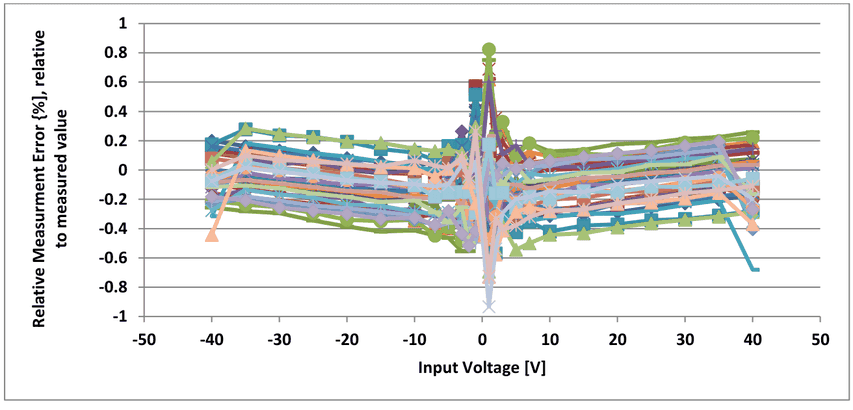
Following figure shows the typical accuracy of all 32 differential channels after calibration
1.9Digital Output board
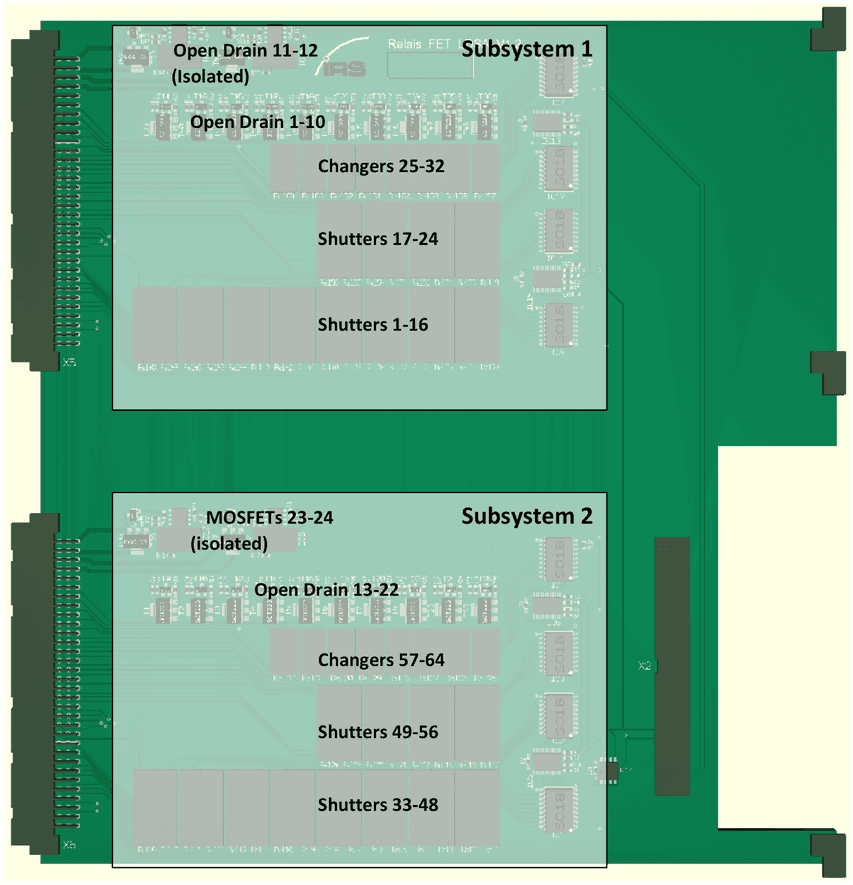
The digital output card provides 64 relays and 24 MOSFETs for general switching purposes. The relays are divided into 48 shutters and 16 changers. The MOSFETs are connected as open-drain low side switches and can handle up to 60V and 3A. However, the VG connector is only specified for 2A per pin so a current of 2A should not be exceeded. The overall current of all 10 FETs that switch to GND should be kept below 14A.
4 of the 24 transistors are galvanically isolated from the rest (and from each other).
The MOSFETs can each be switched directly from I/O pins of the sbRIO: a logical 0 turns the MOSFET on, a logical 1 off. Every MOSFET output may be used for fast switching applications as PWM.
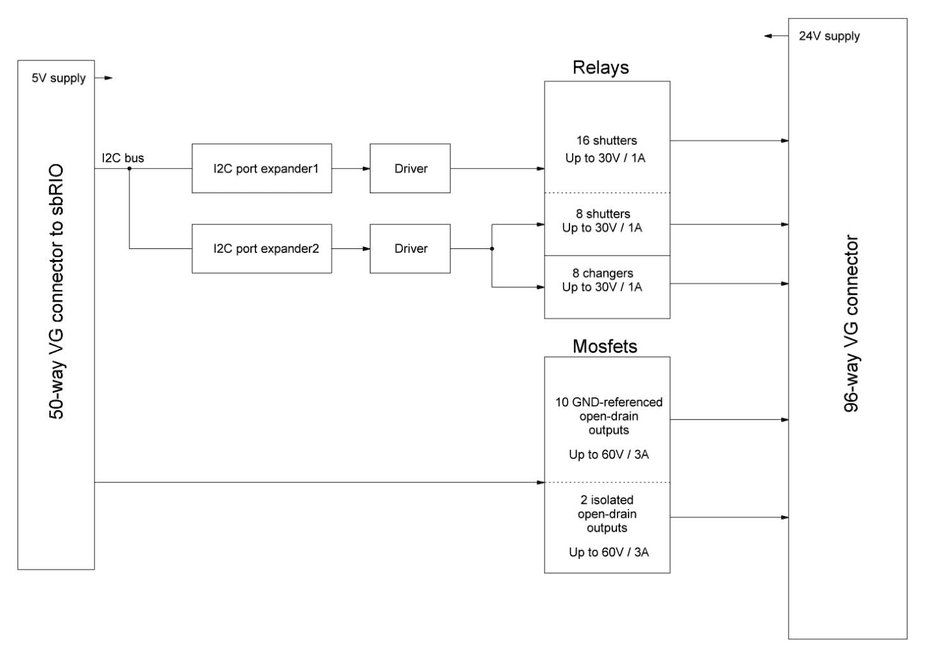
The relays have to be accessed through I²C port expanders. All port expanders are connected to the same I²C bus but have different addresses. The port expanders switch the relays with help of powerful driver ICs.
The Relais_FET_LDSA card consists of two identical subsystems. The MOSFET part and the port expanders of the card are powered from the sbRIO; the relays need an additional 24V supply on the VG connectors X5, X6.
1.9.1Block Diagram
A functional block diagram is shown below that illustrates how each of the subsystems works (i.e. one half of the total system).
1.9.2Specifications
| Item | Min | Typical | Max | Unit |
|---|---|---|---|---|
| Supply current @24V all Relays open | 4 | 7 | 20 | mA |
| Supply current @24V all Relays on | 600 | 700 | 800 | mA |
| Supply Voltage | 22 | 24 | 26 | VDC |
| Number of shutter relays | 48 | |||
| Number of changer relays | 16 | |||
| Number of open drain to System GND | 20 | |||
| Number of open drain isolated | 4 |
Open Drain MOSFET Outputs
| Item | Min | Typical | Max | Unit |
|---|---|---|---|---|
| voltage range | 60 | V | ||
| continuous current (limited by connector) | 0 | 2 | A | |
| RDS(on) @ | 60 | 100 | 150 | mOhm |
| Fall time tf | 0,5 | 1 | µs | |
| Rise time tr @ RPullup = 1 kOhm | 0,5 | 1 | µs |
Relays- Shutters
| Item | Min | Typical | Max | Unit |
|---|---|---|---|---|
| Switching Voltage | 60 | VDC or VACpeak | ||
| Switching current | 1.0 | A | ||
| Carry current | 1.25 | A | ||
| Contact resistance | 200 | mOhm | ||
| Life expectation @5 V / 10mA | 1000 | x106 cycles |
Relays- Changeover
| Item | Min | Typical | Max | Unit |
|---|---|---|---|---|
| Switching Voltage | 60 | VDC or VACpeak | ||
| Switching current | 1.0 | A | ||
| Carry current | 1.0 | A | ||
| Contact resistance @6V 10mA | 50 | mOhm | ||
| Life expectation @ no load | 1000 | x106 cycles | ||
| Life expectation @6 V / 100mA | 50 | x106 cycles |
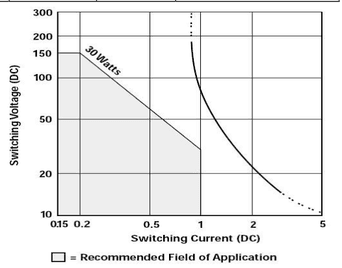
Following figure shows the maximum switching voltage, dependent on the switching current of the changeover relays.
1.9.3Layout
1.9.4Connection to sbRIO
The card is connected to sbRIO header P3 via a 50 way ribbon cable. The corresponding connector has the following pin assignments. Make sure the card is not connected to any other connector than P3 of the sbRIO!
| Pin number P3 | Name | Description |
|---|---|---|
| 1 | GND | |
| 2 | Open Drain 13 | |
| 3 | Open Drain 14 | |
| 4 | GND | |
| 5 | Open Drain 15 | |
| 6 | GND | |
| 7 | Open Drain 16 | |
| 8 | GND | |
| 9 | Open Drain 17 | |
| 10 | GND | |
| 11 | Open Drain 18 | |
| 12 | Open Drain 19 | |
| 13 | Open Drain 20 | |
| 14 | GND | |
| 15 | Open Drain 21 | |
| 16 | GND | |
| 17 | Open Drain 22 | |
| 18 | GND | |
| 19 | Open Drain 23 (isolated) | |
| 20 | GND | |
| 21 | Open Drain 24 (isolated) | |
| 22 | GND | |
| 23 | Open Drain 1 | |
| 24 | GND | |
| 25 | Open Drain 2 | |
| 26 | GND | |
| 27 | Open Drain 3 | |
| 28 | GND | |
| 29 | Open Drain 4 | |
| 30 | GND | |
| 31 | Open Drain 5 | |
| 32 | reserved | |
| 33 | Open Drain 6 | |
| 34 | GND | |
| 35 | Open Drain 7 | |
| 36 | GND | |
| 37 | Open Drain 8 | |
| 38 | GND | |
| 39 | SDA (I²C) | |
| 40 | GND | |
| 41 | SCL (I²C) | |
| 42 | GND | |
| 43 | Open Drain 9 | |
| 44 | +5V supply | |
| 45 | Open Drain 10 | |
| 46 | GND | |
| 47 | Open Drain 11 (isolated) | |
| 48 | +5V supply | |
| 49 | Open Drain 12 (isolated) | |
| 50 | GND |
1.9.5Pinning VG connector X5 (external signals digital subsystem 1)
| Pin | Signal | Pin | Signal | Pin | Signal |
|---|---|---|---|---|---|
| a1 | Rel1 (COM) | b1 | Rel2 (COM) | c1 | Rel3 (COM) |
| a2 | Rel1 (NO) | b2 | Rel2 (NO) | c2 | Rel3 (NO) |
| a3 | Rel4 (COM) | b3 | Rel5 (COM) | c3 | Rel6 (COM) |
| a4 | Rel4 (NO) | b4 | Rel5 (NO) | c4 | Rel6 (NO) |
| a5 | Rel7 (COM) | b5 | Rel8 (COM) | c5 | Rel9 (COM) |
| a6 | Rel7 (NO) | b6 | Rel8 (NO) | c6 | Rel9 (NO) |
| a7 | Rel10 (COM) | b7 | Rel11 (COM) | c7 | Rel12 (COM) |
| a8 | Rel10 (NO) | b8 | Rel11 (NO) | c8 | Rel12 (NO) |
| a9 | Rel13 (COM) | b9 | Rel14 (COM) | c9 | Rel15 (COM) |
| a10 | Rel13 (NO) | b10 | Rel14 (NO) | c10 | Rel15 (NO) |
| a11 | Rel16 (COM) | b11 | Rel17 (COM) | c11 | Rel18 (COM) |
| a12 | Rel16 (NO) | b12 | Rel17 (NO) | c12 | Rel18 (NO) |
| a13 | Rel19 (COM) | b13 | Rel20 (COM) | c13 | Rel21 (COM) |
| a14 | Rel19 (NO) | b14 | Rel20 (NO) | c14 | Rel21 (NO) |
| a15 | Rel22 (COM) | b15 | Rel23 (COM) | c15 | Rel24 (COM) |
| a16 | Rel22 (NO) | b16 | Rel23 (NO) | c16 | Rel24 (NO) |
| a17 | Rel25a (NC) | b17 | Rel26a (NC) | c17 | Rel27a (NC) |
| a18 | Rel25a (NO) | b18 | Rel26a (NO) | c18 | Rel27a (NO) |
| a19 | Rel25a (COM) | b19 | Rel26a (COM) | c19 | Rel27a (COM) |
| a20 | Rel28a (NC) | b20 | Rel29a (NC) | c20 | Rel30a (NC) |
| a21 | Rel28a (NO) | b21 | Rel29a (NO) | c21 | Rel30a (NO) |
| a22 | Rel28a (COM) | b22 | Rel29a (COM) | c22 | Rel30a (COM) |
| a23 | Rel31a (NC) | b23 | Rel32a (NC) | c23 | +24V |
| a24 | Rel31a (NO) | b24 | Rel32a (NO) | c24 | +24V |
| a25 | Rel31a (COM) | b25 | Rel32a (COM) | c25 | +24V |
| a26 | Open_Drain1 | b26 | Open_Drain8 | c26 | GND |
| a27 | Open_Drain2 | b27 | Open_Drain9 | c27 | GND |
| a28 | Open_Drain3 | b28 | Open_Drain10 | c28 | GND |
| a29 | Open_Drain4 | b29 | GND | c29 | Open_Drain11 |
| a30 | Open_Drain5 | b30 | GND | c30 | GND_ISO_11 |
| a31 | Open_Drain6 | b31 | GND | c31 | Open_Drain12 |
| a32 | Open_Drain7 | b32 | GND | c32 | GND_ISO_12 |
The open-drain outputs 1 to 10 all switch to GND while the isolated open-drain 11 and 12 switch to separate pins (GND_ISO_11 and GND_ISO_12).
1.9.6Pinning VG connector X6 (external signals digital subsystem 2)
| Pin | Signal | Pin | Signal | Pin | Signal |
|---|---|---|---|---|---|
| a1 | Rel33 (COM) | b1 | Rel34 (COM) | c1 | Rel35 (COM) |
| a2 | Rel33 (NO) | b2 | Rel34 (NO) | c2 | Rel35 (NO) |
| a3 | Rel36 (COM) | b3 | Rel37 (COM) | c3 | Rel38 (COM) |
| a4 | Rel36 (NO) | b4 | Rel37 (NO) | c4 | Rel38 (NO) |
| a5 | Rel39 (COM) | b5 | Rel40 (COM) | c5 | Rel41 (COM) |
| a6 | Rel39 (NO) | b6 | Rel40 (NO) | c6 | Rel41 (NO) |
| a7 | Rel42 (COM) | b7 | Rel43 (COM) | c7 | Rel44 (COM) |
| a8 | Rel42 (NO) | b8 | Rel43 (NO) | c8 | Rel44 (NO) |
| a9 | Rel45 (COM) | b9 | Rel46 (COM) | c9 | Rel47 (COM) |
| a10 | Rel45 (NO) | b10 | Rel46 (NO) | c10 | Rel47 (NO) |
| a11 | Rel48 (COM) | b11 | Rel49 (COM) | c11 | Rel50 (COM) |
| a12 | Rel48 (NO) | b12 | Rel49 (NO) | c12 | Rel50 (NO) |
| a13 | Rel51 (COM) | b13 | Rel52 (COM) | c13 | Rel53 (COM) |
| a14 | Rel51 (NO) | b14 | Rel52 (NO) | c14 | Rel53 (NO) |
| a15 | Rel54 (COM) | b15 | Rel55 (COM) | c15 | Rel56 (COM) |
| a16 | Rel54 (NO) | b16 | Rel55 (NO) | c16 | Rel56 (NO) |
| a17 | Rel57a (NC) | b17 | Rel58a (NC) | c17 | Rel59a (NC) |
| a18 | Rel57a (NO) | b18 | Rel58a (NO) | c18 | Rel59a (NO) |
| a19 | Rel57a (COM) | b19 | Rel58a (COM) | c19 | Rel59a (COM) |
| a20 | Rel60a (NC) | b20 | Rel61a (NC) | c20 | Rel62a (NC) |
| a21 | Rel60a (NO) | b21 | Rel61a (NO) | c21 | Rel62a (NO) |
| a22 | Rel60a (COM) | b22 | Rel61a (COM) | c22 | Rel62a (COM) |
| a23 | Rel63a (NC) | b23 | Rel64a (NC) | c23 | +24V |
| a24 | Rel63a (NO) | b24 | Rel64a (NO) | c24 | +24V |
| a25 | Rel63a (COM) | b25 | Rel64a (COM) | c25 | +24V |
| a26 | Open_Drain13 | b26 | Open_Drain20 | c26 | GND |
| a27 | Open_Drain14 | b27 | Open_Drain21 | c27 | GND |
| a28 | Open_Drain15 | b28 | Open_Drain22 | c28 | GND |
| a29 | Open_Drain16 | b29 | GND | c29 | Open_Drain23 |
| a30 | Open_Drain17 | b30 | GND | c30 | GND_ISO_23 |
| a31 | Open_Drain18 | b31 | GND | c31 | Open_Drain24 |
| a32 | Open_Drain19 | b32 | GND | c32 | GND_ISO_24 |
The open-drain outputs 12 to 22 all switch to GND while the isolated open-drain 23 and 24 switch to separate pins (GND_ISO_23 and GND_ISO_24).
1.9.7PWM timing with MOSFETs
All Open Drain outputs, including the isolated ones, can be used for PWM generation.
The following figure shows the typical timing behaviour of a MOSFET output with an external pull-up of 1 kOhm connected
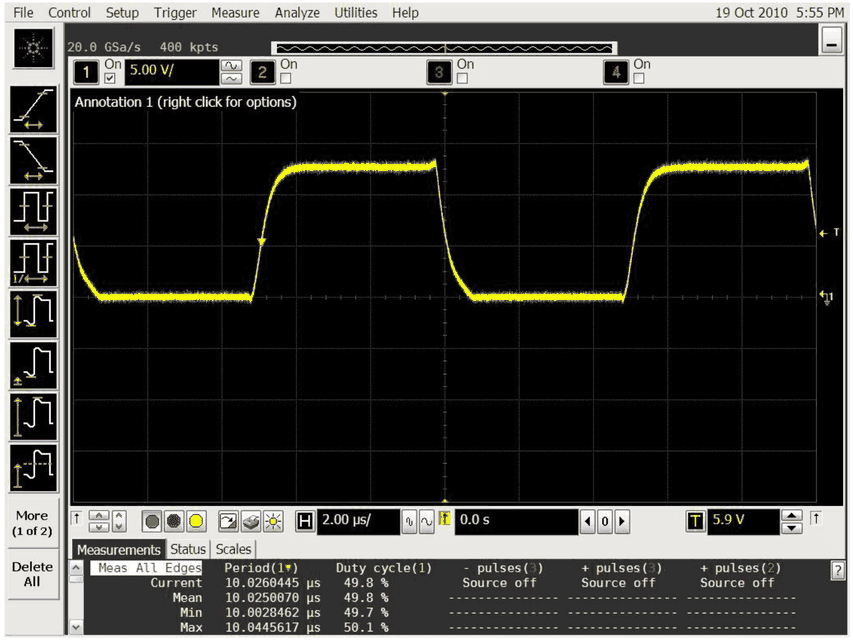
Note that with pull-up resistors of higher resistance, higher rise times will occur. The fall time is quite independent of the pull-up resistor size.
The sbRIO-SW uses a timing resolution of 1µs. If necessary, the resolution can be adjusted up to 25ns. But note, that this would reduce maximum period of signal generation.
Measurement system internal interfaces
2.1SPI interface
The two controllers communicate with the sbRIO with two separate SPI buses that can run at clock rates of up to 18MHz. The microcontrollers are configured as slaves. They can activate an interrupt line in order to force FPGA of sbRIO (which is master) to retrieve microcontroller data. The data size is always 16 bit (referenced as one word).
2.1.1Transmission protocol
The following communication protocol is used for communication in both directions (FPGA to microcontroller, microcontroller to FPGA).
| Word | Name | Range/value |
|---|---|---|
| 0 | LEN (number of data words) N | 1…65535 |
| 1 (high byte) | SIGNATURE | always 0x4D |
| 1 (low byte) | CRC8 (of all following data bytes) | 0x00…0xFF |
| 2 (high byte) | COMMAND | 0x00…0xFF |
| 2 (low byte) | DATA (byte 0) | 0x00…0xFF |
| … | … | … |
| 2+N-1 (low byte) | DATA (byte N-1) | 0x00…0xFF |
It must be noticed that only the low byte of the data area is used. The high byte always contains the constant 0x40 for data messages (except data word 0, which contains the command byte additionally) or 0x80 for status messages (compatibility reasons, FPGA discards received data words with a value less or equal to 0x00FF). A data word with a value of 0x0000 will be added automatically by the microcontroller in order to clear its SPI buffer.
2.1.2Status codes
Each command received from sbRIO will be answered by the microcontroller. This can be done by a data message (which contains application data processed by RT/PC) or a status message. It is possible to deactivate this functionality by command.
The following status codes are defined.
| Value | Content |
|---|---|
0x01 | ACK (command processed successfully, but no data bytes to send for response) |
0x02 | PAR (at least one parameter is out of range) |
0x04 | CMD (command not known) |
0x08 | IDX (object index out of range) |
0x10 | CRC (checksum verification failed) |
0x20 | SIG (wrong signature read) |
0x40 | TIM (SPI timeout detected) |
0x80 | LEN (command length mismatching) |
2.1.3Command description
The latest descriptions can be found in the VI documentation.
2.2Non-volatile storage of data
The on-board data flash of the two STM32 can be used as an EEPROM for the non-volatile storage of data (for example baud rates, ID filter settings, termination resistances …).
2.3Analog Input
The interface of the analog input board consists of
- 3 address buses for multiplexing the analog channels for every analog group separately
- Signals for the serial communication with the ADCs.
- Serial interface to the EEPROM for calibration data.
2.3.1Multiplexers
As shown in the functional block diagram, the channels are multiplexed to ADCs with two channels each. 32 single-ended channels are handled by a 32:1 multiplexer with address lines ADR1_0 to ADR1_4, the remaining 16 single-ended channels are handled by a 16:1 multiplexer with address lines ADR2_0 to ADR2_3 and the differential channels are switched using two 8:1 multiplexers with shared address lines ADR3_0 to ADR3_2.
All address lines are buffered using high-speed CMOS buffers to reduce the load for the FPGA output drivers and to provide clean signals on the PCB.
The address lines are switched during the ADC hold phase to avoid influencing the conversion results.
The inputs are sampled by the internal Sample & Hold stage of the ADCs between the 32nd rising edge of SCK and the rising edge of CONV.
2.3.2ADCs
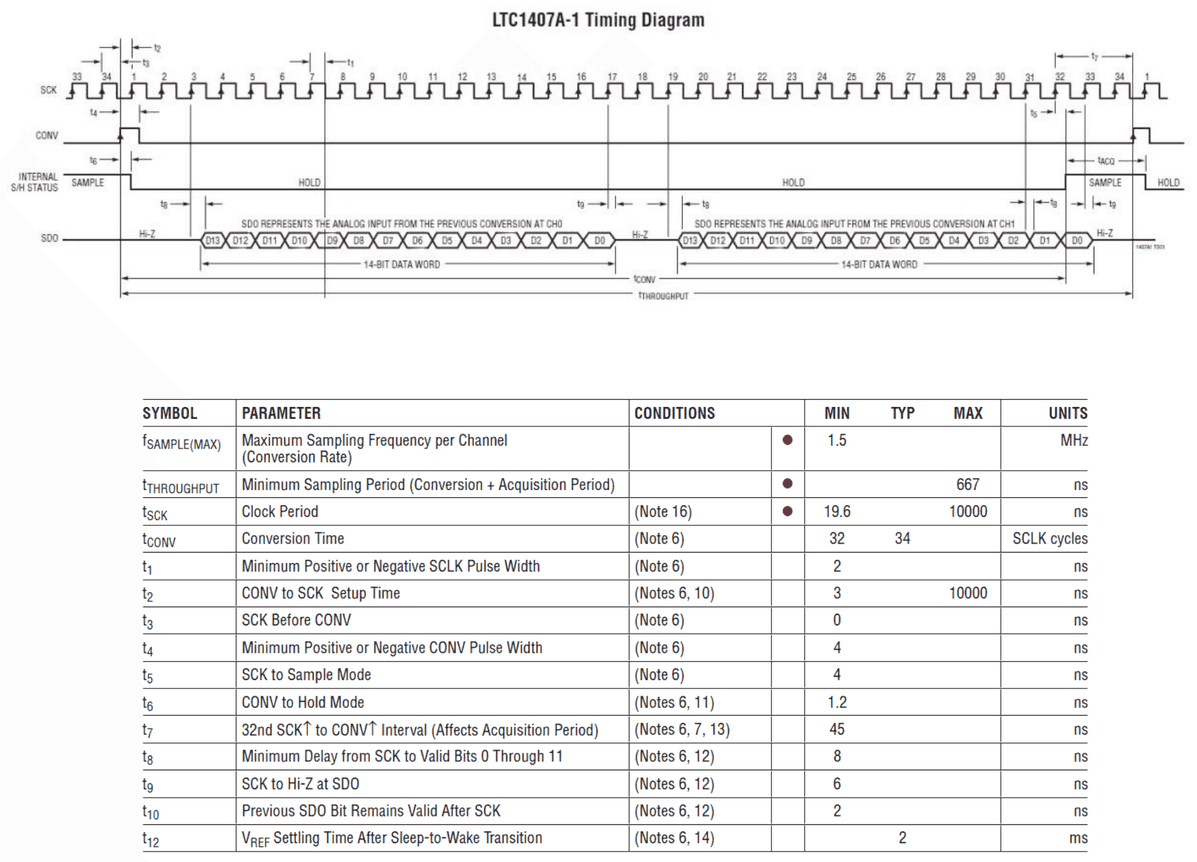
Both ADCs are clocked by the same CONV and SCK signals.
The ADC outputs are buffered using high-speed CMOS buffers to drive the ribbon cable’s capacitance.
2.3.3EEPROM
The EEPROM contains an ID to identify the PCB as an analog measurement card, the type (128 or 64 channel version), a calibration timestamp and the hardware version. Furthermore offset and gain calibration data for each channel is stored as well as the input voltage scaling factor according to the resistor dividers on the PCB. There is an EEPROM present for every analog subsystem respectively. Following table shows an excerpt of the EEPROM content. A detailed memory map can be found in the separate file “EEPROM Memory Map Analog_LDSA.xlsx”.
| Address | Content | Values | Comment |
|---|---|---|---|
| 0 | ID | 0xAA | Identifies the PCB as analog measurement card |
| 1 | Hardware revision | e.g. 0x14 | Hardware revision: e.g. Version 1.3 => 0x13 |
| 2 | Hardware revision: e.g. Version 1.3 => 0x13 | ||
| 3 | Calibration timestamp upper byte | 0x02 | Date of last calibration: e.g. 16.08.2010 => 160810 = 0x2742A |
| 4 | Calibration timestamp middle byte | 0x74 | Date of last calibration: e.g. 16.08.2010 => 160810 = 0x2742A |
| 5 | Calibration timestamp lower byte | 0x2A | Date of last calibration: e.g. 16.08.2010 => 160810 = 0x2742A |
| 6 | |||
| 7 | |||
| 8 | |||
| 9 | Offset byte 1 single-ended channel 1 | Bit31…24 | Offset in Steps of µV |
| 10 | Offset byte 2 single-ended channel 1 | Bit23…16 | Offset in Steps of µV |
| 11 | Offset byte 3 single-ended channel 1 | Bit15…8 | Offset in Steps of µV |
| 12 | Offset byte 4 single-ended channel 1 | Bit7…0 | Offset in Steps of µV |
| 13 | Gain byte 1 single-ended channel 1 | Bit31…24 | Gain of input voltage divider multiplied by 109 |
| 14 | Gain byte 2 single-ended channel 1 | Bit23…16 | Gain of input voltage divider multiplied by 109 |
| 15 | Gain byte 3 single-ended channel 1 | Bit15…8 | Gain of input voltage divider multiplied by 109 |
| 16 | Gain byte 4 single-ended channel 1 | Bit7…0 | Gain of input voltage divider multiplied by 109 |
| 17 | Offset byte 1 single-ended channel 2 | Bit31…24 | Offset in Steps of µV |
| 18 | Offset byte 2 single-ended channel 2 | Bit23…16 | Offset in Steps of µV |
| 19 | Offset byte 3 single-ended channel 2 | Bit15…8 | Offset in Steps of µV |
| 20 | Offset byte 4 single-ended channel 2 | Bit7…0 | Offset in Steps of µV |
| 21 | Gain byte 1 single-ended channel 2 | Bit31…24 | Gain of input voltage divider multiplied by 109 |
| 22 | Gain byte 2 single-ended channel 2 | Bit23…16 | Gain of input voltage divider multiplied by 109 |
| 23 | Gain byte 3 single-ended channel 2 | Bit15…8 | Gain of input voltage divider multiplied by 109 |
| 24 | Gain byte 4 single-ended channel 2 | Bit7…0 | Gain of input voltage divider multiplied by 109 |
| : | : | : | |
| : | : | : | |
| 511 | Gain byte 3 differential channel 15 | Bit15…8 | Gain of input voltage divider multiplied by 109 |
| 512 | Gain byte 4 differential channel 15 | Bit7…0 | Gain of input voltage divider multiplied by 109 |
| 513 | Offset byte 1 differential channel 16 | Bit31…24 | Offset in Steps of µV |
| 514 | Offset byte 2 differential channel 16 | Bit23…16 | Offset in Steps of µV |
| 515 | Offset byte 3 differential channel 16 | Bit15…8 | Offset in Steps of µV |
| 516 | Offset byte 4 differential channel 16 | Bit7…0 | Offset in Steps of µV |
| 517 | Gain byte 1 differential channel 16 | Bit31…24 | Gain of input voltage divider multiplied by 109 |
| 518 | Gain byte 2 differential channel 16 | Bit23…16 | Gain of input voltage divider multiplied by 109 |
| 519 | Gain byte 3 differential channel 16 | Bit15…8 | Gain of input voltage divider multiplied by 109 |
| 520 | Gain byte 4 differential channel 16 | Bit7…0 | Gain of input voltage divider multiplied by 109 |
2.4Digital output
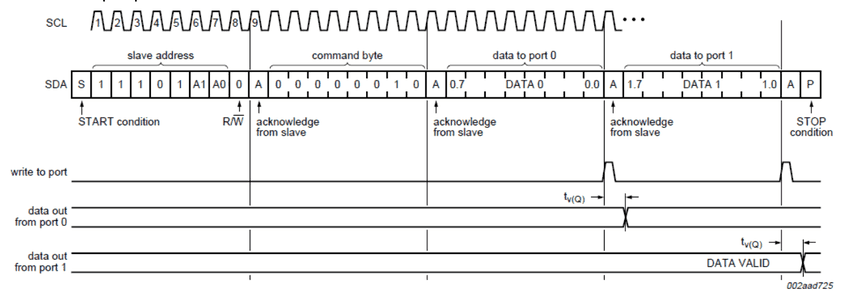
As shown in the block diagram, the relays can be accessed via two I²C port expanders. All pins are configured as inputs at power-up and must be reconfigured as outputs before the relays can be switched.
Addresses for write access:
- Port expander 1 (relays 01 to 15):
0b11101000=0xE8 - Port expander 2 (relays 16 to 32):
0b11101100=0xEC - Port expander 3 (relays 33 to 48):
0b11101110=0xEE - Port expander 4 (relays 49 to 64):
0b11101010=0xEA
The LSB is set to zero for write access.
Write to output ports:
Write to configuration registers:

External extension Interfaces
3.1Supply current measurement – CMM-Interface
For measurement of the DUT current consumption an external IRS current measurement module (CMM) can be inserted. The module is supplied externally and can be read by means of a synchronous serial channel with LVDS differential digital signalling.
The serial interface is designed in a way to concatenate several CMM’s in a daisy chain type, as illustrated in the following figure, where the test system is actually the LVDS interface, which is available on the base and communication board.

3.1.1Communication protocol
The protocol for reading data of one current measurement module is as follows:

When En_In is asserted, the CMM_II module sends out its current measurement value during the next 32 clock cycles with MSB first. After every 16th clock cycle a pause of approx. 5µs with CLK_In at low level should be left. This delay is used to leave the CMM_II microcontroller time to sort next 16-bit data word. After 32 clock cycles the previously received data word is forwarded by the CMM.
Thus, En_in must be valid for 32 clock cycles, multiplied by number of CMMs in the chain.
The current is returned as 32 Bit unsigned long value in steps of 100nA.
3.1.2Connection Diagram
The connection of the signals is according to the following table:
| MesSy signal | MesSy Pin | CMM_II Signal | CMM_II Pin | Which CMM_II |
|---|---|---|---|---|
| LVDS_Out_3+ | B16 | Rx+ | B17 | First in chain |
| LVDS_Out_3- | C16 | Rx- | C17 | First in chain |
| LVDS_Out_2+ | B15 | En_In+ | B16 | First in chain |
| LVDS_Out_2- | C15 | En_In- | C16 | First in chain |
| LVDS_Out_1+ | B14 | Clk_In+ | B15 | First in chain |
| LVDS_Out_1- | C14 | Clk_In- | C15 | First in chain |
| LVDS_In_1+ | C12 | Tx+ (last CMM) | B18 | Last in chain |
| LVDS_In_1- | B12 | Tx- | C18 | Last in chain |
Following example shows the connection of the communication lines of two CMMs:
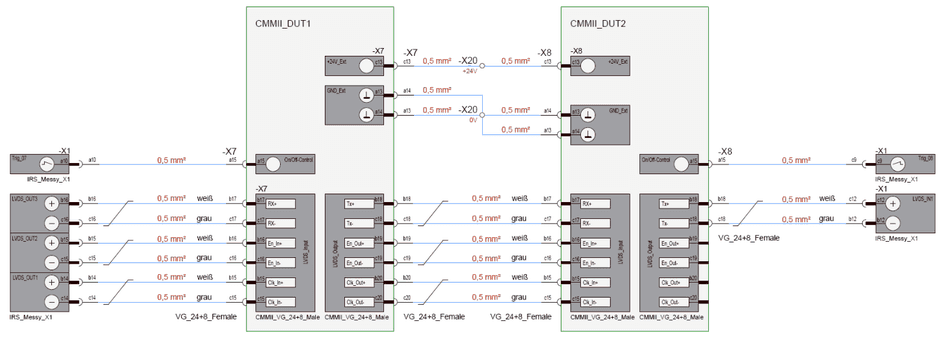
3.2Analog or digital output conditioning
For conditioning of digital outputs or using analogue outputs, please refer to document LDSA_MesSy_Guide_HW_V_1_1.docx
3.3External CAN or serial transceivers
For conditioning of digital outputs refer to document LDSA_MesSy_Guide_HW_V_1_1.docx
3.4Analog input conditioning
For conditioning of analog inputs using voltage dividers or load current measurements, please refer to document LDSA_MesSy_Guide_HW_V_1_1.docx, and the data sheet CurrentConverter_8x_Datasheet_V1.0.pdf.
3.5External I2C-interface
MesSys with a base- and communication board of version 1.3 or higher provide an external I²C-interface to connect additional external electronic modules. Any devices compatible to the I²C-specification may be connected to this interface.
At the moment IRS provides two external modules, which can be controlled by this interface:
- 64x Relay board (identical to one Relay subsystem on MesSy’s digital output board)
- 16x analogue output board (output DC voltages 0…20V)
I²C-interface contains two signal lines. The signals are available at MesSy connector X2 according to the table in chapter 2.7.6 with the following functionality. A typical I²C example telegram for controlling digital outputs is shown in chapter 3.4.
| Signal | X2- Pin | Description |
|---|---|---|
| SCL_Ext | B23 | clock line |
| SDA_Ext | C23 | bidirectional data line |
SW Description
In the following chapter the software concept is introduced. Starting with a general overview, block diagrams of SW subsystems, description of the communication between the SW subsystems, and finally a short functional description of the functional blocks.
For lifetime testing, software for test configuration, data logging and test execution is necessary. These software parts are not described in this document. IRS provides a complete SW solution for lifetime testing which contain additionally to the software described in the following chapter:
- PC-Host-Software
- User interface (GUI)
- TestStand controller (TSC)
- TestStand including test procedure which accesses the measurement system API functions
For description of these software parts, contact IRS.
For the measurement system the following sub-systems are introduced in the following chapter:
- PC-Host-Software
- Base communication to measurement system (PC to RT communication)
- SW for controlling and querying the separate functional blocks
- Signal mapping for accessing analog, digital and communication channels by DUT specific signal name
- Measurement system Software:
- LabVIEW RT software running on sbRIO RT controller
- LabVIEW FPGA software running on sbRIO FPGA
- Microcontroller software running on communication board’s microcontroller
4.1Lifetime testing SW layers
Following block diagram illustrates the different software layers of typical lifetime test equipment, with focus on the measurement system software (yellow). The blue marked SW parts are the generic IRS user interface and TestStand from National Instruments.
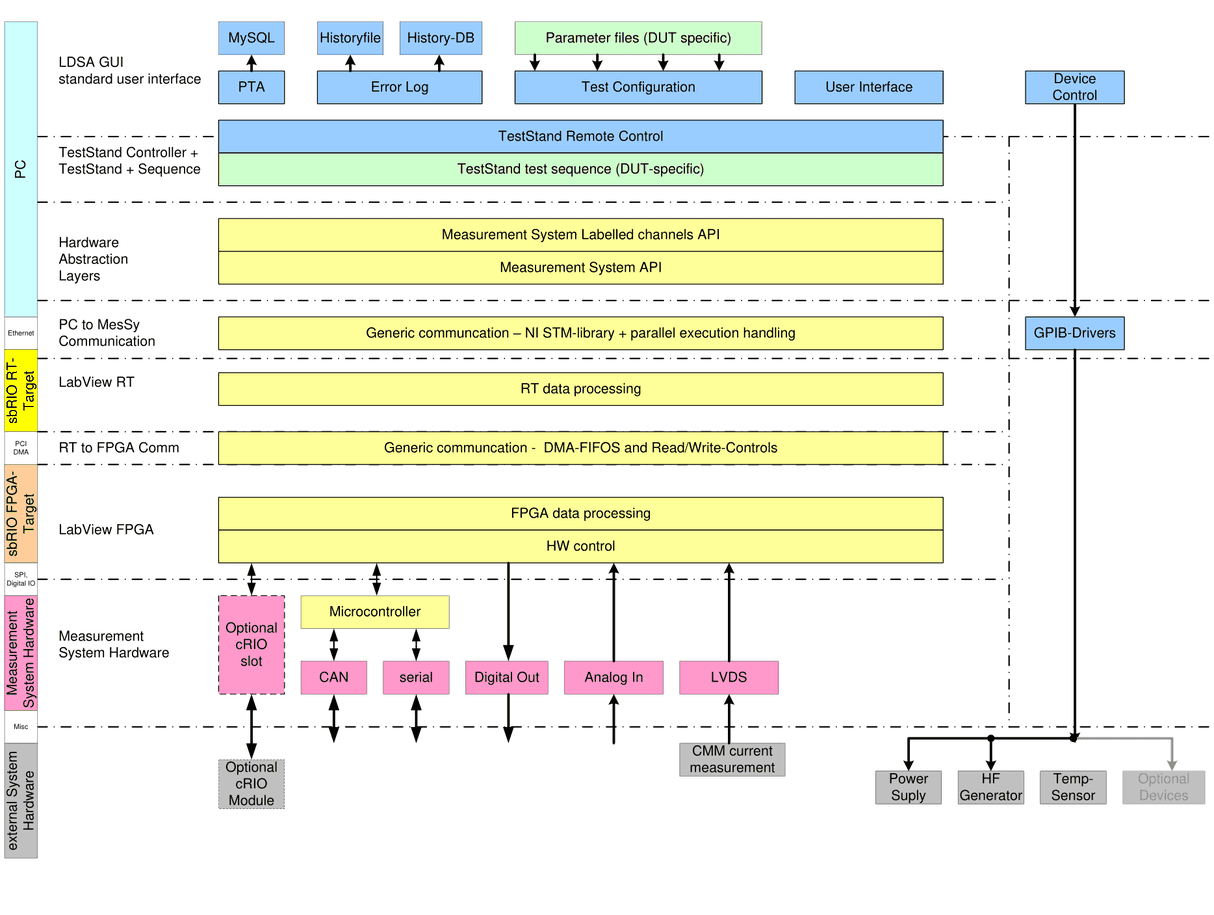
4.2Measurement system embedded software
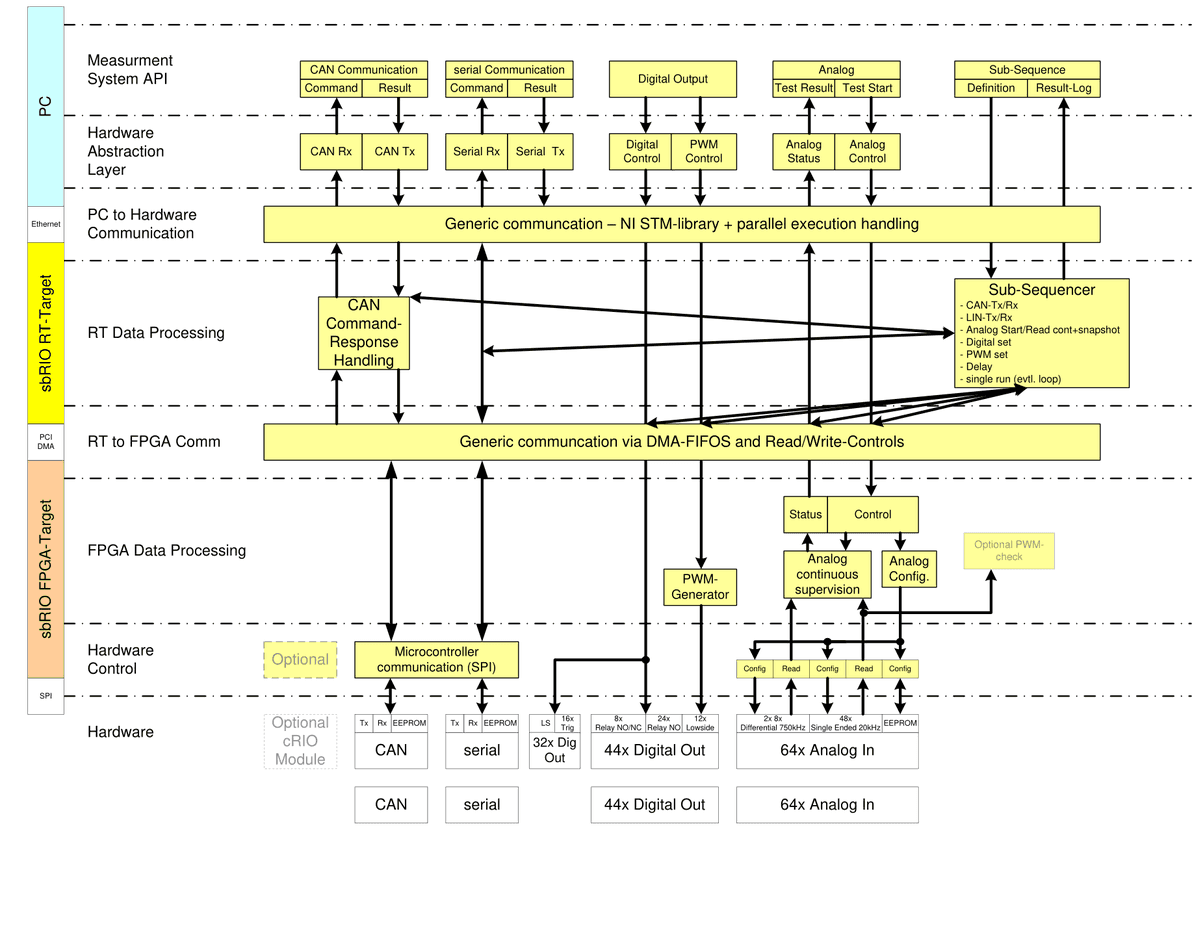
4.2.1Overview FPGA-SW
Next block diagram shows the entire FPGA design with its functional blocks, running on sbRIO FPGA:
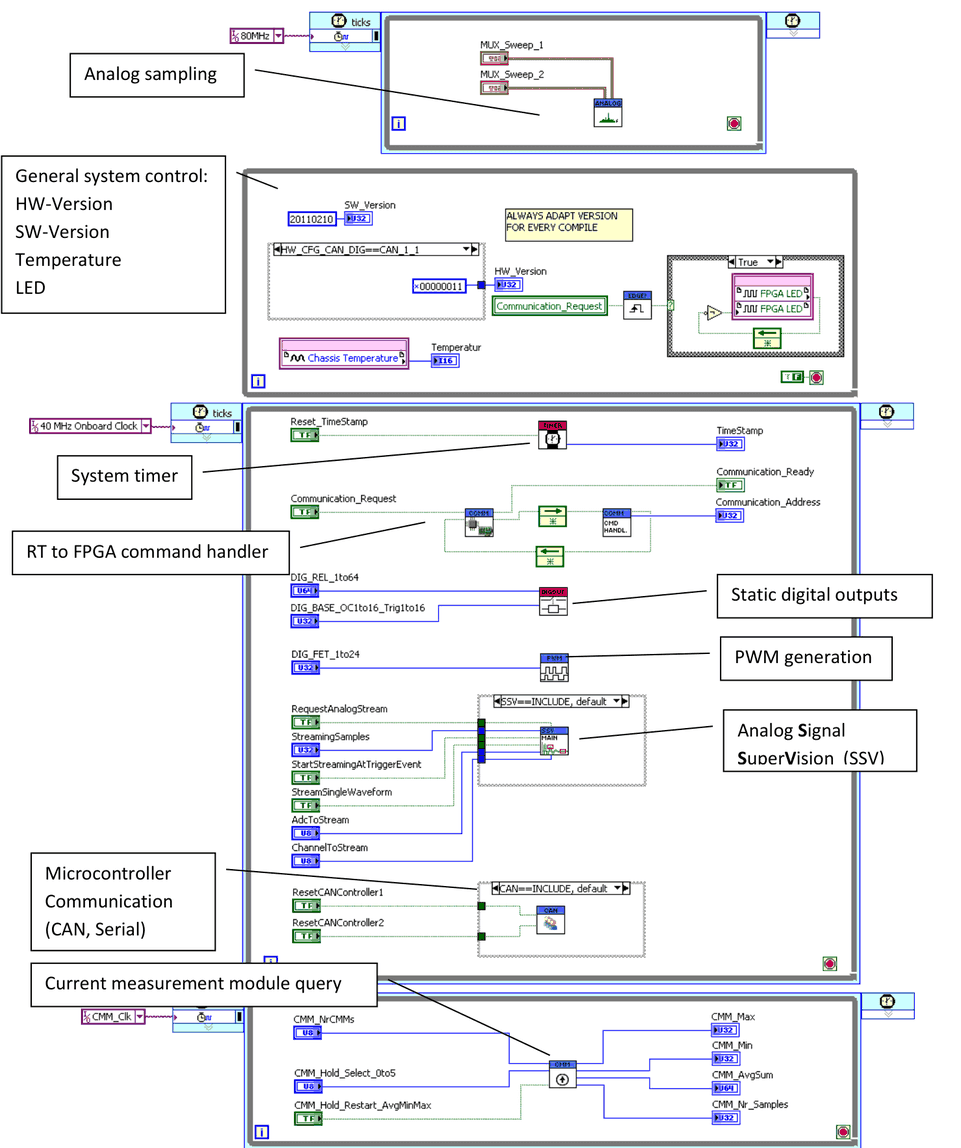
The block diagram contains several Sub-VIs, which handle all FPGA data processing according to the following VI hierarchy:
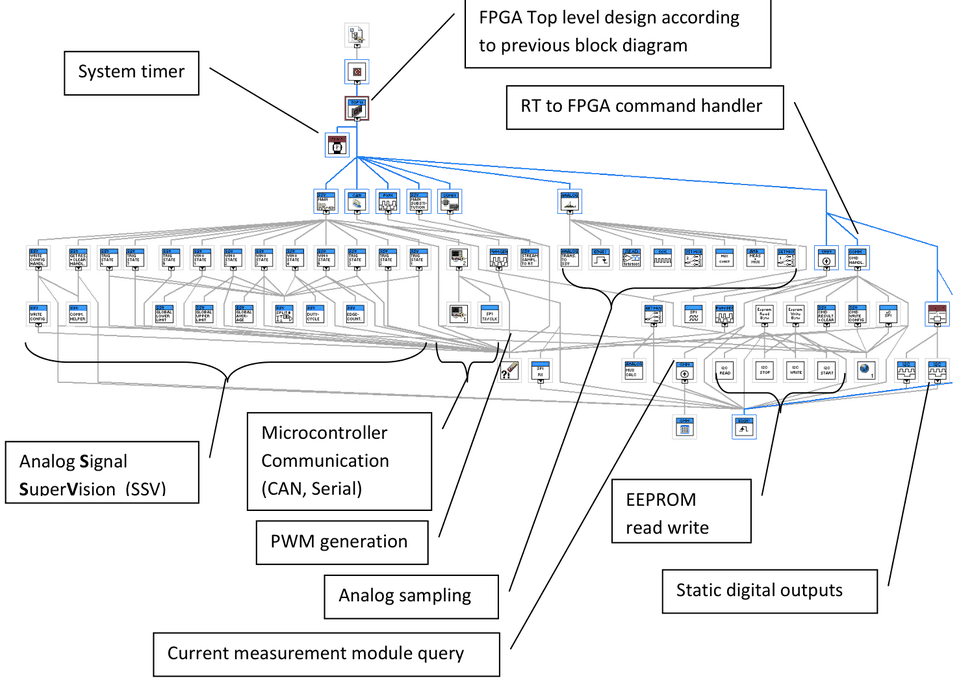
The Sub-VIs are not described in detail, since this would go beyond the scope of this document. To understand the functionality of the blocks, the source code should be investigated.
4.2.2Overview RT-SW
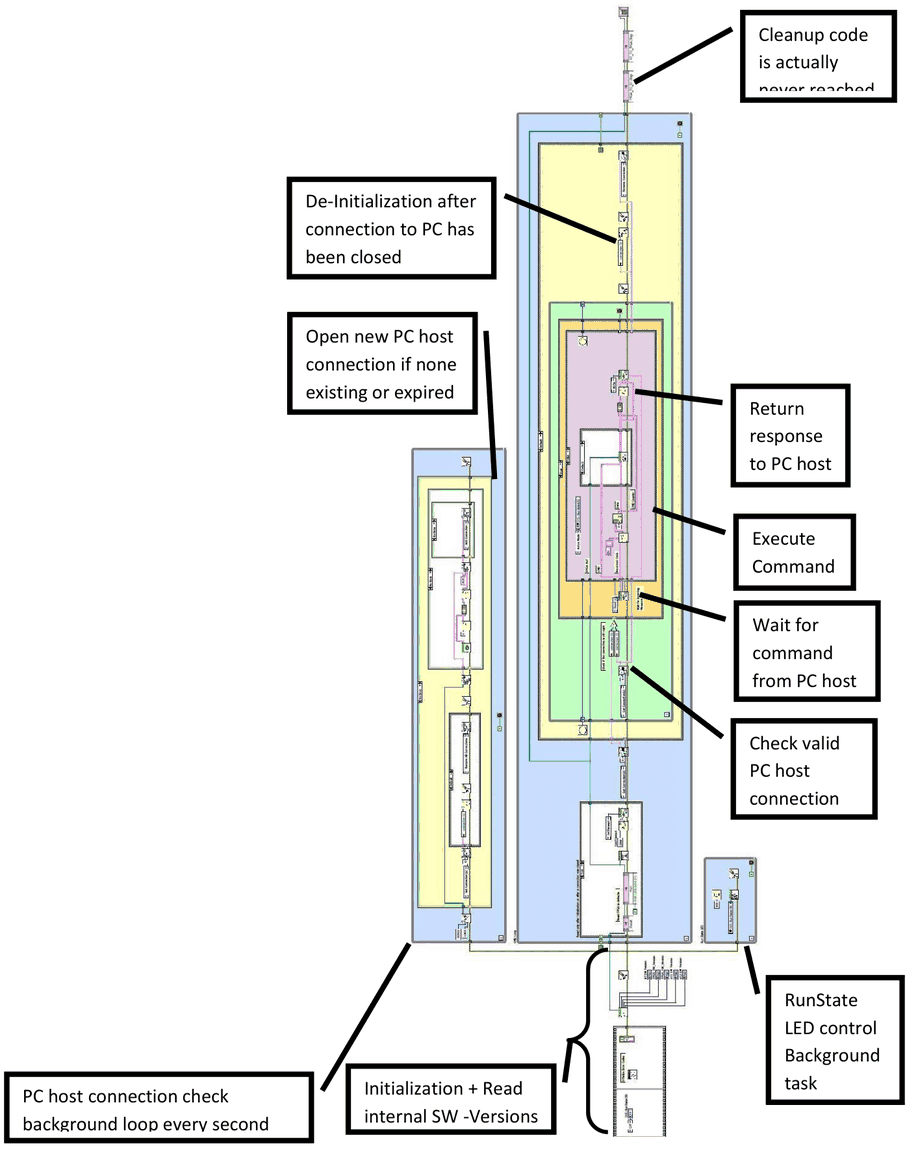
Following block diagram shows the top level RT-design running on the sbRIO RT controller:
After power up, RT-SW initializes the FPGA reference and performs all DMA channel settings for the communication with the FPGA.
Afterwards RT-SW waits for a connection request from the host PC. After connection has been established RT-SW always waits for a command from the host PC to execute.
With every command (e.g. setting digital outputs, request analog values, send CAN command, …) the following steps are performed:
- Call command handler
- Read parameters
- Execute command
- Return response
After the host PC closes the connection, the loop, while waiting for a command is aborted, Ethernet connection is closed, and RT-SW again waits for a new connection to the PC host.
At the moment no other tasks are necessary for RT-SW. There are several options to implement further extensions to this software, including parallel tasks for calculation, running models,….
The block diagram contains several sub-VIs, which handle all RT data processing according to the following VI hierarchy:
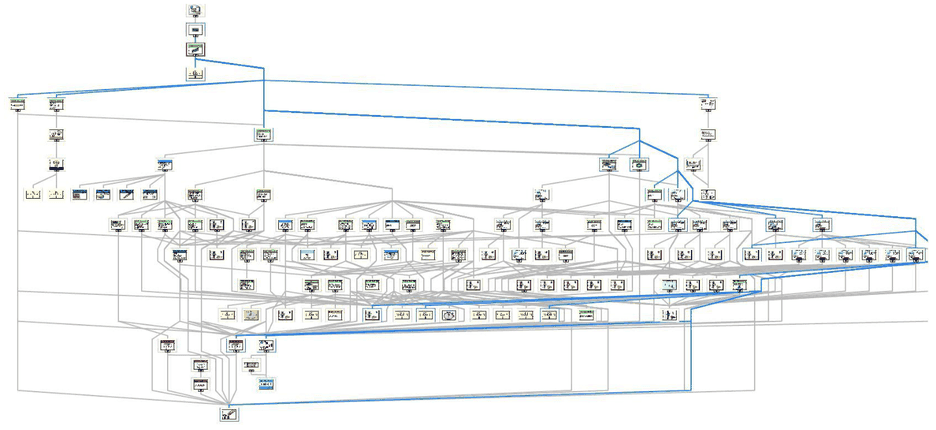
The sub-VIs are not described in detail, since this would go beyond the scope of this document. To understand the functionality of the blocks, the source code should be investigated.
4.2.3RT to FPGA communication
Communication via Read/Write-Controls
Commands which do not have to pass larger data blocks from RT to FPGA or vice versa, use simple read/write controls to send data to, or read data from FPGA. For example see the command handler case for setting digital outputs from the RT point of view:
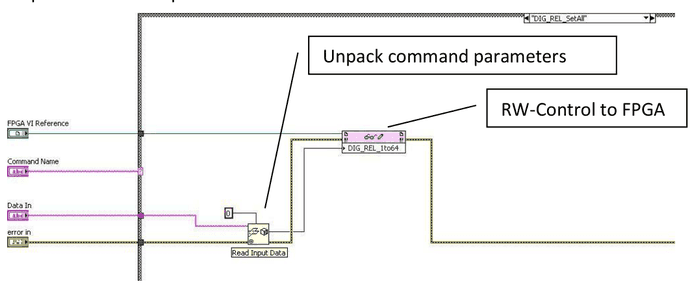
See also the FPGA block diagram in chapter 5.2.1 to see all available Read-Write Controls: (Temperature, digital outputs, Timestamp, Reset, CMM, …)
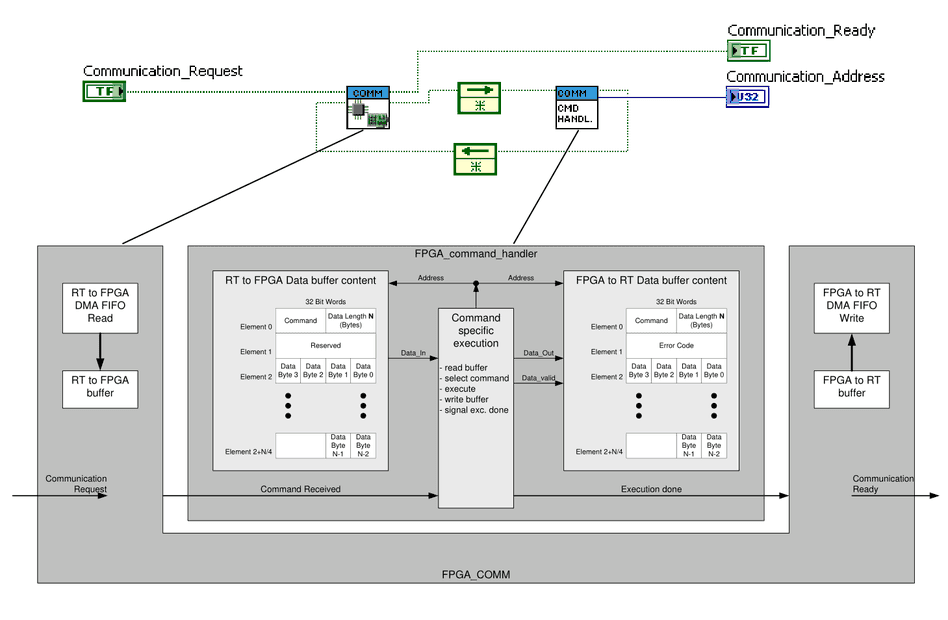
Communication via DMA from FPGA point of view
For passing larger data blocks from RT to FPGA or vice versa, DMA channels can be used. The following structure, which can be found in the figure of chapter 5.2.1, handles the DMA communication:
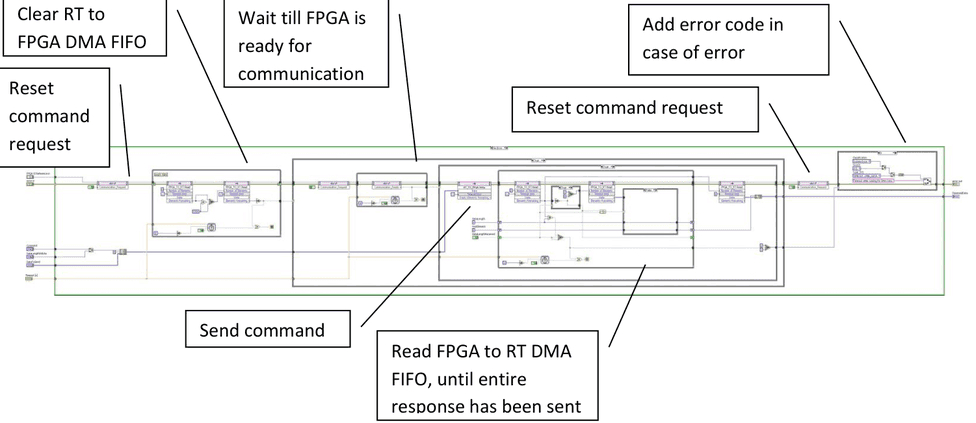
Communication via DMA from RT point of view
The following steps are performed for RT to FPGA communication:
4.3PC to RT communication
4.3.1STM library
Communication between the PC Host interface and the measurement system RT-controller is established by an Ethernet connection. A protocol is implemented, based on the National Instruments STM-library, using TCP/IP Protocol.
Every command or response packet handled by the STM library contains the following data string:

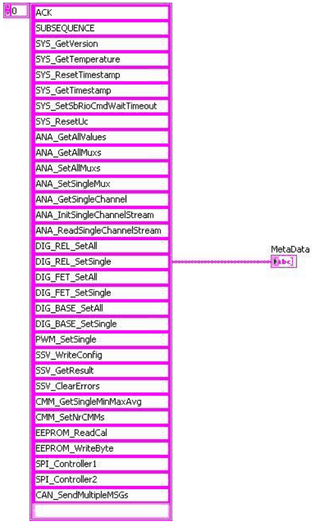
The command field “Metadata“, is an ID, which represents an element of the array of valid commands. The figure below shows an example of the used commands of the measurement system.
Meta data is transmitted once from the PC host to the RT target, after connection has been established by the host PC. This makes sure, that both PC and RT both know the same valid commands, using same IDs.
4.3.2Normal command execution from PC point of view
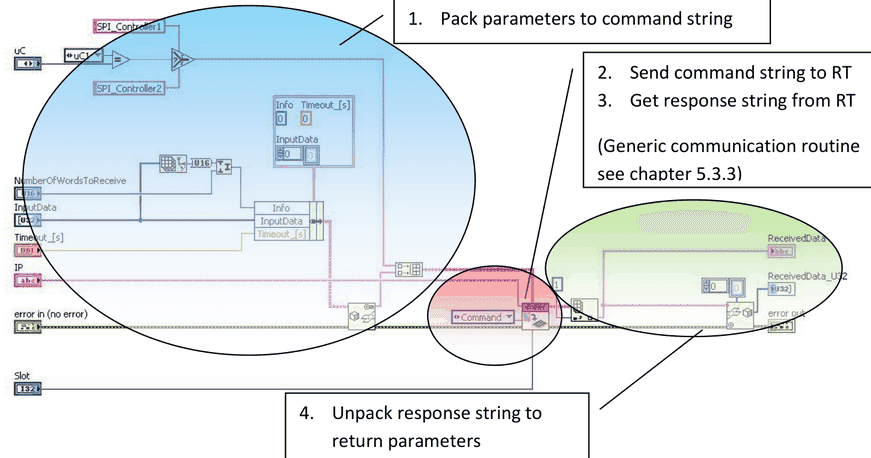
Normal command execution means that PC sends a command. RT executes the command and sends a response immediately. The following steps are performed from the PC side of view:
- Pack parameters to command string:
- This step is command specific, and means to pack any command parameters to a string
- Send command string to RT:
- This step is included in the generic communication routine, which sends the command string to the RT-Target
- Get response string from RT:
- This step is included in the generic communication routine, which waits for the response string from the RT-Target
- Unpack parameters from response string:
- This step is command specific, and means to extract any response parameters from string
4.3.3Slot addressing
Note that for every command a slot parameter is passed. The purpose of this parameter is to distinguish between several DUTs on one measurement system. I.e. for DUTs with only little amount of pins and functions, one measurement system can be used to handle up to 6 DUTs in parallel. In this case, when more than one test executions are connecting to the measurement system, the communication routine has to check the connections for every DUT’s test execution. It may not close the connection, until all test executions of all DUTs have closed the connection. Thus, the slot represents the DUT on the measurement system.
4.3.4Generic communication routine
The generic communication routine is used for every command sent by the PC. Following figure illustrates the steps of this routine.
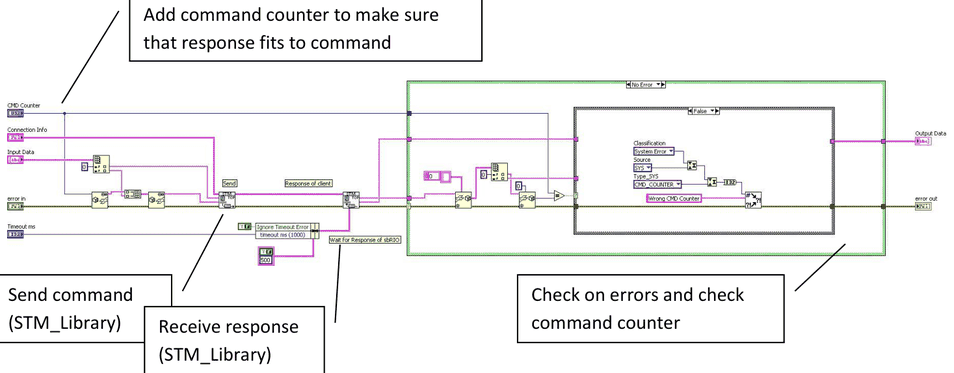
4.3.5Normal command execution from RT point of view
The following figure shows the loop for command reception, which is continuously running on RT:
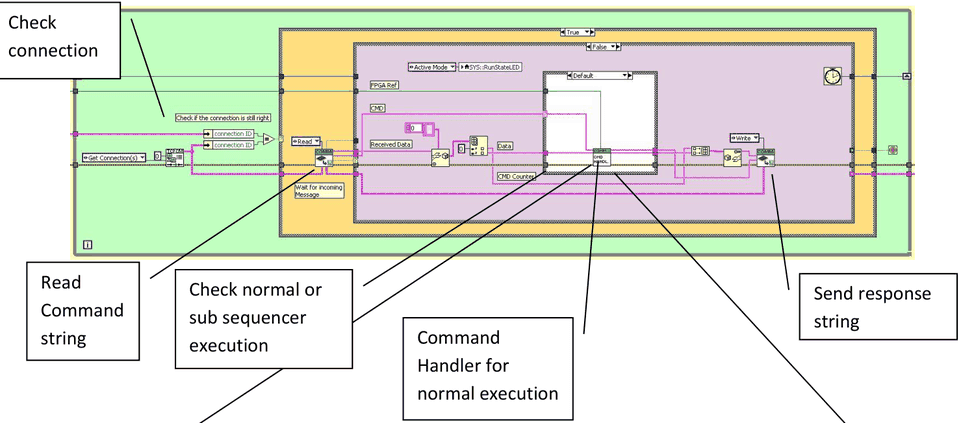
The command handler selects and executes the command:
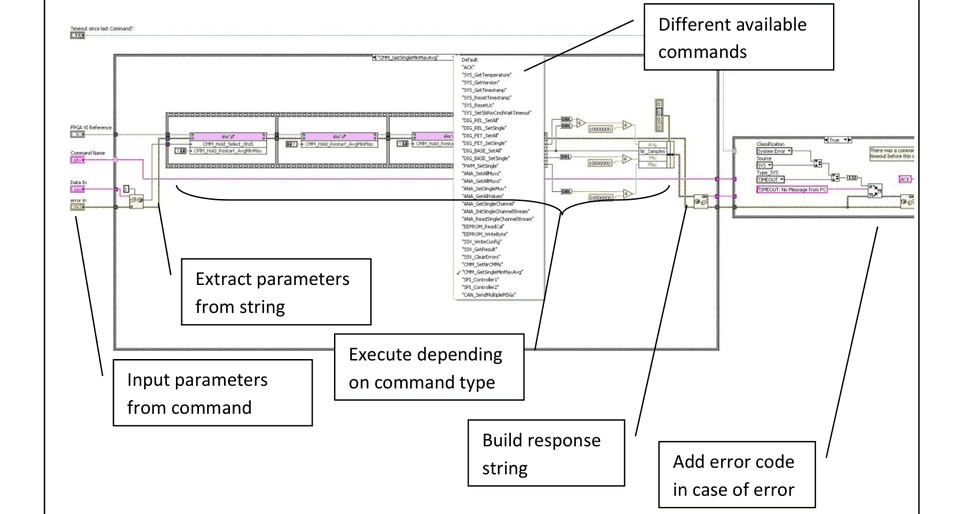
4.4Command flow
4.4.1Normal command execution
The following figure illustrates a typical command flow from PC side of view. In this case the measurement system functions are used within a LabVIEW Application:
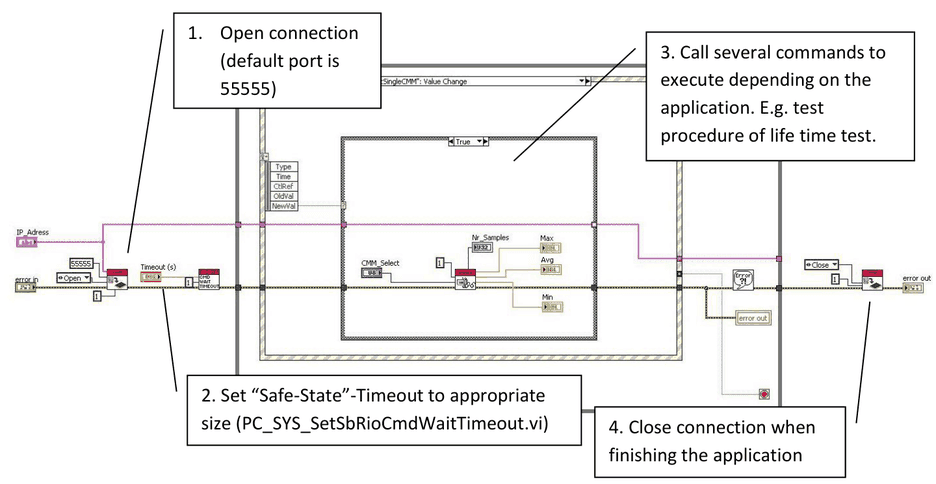
The same steps have to be taken, when accessing the measurement system from TestStand or other applications. Following figure shows a typical execution flow within TestStand
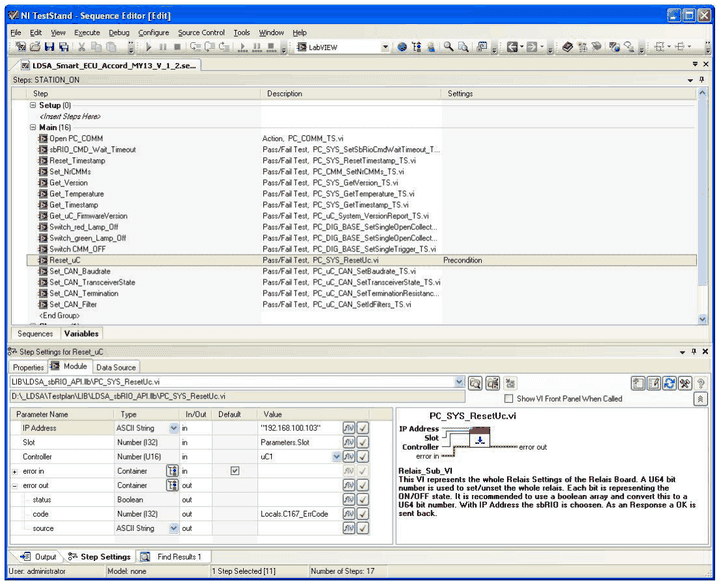
Step 1:
Open the connection to establish the TCP-IP connection, exchange Meta-data between PC and RT.
Step 2:
Call “PC_SYS_SetSbRioCmdWaitTimeout.vi” to set the “safe-state”-timeout to an appropriate size. This timeout means the following. If the measurement system (RT-SW) did not receive a valid command within this timeout period, the RT-SW will switch all outputs off, resets the CAN-Controllers, disconnects TCP-IP-connection and waits for a new open request. The purpose of this timeout is to make sure that the measurement system returns to an idle state and switches off the DUT when the PC had been crashed.
The default value of this timeout is 2 seconds. I.e. every 2 seconds a command has to be sent by PC. This cannot be achieved in all applications. Especially, when the user wants to send commands by triggering buttons, the timeout has to be set to higher values. A typical value for a non-sensitive device would be 60 seconds. Devices like window lifters, which could be damaged when be in an uncontrolled, active state require shorter timeouts, well below 5 seconds. The user may decide the appropriate timeout for his application.
Step 3: (can be repeated indefinitely)
Sending commands as listed in the API description in Measurement system API (CORE_API), or as in Lifetime testing API with labelled channels (TS_API) can be performed application specific in an arbitrary way.
Step 4:
Before closing the application, the connection should be closed. Otherwise the measurement system would still wait for a command, and run into the “safe-state”-timeout at any specified time. When the user tries to re-open the connection to the measurement system, while it is still running, an error would be reported. Thus close connection, before closing the application.
4.4.2Sub-Sequencer execution
The sub-sequencer is implemented to execute commands fast in a well-defined timing in the range of a few milliseconds. When sending commands using normal command execution, the timing between commands is dependent on the timing of the Windows operating system on the PC. With such a non-real-time operating system timing can vary between a few milliseconds up to seconds.
Sub-sequencer execution means to load several commands to RT, execute them without delays caused by the PC and return several responses to PC. The responses can be evaluated on the PC-SW with a non-critical varying timing.
Sub-sequencer command flow
The following command flow must be implemented to use a subsequence
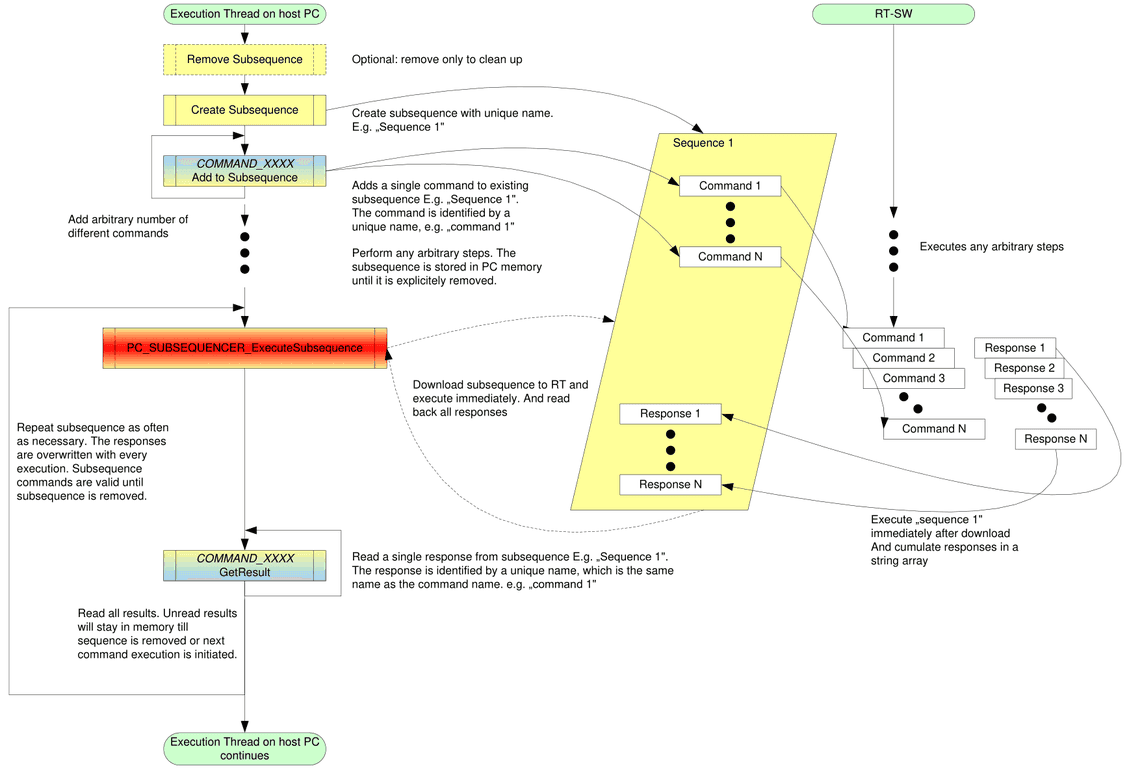
Sub-sequencer command execution from RT point of view
Sub-sequencer execution from RT point of view simply means to receive an array of command strings from PC. The array, containing single command strings to execute, is processed element by element. Responses of the single commands are cumulated in an array of strings and returned to the PC.
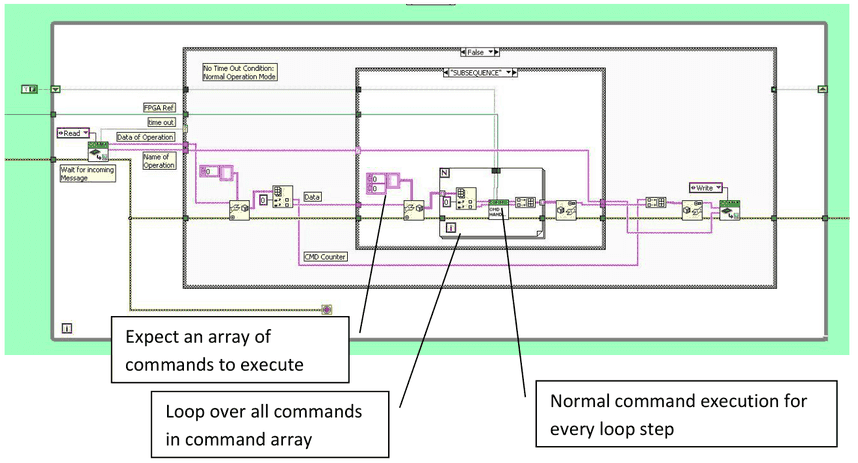
Sub-Sequencer command execution from PC point of view
Sub-Sequencer execution from the PC point of view means to split the command-response handling unit into three parts:
- add command to subsequence (repeatedly for several commands)
- Execute entire subsequence
- Get subsequence response (repeatedly for several commands)
The separation between normal command execution, sub sequencer-“load” and sub sequencer– “get result” is implemented, using polymorphic VIs. The sub-sequencer execution is explained in the following, using the example VI: “CAN_EOL_SendReceive.vi”:
In the first step the normal command execution of CAN_EOL_SendReceive.vi is illustrated to see the difference to sub sequencer-execution
CAN_EOL_SendReceive normal execution:
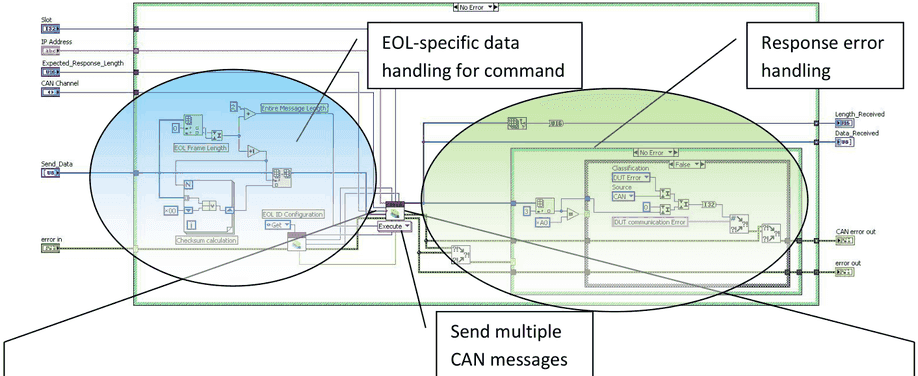
Can_SendMultipleMsgs:
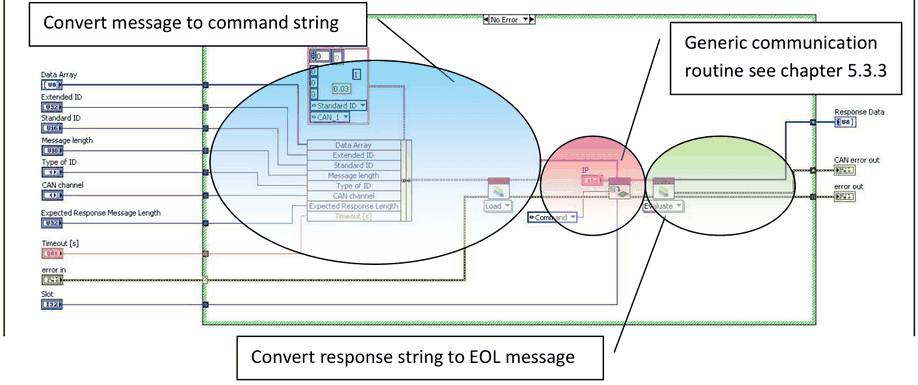
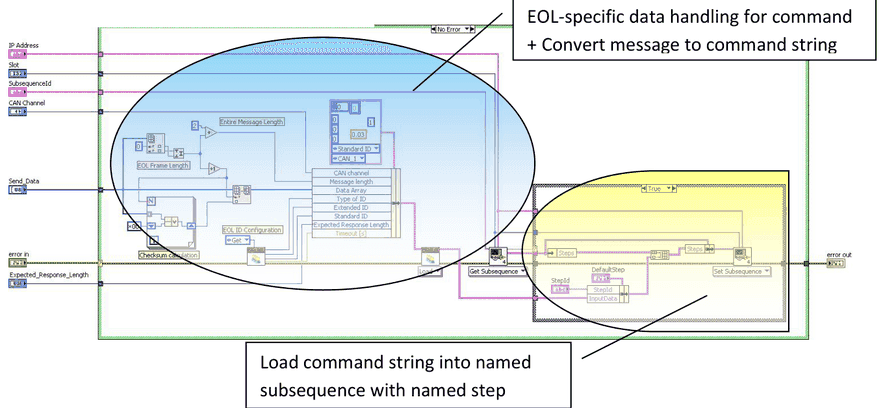
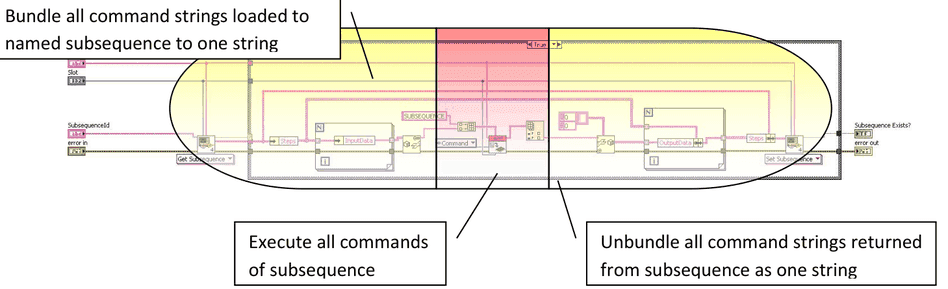
For sub sequencer execution the three coloured parts have to be separated into several VIs. The “Execute Subsequence” part is a generic one, and can be used from every command. But for every command the following parts have to be implemented separately, using polymorphic VI’s:
- COMMAND_XXX_AddToSubsequence
- contains the formatting of the command string, and save the command string in the identified subsequence command container
- COMMAND_XXX_GetResult
- Contains the reading of the response string of the identified sequence and step. The formatted response string is unpacked and converted to appropriate response parameters.
Add to Subsequence (command specific)
Execute Subsequence (one generic VI for all commands)
GetResult (command specific)
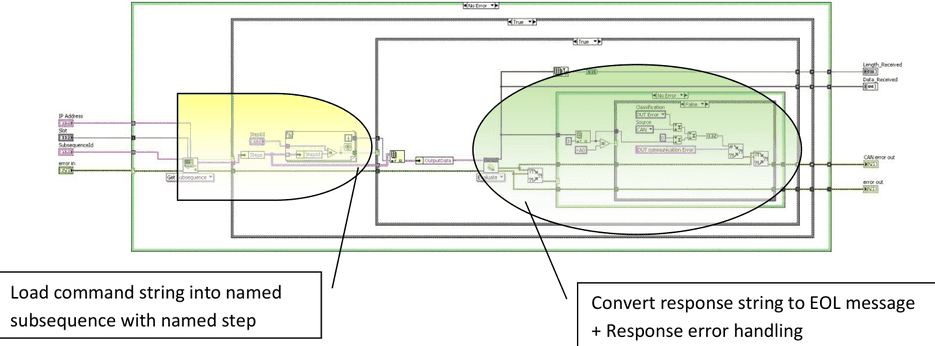
4.5Error Handling
4.5.1General error handling
Every implemented VI has an error input and output.
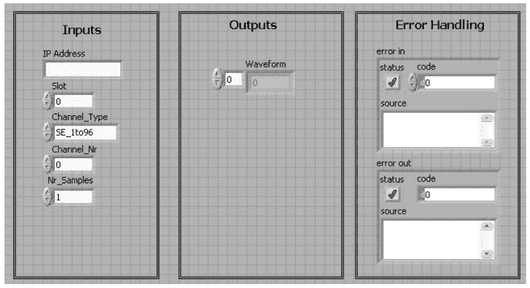
Error codes are returned by all VI’s in the “error out”-cluster.
If an error with a non-zero error code is passed to the VI on “error in”
- the VI’s code is not executed
- the error code is passed through to “error out”
It is recommended to wire the error input and output to any user defined error handler in the application. This makes sure that communication to MesSy and all Parameters are checked and the user of the application gets information about the MesSy and Software status.
4.5.2Error Codes
In the field “code” of “error out” an error code is returned, which is either generated by any VI of the standard LabVIEW library, or by the MesSy software. Values below 5000 including negative values are standard LabVIEW error codes. Values above are MesSy error codes.
The MesSy error codes use the following grouping:
| Bit 30..24 | Bit 23..16 | Bit 15…0 |
|---|---|---|
| Classification | Source | Type |
Classification defines the criticality of the error, where a system error is regarded as a severe error.
A DUT error means, that the MesSy system is still working, but for example a CAN message has not been answered by the unit under test.
A warning may be regarded only for information.
| Number | Classification |
|---|---|
0x10 | System Error |
0x20 | DUT Error |
0x30 | Warning |
Source means the software block, which has detected an error.
| Number | Source | Description |
|---|---|---|
0x00 | SYS | General system control, e.g. timestamp, IP-connection, … |
0x10 | CAN | CAN communication |
0x20 | PWM | Dynamic digital output generation |
0x30 | ANALOG | Analog input |
0x04 | SSV | Signal supervision |
0x05 | DIGOUT | Static digital output |
0x06 | SERIAL | Serial communication lines |
0x07 | MICROCONTROLLER | General microcontroller communication for serial or CAN. |
Type classifies some typical types of errors.
| Number | Error Type |
|---|---|
0x###A | |
0x###B | Parameter |
0x###C | Communication |
0x###D | Timeout |
0x###E | |
0x###F | Unknown |
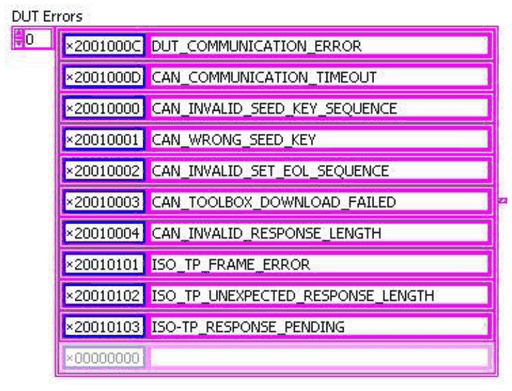
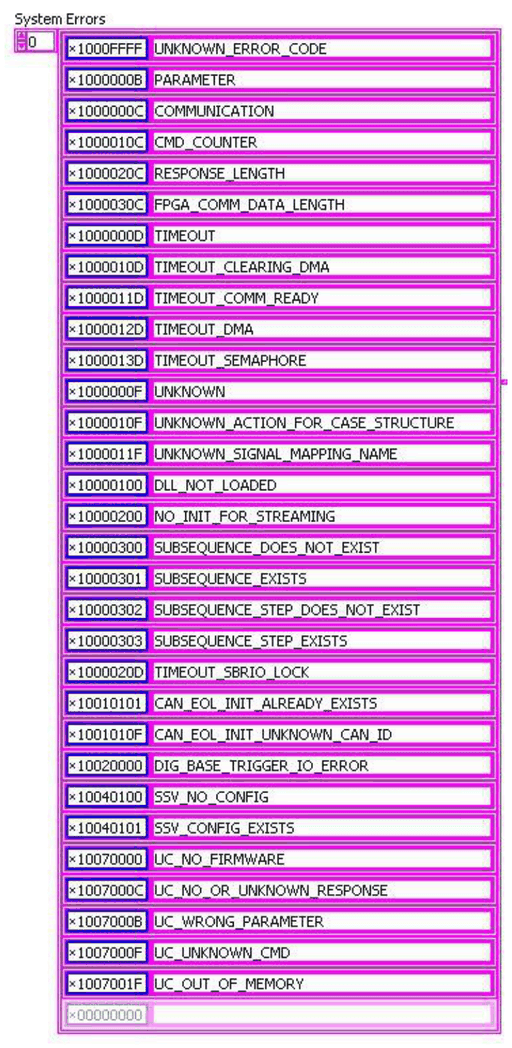
Following tables show the implemented error codes and the corresponding error text, which will be output on “source” on the “error out” cluster:
- DUT errors:
- System errors:
4.6Measurement system API (CORE_API)
A VI library (API) is available to access MesSy by a user application, typically designed in LabVIEW. The library’s functionality will be expanded in future. Because of this, the documentation of the library is available electronically.
The normal command for the CORE API is identical to the flow, described in chapter 5.4.1.
4.6.1Addressing modes for CORE_API
For addressing a specific MesSy the IP-Address of the respective MesSy is used. I.e. every VI of the library has a string input parameter called “IP Address”, which contains the IP-Address in form of a string (e.g. 192.168.101.2 – enter without double quotes)
Note that for every command a slot parameter is passed. The purpose of this parameter is to distinguish between several DUTs on one measurement system. I.e. for DUTs with only little amount of pins and functions, one measurement system can be used to handle up to 6 DUTs in parallel. In this case, when more than one test executions are connecting to the measurement system, the communication routine has to check the connections for every DUT’s test execution. It may not close the connection, until all test executions of all DUTs have closed the connection. Thus, the slot represents the DUT on the measurement system.
4.6.2Functional blocks
Different functional blocks are available in the API. Every VI has a prefix PC_xxx, where xxx is the Block according to the following table:
| Functional Block | Description | Examples |
|---|---|---|
| SYS | System Commands | Get Timestamp, Establish connection, EEPROM read and write, … |
| DIGOUT | Static digital output control | Set / Reset single relay, FET, set / reset all relays ,… |
| PATTERN | Dynamic digital output control (PWM, Pattern) | Set_PWM, Download digital pattern, Start pattern, … |
| ANALOG | Analog input general control | Set Multiplexer, Get single channel value, Get Waveform of one channel, … |
| SSV | Analog input signal supervision (SSV) | Set supervision configuration, read result since last readout. |
| CAN / uC_CAN | CAN communication | Conti EOL protocol, ISO-TP (ISO 15765-2), cyclic message transmission. |
| uC_UART | Serial communication | Serial configuration, send byte, configure serial repeater. |
| CMM | Current measurement module | Read Current Value of one CMM, Set number of CMMs in the chain. |
| SUBSEQUENCER | Subsequencer | Create subsequence, add step, execute subsequence, get step result |
4.7Lifetime testing API with labelled channels (TS_API)
A VI library (API) is available to access MesSy by TestStand more comfortable than using the CORE_API. This library is called TS_API. This additional software layer on top of the CORE_API provides the user a more convenient test procedure design, especially when several DUTs have to be tested either with one MesSy or several MesSy’s.
The normal command flow for TS_API is basically the same as in chapter 5.4.1. Differences are the addressing mode of the MesSy by “Bus” and “Slot” number and the signal mapping for addressing the physical analog, digital or communication channel.
The library’s functionality will be expanded in future as will be the CORE_API. Because of this, the documentation of the library is available electronically.
4.7.1Bus, Slot, signal name addressing
The difference of TS_API to the CORE_API is the addressing of the MesSy’s physical channels. While in the CORE_API every physical channel is addressed by the MesSy’s IP-Address and the physical channel number (e.g. 1…96 for single ended analog inputs SE_1to96, Serial_01 … SERIAL_10, 1…24 for FET, ... ), in TS_API there is an addressing via “Bus”, “Slot” and “Signal name”:
- Bus:
- Range = [0…255]
- Is the last number of the IP-Address.
- The rest of the IP-Address – the IP-address-range - is defined in the signal mapping file (see Signal mapping).
- E.g.: when Bus = 12, and the IP address range is “192.168.100.”, the addressed MesSy’s IP address will be: “192.168.100.012”,
- Slot:
- Range = [1…6]
- MesSy software is created in that way, that one MesSy can handle up to 6 DUTs.
- The Slot number represents the DUT number.
- The Slot selects the appropriate physical channel of one MesSy according to the signal mapping file (see Signal mapping).
- Signal name
- Signal name is an arbitrary Name that corresponds to a signal (typically the signal name of the DUT), which is connected either to analog input, digital output or a communication line.
- The mapping of physical channels to signal names is done in the signal mapping file (see Signal mapping).
E.g. if one MesSy handles three DUTs, the same signal name is present 3 times on one MesSy. The correct physical MesSy channel is selected by the respective Slot number.
4.7.2Signal mapping
In the signal mapping file first of all, the IP address range of all connected MesSy’s is included. The IP address range represents the first three numbers of the IP-addresses (e.g. 192.168.101.).
Furthermore the number of slots, i.e. number of attached DUTs and respective executions is included in this file. And finally the signal mapping from signal names to analog inputs, digital outputs, relays and communication lines for every slot respectively are defined in this file.
The signal mapping file is stored in form of an XML-file. The following XML example shows IP-Address range (common_ip=192.168.101.), number of slots = 2 (count=2) and all possible signal groups.
If a “name” is used more than once, either for the same type (Relay, Single ended input,…) or different types, add the property (as shown in the Analog input example)
resourcesharing = "1"
Otherwise an error will be reported, when the signal mapping file is loaded. This feature may help to avoid unwanted ambiguities.
<?xml version="1.0" encoding="utf-8"?>
<ldsa name="LDSA" count="2" common_ip="192.168.101.">
<modules>
<module name="ANALOG">
   <item name="Example_Signal_Name_Analog_1">
    <connector slot="1" name="SingIn_11" resourcesharing="1"/>
    <connector slot="2" name="SingIn_59" />
   </item>
   <item name="Example_Signal_Name_Analog_2">
    <connector slot="1" name="SingIn_12" />
    <connector slot="2" name="SingIn_60" />
   </item>

   <item name="Example_Signal_Name_Analog_Differential">
    <connector slot="1" name="DiffIn_01a" />
    <connector slot="2" name="DiffIn_09a" />
   </item>
</module>

<module name="RELAY">
   <item name="Relay_VBatt">
    <connector slot="1" name="REL_15" />
    <connector slot="2" name="REL_47" />
   </item>
</module>

<module name="TRIGGER">
   <item name="TRIG1">
    <connector slot="1" name="TRIG_01" />
    <connector slot="2" name="TRIG_04" />
   </item>
</module>

<module name="OPENCOLLECTOR">
   <item name="GREEN">
    <connector slot="1" name="OPEN_COLL_16" />
    <connector slot="2" name="OPEN_COLL_14" />
   </item>
</module>

<module name="FET">
   <item name="PWM_Out">
    <connector slot="1" name="FET_1" />
    <connector slot="2" name="FET_13" />
   </item>
</module>

<module name = "CMM">
  <item name ="CMM">
    <connector slot = "1" name = "CMM_1"/>
    <connector slot = "2" name = "CMM_2"/>
  </item>
</module>

<module name="CAN">
   <item name="COMM_CAN">
     <connector slot="1" name="CAN_1A" />
     <connector slot="2" name="CAN_2A" />
   </item>
   <item name="CAN_Second">
     <connector slot="1" name="CAN_1B" />
     <connector slot="2" name="CAN_2B" />
   </item>
</module>

<module name="SERIAL">
   <item name="K-Line">
     <connector slot="1" name="SERIAL_01" />
     <connector slot="2" name="SERIAL_06" />
   </item>
</module>

<module name="I2C"
  <item name="I2CName">
     <connector slot="1" name="0x42" /> <!-- name is the I2C address without the R/W bit -->
     <connector slot="2" name="0x13" />
  </item>
</module>
</modules>
<itemgroupslist />
</ldsa>
Documents and downloads
Further documents and files for your IRS product are available on myIRS.