CMM-2CH-10A60V
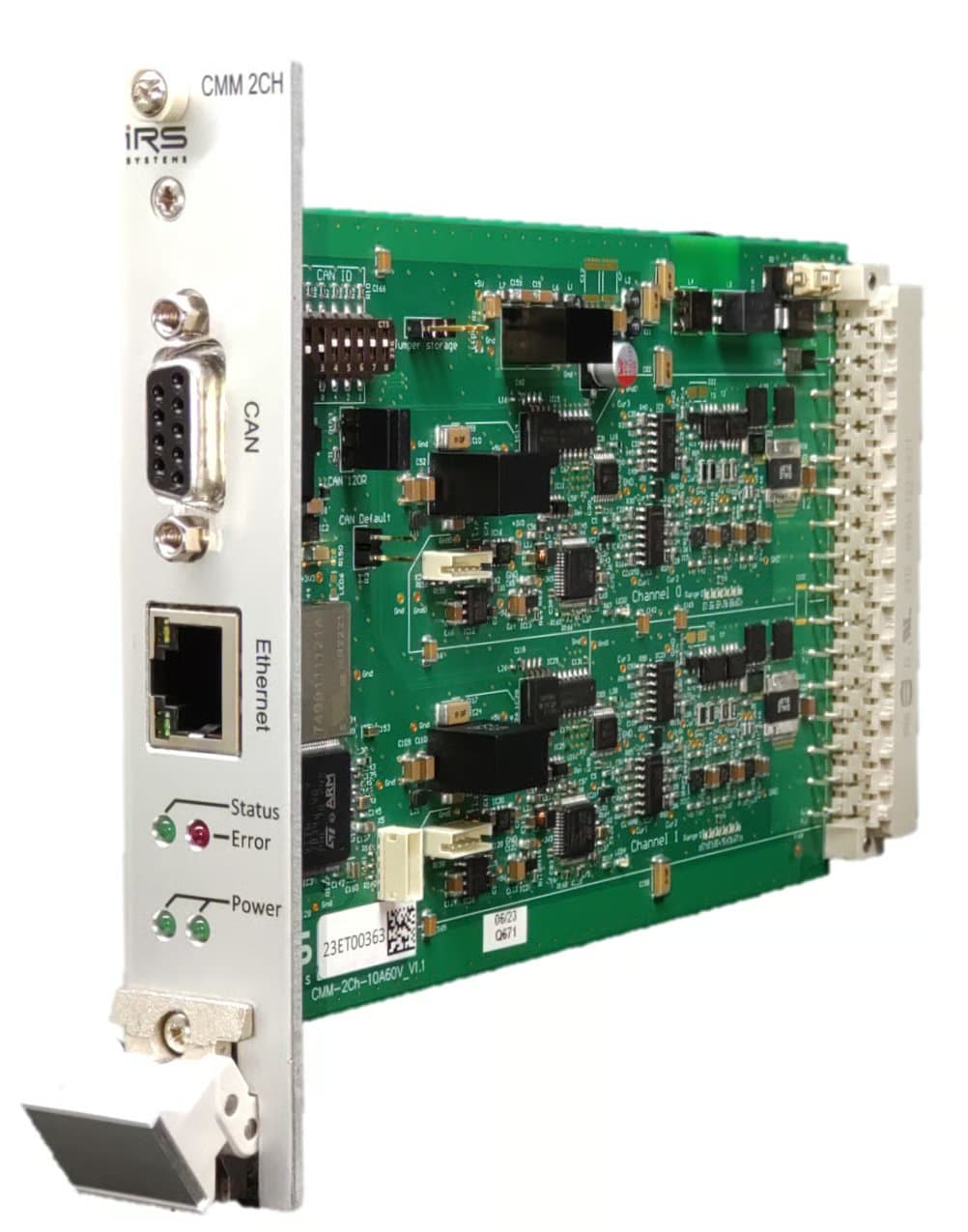
2.1Description
This module offers two separately isolated channels for current measurements over a wide range from 1µA to 10A. Ethernet and CAN-FD are available for communication. Current is measured in six automatically selected ranges as listed in the table below:
| Range | Lower End | Upper End | Lower Threshold | Upper Threshold |
|---|---|---|---|---|
| 0 | 1µA | 100µA | - | 110µA |
| 1 | 100µA | 1mA | 90µA | 1.1mA |
| 2 | 1mA | 10mA | 0.9mA | 11mA |
| 3 | 10mA | 100mA | 9mA | 110mA |
| 4 | 100mA | 1A | 90mA | 1.1A |
| 5 | 1A | 15A | 900mA |
The module samples the currents with a sample rate of 10 kSa/s. Depending on the method used to read the current values, the actual sample rate for the user can be lower. If for example cyclic CAN messages are used to output the current values, the minimal update interval is 1 ms and therefore the actual sample rate is 1 kSa/s.
2.2Mechanical details
| Item | Value |
|---|---|
| Module dimensions | 160mm x 100mm (Eurocard) |
| 19” specification | 5 TE x 3 HE |
2.3Ambient conditions
| Item | Value |
|---|---|
| Ambient operating temperature | 5…50°C |
| Storage temperature | -20…70°C |
| Humidity | 5…80% noncondensing |
2.4Current paths
| Item | Min | Typ | Max | Unit | Remarks |
|---|---|---|---|---|---|
| DC current | 10 | A | |||
| Worst case DC current | 15 | A | 25° Ambient Temperature with airflow >2m/s | ||
| Maximum measurable current | 15 | A | |||
| Single pulse current | 50 | A | max. 100ms | ||
| DC Current per pin on backplane connector | 6 | A | |||
| Voltage across current in/out when module is off | 60 | V | |||
| Leakage current @ OFF | 100 | µA | 60V across module, temperature 25°C | ||
| Isolation rating | -150 | 150 | V | Maximum allowed voltage difference between module supply and current path | |
| Reverse current continuous | 4 | A | |||
| Reverse current single pulse | 30 | A | Max. 100ms |
2.5Module supply
Connect the power supply between +24V-CON and GND-CON. It is strongly recommended not to use the DUT power supply to power the CMM. Please note that the current path is interrupted when the module is unpowered.
| Item | Min | Typ | Max | Unit | Remarks |
|---|---|---|---|---|---|
| Supply voltage | 20 | 24 | 26 | V | +24V-CON to GND-CON |
| Supply current (Ethernet port active) | 110 | mA | Supply voltage = 24V | ||
| Supply current (Ethernet port inactive) | 95 | mA | Supply voltage = 24V | ||
| Supply inrush current | 3 | A | Inrush current for < 1ms @ dU/dt ~ 20V/ms, 24V supply |
2.5.1Typical inrush current waveform

2.6DC accuracy and resolution
The module’s accuracy is verified for DC currents during in-house calibration. The module may of course be re-calibrated. See Calibration recommendation for more info.
| Item | Typ | Max | Unit | Remarks |
|---|---|---|---|---|
| Accuracy uncalibrated | 0,5 | 2 | % | % of respective range’s maximum current |
| Accuracy calibrated | 0,2 | 1 | % | % of respective range’s maximum current |
| Resolution range 0 | 40,4 | nA | ||
| Resolution range 1 | 404 | nA | ||
| Resolution range 2 | 4,04 | µA | ||
| Resolution range 3 | 40,3 | µA | ||
| Resolution range 4 | 403 | µA | ||
| Resolution range 5 | 4,03 | mA |
2.7DC voltage drop
The following table lists the voltage across the module’s current input and output pins for specific current values. These are typical values, measured at room temperature at the connector pins of one channel.
| Item | Typ | Unit | Remarks |
|---|---|---|---|
| Drop @ 100µA | 50 | mV | Range 0 |
| Drop @ 1mA | 50 | mV | Range 1 |
| Drop @ 10mA | 55 | mV | Range 2 |
| Drop @ 100mA | 60 | mV | Range 3 |
| Drop @ 1A | 60 | mV | Range 4 |
| Drop @ 10A | 110 | mV | Range 5 |
| Drop @ 15A | 170 | mV | Range 5 |
2.8Ethernet
The module supports 10Mbit/s and 100Mbit/s Ethernet on the RJ45 front connector. Default IP: 192.168.222.1
2.9CAN-FD
The module provides a CAN-FD interface on the front via a 9-pin D-Sub connector as well as on the backplane connector.
| Item | Value |
|---|---|
| Supported nominal bit rates | 500 kbit/s, 1 Mbit/s |
| Supported data bit rates | 1 Mbit/s, 2 Mbit/s, 4 Mbit/s |
| Default settings | 1 Mbit/s nominal, 4 Mbit/s data, no bit rate switch |
120 Ohm on-board termination is available via jumper. On-board termination is only recommended if a single module is used without further devices connected via CAN. If multiple devices are connected via CAN, it is recommended to use external termination on both ends of the CAN harness. This avoids problems when modules are swapped or replaced.
2.10Backplane connector
Connector type: Harting 09041326921. Please make sure you use all connector pins for current in / current out. A backplane-pcb is available for easy connection with just two pins per current measurement channel.
| Pin | Signal | Pin | Signal |
|---|---|---|---|
| A2 | +24V module supply | C2 | 0V module supply |
| A4 | CAN Low | C4 | CAN High |
| A6 | Channel 0 Current In | C6 | Channel 0 Current In |
| A8 | Channel 0 Current In | C8 | Channel 0 Current In |
| A10 | Channel 0 Current In | C10 | Channel 0 Current In |
| A12 | Channel 0 Current Out | C12 | Channel 0 Current Out |
| A14 | Channel 0 Current Out | C14 | Channel 0 Current Out |
| A16 | Channel 0 Current Out | C16 | Channel 0 Current Out |
| A18 | Channel 0 Current Out | C18 | Channel 0 Current Out |
| A20 | Channel 1 Current In | C20 | Channel 1 Current In |
| A22 | Channel 1 Current In | C22 | Channel 1 Current In |
| A24 | Channel 1 Current In | C24 | Channel 1 Current In |
| A26 | Channel 1 Current Out | C26 | Channel 1 Current Out |
| A28 | Channel 1 Current Out | C28 | Channel 1 Current Out |
| A30 | Channel 1 Current Out | C30 | Channel 1 Current Out |
| A32 | Channel 1 Current Out | C32 | Channel 1 Current Out |
2.11Calibration recommendation
IRS recommends a recalibration within 2 years.
The calibration should be performed for each channel at multiple calibration points for all 6 ranges. IRS recommends measuring at least the following currents.
| Range | Calibration Points |
|---|---|
| 100 uA | 1uA, 20 uA, 40 uA, 60 uA, 80 uA, 100 uA |
| 1 mA | 0.1 mA, 0.2mA, 0.4 mA, 0.6 mA, 0.8 mA, 1 mA |
| 10 mA | 1 mA, 2mA, 4 mA, 6 mA, 8 mA, 10 mA |
| 100 mA | 10 mA, 20mA, 40 mA, 60 mA, 80 mA, 100 mA |
| 1 A | 0.1 A, 0.2A, 0.4 A, 0.6 A, 0.8 A, 1 A |
| 10 A | 1 A, 3 A, 5 A, 8 A, 12 A, 15A |
Current values should be captured with the function (IRS.CMM-xCH.Shared.Gateway).GetMinMaxAverage.
This function returns the value averaged since last read.
Before capturing a valid value, enable the calibration current, perform a dummy read and wait 100 ms.
The fluctuations of the power source used should not exceed 0.1% of the nominal value.
Documents and downloads
Further documents and files for your IRS product are available on myIRS.