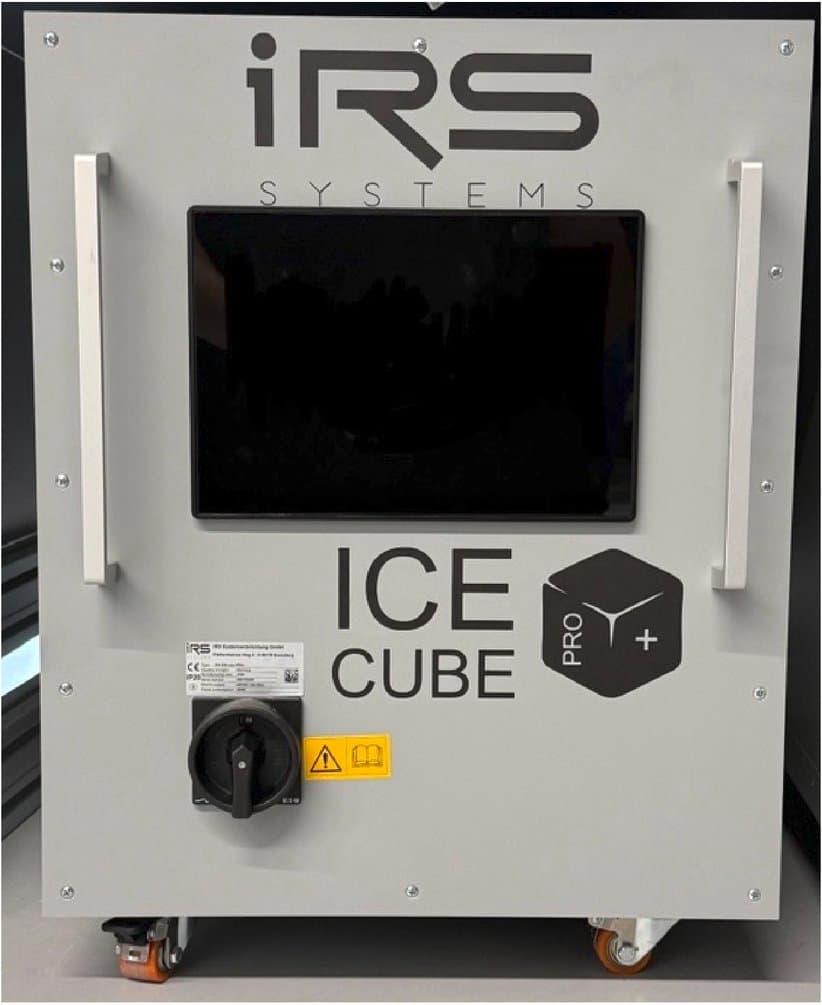
The fluid temperature control unit is a powerful, versatile temperature control unit for the precise temperature control of power electronics assemblies. It offers two independently controlled cooling circuits and is designed for demanding test bench applications.
General Information
1.1Information on the operating manual
This manual enables safe handling of the IRS ICEcube PRO/PRO+. The manual is part of the test system and must be kept in the immediate vicinity of the system, accessible to personnel at all times. Personnel must have carefully read and understood this manual before starting any work. The basic prerequisite for safe working is compliance with all safety instructions and handling instructions given in this manual.
- In addition, the local accident prevention regulations and general safety regulations for the area of application of the device apply.
- Illustrations in this manual are provided for basic understanding and may differ from the actual design of the device.
- In addition to this manual, the operating instructions of the installed components also apply.
- Following the instructions in this operating manual helps to avoid hazards and to increase the reliability and service life of the device.
- IRS Systementwicklung GmbH accepts no liability for damage to persons, animals or property, or to the test system itself, resulting from improper operation of the device and/or disregard of the provisions of these instructions for use.
1.2Explanation of symbols
1.3Disclaimer
All information and notes in this manual have been compiled taking into account the applicable standards and regulations, the state of the art and our many years of knowledge and experience. The manufacturer accepts no liability for damage resulting from:
- Failure to observe the manual
- Use other than intended use
- Use of untrained personnel
- Unauthorized modifications
- Technical changes
- Use of non-approved spare parts
- Vandalism
In the case of special designs, the use of additional ordering options or due to the latest technical changes, the actual scope of delivery may differ from the explanations and illustrations described here.
The obligations agreed in the delivery contract, the general terms and conditions and the delivery conditions of the manufacturer, and the statutory regulations valid at the time the contract was concluded apply.
We reserve the right to make technical changes in the course of improving the performance characteristics and further development.
1.4Intended use
The IRS ICEcube Pro has been designed and constructed exclusively for the intended purpose described here:
High-performance cooling unit for test benches and power electronics
Spare Parts
Spare parts can be obtained from IRS Systementwicklung GmbH or directly from the manufacturer of the respective component. For these devices, IRS Systementwicklung GmbH recommends concluding appropriate local maintenance contracts covering the stocking of spare parts and calibration.
- As a general rule, IRS Systementwicklung GmbH recommends keeping spare parts available for all components of the test system.
- The customer is responsible for defining and organizing the stocking of spare parts.
Safety
This section provides an overview of all important safety aspects for optimum protection of personnel and for safe and trouble-free operation.
Failure to observe the handling instructions and safety instructions listed in this manual can result in considerable hazards.
IRS Systementwicklung GmbH accepts no liability for damage resulting from disregard of the provisions of this operating manual.
3.1Responsibility of the operator
The test system is used in the commercial sector. The operator of the device is therefore subject to the legal obligations regarding occupational safety.
In addition to the occupational safety instructions in this operating manual, the safety, accident prevention and environmental protection regulations applicable to the area of application of the device must be observed. In particular:
The operator must obtain information on the applicable occupational health and safety regulations and, in a risk assessment, additionally identify hazards arising from the special working conditions at the place where the device is used. The operator must implement these in the form of operating instructions for the operation of the device.
- The operator must clearly regulate and define the responsibilities for installation, operation, maintenance and cleaning.
- The operator is responsible for ensuring that only trained personnel work directly or indirectly on the system; in addition, the personnel must have read and understood the operating manual. Furthermore, the operator must instruct the personnel at regular intervals and inform them about the hazards.
- Work instructions must be drawn up by the operator.
- The operator must provide the personnel with the necessary protective equipment.
- The operator is obliged to ensure that the keys supplied by the manufacturer are kept separately from the test system. It must be ensured that unauthorized and unqualified persons have no access to them.
- In particular, the operator must ensure that the test system is used only for the intended application.
- The operating instructions must always be available, legible and complete, at the place where the test system is used.
- None of the safety and warning notices attached to the machine may be removed, and they must be legible.
- Furthermore, the operator is responsible for ensuring that the device is always in technically perfect condition. The following therefore applies:
- The operator must ensure that the maintenance intervals described in this operating manual are observed.
- The operator must have all safety devices checked regularly for functionality and completeness.
3.2Personnel requirements
Personnel according to DGUV Regulation 3
Person in control of the installation is a person who has been assigned direct responsibility for the operation of the electrical installation. If necessary, this responsibility can be partially transferred to other persons.
Qualified electrician is a person who, on the basis of their technical training, knowledge and experience as well as knowledge of the relevant regulations, can assess the work assigned to them and recognize possible hazards.
Electrically instructed person is a person who has been informed by a qualified electrician about the tasks assigned to them and the possible hazards of improper behavior, has been trained if necessary, and has been instructed about the necessary protective devices and protective measures.
3.3Safety rules
3.4Reasonably foreseeable misuse
Any use other than or beyond that specified under “Intended use” is deemed not to be as intended.
Claims of any kind for damage resulting from use other than intended use are excluded. The operator alone is liable for all damage resulting from use other than intended use.
3.5Personal protective equipment
Personal protective equipment must be worn during work to minimize health hazards.
- Always wear the protective equipment required for the respective work while working.
- Follow the notices on personal protective equipment posted in the work area.
3.6Particular hazards
Observe the safety instructions listed here and the warnings in the other chapters of this manual to reduce health hazards and avoid dangerous situations.
3.7Behavior in case of danger and accidents
Preventive measures
- Always be prepared for accidents or fire.
- Keep first aid equipment (first aid kit, blankets, etc.) and fire extinguishers within easy reach.
- Familiarize personnel with accident reporting, first aid and rescue equipment.
- Keep access routes clear for emergency vehicles.
Measures in the event of accidents
- Trigger the emergency stop immediately.
- Initiate first aid measures.
- Rescue persons from the danger zone.
- Inform the person responsible at the site.
- Alert the emergency services.
- Clear access routes for emergency vehicles.
3.8General warning of residual risks
The test system is built according to the state of the art and the recognized safety rules. Nevertheless, risks to life and limb of the user or third parties may arise when handling the test system. In particular, faults or operating states that can impair the safety of the users make it necessary to shut down the device (main switch). In this case, the intended condition must be properly restored (e.g., by maintenance).
3.9General signage of the test system
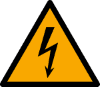
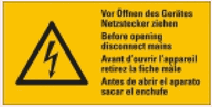
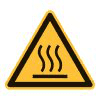
General notes on the signage of the test system:
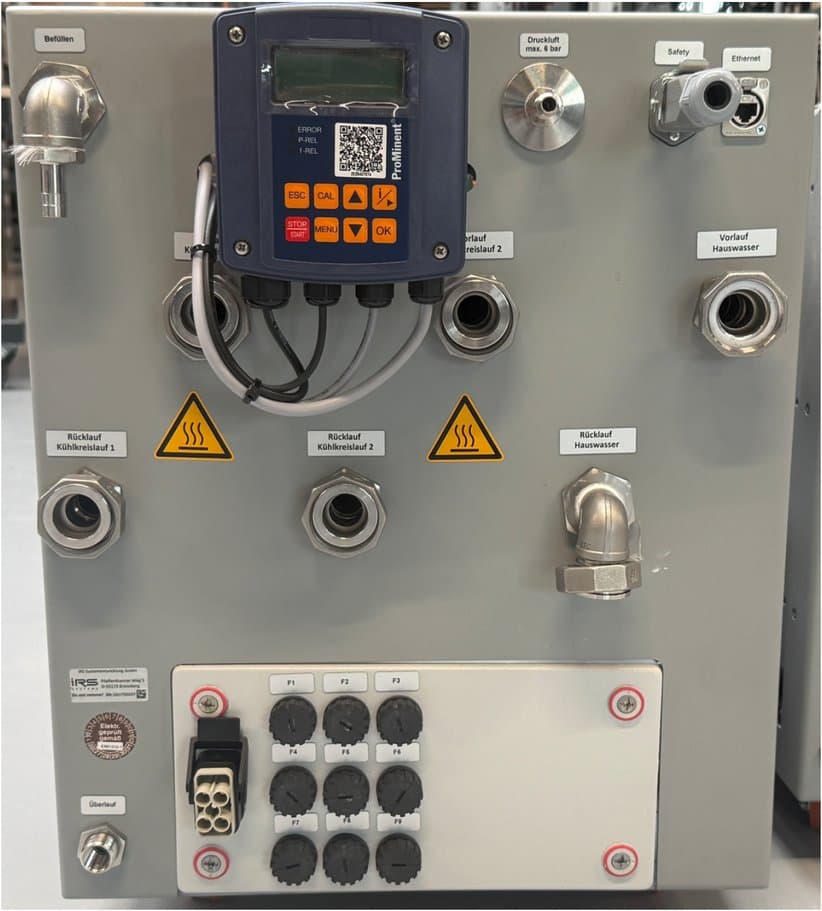
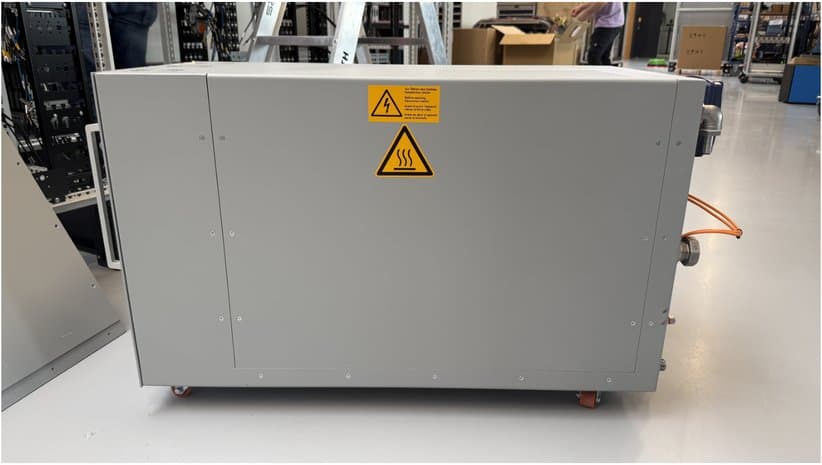
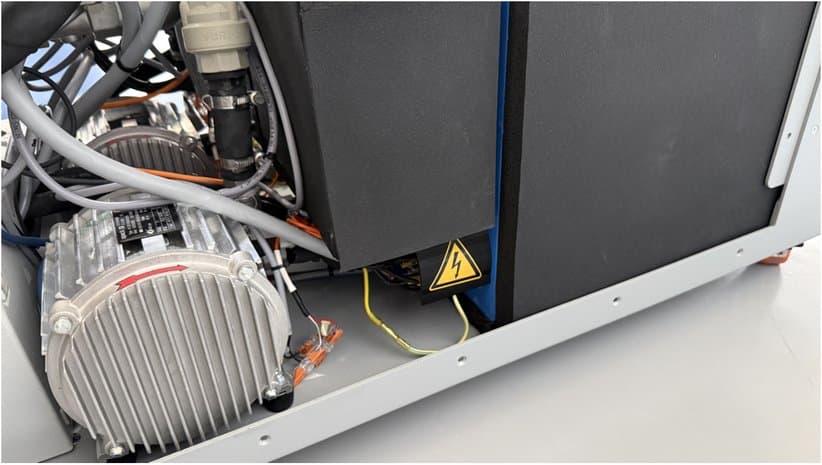
3.10IRS ICEcube PRO safety instructions

Front:
Rear:
Sides:
Tank:
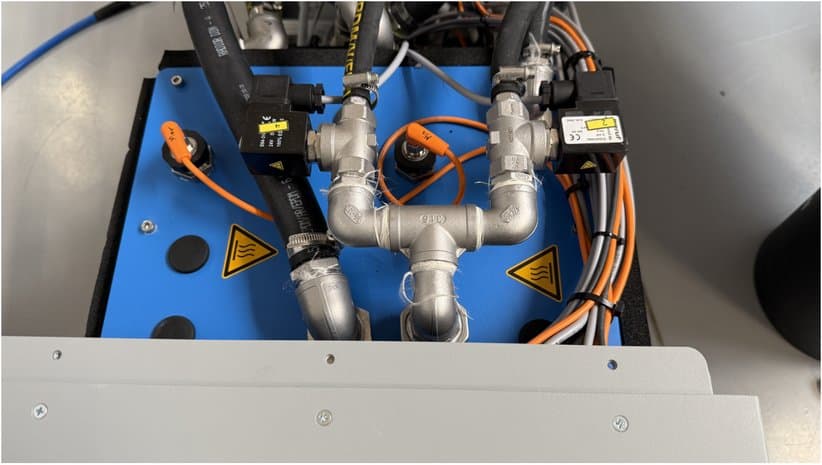
Heating element 1:
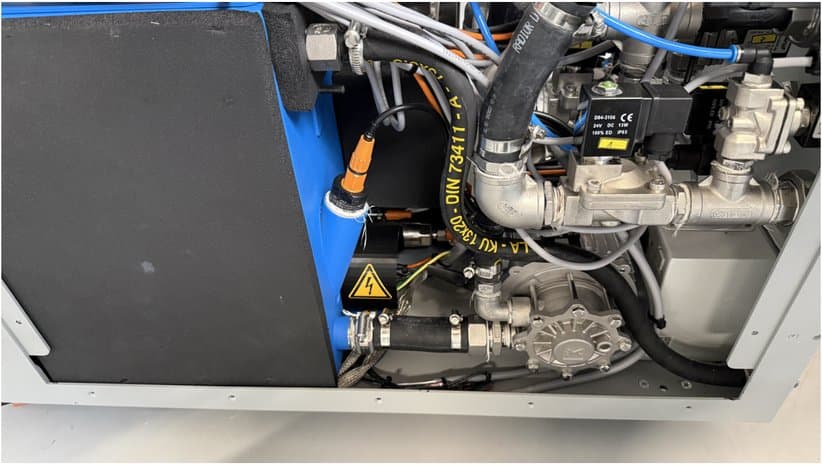
Heating element 2:
Transport, Commissioning, Decommissioning and Disposal
- Use only trained or instructed personnel. Observe the legally permitted minimum age.
- Ensure that only personnel authorized to do so work on the test system.
- Define the responsibilities of the persons carrying out commissioning and enable them to refuse instructions from third parties that are contrary to safety.
- Allow personnel who are to be trained, taught or instructed, or who are undergoing general training, to work on the test system only under the constant supervision of an experienced person.
- Observe other applicable regulations.
4.1Transport
- For loading work, use only tested lifting gear and load-handling devices with sufficient load-bearing capacity.
- Appoint and deploy competent personnel for the lifting operation.
- Use only suitable transport vehicles and industrial trucks with sufficient load-bearing capacity.
- Secure or pack the device reliably.
- Carefully reassemble parts that had to be removed for transport before commissioning.
- Before transport, disconnect the temperature control system from the energy supply (electrical).
4.2Commissioning
- The mains voltage must match the specification on the type plate.
- The fuse protection must be sufficient.
- No major voltage fluctuations or mains disturbances may occur. If they do, the temperature control systems must be equipped with uninterruptible power supplies.
4.3Decommissioning/storage
- If the test system is to be stored for a longer period, it is recommended to drain the storage tank of the temperature control unit. See Draining the cooling water.
- Remove the optionally installed pH measuring electrode from the tank and store it in buffer solution in a container provided for this purpose.
- Ensure sufficient corrosion protection.
- When recommissioning, proceed in accordance with the commissioning instructions.
4.4Dismantling/disposal
The system may only be disposed of by qualified specialist personnel or a specialist company. Disposal of the system is governed by the local disposal regulations and the environmental protection laws applicable in the country of use. When the system has reached the end of its life cycle, safe and proper disposal must be ensured during dismantling, in particular of the parts or substances that are harmful to the environment.
These include, among others:
- Plastics
- Batteries
- Metals
- Electronic parts
Functional Description
5.1Switching on and login
After the power supply has been established with the main switch on the front, the ICEcube boots up and you can connect via the web server or the display.
There are 2 login options: (default IP address: 192.168.222.91)
Web User, (password: IRSice): This access has read and write permissions. The ICEcube can be fully operated via the touch display or the web server.
Web Guest, (password: guest): Only read permissions are active here. The guest access prevents unintended operation during automated sequences. Here the parameters can only be viewed, and it provides insight into the status and error bits.
5.2Operating the ICEcube
The ICEcube can be controlled remotely via Modbus TCP, or it is operated via the web server interface or the touch display.
The following applies:
Gray buttons: these are control elements with which actions are carried out. Almost all actions require the enable, and they are locked in certain error states.
Green and yellow lights: status lights that show which function is currently activated
Blue light: info light; flashes when an action must be carried out (e.g., reset) or only as a general message when everything is ready.
Red light: error light; lights up when error states are present. After the error has been eliminated, the Reset button must be pressed.
5.3Main page
Freigabe (enable): Freigabe sets a global enable bit that enables all functions. It can also be used as an emergency stop function. The green light next to it shows whether Freigabe is active
Reset: Reset resets errors that have been eliminated. The status light indicates whether a reset is pending.
Auto Fill: This function activates automatic filling: after each blow-out of the DUT circuit, the system checks whether the fill level is back at maximum. If there is a deviation, the filling valve opens and water can be topped up. Filling is interrupted when the IceCube is in operation again or the maximum fill level has been reached.
Soll-Temp. DUT (target temperature DUT): This sets the setpoint for the cooling water temperature with which the DUT is to be temperature-controlled. The DUT cooling circuit is then controlled to this supply temperature.
Wassertemp. Haus (facility water temperature): Enter the external facility water temperature here to optimize the controller.
pH-Wert and Leitwert (pH value and conductivity): Allow conclusions to be drawn about the condition of the cooling water in the tank.
Ist-Temperatur, Ist-Durchfluss, Druck (actual temperature, actual flow, pressure): Measured values of the respective DUT circuits.
Pumpe (pump): Activates the cooling water pump
Ausblasen (blow out): The cooling circuit is cleaned with compressed air so that only a small amount of residual water escapes when the DUT is changed.
Dichteprüfung (leak test) The respective cooling circuit is pressurized with compressed air. Monitoring the pressure drop allows conclusions to be drawn about faulty connections or leaks.
Symbols Visualize the activity of the actions
Kreislauf befüllt (circuit filled) Indicates when the DUT circuits are filled with water.
5.4Configuration
Coupling the circuits: For requirements with high cooling capacity or high flow rates, the two cooling circuits can optionally be coupled in parallel. For trouble-free control, the yellow button “Kreise gekoppelt” (circuits coupled) must be activated.
Switch “Pumpe regelt auf” (pump controls to): Durchfluss, Druck (flow, pressure) This selects whether the ICEcube controls to a target pressure or to a desired flow. This function always affects both cooling circuits.
Soll-Temperatur (target temperature): As on the Home page, this sets the setpoint for the cooling water temperature with which the DUT is to be temperature-controlled. The supply temperature of the DUT cooling circuits is then controlled to this value.
Überdruck Schwellwert (overpressure threshold): Since the pumps can deliver a pressure of up to 9 bar, the pressure can be limited to protect sensitive DUTs. If this threshold is exceeded, the ICEcube switches off.
Soll-Druck (target pressure): Pressure to which the respective cooling circuit is controlled
Ist-Druck (actual pressure): Pressure currently measured in the respective cooling circuit
Soll-Durchfluss (target flow): Flow to which the respective cooling circuit is controlled
Ist-Durchfluss: Flow currently measured in the respective cooling circuit
T Korrekturfaktor (temperature correction factor): To compensate for possible tolerances of the temperature sensors, a (gain) correction factor can be stored here. (The default is 1)
T Korrekturwert (temperature correction value): To compensate for possible tolerances of the temperature sensors, an (offset) correction factor can be stored here. (The default is 0)
Ausblasen kontinuierlich (continuous blow-out): Here you can enter the blow-out duration in seconds during which the compressed air flows constantly through the circuits.
Ausblasen Pulsen (pulsed blow-out): Here you can enter the duration in seconds during which the compressed air flows through the circuits in pulses to achieve even better cleaning (approx. 2 s pulses).
5.5Error and status states
Not-Aus Extern (external emergency stop): Interlock Harting connector on the rear not plugged in; interlock loop in the overall system possibly open.
Fehler Überdruck (overpressure error): The error is triggered as soon as the threshold specified in the configuration is exceeded.
Fehler Übertemp. (overtemperature error): Error, water or heating element temperature too high
Füllstand <Min (fill level below minimum): Tank fill level too low
Füllstand Max (fill level maximum): Maximum tank fill level has been reached
Fehler FU (frequency converter error): Frequency converter of the pump is in an error state
fb Heizstab (heating element feedback): Feedback lights up when the heating element is activated.
Dichteprüfung i.O. (leak test OK): Leak test completed and passed
Dichteprüfung läuft (leak test running): Status lights up as long as the leak test is active
Temp. Heizstab (heating element temperature): Temperature measured directly at the heating element
Software Version: Shows the current LOGO PLC software version
5.6Maintenance information
Depending on the cooling medium, limit values can be defined for the pH value and conductivity.
As soon as these are violated, we recommend replacing the coolant.
The filters should be cleaned regularly. At the same time, the liquid can be checked for discoloration and residues in the water.
As soon as cooling capacity and flow rates are impaired, we recommend flushing the circuits and renewing the liquid.
Technical Data
6.1General specifications
| Specification | Value |
|---|---|
| External dimensions (W × H × D) | 600 mm × 445 mm × 1000 mm |
| Weight |
6.2Connection values
| Specification | Value |
|---|---|
| Rated voltage | 400 VAC |
| Current | 32 A |
| Phases | 3 |
| Frequency | 50 Hz |
| Permissible deviation from rated voltage | 5 % |
| Max. possible power consumption | 22 kW |
| Compressed air | <= 6 bar |
6.3Operating conditions
| Specification | Value |
|---|---|
| Ambient temperature | 15–40 °C |
| Relative humidity | 30–70 %, no condensation |
| Installation | In dry indoor rooms |
| Pollution degree 1 | Only dry, non-conductive pollution occurs |
6.4Dual-circuit system
| Specification | Value |
|---|---|
| Temperature range | 10–70 °C |
| Rated cooling capacity | 15 kW at delta T >= 10 °C, temperature difference facility water/cooling circuit |
| Rated heating capacity via two screw-in heating elements | 12 kW |
| Peak cooling capacity for typical maximum values | 150 kW at max. delta T <= 60 °C, facility water: 50 l/min @ 10 °C, cooling circuit: 100 l/min @ 70 °C |
| Temperature gradient at rated cooling capacity, theoretical | 5.4 °C/min |
| Tank capacity | 40 l |
| Cooling medium | Water-glycol mixtures, demineralized water |
| Flow per circuit | Max. 50 l/min; maximum value depends on external pipe lengths and diameters |
| Pump pressure | <= 9 bar |
| Pressure measurement per circuit | 0–10 bar |
| pH measurement in the storage tank, optional | pH 0–14 |
| Conductivity measurement in the storage tank, optional | 0.04–1000 µS/cm |
| Pipe connection on the unit side | Flat-sealing G 3/4" |
6.5Spatial limits
Air inlets and outlets must not be blocked. The distance between the front or rear of the system and a wall or a similar partitioning object must not be less than 80 cm. The cover plates must not be covered by placing paper or other objects on them.
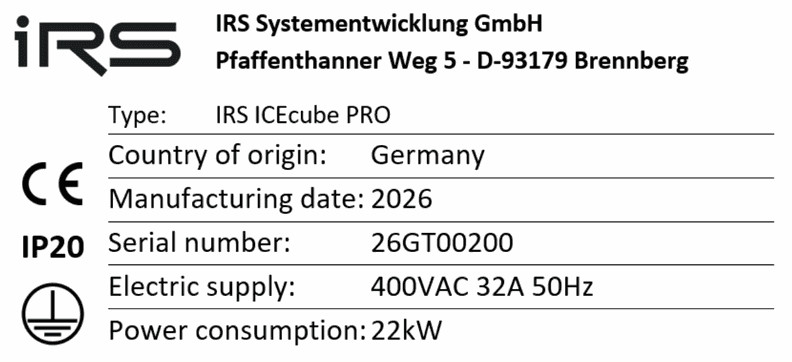
6.6Type plate example
Maintenance and Cleaning
General:
The following notes concern the servicing and maintenance of the test systems.
7.1Servicing
- Inform the operating personnel before starting special and servicing work.
- If the test system is switched off during maintenance and repair work, it must be secured against unexpected restarting.
- Tighten any screw connections loosened during maintenance and servicing work.
- If safety devices have to be removed, they must be reinstalled and checked immediately after the work has been completed.
- Servicing activities may only be carried out by personnel suitable for this purpose.
- During servicing work in the area of the control system, wear protection suitable for ESD-sensitive assemblies (electrostatic sensitive devices).
7.2Maintenance schedule
The following sections describe the maintenance work required for optimum and trouble-free operation.
If you have questions about maintenance work and intervals, contact the manufacturer.
| Part/component/unit | Activity | Method | Daily | Weekly | Monthly | Yearly |
|---|---|---|---|---|---|---|
| Accessibility of all areas of the system? | Check -> Remedy | Visual | x | |||
| Entire system: switches, plugs, screw connections | Check for damage | Visual | x | |||
| Covers | Check for presence and damage | Visual | x | |||
| Foreign bodies/objects in the system? | Check -> Remove | Visual | x | |||
| Foreign bodies in the water | Inspect -> Drain, flush, change water | Test | x | |||
| Cooling water level | Check -> Top up | Test | x | |||
| Filter in the supply line | Check -> Clean/replace | Test | x |
7.2.1Foreign bodies in the storage tank
Check the condition of the water:
- if available, check the data of the pH sensor and the conductivity sensor
- visual inspection for discoloration, dirt and algae growth
Data Security
IRS Systementwicklung GmbH would like to point out a few aspects regarding data security. To avoid data loss in the event of PC failures (such as a defective hard disk or a defective motherboard) and to allow a new PC to be set up as quickly as possible, the customer must observe the following points.
- As standard, the test systems are not equipped with RAID systems.
- The test plans and all configuration files (TestStand sequences, framework, config and INI files) must be copied to a server whose data is backed up.
- The report files must be copied to a server whose data is backed up.
- Images of the test computer should be created at a suitable time so that a new computer can be set up quickly.
- IRS Systementwicklung GmbH can only provide an image of the base system, which does not contain any project-specific data!
- IRS Systementwicklung GmbH recommends connecting the computer of the test system to an “online UPS” to avoid interruptions of the supply voltage. (e.g., power failures, switching off the tester without shutting down the computer, interference from welding equipment) These can lead to data loss.
Calibration
General: As a matter of principle, all power supplies must be calibrated regularly.
IRS ICEcube PRO Connections
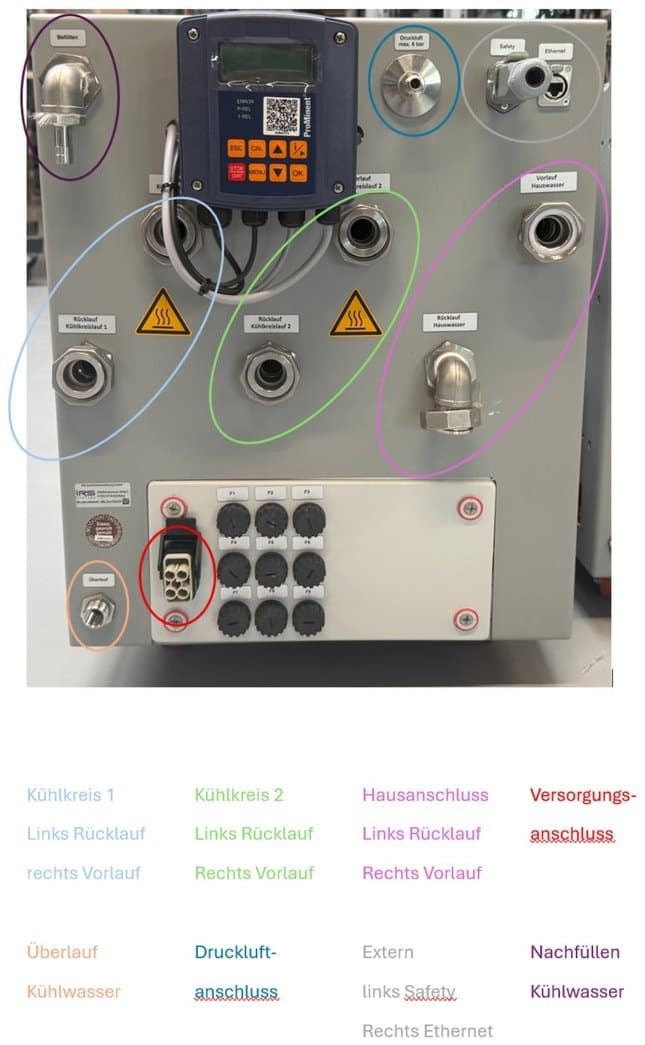
10.1Connector description
Harting Q4/2 power supply
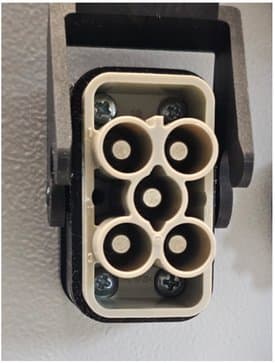
| Pin | Description |
|---|---|
| 1 | L1 |
| 2 | L2 |
| 3 | L3 |
| 4 | N |
| Protective earth (ground symbol) | PE |
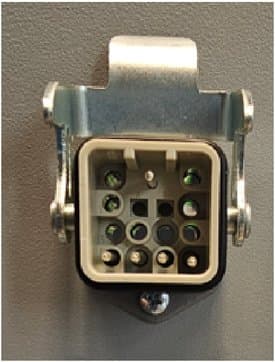
Harting Q12 Safety
| Pin | Signal | Description |
|---|---|---|
| 1 | External emergency stop | Connection of external potential-free contact |
| 2 | External emergency stop | Connection of external potential-free contact |
| 3 | Internal collective fault | Internal potential-free contact |
| 4 | Internal collective fault | Internal potential-free contact |
| 5 | Reserved | |
| 6 | Reserved | |
| 7 | Reserved | |
| 8 | Reserved | |
| 9 | Reserved | |
| 10 | Reserved | |
| 11 | Reserved | |
| 12 | Reserved |
LOGO!
11.1Touchpad screens
11.1.1Home
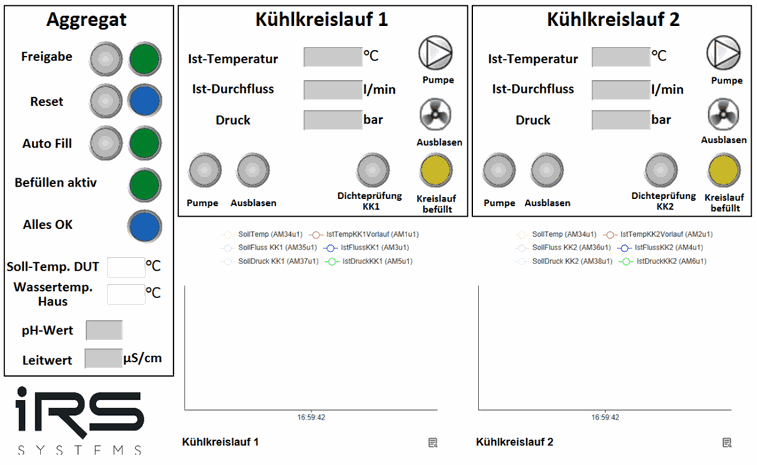
The following functions are available in the Aggregat (unit) area on the left:
- Freigabe (enable) is granted with the gray button; as soon as it has been granted, the green indicator lights up
- Reset must be pressed when the blue indicator next to it flashes, to acknowledge errors
- with Auto Fill, after both cooling circuits have been blown out, the system checks whether the fill level is still at maximum. If not, a valve opens the circuit for refilling, so that the fill level is automatically kept at the correct level
The following status indicators are also available:
- Befüllen aktiv (filling active)
- Alles OK (all OK)
- pH value measurement (IRS ICEcube PRO+ only)
- Conductivity measurement (IRS ICEcube PRO+ only)
The target temperature specifies the desired cooling water temperature with which the DUT is to be temperature-controlled. The water temperature of the facility water connection must be entered.
The following functions are available in the Kühlkreis 1 and Kühlkreis 2 (cooling circuit 1 and 2) areas:
- activating the pump with the Pumpe (pump) button
- blowing out the cooling water with the Ausblasen (blow out) button
- leak test of the DUT circuit with the Dichteprüfung (leak test) button
The following status indicators are also available:
- Ist-Temperatur (actual temperature): measured temperature of the supply line
- Ist-Durchfluss (actual flow): measured flow
- Druck (pressure): measured pressure
- Kreislauf befüllt (circuit filled) indicator
11.1.2Configuration
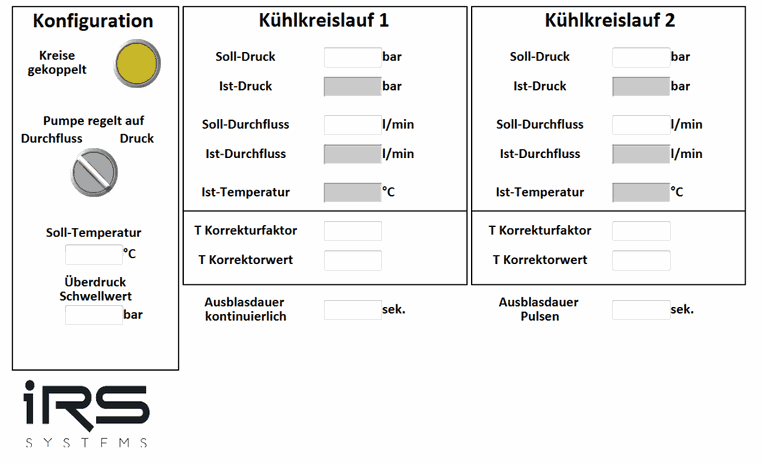
The following functions are available in the Konfiguration (configuration) area on the left:
- select the Kreise gekoppelt (circuits coupled) button if the circuits are connected to each other
- Use the Pumpe regelt auf (pump controls to) rotary switch to switch between pressure-controlled and flow-controlled operation
The following status indicators are also available:
The target temperature of the DUT is entered manually here (10–70 °C).
The following functions are available in the Kühlkreislauf 1 and Kühlkreislauf 2 (cooling circuit 1 and 2) areas:
- Setting the target pressure in Soll-Druck (0–9 bar)
- Setting the target flow in Soll-Durchfluss (0–50 l/min)
- Setting the temperature correction factor in T Korrekturfaktor
- Setting the temperature correction value in T Korrekturwert (offset of the temperature sensor)
- Setting the continuous blow-out duration in Ausblasdauer kontinuierlich
- Setting the pulsed blow-out duration in Ausblasdauer Pulsen
The following status indicators are also available:
- Ist-Temperatur
- Ist-Durchfluss
- Pressure
- Kreislauf befüllt light
11.1.3Status and error log
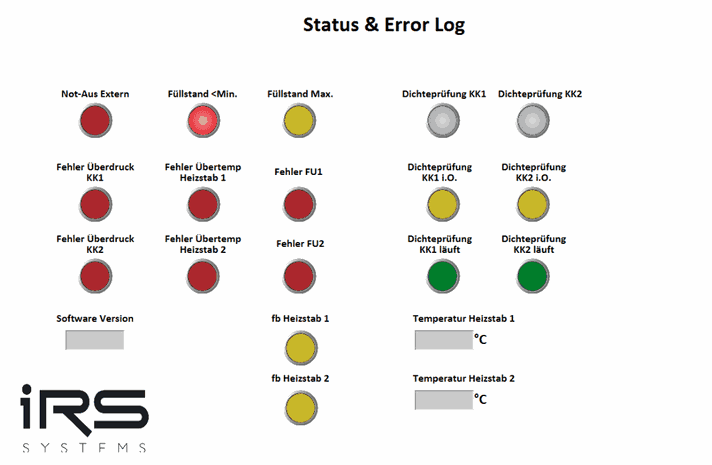
The various error indicators are listed here; an error is present when they light up red. Troubleshooting is described in Troubleshooting.
The gray Dichteprüfung KK (leak test, cooling circuit) button performs a pressure test of the cooling water circuits. The circuit is pressurized with compressed air and the pressure drop is measured, which allows conclusions to be drawn about correct and leak-tight lines / DUTs. The green and yellow lights below it show the status.
The software version and the status, including the heating element temperatures, are shown in the lower part.
11.1.4Switching counter
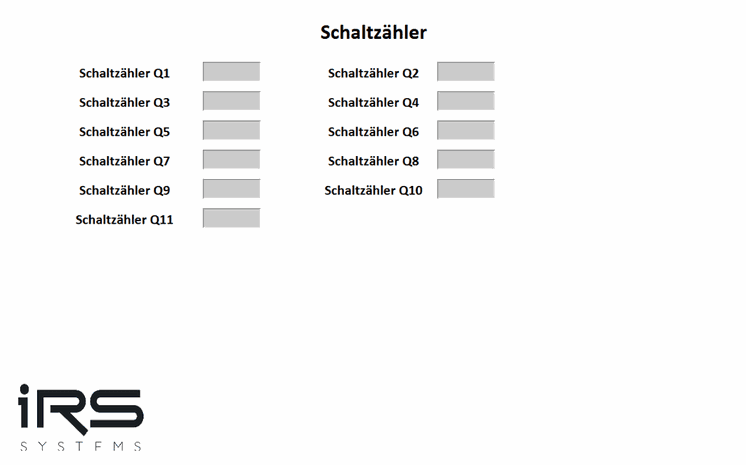
The switching cycles of the solenoid valves Q1–Q11 are recorded and displayed here for maintenance and repair measures.
11.2Troubleshooting
Not-Aus Extern (external emergency stop):
Make sure that the system can be switched on again safely, unlock the emergency stop, and on the screen first reset the cooling unit and then enable it again.
Füllstand < Min (fill level below minimum):
Fill up the cooling water to maximum via the connection provided for this purpose on the cooling unit.
Fill level above maximum:
Drain the cooling water via one of the two cooling circuits. Connect a hose to the supply of KK1 or KK2 (cooling circuit 1 or 2) and place the hose in a collecting container. Switch on the respective pump to pump the coolant out of the tank.
Overpressure cooling circuit 1 and 2:
Stop the pumps. Check the hoses for kinks. Make sure that no object is standing on the hoses or interrupting or impairing the flow. With pressure-controlled pump control, reduce the target pressure.
Overtemperature heating element 1 and 2:
Deactivate the heating elements. Reduce the target temperature in the tank.
Frequency converter 1 and 2:
Switch off the IRS ICEcube.
11.3LOGO! Modbus TCP mapping
| I/O (E/A) | Block type (LOGO) | Description | Address | IEC type | Category | Offset S7 | Info |
|---|---|---|---|---|---|---|---|
| E VB-0-0 | NI | Reset Safety | 1 | coil | write | 0 | Edge |
| E VB-0-2 | NI | Blow-out KK1 | 3 | coil | write | 0 | Edge |
| E VB-0-3 | NI | Blow-out KK2 | 4 | coil | write | 0 | Edge |
| E VB-0-4 | NI | Blow-out reserve KK1 | 5 | coil | write | 0 | Edge |
| E VB-0-5 | NI | Blow-out reserve KK1 | 6 | coil | write | 0 | Edge |
| E VB-0-6 | NI | Activate auto fill | 7 | coil | write | 0 | Edge |
| E VB-0-7 | NI | Enable | 8 | coil | write | 0 | Edge |
| E VB-1-0 | NI | Pump request KK1 | 9 | coil | write | 0 | Edge |
| E VB-1-1 | NI | Pump request KK2 | 10 | coil | write | 0 | Edge |
| E VB-1-2 | NI | Leak test KK1 | 11 | coil | write | 0 | Edge |
| E VB-1-3 | NI | Leak test KK2 | 12 | coil | write | 0 | Edge |
| A VB-10-0 | NQ | Flashes on safety error | 81 | coil | read | 0 | Feedback |
| A VB-10-1 | NQ | Enable active | 82 | coil | read | 0 | Feedback |
| A VB-10-2 | NQ | Filling process active | 83 | coil | read | 0 | Feedback |
| A VB-10-3 | NQ | Blow-out KK1 active | 84 | coil | read | 0 | Feedback |
| A VB-10-4 | NQ | Blow-out KK2 active | 85 | coil | read | 0 | Feedback |
| A VB-10-5 | NQ | Pump KK1 active | 86 | coil | read | 0 | Feedback |
| A VB-10-6 | NQ | Pump KK2 active | 87 | coil | read | 0 | Feedback |
| A VB-10-7 | NQ | External emergency stop | 88 | coil | read | 0 | Feedback |
| A VB-11-0 | NQ | Fill level min | 89 | coil | read | 0 | Feedback |
| A VB-11-1 | NQ | Fill level max | 90 | coil | read | 0 | Feedback |
| A VB-11-2 | NQ | KK1 filled | 91 | coil | read | 0 | Feedback |
| A VB-11-3 | NQ | KK2 filled | 92 | coil | read | 0 | Feedback |
| M1 | M | Pump KK1 | 8257 | coil | read | 0 | Status pump requested |
| M2 | M | Pump KK2 | 8258 | coil | read | 0 | Status pump requested |
| M3 | M | Blow-out KK1 active | 8259 | coil | read | 0 | Status |
| M4 | M | Blow-out KK2 active | 8260 | coil | read | 0 | Status |
| M5 | M | Reverse blow-out KK1 active | 8261 | coil | read | 0 | Status |
| M6 | M | Reverse blow-out KK2 active | 8262 | coil | read | 0 | Status |
| M7 | M | Safety All OK | 8263 | coil | read | 0 | Status |
| M9 | M | KK1 filled | 8265 | coil | read | 0 | Status |
| M10 | M | KK2 filled | 8266 | coil | read | 0 | Status |
| M11 | M | External emergency stop | 8267 | coil | read | 0 | Status |
| M12 | M | Enable | 8268 | coil | read | 0 | Status |
| M13 | M | Auto fill active | 8269 | coil | read | 0 | Status |
| M15 | M | Fill level min. | 8271 | coil | read | 0 | Status |
| M16 | M | Fill level max. | 8272 | coil | read | 0 | Status |
| M18 | M | fb heating element 1 | 8274 | coil | read | 0 | Feedback |
| M19 | M | fb heating element 2 | 8275 | coil | read | 0 | Feedback |
| M20 | M | Leak test KK1 running | 8276 | coil | read | 0 | Status |
| M21 | M | Leak test KK2 running | 8277 | coil | read | 0 | Status |
| M22 | M | Leak test KK1 OK | 8278 | coil | read | 0 | Feedback |
| M23 | M | Leak test KK2 OK | 8279 | coil | read | 0 | Feedback |
| M32 | M | Flow control high, pressure control low | 8288 | coil | write | 0 | ON/OFF (high/low) |
| M33 | M | Error circuits coupled | 8289 | coil | write | 0 | Error |
| M37 | M | Error overtemperature heating element 1 | 8293 | coil | read | 0 | Error |
| M38 | M | Error overtemperature heating element 2 | 8294 | coil | read | 0 | Error |
| M39 | M | Error FU1 (frequency converter 1) | 8295 | coil | read | 0 | Error |
| M40 | M | Error FU 2 (frequency converter 2) | 8296 | coil | read | 0 | Error |
| M41 | M | Error overpressure KK1 | 8297 | coil | read | 0 | Error |
| M42 | M | Error overpressure KK2 | 8298 | coil | read | 0 | Error |
| AM1 | AM | Actual temp KK1 supply | 529 | holding register | read | 40000 | Read Int |
| AM2 | AM | Actual temp KK2 supply | 530 | holding register | read | 40000 | Read Int |
| AM3 | AM | Actual flow KK1 | 531 | holding register | read | 40000 | Read Int |
| AM4 | AM | Actual flow KK2 | 532 | holding register | read | 40000 | Read Int |
| AM5 | AM | Actual pressure KK1 | 533 | holding register | read | 40000 | Read Int |
| AM6 | AM | Actual pressure KK2 | 534 | holding register | read | 40000 | Read Int |
| AM7 | AM | pH value | 535 | holding register | read | 40000 | Read Int |
| AM8 | AM | Conductivity | 536 | holding register | read | 40000 | Read Int |
| AM9 | AM | Temp heating element 1 | 537 | holding register | read | 40000 | Read Int |
| AM10 | AM | Temp heating element 2 | 538 | holding register | read | 40000 | Read Int |
| AM11 | AM | Heating element interlock; AM11=0 control active; AM11=1 heating element 1 deactivated; AM11=2 heating element 2 deactivated; AM11=3 both heating elements are deactivated | 539 | holding register | read | 40000 | Read Int |
| AM14 | AM | Software version LOGO | 542 | holding register | read | 40000 | Status |
| AM27 | AM | Blow-out duration in s (default 5 s, manual <1) | 555 | holding register | read/write | 40000 | Set/Read Int |
| AM28 | AM | Pulse duration in s (default 5 s, manual <1) | 556 | holding register | read/write | 40000 | Set/Read Int |
| AM29 | AM | Overpressure threshold (default 2.7 bar) | 557 | holding register | read/write | 40000 | Set/Read Int |
| AM30 | AM | Correction factor temp KK1 | 568 | holding register | write | 40000 | Set Int |
| AM31 | AM | Correction factor temp KK1 | 569 | holding register | write | 40000 | Set Int |
| AM32 | AM | Correction factor temp KK2 | 570 | holding register | write | 40000 | Set Int |
| AM33 | AM | Correction factor temp KK2 | 571 | holding register | write | 40000 | Set Int |
| AM34 | AM | Target temp | 572 | holding register | write | 40000 | Set Int |
| AM35 | AM | Target flow KK1 | 573 | holding register | write | 40000 | Set Int |
| AM36 | AM | Target flow KK2 | 574 | holding register | write | 40000 | Set Int |
| AM37 | AM | Target pressure KK1 | 575 | holding register | write | 40000 | Set Int |
| AM38 | AM | Target pressure KK2 | 576 | holding register | write | 40000 | Set Int |
| AM42 | AM | Facility water temperature | 580 | holding register | write | 40000 | Set Int |
| I3 | I | Auxiliary contact heating element 1 | 3 | Dig. input | read | 10000 | Feedback |
| I4 | I | Auxiliary contact heating element 2 | 4 | Dig. input | read | 10000 | Feedback |
Cooling Circuit
12.1Connecting the cooling circuit
Connect the hoses of the object to be temperature-controlled to the supply and return of the respective cooling circuit.
12.2Coupling the cooling circuits
If a large amount of water is required, both supply lines and both return lines can be coupled in parallel.
12.3Filling up the cooling water
Place the container with the cooling medium in an elevated position and connect it to the connection provided for refilling the cooling water.
12.4Draining the cooling water
Drain the cooling water via one of the two cooling circuits. Connect a hose to the supply of KK1 or KK2 (cooling circuit 1 or 2) and place the hose in a collecting container. Switch on the respective pump to pump the coolant out of the tank.
12.5Replacing the pH sensor
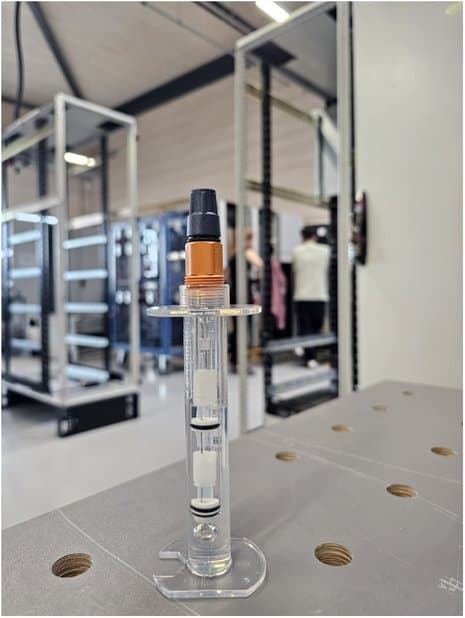
- Drain the tank
- Disconnect the plug
- Remove the sensor
12.5.1Calibrating the pH sensor
- Select the calibration menu CAL; start the calibration with CAL
- Set the pH value of the buffer for ZERO with the arrow keys
- Immerse the sensor in test container 1 with the buffer solution (e.g., pH 7), moving the sensor gently
- Start the calibration with CAL; when
CAL= ACCEPTis shown on the display and the displayed mV value is stable, accept the value with CAL - Remove the sensor from the buffer solution, rinse it thoroughly with water and then dab it dry
- Set the pH value of the buffer for SLOPE with the arrow keys
- Immerse the sensor in test container 2 with the buffer solution (e.g., pH 4), moving the sensor gently
- Start the calibration with CAL; when
CAL= ACCEPTis shown on the display and the displayed mV value is stable, accept the value with CAL - The determined values for zero point and slope are displayed. If the values for ZERO and SLOPE are both OK, the calibration is saved as successful. If the result of the calibration is outside the tolerance limits, the error message
ERRappears - Continue with CAL to confirm the result and end the calibration (if necessary, also unsuccessfully)