Electric Motor Emulator for inverter testing with active load
General Information
1.1About the operating instructions
These instructions will ensure the safe and efficient handling of IRS EME (active motor emulator).
The instruction is part of the test system and must always be kept accessible in the immediate vicinity of the system. The personnel must read this instruction carefully before starting any work. Basic condition for safe operation is the compliance with all specified safety and operating instructions in this manual.
In addition, the local accident prevention regulation and general safety regulation for the use of the device are valid.
Illustrations in this manual, the instructions in the appendix for the installed components apply.
Following the instructions given in this manual helps to avoid dangers and to increase the reliability and lifetime of the device.
We accept no liability for consequential damage and accept no responsibility for damage to property or injury to persons caused by improper operation or failure to observe the safety instructions. Such cases void the guarantee.
If you have any questions that are not answered by this instruction, please contact:
IRS Systementwicklung GmbH
Pfaffenthanner Weg 5
D-93179 Brennberg
+49 (0) 94 84 / 95 00 – 0
www.irs.systems
1.2Explanation of symbols
1.2.1Safety instructions
1.2.2Special Safety instructions
To draw attention to special risks, the following symbols are used in safety instructions:
1.3Limitation of Liability
All information and instructions in this manual have been compiled in accordance with applicable standards and regulations, the prior art as well as our many years of knowledge and experience.
The manufacturer assumes no liability for damages resulting from:
- Ignoring the instructions
- Improper use
- Use of untrained personnel
- Unauthorized modifications
- Technical changes
- Use of unauthorized spare parts
The actual scope of delivery can vary for special designs, utilization of additional order options or because the latest technical changes from the explanations and representations described here.
Valid are in the delivery contract agreed obligations, the terms and conditions as well as the manufacturers delivery terms and at the time valid legal regulations.
We reserve the right to make technical changes in the context of improving the usage properties and further development.
1.4Spare parts
Obtain spare parts from authorized dealers or directly from the manufacturer of each component.
1.5Servicing
For technical information contact our customer service.
In addition, our employees are always interested in new information and experiences arising from the application and for the improvement of our products.
Safety instructions
The following general safety precautions must be observed during all phases of operation of this instrument. Failure to comply with these precautions or with specific warnings or instructions elsewhere in this manual violates safety standards of design, manufacture, and intended use of the instrument. IRS Systementwicklung GmbH assumes no liability for the customer’s failure to comply with these requirements.
2.1Responsibility of the operator
The device is used in the industrial sector. Therefore, the operator is subject to the legal responsibilities for workplace safety.
In addition to safety instructions in this manual, the operator must comply with general safety, accident prevention and environmental protection requirements. These are especially:
- The operator must be aware of the applicable health and safety regulations and in a hazard assessment other hazards that may result from the specific conditions at the site of operation. This must be implemented for the operation of the device in the form of operating instructions.
- The operator must clearly regulate and specify the responsibilities for installation, operation, maintenance and cleaning.
- The operator must ensure that all employees who handle the unit, have read and understood the operating instructions. In addition, he must train regularly and inform the personnel about the risks.
- The operator must provide the required personnel protective equipment.
- Furthermore, the operator is responsible for ensuring that the equipment is always in perfect condition, therefore the following applies:
- The operator must ensure that the maintenance intervals described in this manual are adhered.
- The operator must check all safety devices for functionality and completeness regularly.
2.2Personnel qualification
Personnel (according BGV A 3)
- Nominated person in control of an electrical installation is a person who is authorized to take the responsibility of the electrical establishment. If necessary, the responsibility can be partly given off to other persons.
- Electrically qualified person is a person who is capable to estimate potential risks due to his expertise, experience and knowledge of corresponding assignments.
- Electrically instructed person is one who has been taught by a qualified electrician over its assigned tasks and the potential hazards of improper behavior required, trained and have the necessary safety devices and protective measures.
2.3Intended use
The EME active motor emulator is designed and constructed exclusively for the purpose described herein:
Testing of inverters, not exclusively, but mainly for e-mobility applications like traction inverters of electrical vehicles. The device under test (DUT) may run under specific parameters like heat, cold, humidity, vibration, salt spray or others. The Emulator itself runs in industrial plants at room temperature at normal humidity without environmental stress.
The emulator performs the following functionality:
- Simulation of the vehicle electrical system from the DUT point of view:
- Motor phases
- Battery power supply (in combination with external DC power supply)
- Position sensor input signals (e.g. SIN/COS or Resolver)
- Monitoring of voltages and currents which are applied to or output from the DUT
- Provision of measurement data to the overall system.
2.4Improper Use
Other than under the "Intended Use" specified or beside this all usage is considered as improper use! Claims of any kind for damage resulting from improper use are excluded. The operator is liable for all damages resulting from improper use.
2.5Special hazards
The following safety instructions and warnings in the other chapters of this manual should be observed to reduce health hazards and avoid dangerous situations
2.6Behavior in emergencies and accidents
Preventive measures
- Always be prepared for accidents or fire!
- First-aid equipment (first aid kit, blankets, etc.), and fire extinguishers retain for future use
- Make personnel familiar with accident reporting, first aid equipment and rescue measures.
- Keep access routes for emergency vehicles clear.
Measures in case of accidents
- Trigger emergency stop
- First-aid measures should be considered.
- Recover people from the danger zone
- Inform the responsible person on site.
- alert emergency services
- Keep access routes for emergency vehicles clear.
Technical Introduction
3.1Inverter test setup
Following block diagram gives an overview of a typical inverter test setup from the point of view of a single device under test (DUT):
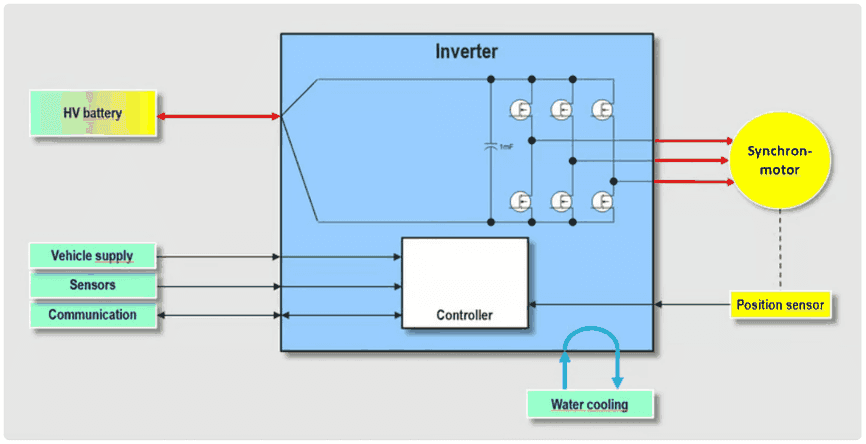
The central item in the picture is the inverter, the device under test (DUT), which is electrically connected to:
- Power supplies, communication interfaces, miscellaneous sensors
- The HV battery
- the electrical motor via typically 3 motor phases
- and its position sensor
- For inverters for power ranges of several kilowatts water cooling is usually applied.
The yellow marked parts are covered by the IRS EME active motor load:
- synchronous motor
- position sensor
- and partially the HV battery in combination with a standard DC power supply.
3.2Test approaches for motor load
3.2.1Classic mechanical coupled motors, passive load, high-end motor emulator
To simulate the motor, there are generally different approaches commonly used:
- Simulation of a simple passive load
- Operation of a real motor, mechanically coupled with another motor-inverter-combination
- High-end motor simulators
The following table shows the advantages and disadvantages of these setups:
| Passive coil | Active motor simulator – full size | Mechanically coupled motors |
|---|---|---|
| (+) Very cost-efficient | (–) Very high price | (–) Very high price |
| (+) Small setup | (–) Space consuming setup | (–) Space consuming setup |
| (+) Full phase current | (+) Full phase current | (+) Full phase current |
| (–) Only reactive phase current | (+) Simulation of real phase currents | (+) Simulation of real phase currents |
| (–) No recuperation | (+) Recuperation possible | (+) Recuperation possible |
| (o) Low DC currents | (o) Real DC current from battery | (o) Real DC current from battery |
3.2.2IRS EME Active motor load as intermediate solution
IRS EME active motor load is a solution which combines advantages of full-size high end motor simulators with the advantages of the passive coil, by keeping the concept simple, reliable and at a low cost.
| Active motor simulator – IRS |
|---|
| (o) Cost efficient |
| (+) Small setup |
| (+) Full phase current |
| (+) Simulation of real phase currents |
| (+) Recuperation possible |
| (+) Real DC current, but low power |
To simulate a real load condition the induced voltage of the electrical motor needs to be generated, according to the equivalent circuit of a motor:
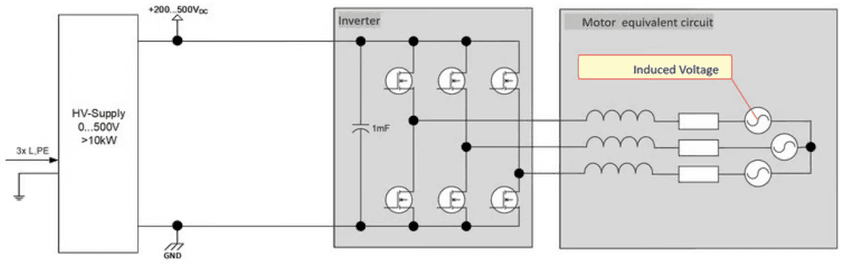
Voltage sources for high power are often also switched power supplies, while a good energy feedback is necessary to achieve a compact and cost-efficient setup.
3.3IRS EME basic principle of operation
Following picture shows the basic setup of the IRS electrical motor emulator for a three-phase-inverter as device under test (DUT):
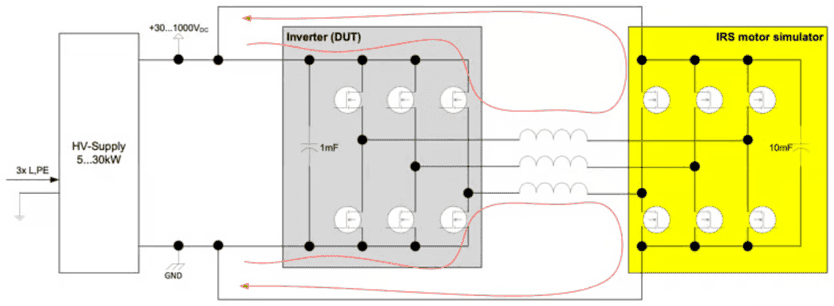
The concept is based on the idea to directly couple two inverters and run against each other - both three phases and the DC-Link are directly coupled. As battery simulator a standard power supply may be used. With appropriate control of the motor simulator, the phase current flows from DUT to simulator via the phase coils and back to the DUT via the DC-Link, and vice versa.
Thus, the DC-Link of the DUT is stressed with a realistic current, but since the energy is flowing between the two inverters, the battery simulation needs only to provide the energy for the losses of the entire system. This is one of the most important benefits: a relatively small power supply without energy feedback to the grid can be used. With a power supply of only 20kW,
- 250kW can be simulated at 500V DC voltage,
- 350kW can be simulated at 850V DC.
The standard emulator variant is capable of handling voltages up to 1000V, resulting in even higher power ranges which can be simulated. In most setups, three basic setpoints define the operation:
- EME generates the induced voltage of the motor
- DUT is in current control mode, defining the applied torque to the motor.
- EME defines the speed via the position sensor signal
In this document, we mostly refer to the voltage range up to 1000V, since this is covered by the standard IRS EME. In the meantime, different downsized variants are available which will be illustrated in later chapters. But the basic principle is the same for all IRS EME variants.
EME Overview
4.1EME Overview
Every single EME covers a 3-phase system. Two identical EME may be optionally combined to simulate a 6-phase motor, where one system acts as master and one as slave.
4.2Power stage
Every IRS EME active motor load contains a 3-phase two-level inverter, while different technologies are applied:
- VARIS - versions: IGBT (Standard device)
- SiC - version SiC-MOSFET (In development)
Different variants are available to cover different types of inverters:
4.2.1HV-Versions, IGBT-based
| Parameter/Type | VARIS I | VARIS II | VARIS III |
|---|---|---|---|
| UDC [V] | 40...1000 | 40...1000 | 40...1000 |
| Phase current continuous [A] @ 450V @ 8kHz PWM | 400 | 600 | 600 |
| Phase current 5 seconds [A] @ 450V @ 8kHz PWM | 600 | 650 | 650 |
| Phase current continuous [A] @ 850V @ 8kHz PWM | 200 | 400 | 600 |
| PWM frequency [kHz] | 4…12 | 4…12 | 4…12 |
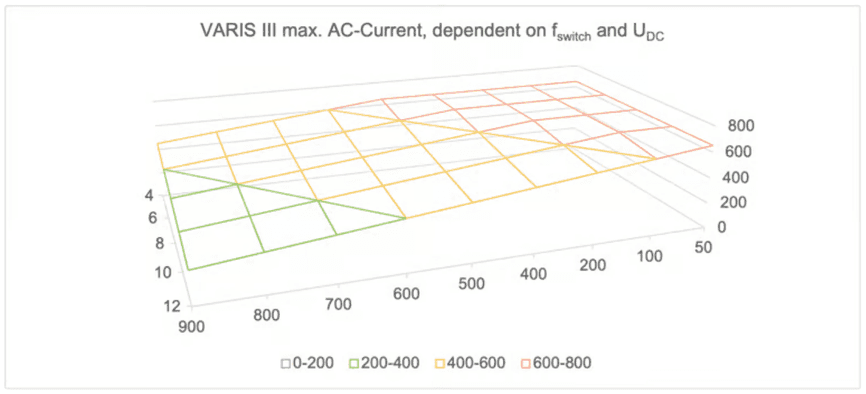
Maximum current is depending on the applied DC voltage and switching frequency. The following diagram illustrates the dependency for example VARIS III:
4.3Position Sensor
4.3.1SIN/COS generator
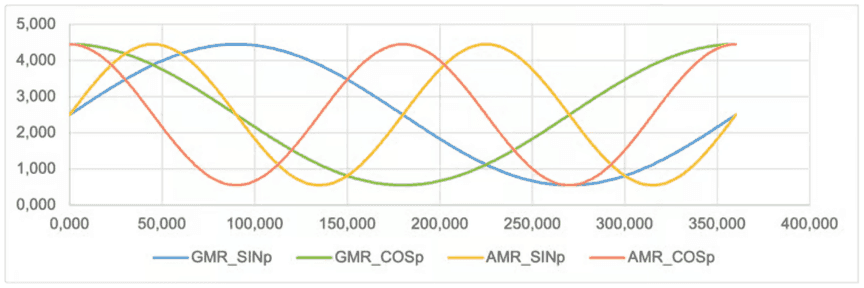
By default, IRS EME comes with an 8 channel SIN/COS signal generator to simulate AMR/GMR position sensors.
The following pictures illustrate the typical signal levels, depending on the current position in degree. For a clear view, only 4 signals are shown in a single picture. The first one shows non-inverted SIN and COS for GMR and AMR (please note that some inverters use only the GMR-signals):
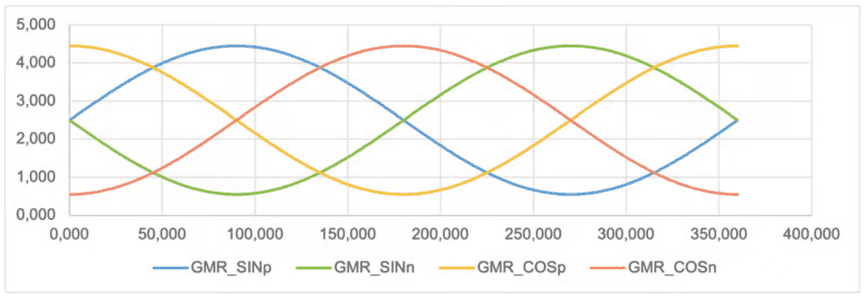
GMR-signals synchronous to mechanical speed:
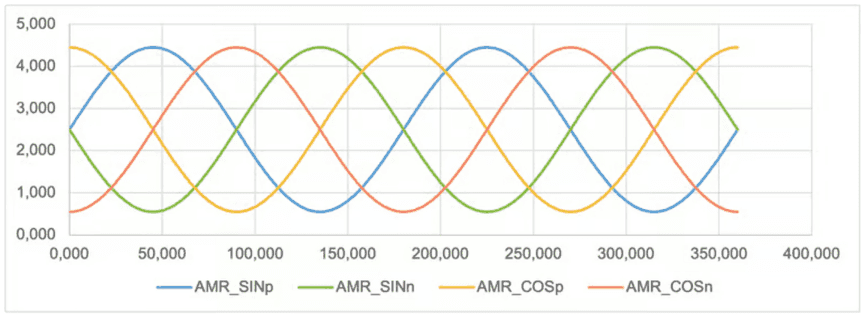
AMR-signals synchronous to DOUBLE mechanical speed:
4.3.2Resolver simulation
Optionally, an additional module may be plugged in to simulate resolver position sensors.
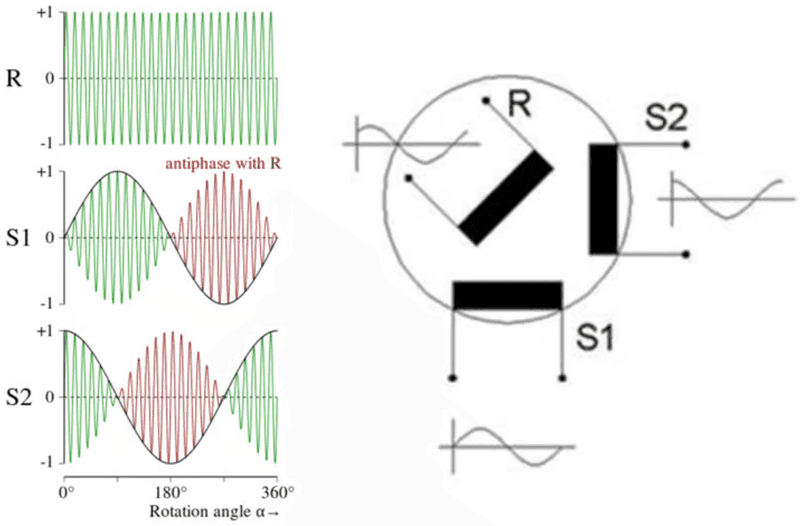
All inputs and outputs are isolated by transformers, as it is the case in real resolver sensors:
- Excitation signal + and - input: generated by the DUT (typ. 10kHz)
- SIN + and SIN – output: modulated by resolver simulator is feedback to the DUT
- COS + and COS – output: modulated by resolver simulator is feedback to the DUT
4.4EME Components and default Device IP Addresses
There are basically two components of measurement equipment, which need to be addressed via Ethernet. These are:
- EME control board
- EME switch and cooling controller
Basically, any IP-address may be configured, but after delivery the following default IP addresses are configured:
| Device | ID / IP-Address | Remarks |
|---|---|---|
| EME Control board | 192.168.222.5 | This device contains the main EME embedded software |
| EME Switch & Cool | 192.168.222.11 | Controller for DC- and discharge-relay, fan, and cooling pump control |
In case, EME is applied in a system with several DUTs, the numbers in the IP-Address are incremented for every test station.
4.5Measurements
4.5.1Voltages, currents, and timing
The following measurements are conducted by the active motor load EME:
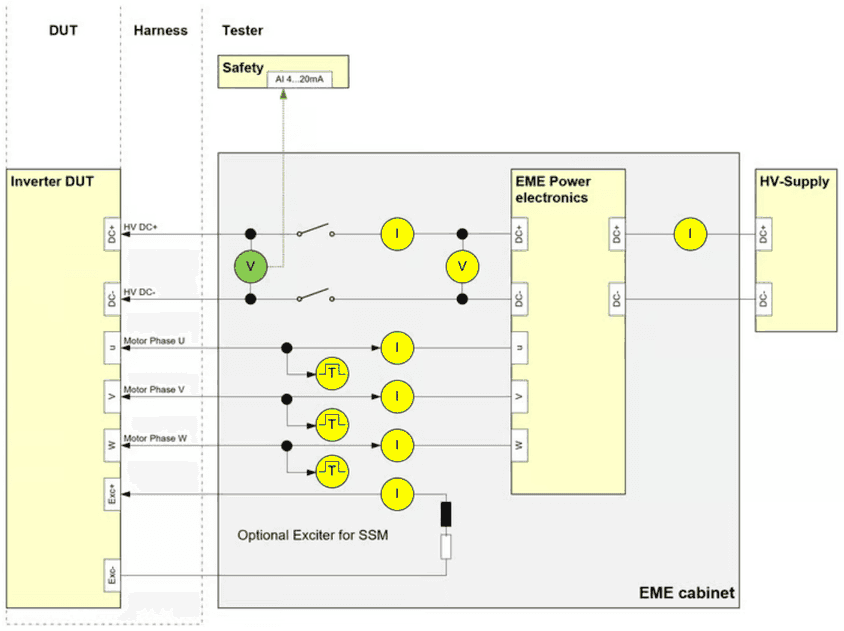
All yellow marked measurements are conducted by the EME controller board, and can be read out by the LabVIEW library via Ethernet. These signals are sampled at a sample-rate of 100kS/s:
- 3x phase current measurement (+-1000A)
- 1x HV DC voltage measurement (0…1000V)
- 1x HV current measurement to DUT (+-600A)
- 1x HV current measurement from HV power supply (+-200A)
- 1x Exciter current measurement (optional) (+-50A)
The voltage measurement after the DC-Main relay is usually evaluated both by safety circuit to detect if there is a hazardous voltage on the DUT and optional additional measurement equipment. EME includes a voltage transducer with an adjustable output signal, marked in green. By default, 4…20mA are output representing the HV voltage at the DUT of 0…1000V.
Finally, motor phases U, V, W PWM timing is monitored with a resolution of 50ns.
4.5.2EME internal temperatures
The following internal temperatures are monitored with a sample rate of approximately 5 S/s.
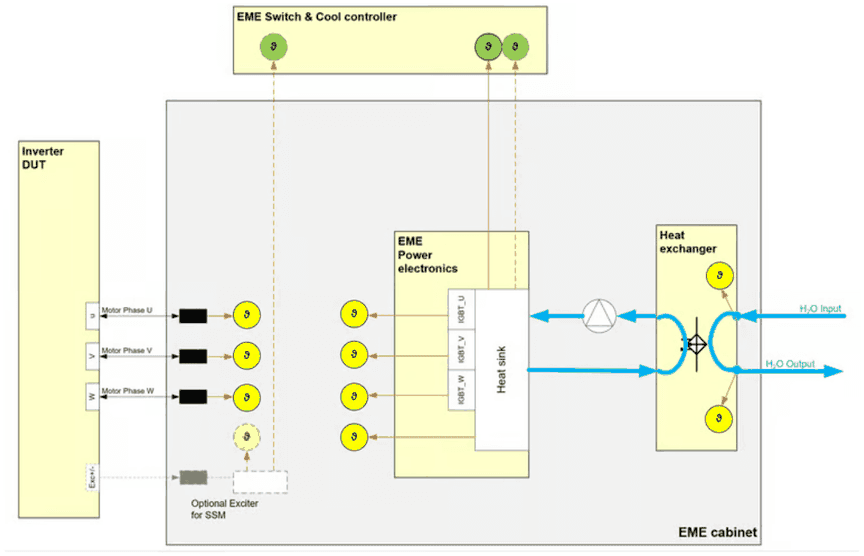
The temperatures must remain below the following maximum values:
| Measured by | Sensor | Description | Maximum Temperature [°C] |
|---|---|---|---|
| EME control board | PT100 | Power stage heat sink | 50 |
| EME control board | IGBT_U | IGBT Phase U (close to heat sink) | 65 |
| EME control board | IGBT_V | IGBT Phase V (close to heat sink) | 65 |
| EME control board | IGBT_W | IGBT Phase W (close to heat sink) | 65 |
| EME control board | Choke_U | Coupling inductance Phase U | 80 |
| EME control board | Choke_V | Coupling inductance Phase V | 80 |
| EME control board | Choke_W | Coupling inductance Phase W | 80 |
| EME control board | Exciter | Optional Exciter resistor for SSM | 70 |
| EME control board | H2O_In | Cooling water inlet | 40 |
| EME control board | H2O_Out | Cooling water outlet | 60 |
| Switch & cool | T VARIS 1 | Power stage heat sink as reference for cooling controller | 50 |
| Switch & cool | T_VARIS 2 / T_Exciter | In case of existing exciter -> exciter resistor, alternatively second T_VARIS |
4.5.3EME cooling and switching controller
The following measurements and controls are conducted by the EME switch and cool unit.
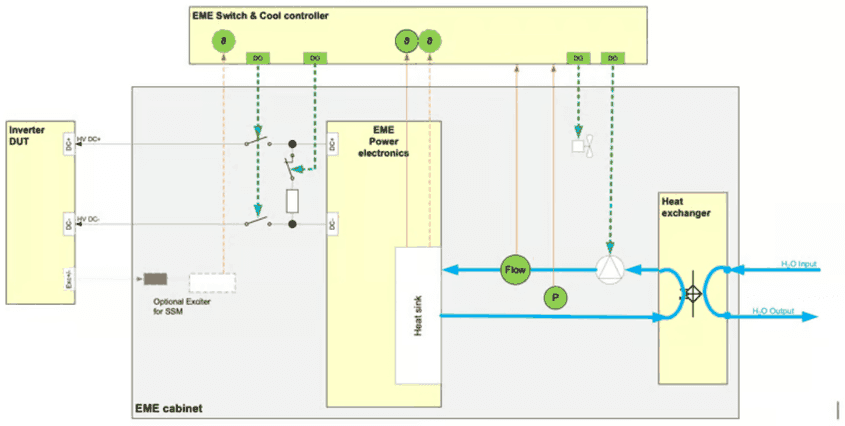
Depending on T_VARIS and T_Exciter the cooling pump is automatically activated and controlled
4.6EME communication
4.6.1Ethernet
Gigabit-Ethernet is the main communication interface which is accessible via the provided LabVIEW library.
4.6.2CAN
Physically available, but currently not implemented in software.
4.7Synchronisation
When EME is operated normally, it synchronizes its output stage to the switching parameters of the DUT. The following chapter describes this synchronization mechanism.
Auto-Synchronization!
4.8Safety interface
4.8.1Standard interface with external safety controller
The following figure illustrates the safety interface:
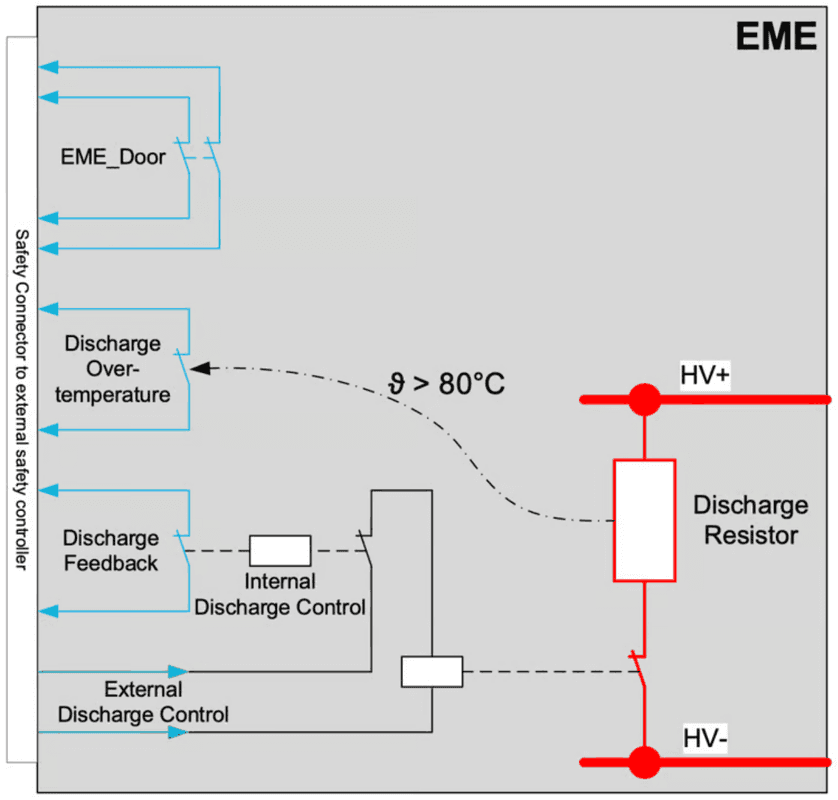
An external safety controller MUST implement the following functionalities:
- It MUST shut down external -Supply immediately in case of
- EME Door Open
- EME Discharge Overtemperature
- EME Discharge Active
- EME-discharge MUST be DE-activated in case of:
- HV-Supply applies a voltage > 20V
- EME-discharge MUST be activated in case of
- Any error
- BUT only when HV-Supply is shut down.
The following table illustrates the different situations, where the discharge control signal is inverted:
| External Safety controller MUST set | HV-Supply | External Discharge control signal |
|---|---|---|
| In case of following status | ||
| EME-Door open | OFF | OFF |
| EME Discharge Overtemperature | OFF | OFF |
| EME Internal Discharge active (indicated by “Discharge feedback” signal) | OFF | ON or OFF; Discharge already activated by EME |
| External Discharge Control active | OFF | ON (no discharge) |
| HV-Voltage >20V applied | ON | ON (no discharge) |
| Isolation failure (independent monitoring, not integrated in EME) | OFF | OFF |
Common safety controllers operate on 24VDC. External Discharge Control signal should be controlled by 24VDC. See the following chapters about electrical parameters and connector pin-out.
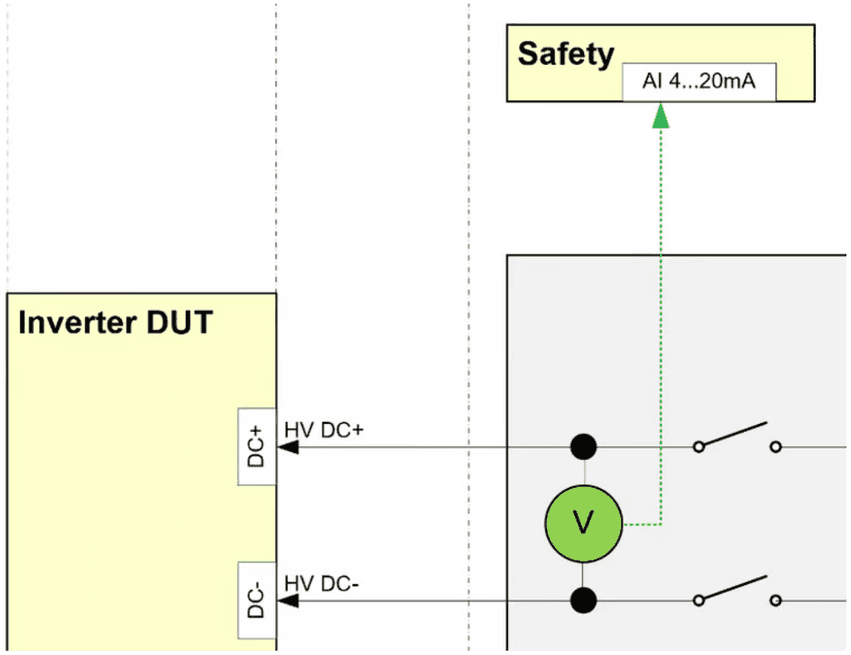
Furthermore, a voltage converter is integrated which can be used by the safety controller to monitor the DUT voltage, and lock doors if voltages >50V are applied.
By default, the voltage converter outputs 4…20mA, which represents 0…1000V at the output to the DUT.
4.8.2Isolation Monitor
An Isolation monitor (e.g. Bender ISO-685) is necessary to monitor the isolation of HV+ and HV- against earth ground, because usually for inverter testing an IT-system is implemented.
In default configuration the HV supply and isolation monitor are not integrated into the emulator. But in case the HV supply is integrated into the emulator cabinet, isolation monitoring is part of the IRS system and must be checked by an integrated safety controller.
4.8.3Integrated safety controller
It is possible to integrate a safety controller depending on customers requirements. This is usually applied, when HV supply is integrated into the emulator cabinet.
There are different options for safety controllers:
- PILZ PNOZ Multi II
- Siemens ET200 safety modules with external CPU
- Wieland safety controller.
- …
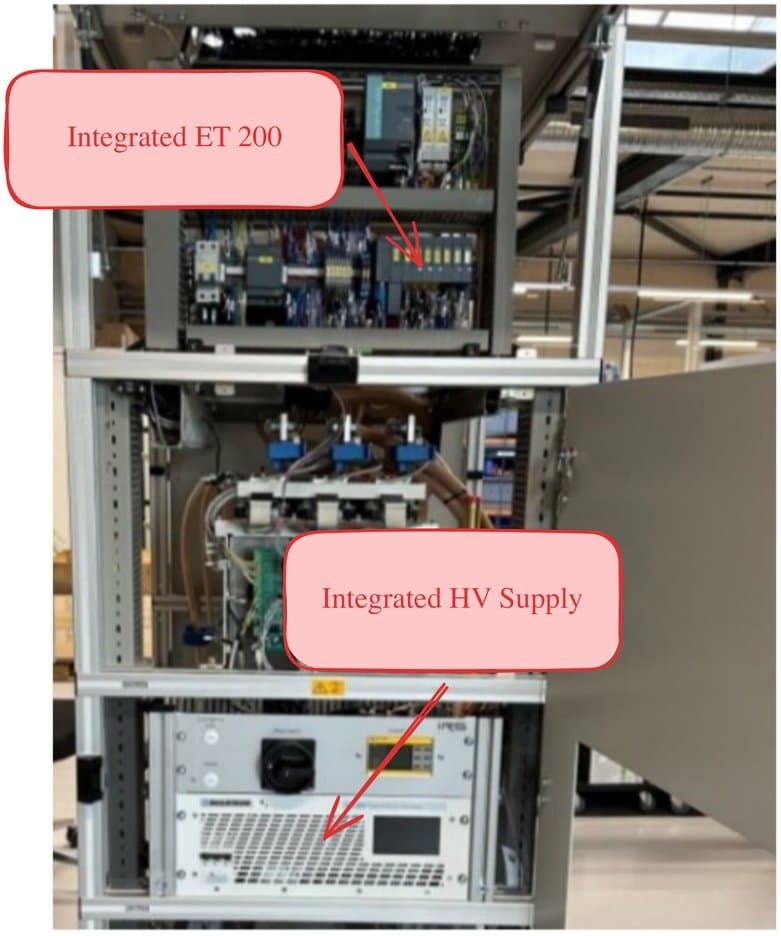
Different options may be individually discussed and integrated. Examples can be found in the following pictures:
4.8.4Example: PILZ or Wieland safety
If any of the safety events occurs, the HV supply is immediately shut down safely and the “Reset” button on the left side will flash in blue color. A single event is stored until the user acknowledges this event by pressing the “Reset button”. The system will remain in safe state until the “Reset” button is pressed by the user.
When the safety event is not present anymore the HV supply is enabled again after acknowledging by the “Reset”-Button.
On the indicators on the safety controller the user may read the current status of the safety controller, while the inputs mean the following:
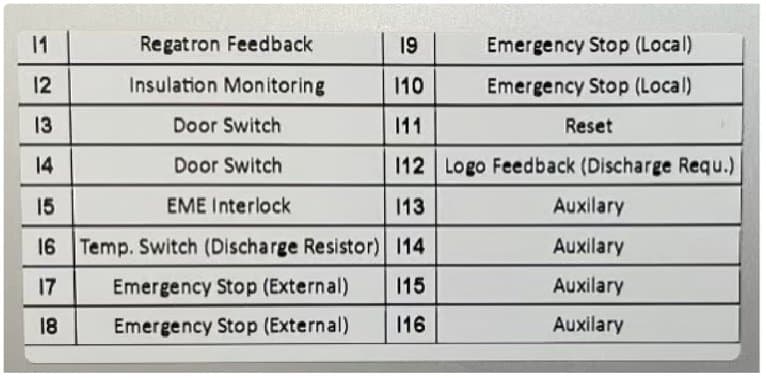
A signal lamp may be mounted on the emulator cabinet to indicate the following situations:
- Green: no failure, no HV voltage -> it is safe to handle DUT
- Red: no failure, HV voltage > 20V -> do NOT touch DUT
- Orange: failure (e.g. emergency stop, isolation failure, door open, …)
An overall safety controller may be used to lock doors in case of applied voltage. This functionality may be integrated by IRS, if required.
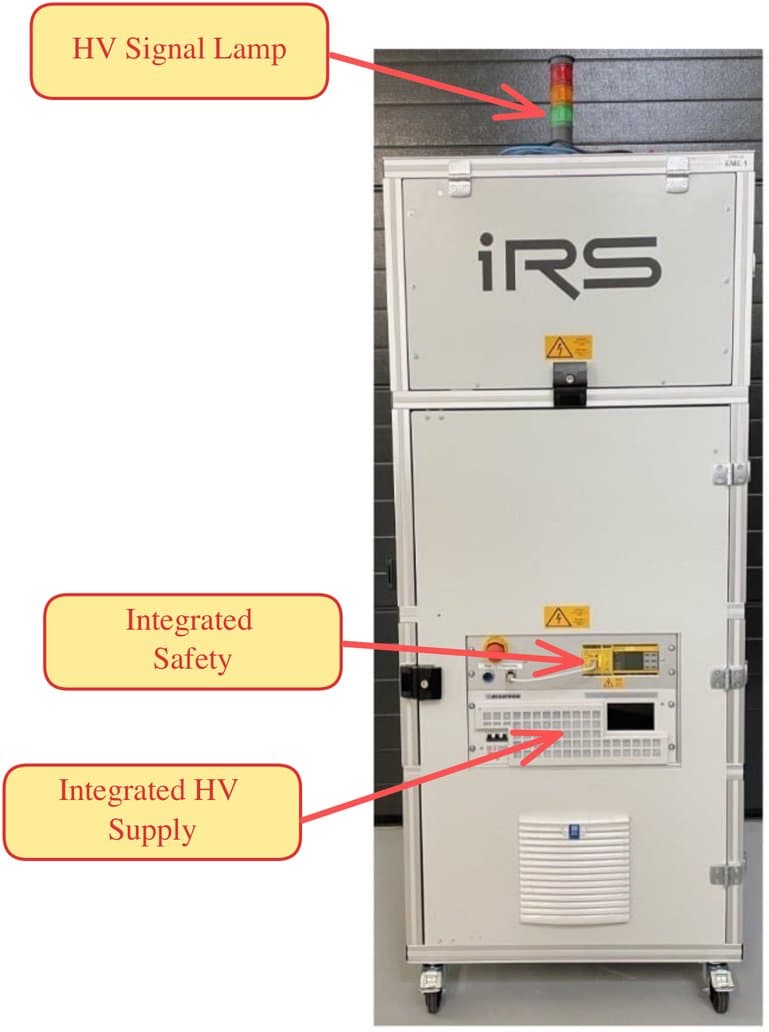
4.8.5Example: Siemens ET200 safety
Integrated ET200
With ET200, an external Siemens PLC CPU must be used to implement the safety program. IRS provides an example code that can be used for integration in the PLC CPU.
Integrated HV supply
Please note that with this version the integrator of the PLC software is responsible for the safety of the system. I.e. safe shutdown in any error situation must be handled by the integrator.
Technical Data
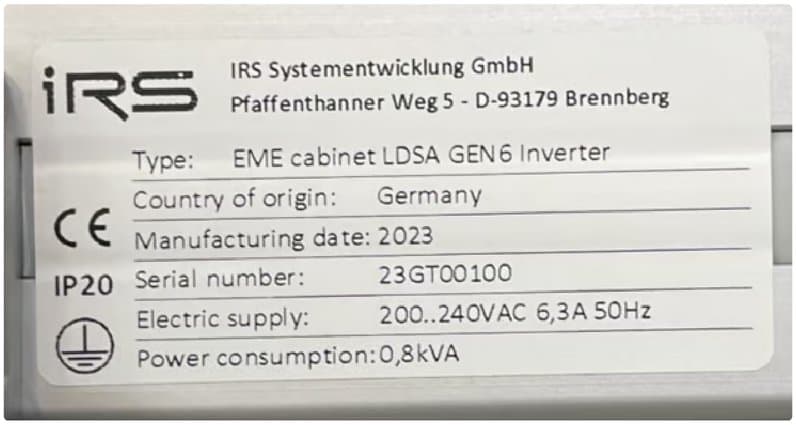
5.1Type label
5.2General data
| Item | Variant | Value | Unit |
|---|---|---|---|
| EME 1x 3-phase (W x D x H) | 1x VARIS II | 800 x 900 x 2050 | mm |
| EME 2x 3-phase (W x D x H) | 2x VARIS III | 1200 x 900 x 2050 | mm |
| Weight approx. | 1x VARIS II / 2x VARIS III | 500 / 800 | kg |
5.3Operating conditions
| Item | Value | Unit |
|---|---|---|
| Temperature range | 5-35 | °C |
| Relative humidity | max 31 °C: 80 | % |
| Relative humidity | max 40 °C: 50 | % |
| Relative humidity | No condensation | |
| Setup | in dry laboratory rooms | |
| altitude above sea level | max. 2000 | m |
5.4Supply connections
| Tester component | Item | Value | Unit |
|---|---|---|---|
| AC Input | Supply voltage | 100…240 | VAC |
| AC Input | Supply frequency | 50/60 | |
| Tester electronics supply | Max. Current | 6 | AAC |
| Tester electronics supply | Max. Current | Typ. 0,5 | kVA |
| DC-Supply | DC supply voltage | 0…1000 | VDC |
| DC-Supply | DC supply current (Depending on use-case) | -150…150 | AAC |
Connection Overview
6.1Connection overview
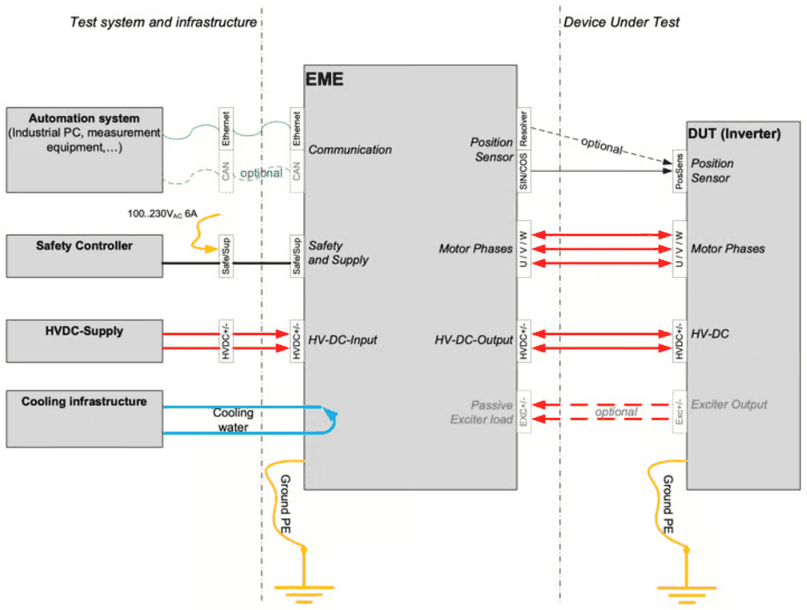
The following figure illustrates the connections which need to be established from and to EME. These are:
- connections to the overall test system (left side in the picture).
- connections to the inverter under test (right side).
6.2Water cooling
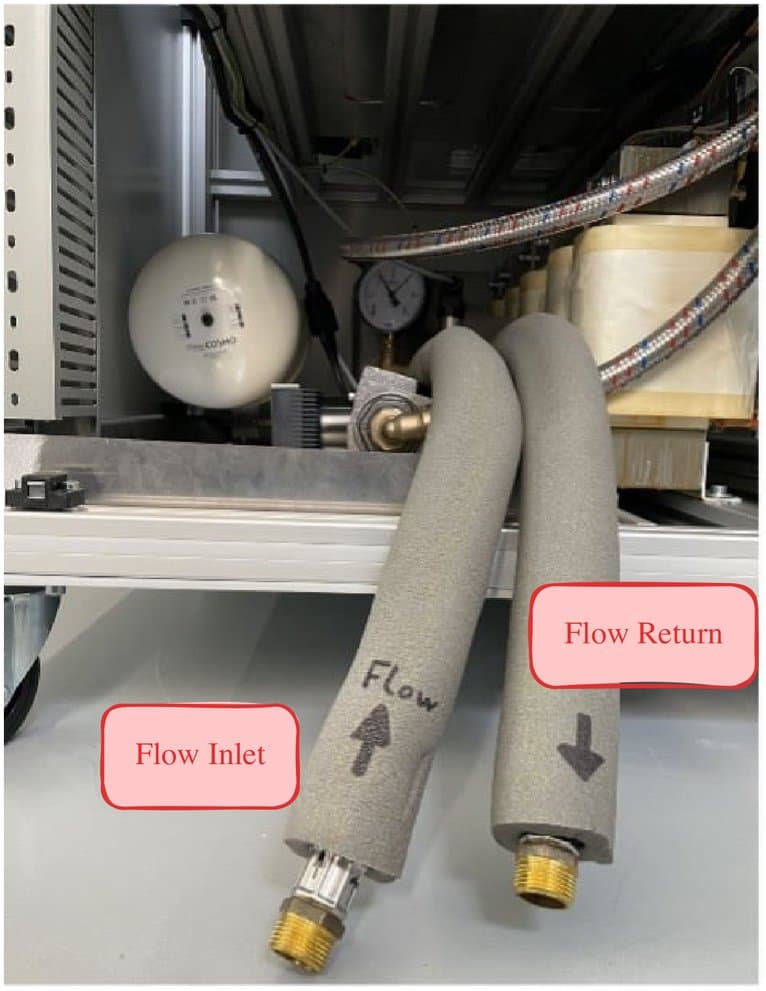
The active motor simulation is using water cooling.
An inlet temperature of about 15°C is recommended (10…25°C). Keep cooling water clean, filters are recommended to avoid remnants in the heat exchanger which reduce the cooling capacity.
A flow limiter should be added to define the water flow. Flow rate is depending on average and peak power. Typical values are 5…30l/min. Please monitor the EME temperatures as shown in EME internal temperatures.
Make sure that cooling water is only applied when necessary to reduce the amount of condensing water.
6.3Test system connections
For proper operation the active motor load requires connections to the overall test system. The figure in Connection overview illustrates the test system connections on the left side, while red marked wires contain hazardous voltages. The blue marked lines correspond to the cooling tubes.
Connections are designed with modular Harting connectors as far as possible to make sure that no wrong connections can be established. Furthermore, the same connectors may be used for different international standards. Connector counterparts are delivered together with the system.
All connections are available at the top of the cabinet.
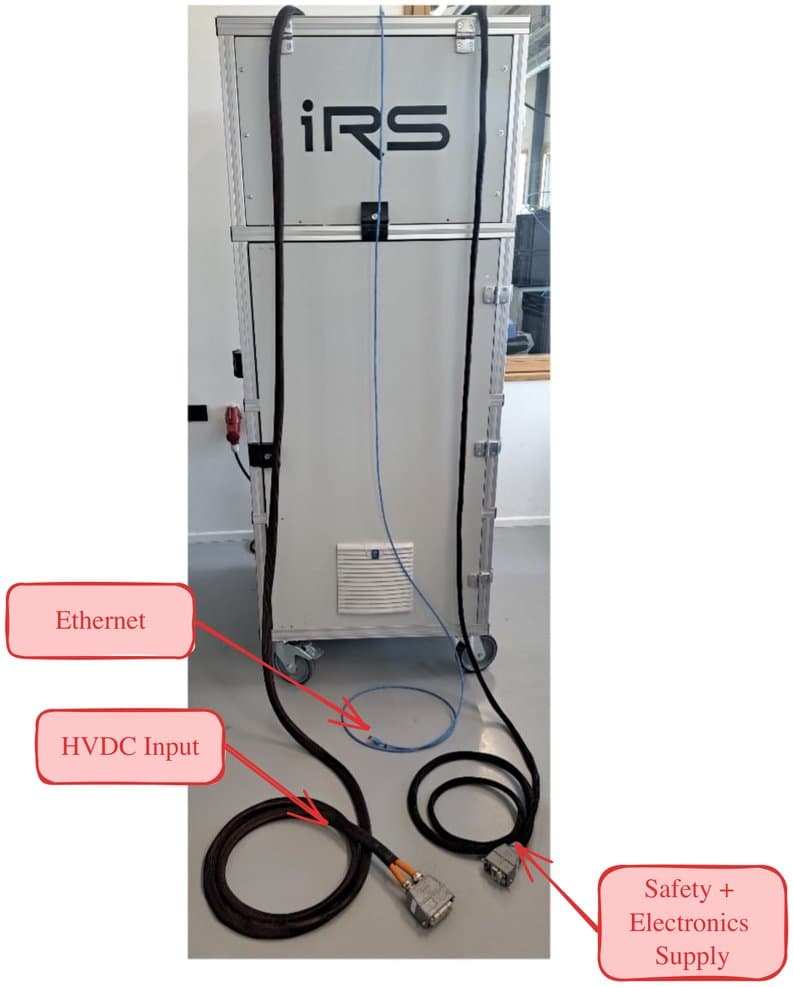
Safety + electronics supply
6.3.1HV-DC from Power Supply
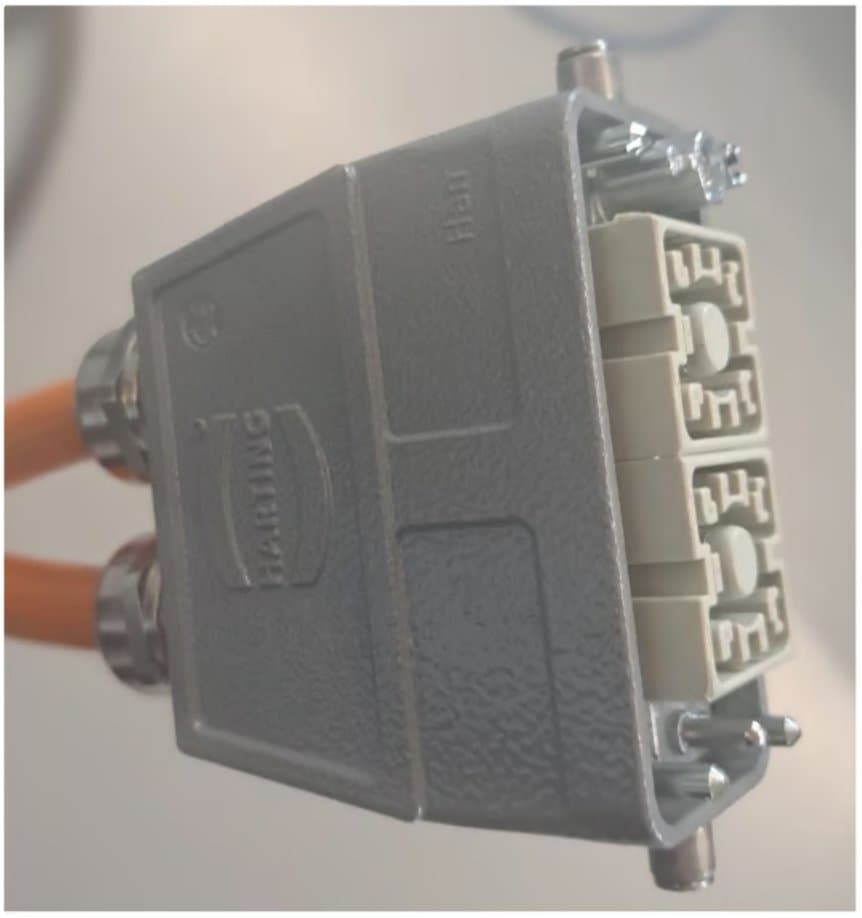
The following Harting HAN-connector is applied for connection to the HVDC power supply.
Pinout is as follows:
- Pin1 HVDC**+**
- Pin2 HVDC**-**
Both male and female connectors are protected against direct contact. This is necessary because the active load buffer capacitors may be charged even when disconnected.
The connector is rated for 200A/1kVDC. Thus, use power supply below this rating.
6.3.2Safety and electronics supply
The following Harting HAN-connector is applied for connection to the electronics supply and the safety interface. The pinout is as follows:
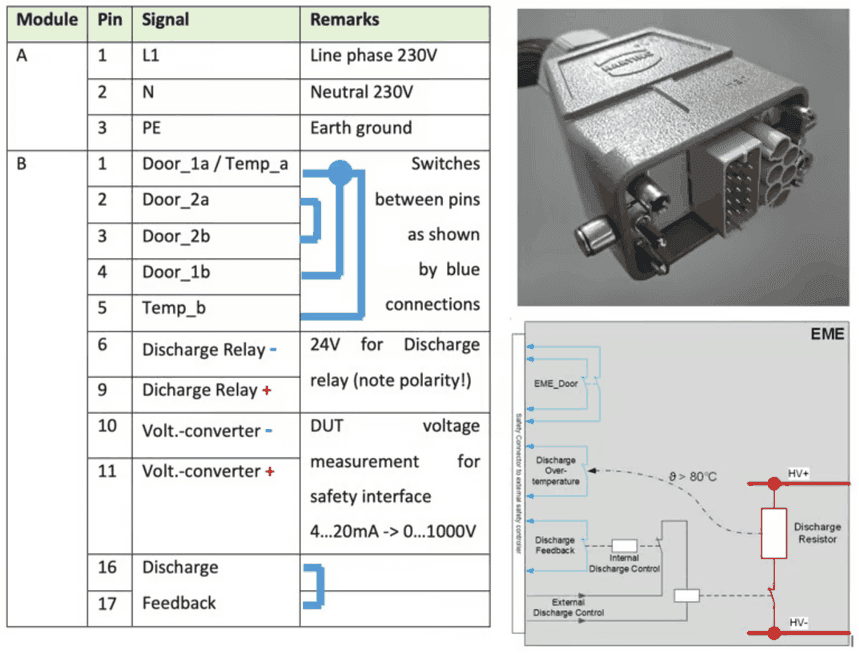
On the right side the functionality of the safety interface is illustrated, both for switches and the analog output for DUT voltage measurement.
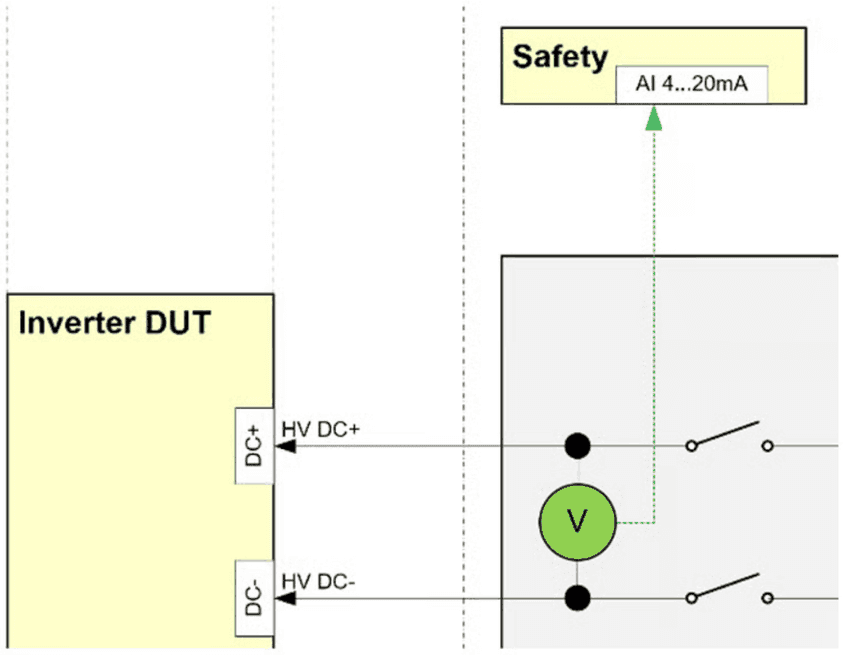
6.3.3Ethernet communication
Use the Ethernet cable with RJ45 connector for communication with a Windows-PC.
6.3.4CAN communication
Currently not applied in software.
6.4DUT connection
After the tester internal connections are ready, the wiring to the DUT needs to be established. The figure in Connection overview illustrates the DUT connections on the right side, while red marked wires contain hazardous voltages. The blue marked lines correspond to the cooling tubes.
6.4.1Position Sensor Simulation
SIN/COS Simulation
| Pin | Signal | Pin | Signal |
|---|---|---|---|
| 1 | GMR_SIN_P | 7 | AMR_COS_P |
| 2 | GMR_SIN_N | 8 | AMR_COS_N |
| 3 | GMR_COS_P | 9 | -- |
| 4 | GMR_COS_N | 10 | -- |
| 5 | AMR_SIN_P | 11 | -- |
| 6 | AMR_SIN_N | 12 | GND |
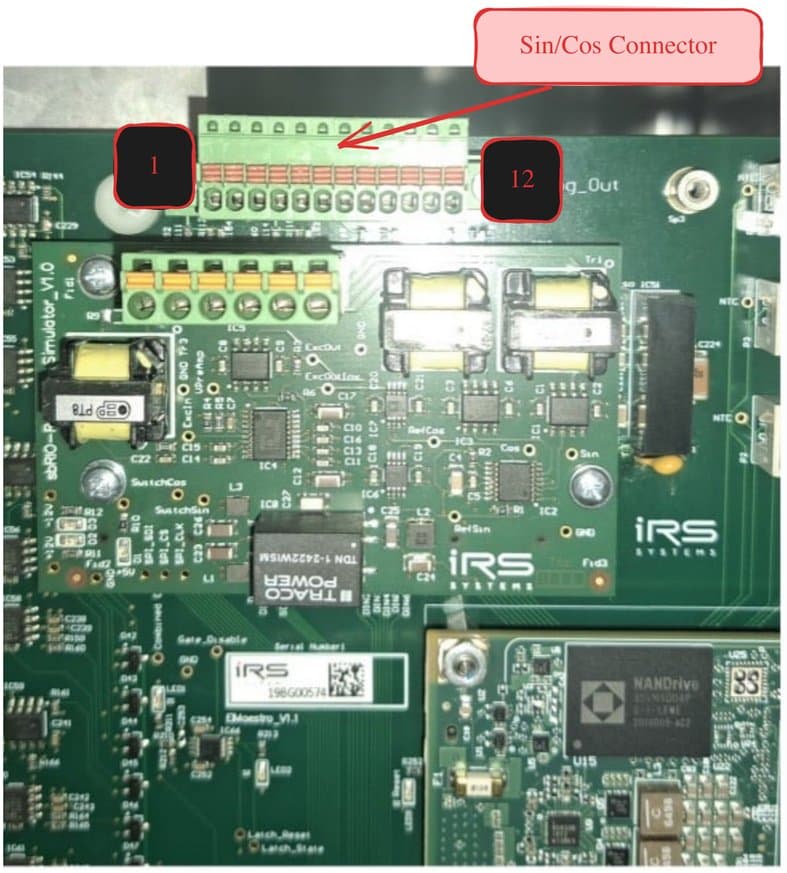
Please refer to SIN/COS generator for functional description
Resolver Simulation
| Pin | Signal |
|---|---|
| 1 | SIN+ |
| 2 | SIN- |
| 3 | COS+ |
| 4 | COS- |
| 5 | EXC+ |
| 6 | EXC- |
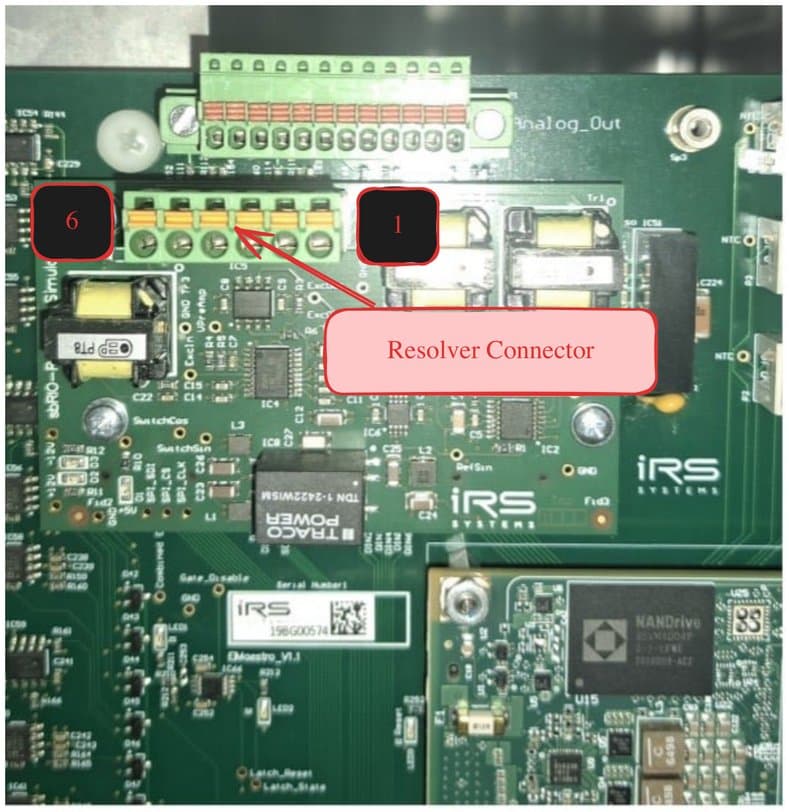
Please refer to Resolver simulation for functional description
6.4.2DUT connection of the 3 motor phases, HV-DC and optional exciter
Motor phases, HV-DC supply and exciter wires are connected according to the picture below. Preferred, the cables are marked with the following labels to make sure not to mix them up:
- U V W
- DC+ DC-
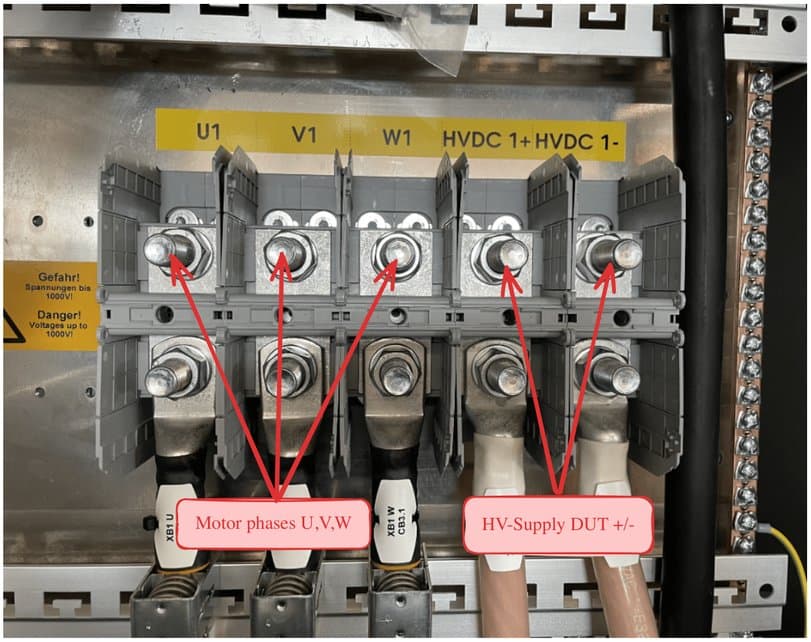
Always apply shielding clamps and strain reliefs similar to the following picture:
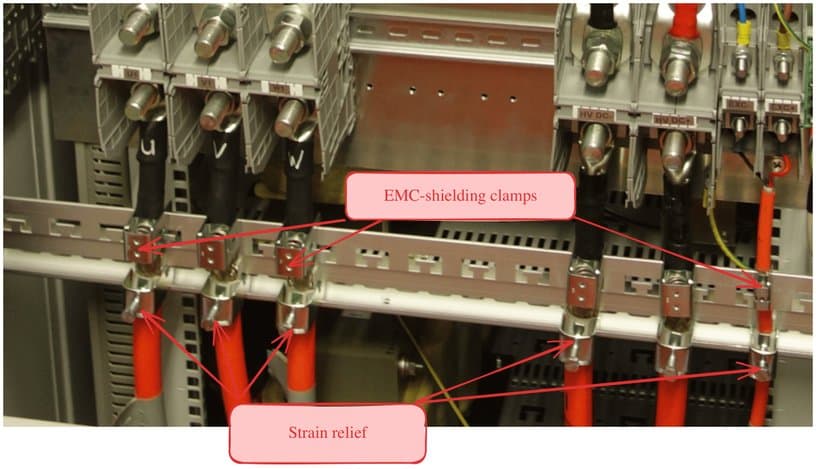
Since there are several wires for three DUTs, it is a good choice also to mark the wires with DUT1, DUT2, DUT3.
Additional to the EMC-shielding clamp, a strain relief has to be mounted in the lower part of the shielding rail. The same procedure with shielding clamps and strain relief holds for the Exciter connections.
6.4.3EMC issues
Since the DUT inverter may be a source of electrical noise, measures need to be taken to reduce emissions from the DUT. Most emissions are radiated over the motor phase cables. Thus, special care needs to be taken about:
- Proper Shielding of motor phase, HV-DC-, and Exciter-cables
- Proper grounding of the DUT and test system.
- Positioning of power and signal cables
When operating the system, it is crucial that all power cables are properly shielded on BOTH ends. I.e.
- At the emulator connection
- At the DUT-housing
Use shielding clamps at the emulator connections:
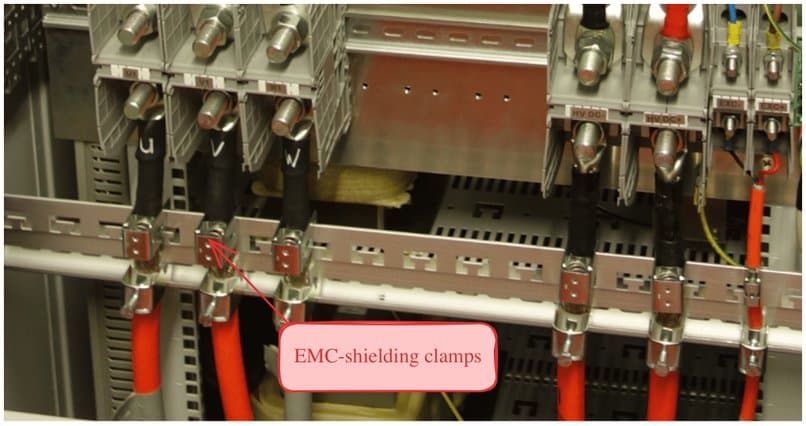
Make sure that all power cable shields are properly connected to the DUT housing by metal bushings:
To make sure, that the DUT housing has a proper ground connection, establish an additional ground wire to a good potential earth Ground.
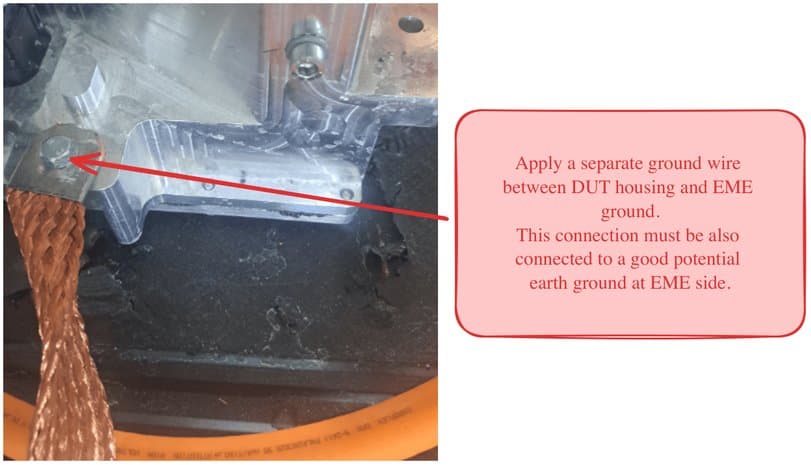
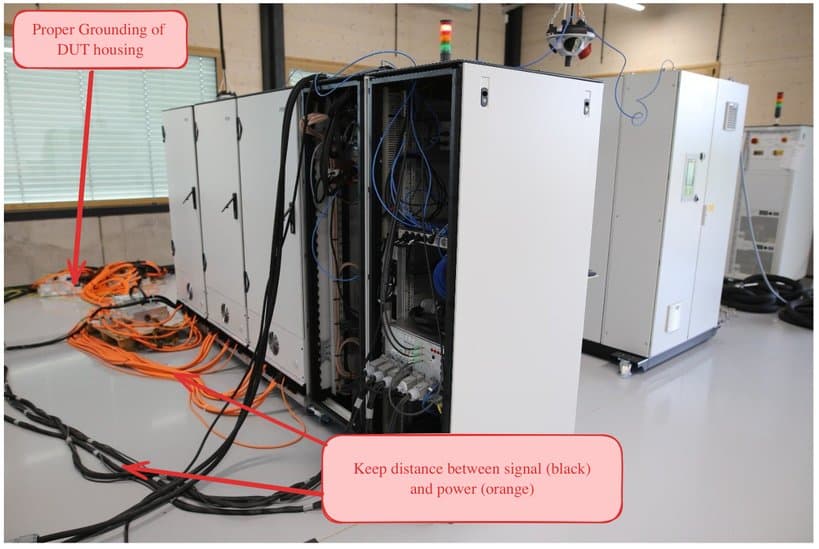
And keep as much distance as possible between signal cables and power wires to reduce cross interference. If there is not enough space, avoid routing them in parallel, prefer orthogonal orientation.
Power Up
7.1Power up
Make sure that 230V electronics supply is present. After power up, the electronics needs about 2 minutes for boot process. Afterwards HV DC voltage may be applied.
Operate Software
After connecting all system components and the DUTs, and after power up, the motor emulator may be operated by software either manually by a remote panel but for most test systems by an automation software.
8.1Software packages
The Emulator comes by default with a LabVIEW library IRS.EME.TS.API including dependencies for integration in user specific automation software.
Alternatively, the user may use low-level TCP-IP communication with a command-response structure, based on JSON command description (see EME Example Communication.txt).
A test panel is provided to control EME manually. It contains most control functions of the LabVIEW library. Thus, in the following software functions are explained based on the test panel because of good illustration. The explanations for the test panel may be transferred to operation with automation software.
8.2Manual control via EME test panel
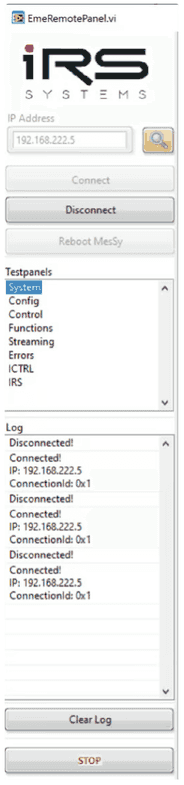
The EME_RemotePanel software may be used to control EME manually. It may be opened in parallel to the automation software.
The panel includes up to 8 functional sub-panels and controls to handle the IP-connection.
- System: general status (software version, temperatures, CPU-load)
- Config: general configuration (motor and sensor parameters)
- Control: operation parameter (“induced voltage”, speed,…)
- Function: operation parameter for fixed position
- Streaming: waveform measurements
- Errors: indicates error flags
- ICTRL: advanced settings for inverter operation, not for emulator.
- IRS: critical and advanced parameters only accessible by IRS
The respective functional sub-panel may be selected in the control “Testpanels”.
8.2.1Connection handling
The following controls and buttons are used for connection handling
- IP-Address: identifies a specific EME in the network
- Scan: searches for visible EME in the network
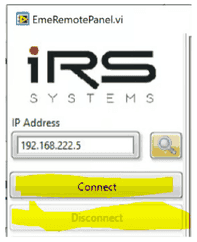
- Connect: establishes communication with one EME
- Disconnect: stops communication with one EME
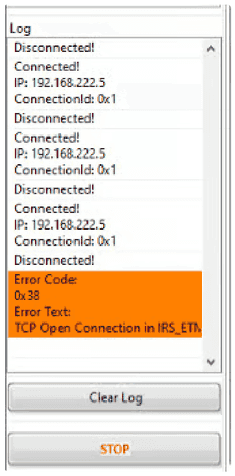
- Log: shows communication status with EME
orange items show errors
There may be several EME in one ethernet network. The respective EME is addressed by its IP-Address. You may either enter the known IP address directly in the yellow marked field:
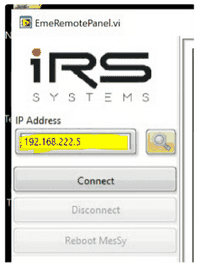
Alternatively, you may search for existing EME in the network. By pressing the following two yellow marked buttons:
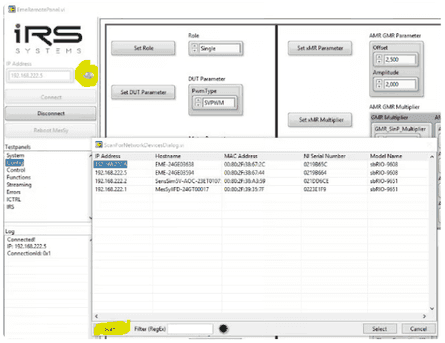
After pressing the “Connect” button all other functions in the sub-tabs are available.
After pressing “Disconnect” no operation is possible.
In the Log window the communication status is listed:
- Connect event
- Disconnect event
- Errors (marked in orange with error description)
The log window may be cleared with the button “Clear Log”.
After pressing the “STOP” button, the test panel will close.
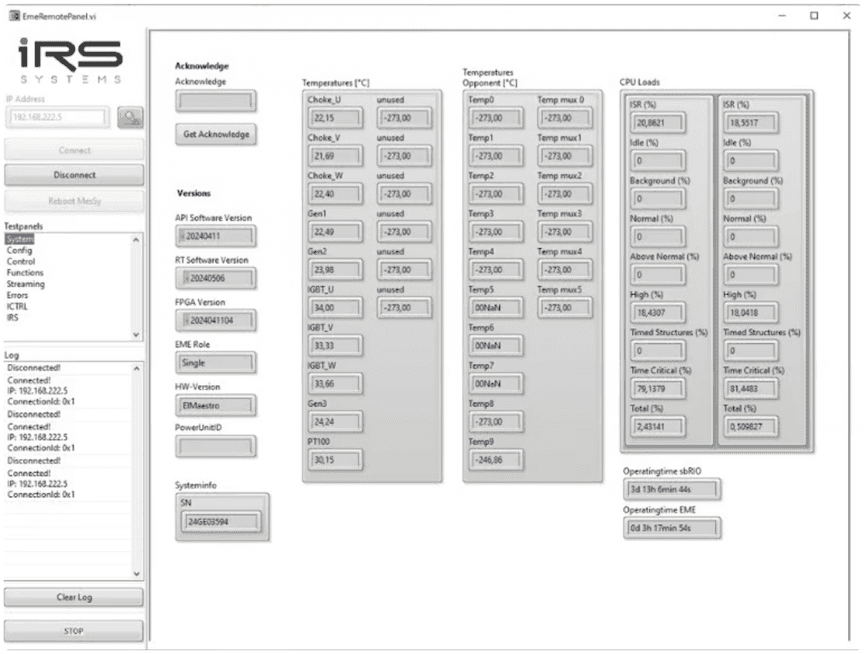
8.2.2System
In the system status overview the following parameters are shown:
- General information:
- Software versions of
- EME-API (LabVIEW-library on PC)
- RT-Software (real-time firmware on EME)
- FPGA (lowest level firmware on EME)
- Control board
- HW-version
- Serial number
- Software versions of
- Internal temperatures
- Temperature values of EME
- Temperatures of “Opponent”
- in case of combined 6-phase system.
- In most cases all “Opponent” values may be ignored.
- CPU load
- Operating times of
- sbRIO (real-time controller + FPGA running time)
- EME (powered operation time while EME is active).
8.2.3Config
In the Config sub-panel, generic motor and position sensor parameters may be set. The order of configuration is not relevant. Settings in this window may be changed at any time while EME is not activated.
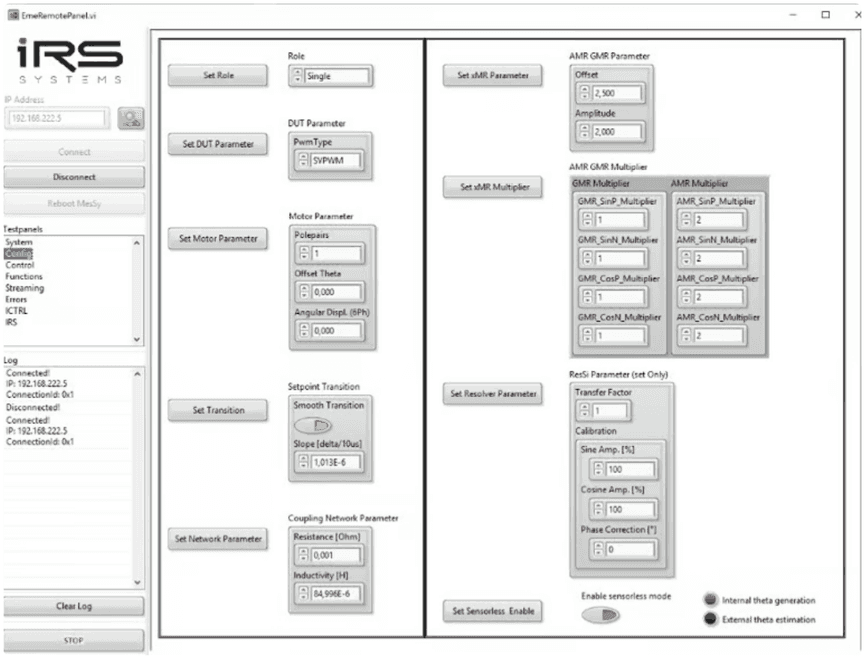
The configuration parameters on the left side describe the motor parameters and are as follows:
- Set Role
- “Single” for normal Emulator operation -> valid for most applications
- “Inverter Single” for Inverter operation -> typical use-case for sensor calibration
- …Master/Slave… Master- and Slave-Configurations are only used for 6-phase-systems. Please contact IRS for simulation of 6-phase motors.
- Set DUT Parameter
- “SPWM” pure sinusoidal modulation (usually not used)
- “SVPWM” standard Space-Vector-PWM (standard setting).
- Set Motor Parameter
- Polepairs: number of motor pole pairs (typical 3…4, must be >= 1)
- Offset: Theta offset of position sensor (Range +-1 for +-180°)
- Angular Displ (6ph): only used for 6-phase motors (0 by default)
- Set Transition
- Smooth Transition should always be enabled to avoid too fast change of modulation.
- Slope [delta/10µs] typical value in the range about 10-4…10-7
- Set Network Parameters
- Resistance [Ohm]: typical resistance of the setup (200µ … 1m)
- Inductivity [H]: typical applied inductance (85µH)
The configuration parameters on the right side describe the position sensor parameters and are as follows:
- Set xMR Parameter
- Offset: DC voltage of SIN/COS sensor signals (typical 2,5V)
- Amplitude: amplitude of SIN/COS sensor signals (typ. 2V)
- Set xMR Multiplier
- AMR/GMR_SIN/COS_P/N: factor between mechanical frequency and SIN/COS Signals (typ. 1…3)
- Set Resolver Parameter
- Transfer Factor: quotient between sine or cosine max. amplitude to excitation amplitude
- Calibration: usually default values (100%, 0°)
- Sine Amp [%] correction factor in case of symmetry difference
- Cosine Amp [%] correction factor in case of symmetry difference
- Phase Correction [°] phase shift correction between sine and cosine
- Set Sensorless Enable
- Enable sensorless mode: if set to True, the emulator ignores position sensor. And calculates current position from DUT PWM. Position sensor signals are generated nevertheless.
8.2.4Control
In the “Control” sub-panel, EME may be activated and the operation points may be set.
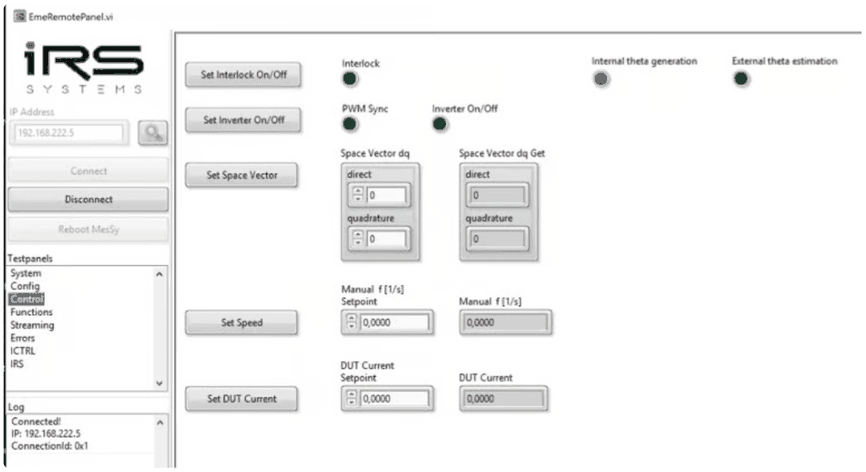
- Set Interlock On/Off
- Prepare EME for activation
- When set, some general parameters like “Role” may not and can’t be changed!
- Set Inverter On/Off
- When set, EME is activated:
- It starts synchronization to the DUT in case of emulator modes
- In Inverter role, it immediately activates the outputs to control current on the motor load
- The feedback flags
- “PWM sync”
- is immediately activated
- and remains active until “Set Inverter On/Off” is reset by the user.
- It indicates that EME “should be active”
- “Inverter On/Off”
- remains activated, as long as there is no error condition.
- I.e. it is reset as soon as an error occurs.
- “PWM sync”
- When set, EME is activated:
- Set Space Vector
- Sets the “induced voltage of the motor” relative to DC-link-voltage.
- Only use quadrature; do not use direct, because this leads to abnormal phase shifts.
- I.e. if quadrature set to 0
- there is no induced voltage from the motor
- no real power simulated
- I.e. if quadrature set to 0.9
- maximum induced voltage of the motor (90% of available DC-Voltage ½)
- maximum real power is simulated
- the limit of this parameter is 0.9.
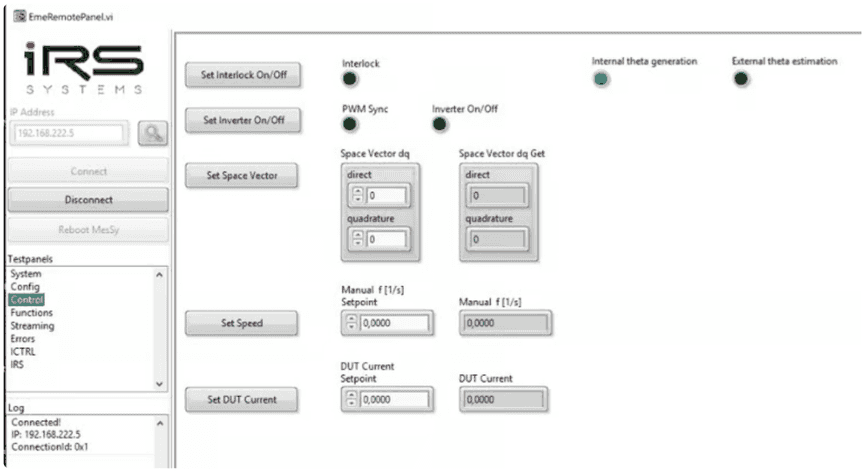
- Set Speed:
- Defines both
- position sensor signal frequency
- is generated independently from EME activity
- both for resolver and SIN/COS
- motor output frequency
- position sensor signal frequency
- Typical values are 0…500Hz.
- The motor output frequency is calculated as speed * polepairs.
- Defines both
- Set DUT Current
- Reserved, currently unused parameter.
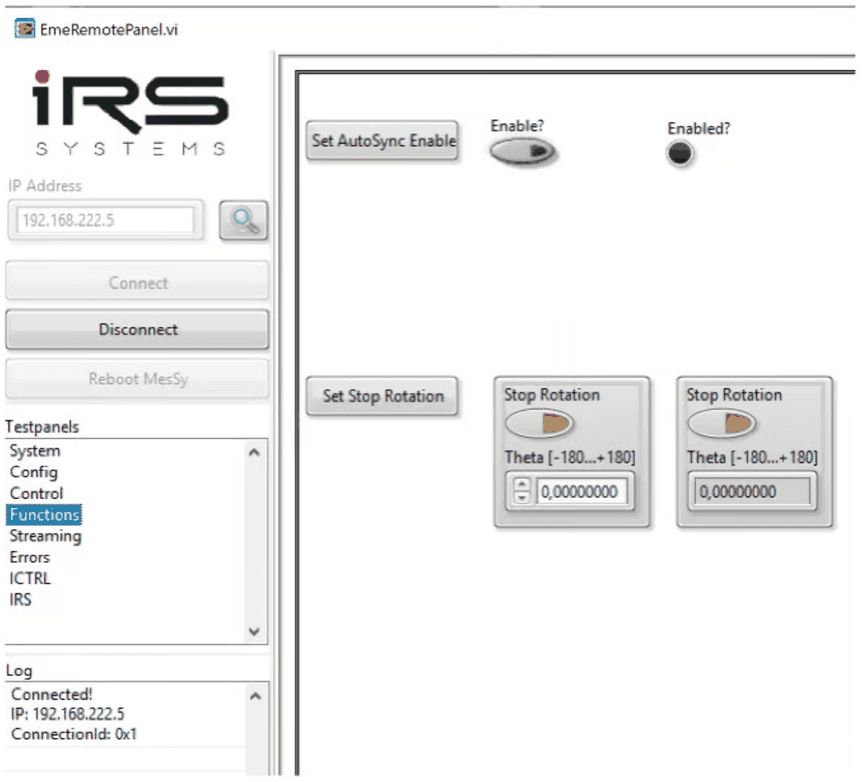
8.2.5Functions
Sub-panel “Functions” contains the following two functionalities:
- AutoSync Enable
- Set to True to enable easy synchronization.
- Explanation for this function see Synchronisation.
- Set Stop Rotation
- Stop Rotation:
- False: rotation motor is being simulated
- True: motor at fixed position is being simulated
- Theta [-180…+180°]
- In case of stopped rotation, this position will be set.
- Please note that the simulation may only move to the selected position, when speed is non-zero!
- Stop Rotation:
8.2.6Streaming
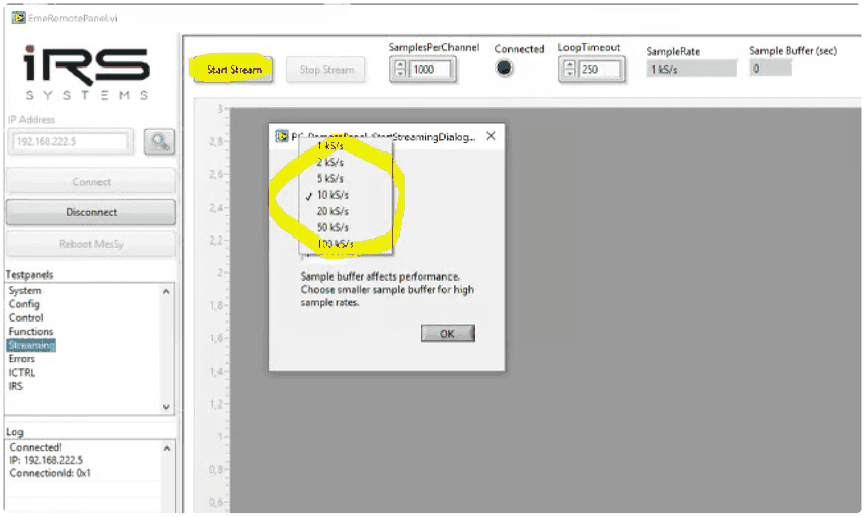
By using the “Streaming” sub-panel waveforms may be captured from EME. Waveform streaming is started after:
- Start Stream
- button is pressed -> window appears to adjust streaming sampling rate
- 100kS/s is the maximum sampling rate,
- 10kS/s is mostly sufficient and leads to higher performance on the PC.
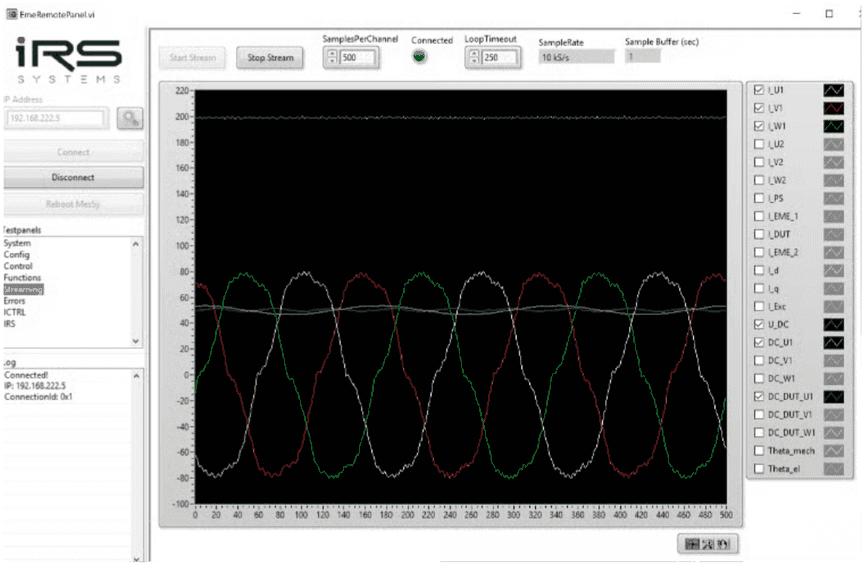
- When stream is active, different waveforms may be selected:
- With the LabVIEW API the user may additionally:
- Continuously stream data to file (TDMS format)
- Get characteristic values from stream (RMS phase currents, DC-voltage,…)
- See
Eme_STREAMING_MemoryStream_GetChannel_TS.vi
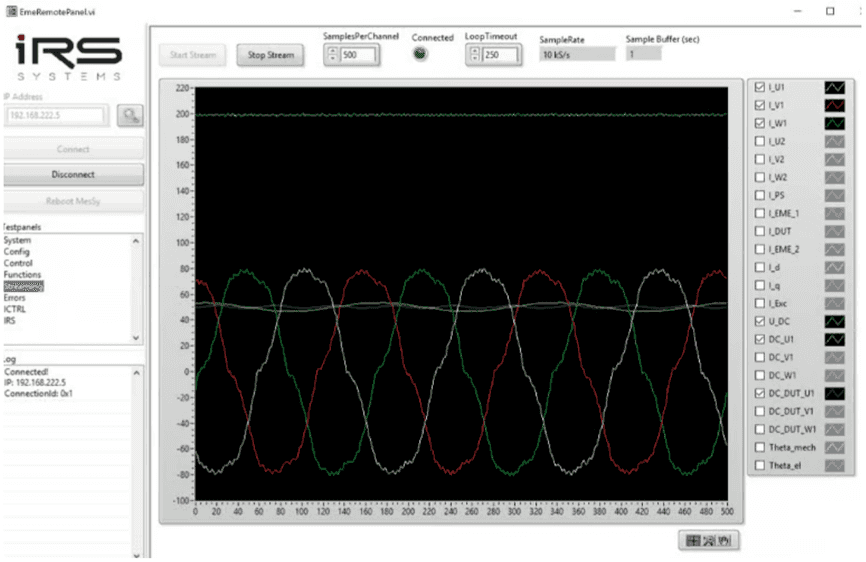
- The waveforms have the following meaning:
- I_U/V/W1
- phase currents of inverter phase U, V, W
- positive values mean direction into EME
- negative values out from EME
- I_U/V/W1
- The waveforms have the following meaning:
- I_PS
- DC current from HV power supply
- I_DUT
- DC current to DUT
- Positive values mean motor operation of EME
- Negative values indicate recuperation operation
- I_d/q
- Calculated value from phase currents in d/q-direction
- I_Exc
- Optional exciter current for simulation of externally excited motors
- U_DC
- DC-Link voltage
- DC_U/V/W1
- When EME is active: Duty cycle generated by EME on motor phases U,V,W
- When EME is inactive: represents a “theoretical” duty cycle, which would be applied when EME would be active
- DC_DUT_U/V/W1
- Measured duty cycle from DUT
- Theta_mech
- Current mechanical position
- Theta_el:
- Current electrical position ( = mechanical position * polepairs)
- I_U/V/W2
- Reserved for 6-phase systems
- I_EME_1/2
- Reserved for 6-phase systems
- I_PS
8.2.7Errors
“Errors” sub-panel indicates errors, which may occur:
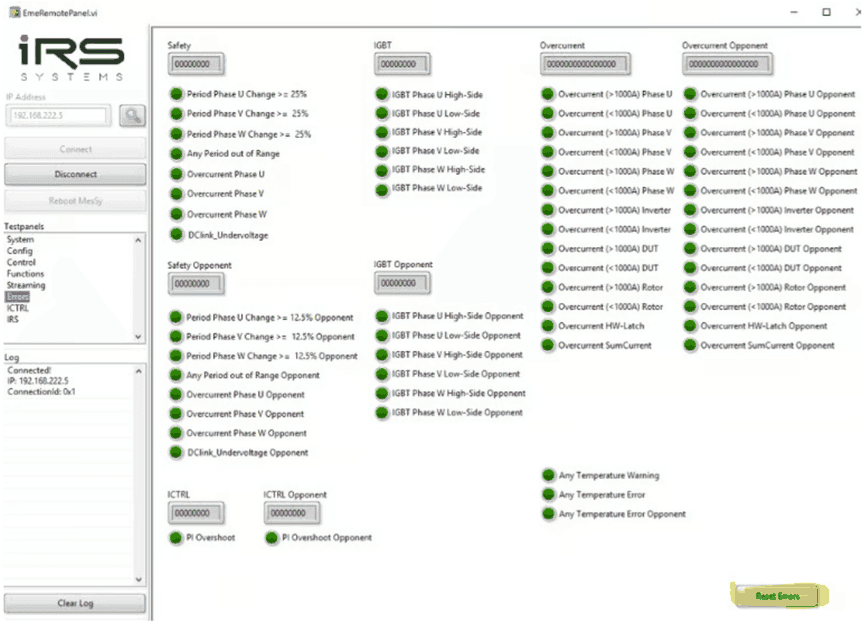
With the button “Reset Errors” errors flags may be reset as soon as the error is not present anymore. The error flags indicate:
- Safety:
- Period out of range:
- There was no PWM-signal from DUT
- either on specific phase U,V,W or on any phase
- Overcurrent Phase U/V/W
- Software overcurrent shut-down
- current on respective phase exceeded +1000A or -1000A.
- one sample (10µs sample time) is sufficient to trigger this error.
- DCLink_Undervoltage
- The DC link voltage fell below configured limit.
- The limit is configured in EME and may be adapted by IRS.
- Period out of range:
- IGBT Phase U/V/W High/Low side:
- If this error occurs, there is a hardware damage on IGBT power switch.
- Power stage must be repaired.
- Overcurrent (</> 1000A) Phase U/V/W/Inverter/DUT/Rotor
- Indicates that the HW overcurrent shutdown has been triggered by the respective current sensor
- There is a separate indicator for every phase and polarity
- Overcurrent Sum Current
- Software overcurrent detection for sum current of motor phases
- Any Temperature
- …Opponent:
- All error flags from second linked EME - reserved for 6-phase systems
8.2.8ICTRL
The sub-panel „ICTRL” may be used for inverter operation. It contains settings for using EME in current controlled mode.
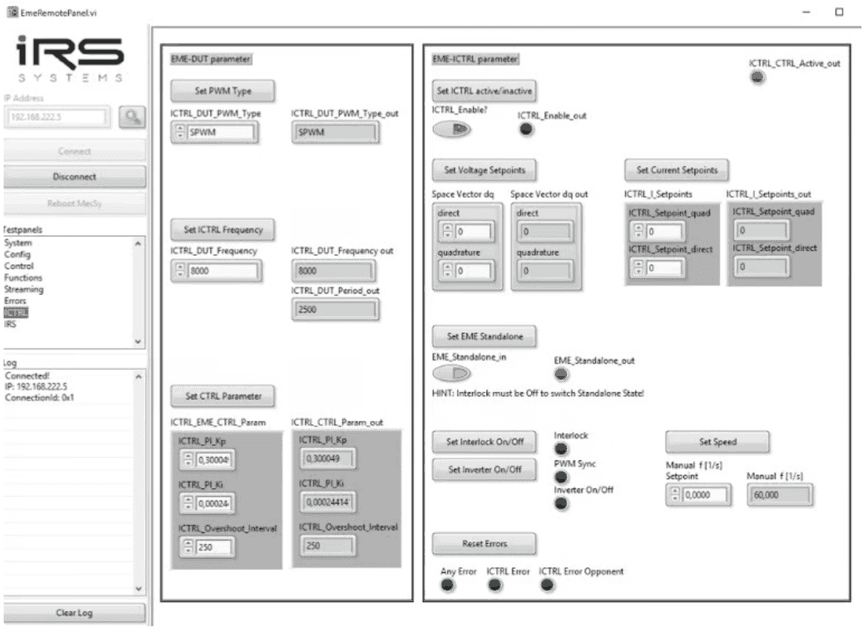
The following parameters need to be set for inverter operation:
- Set ICTRL Frequency switching frequency in Hz
- Set PWM Type
- SPWM sinusoidal modulation
- SVPWM standard space-vector-PWM
- Set CTRL parameters
- ICTRL_PI_Kp: proportional value of current controller
- ICTRL_PI_Ki: integral value of current controller
- ICTRL_Overshoot: max. difference between setpoint and actual current
- Set ICTRL active/inactive
- When False:
- use direct modulation via space vector d and q component
- When True: use
- When False:
- Set Voltage Setpoints
- Sets the “induced voltage of the motor” relative to DC-link-voltage.
- Only use quadrature; do not use direct, because this leads to abnormal phase shifts.
- I.e. if quadrature set to 0
- there is no induced voltage from the motor
- no real power simulated
- I.e. if quadrature set to 0.9
- maximum induced voltage of the motor (90% of available DC-Voltage ½)
- maximum real power is simulated
- the limit of this parameter is 0.9
- identical parameter as in Control (control sub-panel)
- Set Current Setpoints
- Sets the phase current to control in direct and quadrature direction in A
- Set EME Standalone
- Should be always active (default setting)
- Only used for IRS
Furthermore, the same buttons and controls as in “Control” sub-panel are visible for easy operation (Set Interlock On/Off, Set Inverter On/Off, Set Speed, Reset Errors).
8.3Automated operation
In the following chapter typical programming flows are described for normal Emulator and Inverter operation.
8.3.1Inverter operation
The following figure illustrates a typical programming flow for inverter operation, especially as it is used for current sensor calibration of the DUT.
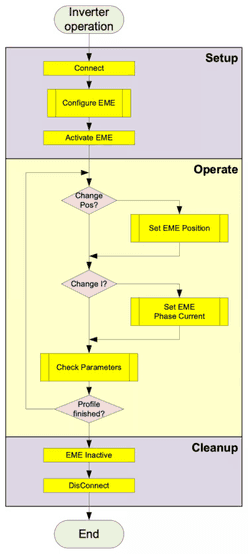
The following steps and parameters show a typical setting for inverter operation, especially for current sensor calibration, where DC currents are applied on the motor phases.
In the table,
- Absolutely necessary commands/parameters are marked in yellow and blue for environment
- recommended parameters are marked in green, they are set by default.
- while others are not relevant.
The order in the table should be regarded as order of commands, which should be sent one after another to EME.
Italic steps are environment settings. Bold written command name can be found in the JSON communication description file:
Setup
Setup environment
| Step | Parameters | Remarks | Marked |
|---|---|---|---|
| Connect Passive load | short EME output via DUT in active short circuit, while HV-DC supply of DUT is disconnected. | blue | |
| Disconnect DC from DUT | blue | ||
| Connect EME | IP-Address | Default = 192.168.222.5 | yellow |
EME configuration commands:
| Step (JSON command name) | Parameters | Remarks | Marked |
|---|---|---|---|
| SET_Role | Inverter Single | yellow | |
| SET_DutParameter | SVPWM | – | |
| SET_MotorParameter | Polepairs = 1 | Default parameter, other values possible | green |
| SET_MotorParameter | Offset Theta = 0 | green | |
| SET_MotorParameter | Angular Displ. = 0 | green | |
| SET_SetpointTransition | True @ 1e-6 | Other value possible | yellow |
| SET_CouplingNetworkParameter | R=0.001, L=85e-6 | Default parameters, recommended for standard setup | yellow |
| SET_ICTRL_DUT_PWM_TYPE | SPWM | Default parameters, recommended for standard setup | green |
| SET_ICTRL_DUT_Frequency | 8000 | Default parameters, recommended for standard setup | green |
| SET_ICTRL_EME_CTRL_Param | Kp=0.3, Ki=0,00025, Overshoot=250 | Default parameters, recommended for standard setup | green |
| SET_ICTRL_EME_Enable_CTRL | True | Must be active for current control | yellow |
| SET_ICTRL_Setpoints | direct=quadrature=0 | Must be 0 before activation | yellow |
| SET_EME_Standalone | True | Default, must be True | green |
| SET_ManualRevolutionSpeed | 60 | Other value possible, typ. 0…200 | yellow |
| SET_StopRotation | False | Must be false for rotating operation and sync. | yellow |
Activate Environment
| Step | Parameters | Remarks | Marked |
|---|---|---|---|
| Activate HV-Supply | 200V | Must be above undervoltage limit | blue |
| Activate Cooling | Typ. 5…10 l/min depending on current profile | blue |
Activate EME
| Step (JSON command name) | Parameters | Remarks | Marked |
|---|---|---|---|
| ERROR_ResetError | none | Action without parameters | yellow |
| SET_Interlock | True | yellow | |
| ACTION_PwmSync | True | yellow |
From now on, EME output is active and may be operated at different setpoints.
Operate
The following steps may be executed at any time during operation.
Operate rotation and apply current:
| Step (JSON command name) | Parameters | Remarks | Marked |
|---|---|---|---|
| SET_ManualRevolutionSpeed | 60 | Other value possible, typ. 0…200 | yellow |
| SET_ICTRL_Setpoints | Direct = 0, Quadrature = 0…600 | Please make sure that proper water cooling is active when applying currents >50A!!!! | yellow |
Operate at fixed position (necessary for current sensor calibration) while applying current:
| Step (JSON command name) | Parameters | Remarks | Marked |
|---|---|---|---|
| SET_StopRotation | True, Theta = -180 … 180 | Typical current sensor calibration positions: 0° / -120° / +120° | yellow |
| SET_ICTRL_Setpoints | Direct = 0, Quadrature = 0…600 | Please make sure that proper water cooling is active when applying currents >50A!!!! | yellow |
Reading measurement values from streaming data is available with LabVIEW library.
Cleanup
Deactivate EME
| Step (JSON command name) | Parameters | Remarks | Marked |
|---|---|---|---|
| SET_ICTRL_Setpoints | Direct = 0, Quadrature = 0 | yellow | |
| ACTION_PwmSync | False | yellow | |
| SET_Interlock | False | yellow |
Cleanup Environment
| Step | Parameters | Remarks | Marked |
|---|---|---|---|
| Shutdown HV-Supply | 0V | blue |
8.3.2Normal Motor Emulator operation
The following figure illustrates a typical programming flow for emulator operation. After configuration of EME and DUT, the synchronization of EME to DUT must happen. Afterwards the user may run a current profile, while EME parameters may be kept constant or may be changed at any time.
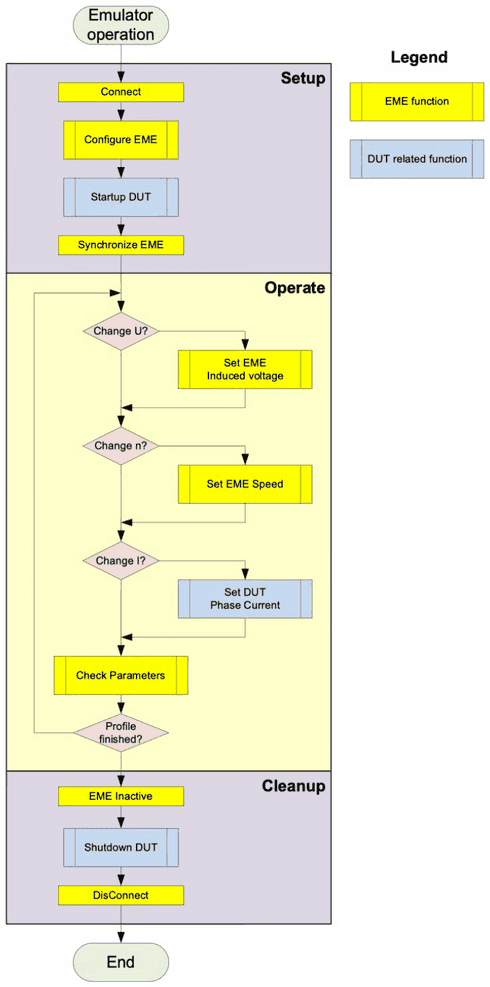
The following steps and parameters show a typical setting for normal emulator operation. In the table,
- Absolutely necessary commands/parameters are marked in yellow and blue for environment
- recommended parameters are marked in green, they are set by default.
- while others are not relevant.
The order in the table should be regarded as order of commands, which should be sent one after another to EME.
Italic steps are environment settings. Bold written command name can be found in the JSON communication description file:
Setup
Setup environment
| Step | Parameters | Remarks | Marked |
|---|---|---|---|
| Connect DUT Hardware | (phases, DC, position sensor, communication LV-supply) | Wrong connections may lead to critical currents and damage. | blue |
| Connect EME | IP-Address | Default = 192.168.222.5 | yellow |
EME configuration commands:
| Step (JSON command name) | Parameters | Remarks | Marked |
|---|---|---|---|
| SET_Role | Single | yellow | |
| SET_DutParameter | SVPWM | yellow | |
| SET_MotorParameter | Polepairs = according to DUT | Default = 1 | yellow |
| SET_MotorParameter | Offset Theta = accord. to DUT | Default = 0 | yellow |
| SET_MotorParameter | Angular Displ. = 0 | yellow | |
| SET_SetpointTransition | True @ 1e-6 | Other value possible | yellow |
| SET_CouplingNetworkParameter | R=0.001, L=85e-6 | yellow | |
| SET_EME_Standalone | True | Default, must be True | green |
| SET_ManualRevolutionSpeed | 60 | Other value possible, typ. 0…200 | yellow |
| SET_ManualSetpointDq | Direct=0, quadrature=0.05 | Should be low, but q > 0 is recommended | yellow |
| SET_AutoSyncEnable | True | Enabling is recommended. If DUT increases its duty cycle slowly before synchronization, it may also be set to False. | yellow |
| SET_StopRotation | False | Must be false for rotating operation and during synchronization. | green |
EME configuration commands depending on position sensor, either SIN/COS, resolver or sensorless.
In case of Resolver:
| Step (JSON command name) | Parameters | Remarks | Marked |
|---|---|---|---|
| SET_ResSiParameter | TransferFactor = 1, SineAmplitude = 100 [%], CosineAmplitude = 100 [%], PhaseCorrection = 0 [°] | Parameters according to DUT resolver parameters. Here, default parameters are shown | yellow |
In case of SIN/COS:
| Step (JSON command name) | Parameters | Remarks | Marked |
|---|---|---|---|
| SET_AMRGMRParameter | Offset = 2.5, Amplitude = 2.0 | Parameters according to DUT sensor parameters. Multiplier defines the ratio of signal frequency to mechanical speed. | yellow |
| SET_AMRGMRMultiplier | GMR_SinP_Multiplier = 1, GMR_SinN_Multiplier = 1, GMR_CosP_Multiplier = 1, GMR_CosN_Multiplier = 1, AMR_SinP_Multiplier = 2, AMR_SinN_Multiplier = 2, AMR_CosP_Multiplier = 2, AMR_CosN_Multiplier = 2 | Parameters according to DUT sensor parameters. Multiplier defines the ratio of signal frequency to mechanical speed. | yellow |
Activate Environment
| Step | Parameters | Remarks | Marked |
|---|---|---|---|
| Activate HV-Supply | According to DUT volt. | Must be above undervoltage limit, dep | blue |
| Activate Cooling | Typ. 5…10 l/min depending on current profile | blue | |
| Activate DUT | After this step, DUT must activate PWM output | blue |
Activate EME
| Step (JSON command name) | Parameters | Remarks | Marked |
|---|---|---|---|
| ERROR_ResetError | none | Action without parameters | yellow |
| SET_Interlock | True | yellow | |
| ACTION_PwmSync | True | Must be activated before DUT duty cycle is too high. | yellow |
From now on, EME output is active and may be operated at different setpoints.
Operate
The following steps may be executed at any time during operation.
Operate rotation and apply current:
| Step (JSON command name) | Parameters | Remarks | Marked |
|---|---|---|---|
| SET_ManualRevolutionSpeed | 60 | Other value possible, typ. 0…200 | yellow |
| SET_ManualSetpointDq | Direct=0, quadrature=0.1…0.9 | Higher quadrature -> means higher induced voltage -> higher real power -> higher DC-current. | yellow |
| Set DUT current | +-600A; Within the possible power ranges of the system!! | Negative current setpoints usually result in recuperation operation. Both d- and q-current may be applied, while q-current leads to real power and higher DC-current. | blue |
Reading measurement values from streaming data is available with LabVIEW library.
Cleanup
Deactivate EME
| Step (JSON command name) | Parameters | Remarks | Marked |
|---|---|---|---|
| Set DUT current | 0 | blue | |
| ACTION_PwmSync | False | yellow | |
| SET_Interlock | False | yellow |
Cleanup Environment
| Step | Parameters | Remarks | Marked |
|---|---|---|---|
| Shutdown HV-Supply | 0V | blue |
Transport & Storage
9.1Safety note for transport
9.2Transport inspection
Check the delivery immediately on receipt for completeness and transport damage. Check the shock and tilt indicators placed on the wooden transport box.
Proceed with visible damage as follows:
- Do not receive the delivery or only conditionally receive the delivery.
- Make a note of extent of damage on the transport documents or the bill of delivery.
- Submit a complaint.
- Transport and initial commissioning implemented by manufacturer.
9.3Packaging
The packaging is to protect the individual components to the assembly from shipping damage, corrosion and other damage. Therefore, do not destroy the packaging and remove just before the installation.
9.4Storage
Store the unit under the following conditions:
- Do not store outdoor.
- Keep dry and dust free.
- Do not expose to aggressive media.
- Protect from direct sunlight.
- Avoid mechanical shocks.
Assembly
10.1Assembly, installation and initial commissioning
- Assembly installation and initial commissioning implemented by manufacturer.
Maintenance and cleaning
In the following sections, the maintenance is described, which is required for optimal and trouble-free operation. If you have questions about maintenance work and intervals contact the manufacturer. Connections for higher currents must be checked for clean contacting and mechanical strength (tensile test).
| Component | No. / System | After setup | Monthly | Yearly | To Do |
|---|---|---|---|---|---|
| High current contacts motor phases | 9 | X | X | Check proper connection of the ring-lugs. Do the ring lugs lie flat on the contact area? Are the nuts pulled tight? Do a manual tensile test on the cable. | |
| High current contacts HV DC | 12 | X | |||
| calibration | 1 set | According To agreement Typ. 1..3 years | EME calibration needs to be done on site with calibration kit. | ||
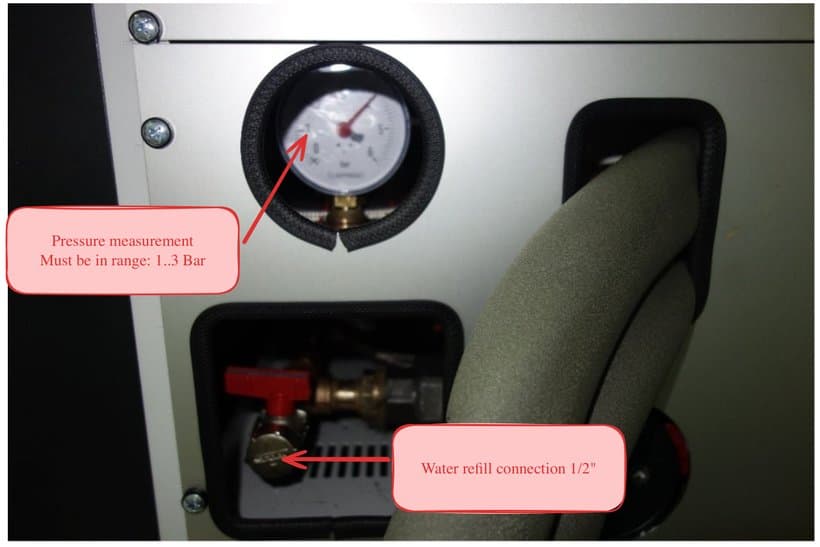
| EME internal cooling circuit | 3 | x | X | Check water pressure at manometer (see chapter Cooling water pressure check). ggf. nachfüllen (siehe Kapitel Fill the cooling water) |
11.1Cooling water pressure check
11.2Fill the cooling water
If the internal pressure drops below 1 bar, the internal cooling circuit must be refilled. To do so, connect a tube with ½“ fitting to the refill connection (see picture above) and fill with a water/glycol mixture with a pressure of at least 3 bar.
Optimum mixture is:
- 25% glycol
- 75% clean water
Open the valve behind the refill connection to let water/glycol mixture flow into the internal buffer. Close the valve when the manometer shows 2,5 bar. Disconnect the filling tube, and clean remnants of eventually spilled water/glycol.
11.3Cleaning
Switch off system before cleaning, service and maintenance and measures and secure against immediate restart.
Cool off system before cleaning and service.
The surface of devices can be cleaned with a damp cloth.
If water or is present in the drip pan, absorb it with a dry cloth.
System Errors
12.1System errors
Following chapter mentions possible causes for system errors and its troubleshooting.
12.2Software errors
Please contact manufacturer for any software errors which can’t be solved after understanding these explanations in the functional description.
Disassembly & Disposal
13.1Disassembly and disposal
After you stop using disassemble and perform an environmentally responsible manner.
13.2Safety
13.3Dismantling
13.4Disposal
The appliance is not intended for private use. It is manufactured and supplied for the commercial sector and should be disposed of properly by the end user.