11.1Touchpad screens
11.1.1Home
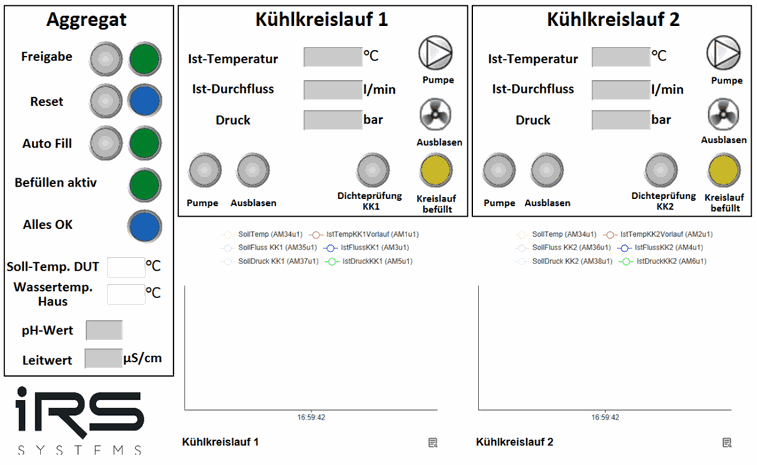
The following functions are available in the Aggregat (unit) area on the left:
- Freigabe (enable) is granted with the gray button; as soon as it has been granted, the green indicator lights up
- Reset must be pressed when the blue indicator next to it flashes, to acknowledge errors
- with Auto Fill, after both cooling circuits have been blown out, the system checks whether the fill level is still at maximum. If not, a valve opens the circuit for refilling, so that the fill level is automatically kept at the correct level
The following status indicators are also available:
- Befüllen aktiv (filling active)
- Alles OK (all OK)
- pH value measurement (IRS ICEcube PRO+ only)
- Conductivity measurement (IRS ICEcube PRO+ only)
The target temperature specifies the desired cooling water temperature with which the DUT is to be temperature-controlled. The water temperature of the facility water connection must be entered.
The following functions are available in the Kühlkreis 1 and Kühlkreis 2 (cooling circuit 1 and 2) areas:
- activating the pump with the Pumpe (pump) button
- blowing out the cooling water with the Ausblasen (blow out) button
- leak test of the DUT circuit with the Dichteprüfung (leak test) button
The following status indicators are also available:
- Ist-Temperatur (actual temperature): measured temperature of the supply line
- Ist-Durchfluss (actual flow): measured flow
- Druck (pressure): measured pressure
- Kreislauf befüllt (circuit filled) indicator
11.1.2Configuration
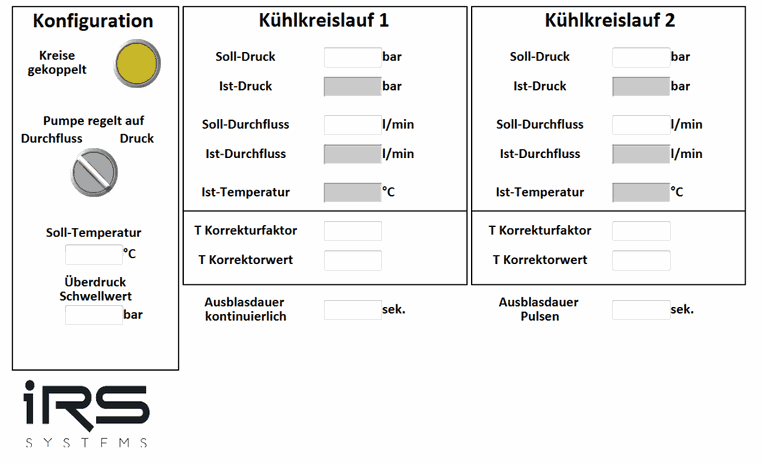
The following functions are available in the Konfiguration (configuration) area on the left:
- select the Kreise gekoppelt (circuits coupled) button if the circuits are connected to each other
- Use the Pumpe regelt auf (pump controls to) rotary switch to switch between pressure-controlled and flow-controlled operation
The following status indicators are also available:
The target temperature of the DUT is entered manually here (10–70 °C).
The following functions are available in the Kühlkreislauf 1 and Kühlkreislauf 2 (cooling circuit 1 and 2) areas:
- Setting the target pressure in Soll-Druck (0–9 bar)
- Setting the target flow in Soll-Durchfluss (0–50 l/min)
- Setting the temperature correction factor in T Korrekturfaktor
- Setting the temperature correction value in T Korrekturwert (offset of the temperature sensor)
- Setting the continuous blow-out duration in Ausblasdauer kontinuierlich
- Setting the pulsed blow-out duration in Ausblasdauer Pulsen
The following status indicators are also available:
- Ist-Temperatur
- Ist-Durchfluss
- Pressure
- Kreislauf befüllt light
11.1.3Status and error log
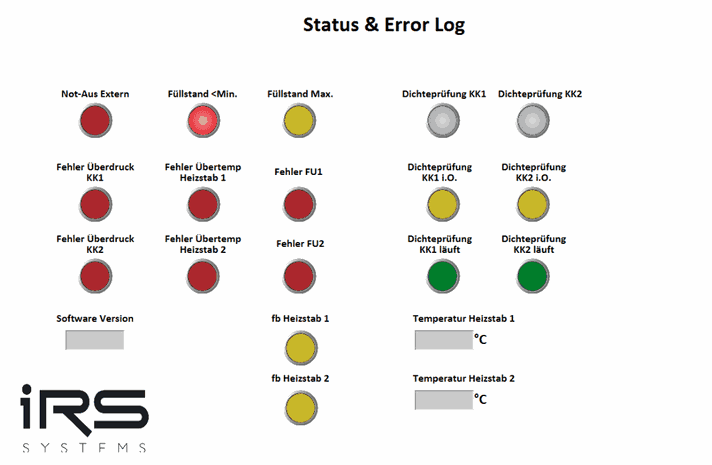
The various error indicators are listed here; an error is present when they light up red. Troubleshooting is described in Troubleshooting.
The gray Dichteprüfung KK (leak test, cooling circuit) button performs a pressure test of the cooling water circuits. The circuit is pressurized with compressed air and the pressure drop is measured, which allows conclusions to be drawn about correct and leak-tight lines / DUTs. The green and yellow lights below it show the status.
The software version and the status, including the heating element temperatures, are shown in the lower part.
11.1.4Switching counter
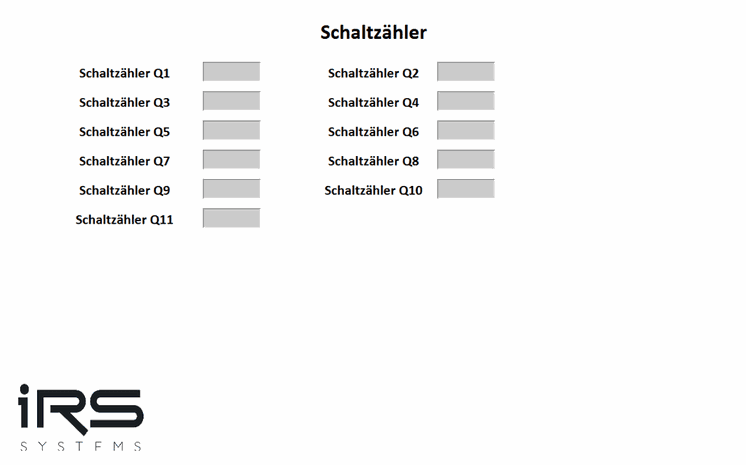
The switching cycles of the solenoid valves Q1–Q11 are recorded and displayed here for maintenance and repair measures.
11.2Troubleshooting
Not-Aus Extern (external emergency stop):
Make sure that the system can be switched on again safely, unlock the emergency stop, and on the screen first reset the cooling unit and then enable it again.
Füllstand < Min (fill level below minimum):
Fill up the cooling water to maximum via the connection provided for this purpose on the cooling unit.
Fill level above maximum:
Drain the cooling water via one of the two cooling circuits. Connect a hose to the supply of KK1 or KK2 (cooling circuit 1 or 2) and place the hose in a collecting container. Switch on the respective pump to pump the coolant out of the tank.
Overpressure cooling circuit 1 and 2:
Stop the pumps. Check the hoses for kinks. Make sure that no object is standing on the hoses or interrupting or impairing the flow. With pressure-controlled pump control, reduce the target pressure.
Overtemperature heating element 1 and 2:
Deactivate the heating elements. Reduce the target temperature in the tank.
Frequency converter 1 and 2:
Switch off the IRS ICEcube.
11.3LOGO! Modbus TCP mapping
| I/O (E/A) | Block type (LOGO) | Description | Address | IEC type | Category | Offset S7 | Info |
|---|---|---|---|---|---|---|---|
| E VB-0-0 | NI | Reset Safety | 1 | coil | write | 0 | Edge |
| E VB-0-2 | NI | Blow-out KK1 | 3 | coil | write | 0 | Edge |
| E VB-0-3 | NI | Blow-out KK2 | 4 | coil | write | 0 | Edge |
| E VB-0-4 | NI | Blow-out reserve KK1 | 5 | coil | write | 0 | Edge |
| E VB-0-5 | NI | Blow-out reserve KK1 | 6 | coil | write | 0 | Edge |
| E VB-0-6 | NI | Activate auto fill | 7 | coil | write | 0 | Edge |
| E VB-0-7 | NI | Enable | 8 | coil | write | 0 | Edge |
| E VB-1-0 | NI | Pump request KK1 | 9 | coil | write | 0 | Edge |
| E VB-1-1 | NI | Pump request KK2 | 10 | coil | write | 0 | Edge |
| E VB-1-2 | NI | Leak test KK1 | 11 | coil | write | 0 | Edge |
| E VB-1-3 | NI | Leak test KK2 | 12 | coil | write | 0 | Edge |
| A VB-10-0 | NQ | Flashes on safety error | 81 | coil | read | 0 | Feedback |
| A VB-10-1 | NQ | Enable active | 82 | coil | read | 0 | Feedback |
| A VB-10-2 | NQ | Filling process active | 83 | coil | read | 0 | Feedback |
| A VB-10-3 | NQ | Blow-out KK1 active | 84 | coil | read | 0 | Feedback |
| A VB-10-4 | NQ | Blow-out KK2 active | 85 | coil | read | 0 | Feedback |
| A VB-10-5 | NQ | Pump KK1 active | 86 | coil | read | 0 | Feedback |
| A VB-10-6 | NQ | Pump KK2 active | 87 | coil | read | 0 | Feedback |
| A VB-10-7 | NQ | External emergency stop | 88 | coil | read | 0 | Feedback |
| A VB-11-0 | NQ | Fill level min | 89 | coil | read | 0 | Feedback |
| A VB-11-1 | NQ | Fill level max | 90 | coil | read | 0 | Feedback |
| A VB-11-2 | NQ | KK1 filled | 91 | coil | read | 0 | Feedback |
| A VB-11-3 | NQ | KK2 filled | 92 | coil | read | 0 | Feedback |
| M1 | M | Pump KK1 | 8257 | coil | read | 0 | Status pump requested |
| M2 | M | Pump KK2 | 8258 | coil | read | 0 | Status pump requested |
| M3 | M | Blow-out KK1 active | 8259 | coil | read | 0 | Status |
| M4 | M | Blow-out KK2 active | 8260 | coil | read | 0 | Status |
| M5 | M | Reverse blow-out KK1 active | 8261 | coil | read | 0 | Status |
| M6 | M | Reverse blow-out KK2 active | 8262 | coil | read | 0 | Status |
| M7 | M | Safety All OK | 8263 | coil | read | 0 | Status |
| M9 | M | KK1 filled | 8265 | coil | read | 0 | Status |
| M10 | M | KK2 filled | 8266 | coil | read | 0 | Status |
| M11 | M | External emergency stop | 8267 | coil | read | 0 | Status |
| M12 | M | Enable | 8268 | coil | read | 0 | Status |
| M13 | M | Auto fill active | 8269 | coil | read | 0 | Status |
| M15 | M | Fill level min. | 8271 | coil | read | 0 | Status |
| M16 | M | Fill level max. | 8272 | coil | read | 0 | Status |
| M18 | M | fb heating element 1 | 8274 | coil | read | 0 | Feedback |
| M19 | M | fb heating element 2 | 8275 | coil | read | 0 | Feedback |
| M20 | M | Leak test KK1 running | 8276 | coil | read | 0 | Status |
| M21 | M | Leak test KK2 running | 8277 | coil | read | 0 | Status |
| M22 | M | Leak test KK1 OK | 8278 | coil | read | 0 | Feedback |
| M23 | M | Leak test KK2 OK | 8279 | coil | read | 0 | Feedback |
| M32 | M | Flow control high, pressure control low | 8288 | coil | write | 0 | ON/OFF (high/low) |
| M33 | M | Error circuits coupled | 8289 | coil | write | 0 | Error |
| M37 | M | Error overtemperature heating element 1 | 8293 | coil | read | 0 | Error |
| M38 | M | Error overtemperature heating element 2 | 8294 | coil | read | 0 | Error |
| M39 | M | Error FU1 (frequency converter 1) | 8295 | coil | read | 0 | Error |
| M40 | M | Error FU 2 (frequency converter 2) | 8296 | coil | read | 0 | Error |
| M41 | M | Error overpressure KK1 | 8297 | coil | read | 0 | Error |
| M42 | M | Error overpressure KK2 | 8298 | coil | read | 0 | Error |
| AM1 | AM | Actual temp KK1 supply | 529 | holding register | read | 40000 | Read Int |
| AM2 | AM | Actual temp KK2 supply | 530 | holding register | read | 40000 | Read Int |
| AM3 | AM | Actual flow KK1 | 531 | holding register | read | 40000 | Read Int |
| AM4 | AM | Actual flow KK2 | 532 | holding register | read | 40000 | Read Int |
| AM5 | AM | Actual pressure KK1 | 533 | holding register | read | 40000 | Read Int |
| AM6 | AM | Actual pressure KK2 | 534 | holding register | read | 40000 | Read Int |
| AM7 | AM | pH value | 535 | holding register | read | 40000 | Read Int |
| AM8 | AM | Conductivity | 536 | holding register | read | 40000 | Read Int |
| AM9 | AM | Temp heating element 1 | 537 | holding register | read | 40000 | Read Int |
| AM10 | AM | Temp heating element 2 | 538 | holding register | read | 40000 | Read Int |
| AM11 | AM | Heating element interlock; AM11=0 control active; AM11=1 heating element 1 deactivated; AM11=2 heating element 2 deactivated; AM11=3 both heating elements are deactivated | 539 | holding register | read | 40000 | Read Int |
| AM14 | AM | Software version LOGO | 542 | holding register | read | 40000 | Status |
| AM27 | AM | Blow-out duration in s (default 5 s, manual <1) | 555 | holding register | read/write | 40000 | Set/Read Int |
| AM28 | AM | Pulse duration in s (default 5 s, manual <1) | 556 | holding register | read/write | 40000 | Set/Read Int |
| AM29 | AM | Overpressure threshold (default 2.7 bar) | 557 | holding register | read/write | 40000 | Set/Read Int |
| AM30 | AM | Correction factor temp KK1 | 568 | holding register | write | 40000 | Set Int |
| AM31 | AM | Correction factor temp KK1 | 569 | holding register | write | 40000 | Set Int |
| AM32 | AM | Correction factor temp KK2 | 570 | holding register | write | 40000 | Set Int |
| AM33 | AM | Correction factor temp KK2 | 571 | holding register | write | 40000 | Set Int |
| AM34 | AM | Target temp | 572 | holding register | write | 40000 | Set Int |
| AM35 | AM | Target flow KK1 | 573 | holding register | write | 40000 | Set Int |
| AM36 | AM | Target flow KK2 | 574 | holding register | write | 40000 | Set Int |
| AM37 | AM | Target pressure KK1 | 575 | holding register | write | 40000 | Set Int |
| AM38 | AM | Target pressure KK2 | 576 | holding register | write | 40000 | Set Int |
| AM42 | AM | Facility water temperature | 580 | holding register | write | 40000 | Set Int |
| I3 | I | Auxiliary contact heating element 1 | 3 | Dig. input | read | 10000 | Feedback |
| I4 | I | Auxiliary contact heating element 2 | 4 | Dig. input | read | 10000 | Feedback |