Legal Notices
1.1Warning Notices
This manual contains notices that you must observe for your personal safety and to prevent damage to property. Notices concerning your personal safety are highlighted by a warning triangle; notices concerning damage to property alone appear without a warning triangle. Depending on the hazard level, the warning notices are shown as follows, in decreasing order of severity.
If more than one hazard level applies, the warning notice for the highest level is always used.
If a warning notice with the warning triangle warns of personal injury, a warning of damage to property can also be added to the same warning notice.
1.2Qualified Personnel
The product/system described in this documentation may only be handled by personnel qualified for the task in question, in compliance with the documentation for that task, in particular the safety instructions and warning notices it contains. Because of their training and experience, qualified personnel are able to recognize risks and avoid possible hazards when working with these products/systems.
1.3Intended Use
1.3.1Permitted Use
With this device (PWZ – Phasen-Winkel-Zuschaltung, phase-angle switching), you can synchronize asynchronous switching signals to a reference signal to switch them at an adjustable phase angle:
- The (asynchronous) digital inputs can be activated at any time, for example by a PLC.
- As soon as the PWZ has detected such a start condition, the input signal is passed on to the corresponding digital output.
However, the switching operations (activation and deactivation) at the outputs do not take place at an arbitrary time, as they do at the input, but at a configurable time (which corresponds to a phase angle). The module knows the current phase angle from the reference input (AC voltage with a frequency of about 50 Hz).
1.4Disclaimer
All information and notes in this manual have been compiled taking into account the applicable standards and regulations, the state of the art, and our many years of knowledge and experience.
The manufacturer accepts no liability for damage resulting from:
- Failure to observe the instructions
- Use other than as intended
- Use of untrained personnel
- Unauthorized modifications
- Technical changes
- Use of unapproved spare parts
For special designs, when additional ordering options are used, or because of the latest technical changes, the actual scope of delivery can differ from the explanations and illustrations described here.
The obligations agreed in the supply contract, the general terms and conditions and the manufacturer's terms of delivery apply, as well as the statutory regulations valid at the time the contract was concluded.
We reserve the right to make technical changes to improve the performance characteristics and as part of further development.
Spare Parts
You can obtain spare parts from IRS or directly from the manufacturer of the respective component.
Safety
This section gives an overview of all important safety aspects for optimum protection of personnel and for safe and trouble-free operation.
Failure to follow the procedures and safety instructions given in this manual can lead to considerable hazards!
IRS Systementwicklung GmbH accepts no liability for damage resulting from failure to observe the provisions of this operating manual.
3.1Reasonably Foreseeable Misuse
3.2Special Hazards
Observe the safety instructions listed here and the warning notices in the other chapters of this manual to reduce health hazards and avoid dangerous situations.
3.3Behavior in Dangerous Situations and Accidents
Preventive measures
- Always be prepared for accidents or fire.
- Keep first-aid equipment (first-aid kit, blankets, etc.) and fire extinguishers within easy reach.
- Familiarize personnel with accident reporting, first-aid and rescue equipment.
- Keep access routes for emergency vehicles clear.
Measures in the event of accidents
- Initiate first-aid measures.
- Recover persons from the danger zone.
- Inform the person in charge on site.
- Alert the emergency services.
- Clear access routes for emergency vehicles.
3.4General Warning of Residual Risks
The test system is built according to the state of the art and the recognized safety rules. Nevertheless, risks to the life and limb of the user or third parties can arise when handling the test system. In particular, faults or operating states that can impair the safety of the users make it mandatory to shut down the equipment (main switch). In this case, the intended condition must be properly restored (for example, by maintenance).
3.5General Signage of the Test Facility
General notes on the signage of the test facility:
3.6Safety Instructions for the MiniPWZ-2
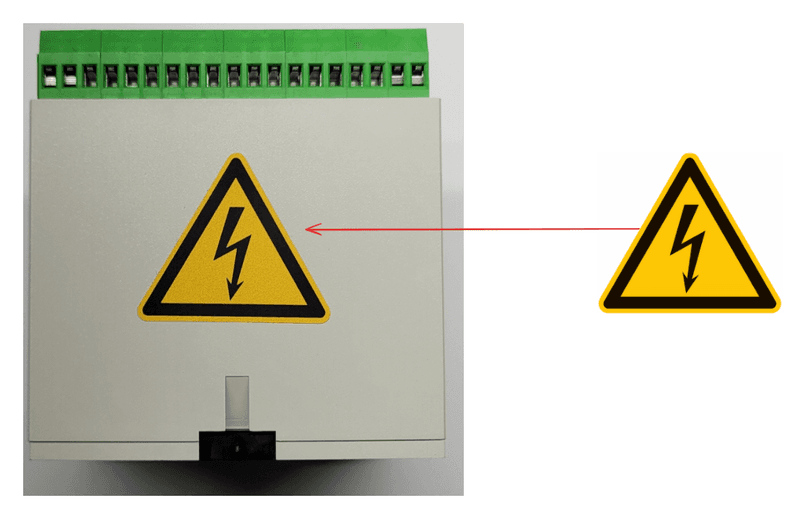
Basic hazards:
Functional Description
With the Mini PWZ II, you can synchronize asynchronous switching signals to a reference signal to switch them at an adjustable phase angle: The (asynchronous) digital inputs can be activated at any time, for example by a PLC. The (synchronous) digital outputs are switched the next time the reference signal reaches the set phase angle.
4.1Operating Modes
The exact behavior of the outputs depends on the mode that is set:
| Mode | Description |
|---|---|
| Disabled | Channel disabled |
| 1 | The input signal is passed directly to the output; angles are not taken into account |
| 2 | Only the switch-on angle is active; the output switches off with the falling edge of the input signal |
| 3 | Switch-on and switch-off angles active |
| 4 | Switch-on and switch-off angles active, no input signal required, switching takes place in every period |
4.2Examples
The behavior of the outputs depends on the state of the inputs when the set phase angle is reached. If, for example, the switch-on angle is set to 90°, the module checks, when the phase angle reaches 90°, whether the input is set, and if so, it switches the output on. If the output is already switched on, it stays switched on.


4.3Channels
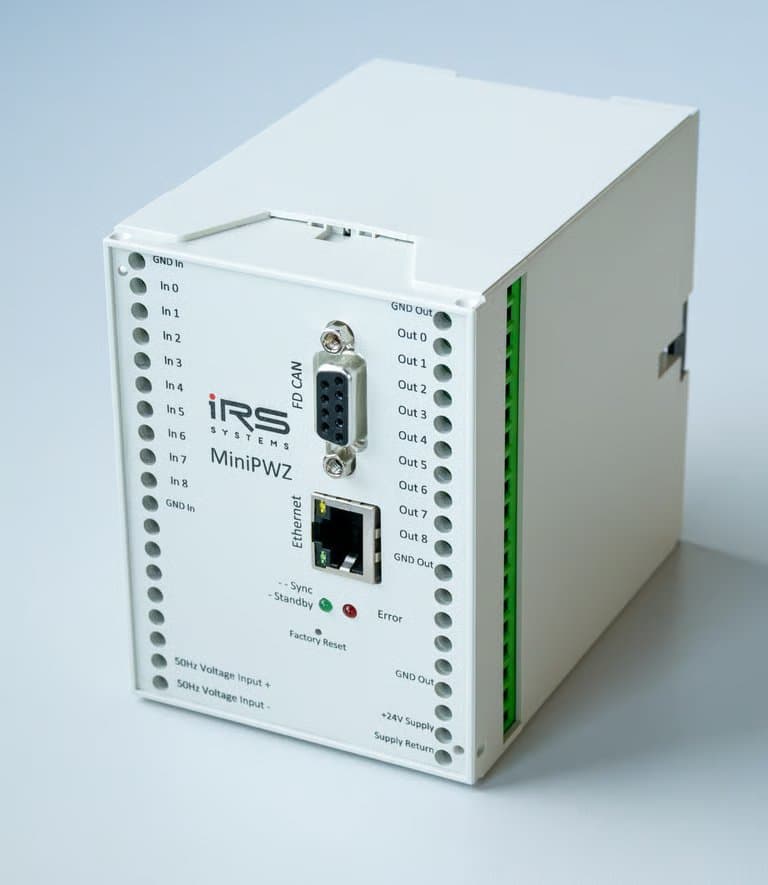
The Mini PWZ II has 4 independent channels, each with its own digital input and its own digital output. The assignment of the channels to the inputs and outputs is static. This means that Input0 and Output0 belong to Channel0, Input1 and Output1 belong to Channel1, and so on.
For each channel, you can set the mode and the switch-on and switch-off angles independently of the other channels. For details on the configuration, see the section WebServer.
4.4Enable Signal
You can connect an enable signal from the PLC to Input4. The input logic of the enable signal is inverted. If nothing is connected to Input4 or the signal level of the PLC is 0 V, all outputs behave as configured in the WebServer. If the PLC applies 24 V to Input4, all outputs of the Mini PWZ II are deactivated.
4.5Status Signals
The Mini PWZ II outputs the following signals via the WebServer:
Signal Detected:
The time since the last positive zero crossing is monitored. If this time exceeds 100 ms, the signal is set to false.
Frequency Ok:
The current input frequency is calculated from the positive zero crossings. If the measured value is between 44 and 66 Hz, the signal is true.
SPLL Is Locked:
The current phase angle is derived from an internal reference signal. The internal reference signal is coupled to the input signal by a phase-locked loop (software PLL = SPLL). If the deviation between the internal and the external signal becomes too large, the signal "Is Locked" is set to false.
4.6Status Output
In addition, the Mini PWZ II outputs a status signal at Output4. The output level is 24 V if all of the signals above are true, and 0 V if one of the signals above is false.
Communication Interfaces
You can change the parameters via the WebServer (recommended) or with the IRS.DiscoveryTool (available from the IRS download area). The procedure is described in the chapter Initial Commissioning.
5.1Factory Settings
If you press the Factory settings button for longer than 4 seconds (until the red LED lights up), the default settings are restored.
5.2Ethernet
Default settings
- IP address:
192.168.222.1 - Subnet mask:
255.255.255.0 - Gateway:
0.0.0.0
5.3FD CAN
Default settings
- Addressing: 0 (see Identifier Structure)
- Nominal bit rate: 1 Mbit/s
- Data bit rate: 4 Mbit/s
Frame format
The module supports Classic CAN and FDCAN.
Database
You can download a database file (SYM or DBC) that describes all commands from the IRS download area.
5.3.1Identifier Structure
Only extended identifiers are used.
| Bits | Content |
|---|---|
| 28 | Direction (0 for uC RX, 1 for uC TX) |
| 27-20 | Command (RX) / status (TX) |
| 19-12 | Module ID (P for PASw) |
| 11-0 | User-defined addressing |
Setting the Delay Time
The MiniPWZ-2 is usually not used as a stand-alone device but in combination with other circuit parts. For example, an additional transformer for stepping down medium voltage is connected upstream, or there are additional switching stages on the output side. These additional circuit parts can affect the phase position and the propagation times of the switching signals. To compensate for this influence, you can store individual delay times for each channel in the MiniPWZ-2.
6.1Procedure
6.1.1Step 1: Prepare the Measurement
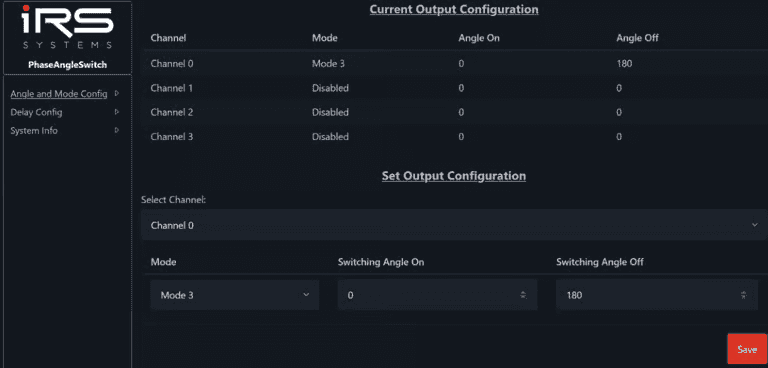
To measure the delay times, we recommend configuring the MiniPWZ-2 with Mode4, Angle On = 0° and Angle Off = 180°.
6.1.2Step 2: Measure the Delay Times
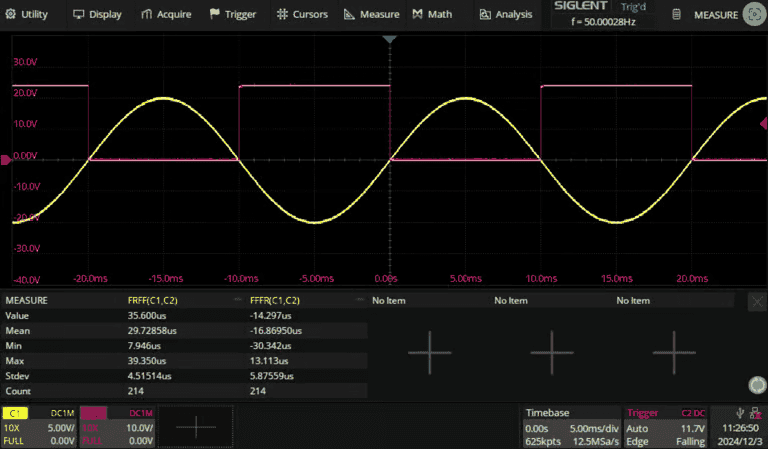
The measurement differs depending on the design of the input and output circuits. In the following example, a test signal from a function generator was fed into the 50 Hz input of the MiniPWZ-2 (yellow), and the output signal was measured with an oscilloscope (red). Note that the output signal is inverted because of the open-drain circuit of the output board used (24 V = "Off", 0 V = "On"). With more complex setups, the measurement can be considerably more complicated. The delay time for switching on ("On") was measured as the time between the first rising edge of the input signal and the first falling edge of the output signal (FRFF(C1,C2)). The delay time for switching off ("Off") was measured as the time between the first falling edge of the input signal and the first rising edge of the output signal (FFFR(C1,C2)). The measurement methods chosen can differ depending on the setup.
6.1.3Step 3: Set the Delay Times
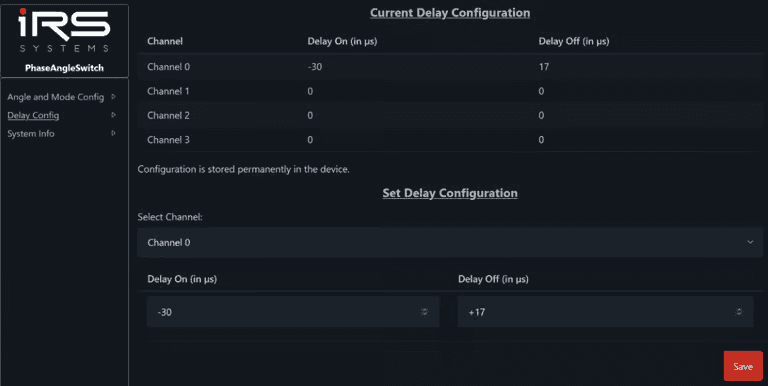
You can configure the delay times on the "Delay Config" page for each channel, separately for switching on and switching off. The values are stored permanently in the MiniPWZ-2 and are retained after a restart. In the example, a delay time of 30 µs for switching on and -17 µs for switching off was measured in step 2. To compensate for these values, the delay times were set to -30 µs for switching on and +17 µs for switching off.
6.1.4Step 4: Check the Result
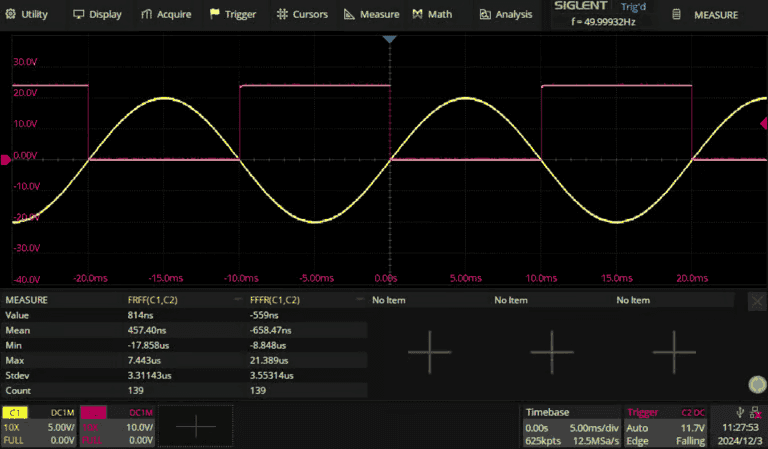
After you have set the delay times, you should repeat the measurement from step 2. The delay times should now be close to 0.
6.2Delays Greater Than One Period
The Mini PWZ II can compensate for delays in the range from -100 ms to +100 ms. The delay can therefore be greater than one period of the mains sine wave (20 ms at 50 Hz). The following section describes how delays for which this is the case are handled.
The Mini PWZ II samples the reference signal several times per mains period and always calculates the current period of the reference signal. Using the calculated period and the configured delays, it continuously adapts the switching times to the reference signal.
In simplified terms, the switching time is calculated as follows:

The module then checks whether the switching time is less than 0 or greater than the period. If this is the case, the period duration is added or subtracted until the switching time lies between 0 and the period duration, and this switching time is then stored.
This procedure ensures that switching takes place at the correct phase angle even with large delays in the output stage. However, two channels with significantly different delays (> 20 ms) can still switch in the same period. The following example explains this behavior. To simplify the calculations, a period of 20 ms is assumed.
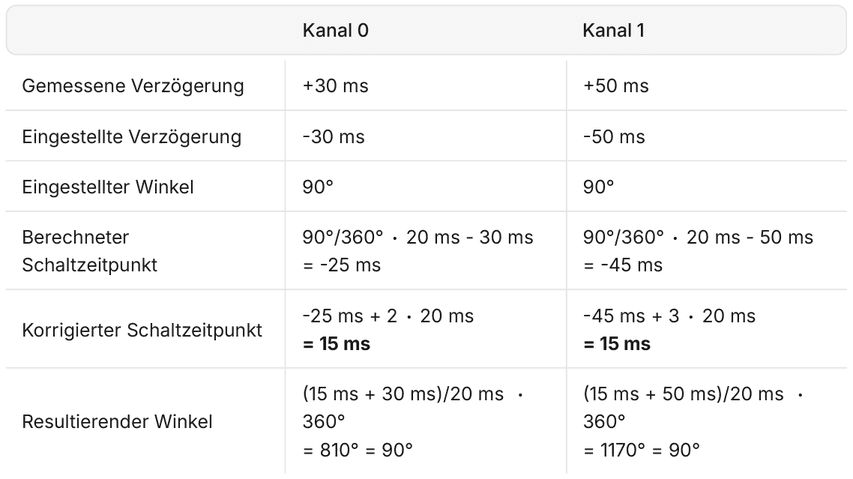
You can see that both delays lead to the correct switching angle. However, the output stages switch in different periods.
With delays greater than one period, the correct timing relationship between two channels is therefore not ensured in all cases.
WebServer
You can reach the WebServer in a browser by entering either the IP address or the host name (for example, irs24bg00961.local).
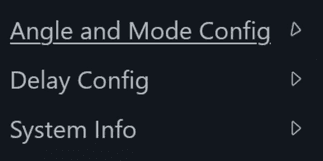
The menu is on the left-hand side and has three options:
7.1Angle and Mode Config
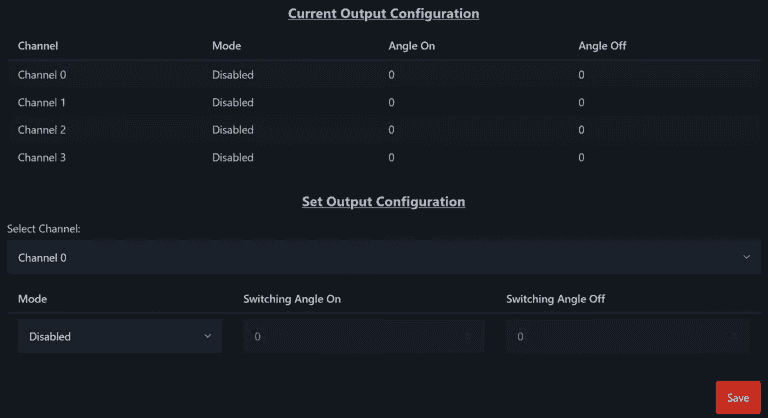
You can configure the mode, switch-on angle and switch-off angle individually for each channel. You can set the phase angles in the range from -180° to +540°. The different modes are explained in more detail in the section Functional Description.
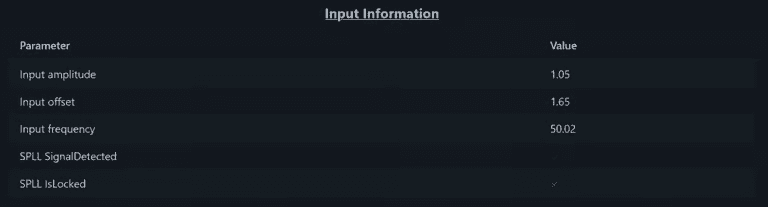
This page also shows information about the reference signal.
7.2Delay Config
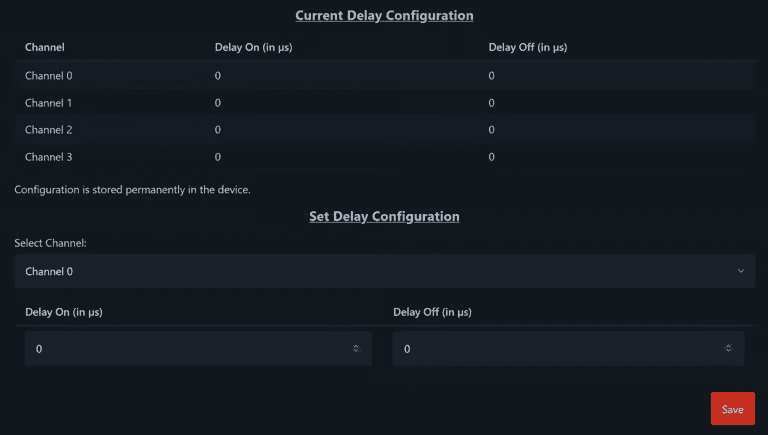
You can configure the switch-on and switch-off delays individually for each channel.
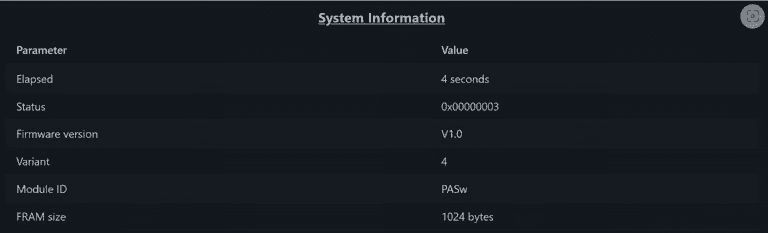
7.3System Info
Among other things, this page shows the installed variants of the input and output modules and any errors that have occurred.
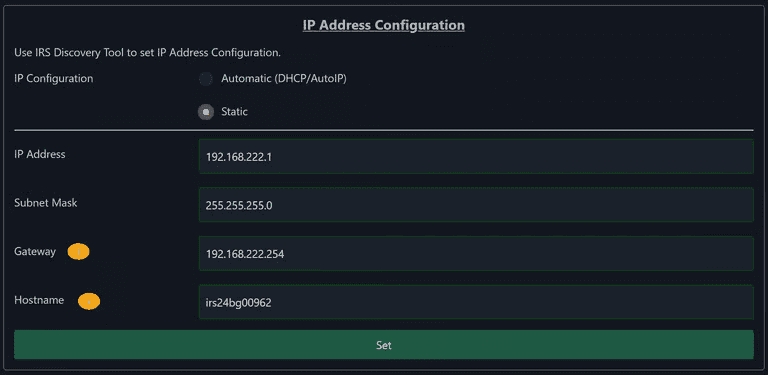
You can also configure the network settings here.
Firmware Update
An update of the microcontroller firmware can be necessary to provide new features. A PC application is available for this.
After you have installed and started the PC application, the update takes 5 simple steps.
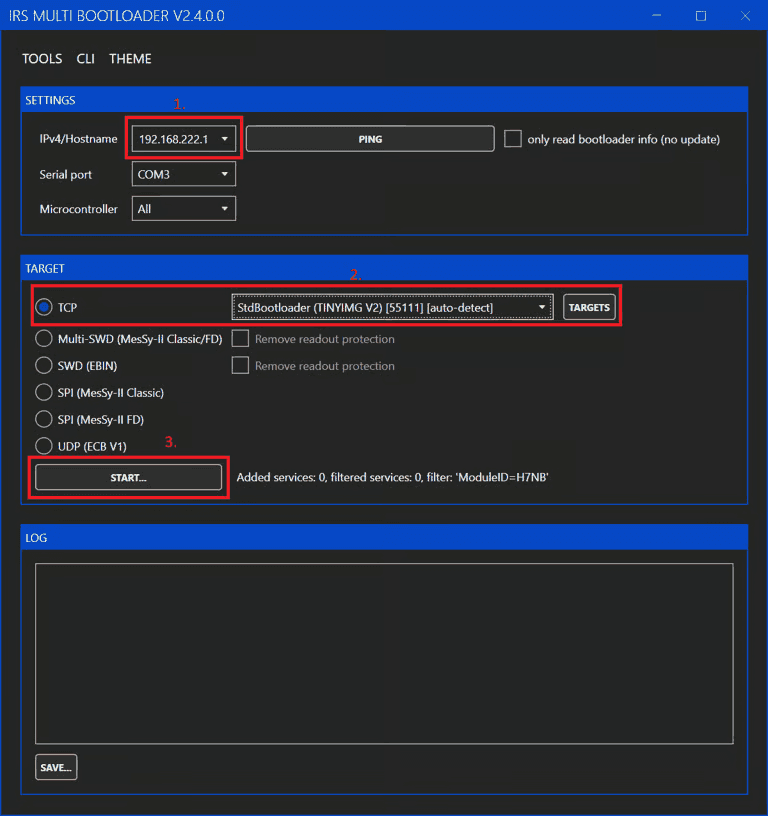
- Enter the IP address of the MiniPWZ-II.
- Select the bootloader type (TCP and StdBootloader) (these are the default settings).
- Click Start.
- In the file dialog that then appears, select the update file (you can obtain it from IRS Support).
- The update starts automatically; success is indicated by Update completed (in the log window). After the update, you can also check the firmware version via the WebServer.
Initial Commissioning
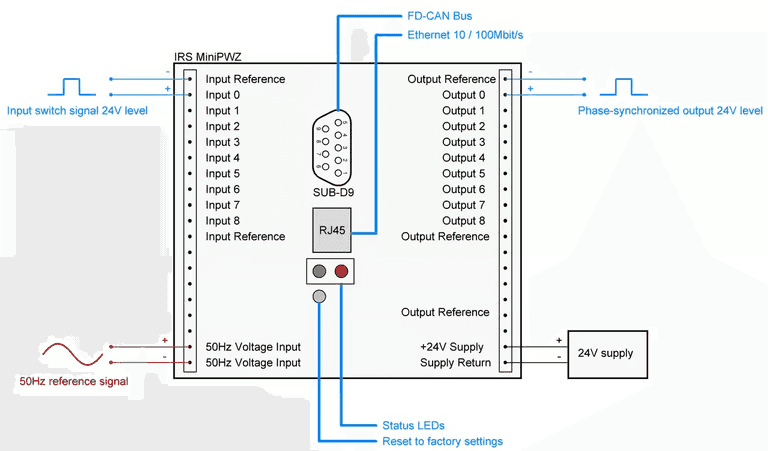
9.1Step 1: Wiring
- The signals to be connected depend on the system environment; the following list represents the minimum.
- Power supply (+24V Supply/Supply Return)
- Reference signal (50 Hz Voltage Input)
- An unsynchronized input signal (Input 0/Input Reference)
- A synchronized output signal (Output 0/Output Reference)
- Ethernet via RJ45 connector (for configuration via the WebServer)
9.2Step 2: IP Configuration
9.2.1WebServer
We recommend the web interface for setting the Ethernet configuration; see also the previous chapter WebServer.
9.2.2DiscoveryTool
- Select mDNS (Multicast DNS, a protocol for translating IP addresses).
- Start the module search.
- Select the module you want.
- Open the network configuration menu.
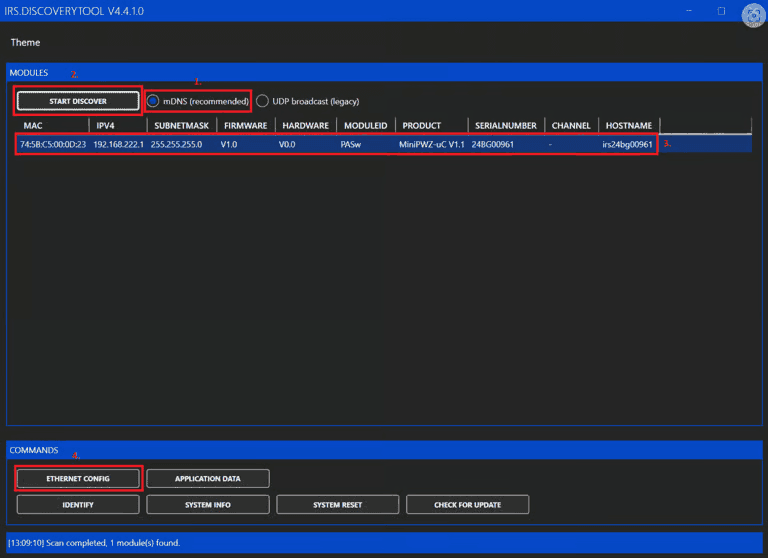
Clicking Update writes the changes to the microcontroller and restarts the controller. The configuration window then closes automatically.
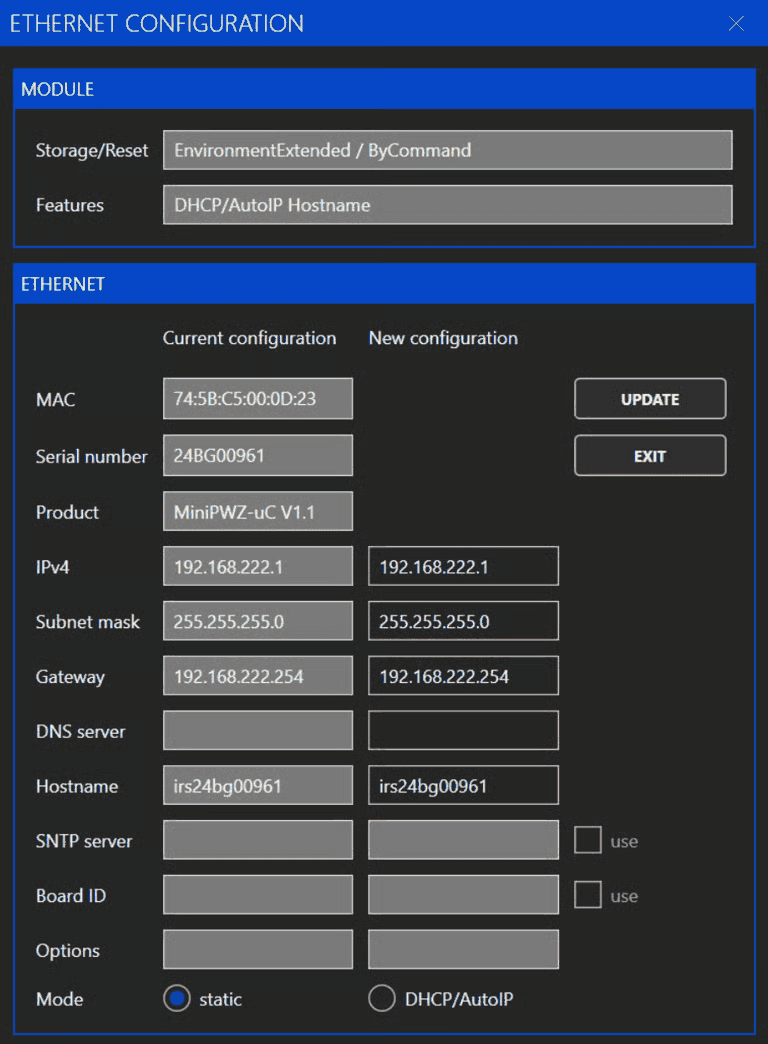
- DNS server: not required for this module
- DHCP/AutoIP: if no DHCP server is available, the module switches to AutoIP (you can find the assigned address by running the search again)
9.3Step 3: Miscellaneous
We recommend determining the delay times as described in the chapter Setting the Delay Time and entering them accordingly.
Status LEDs
10.1Green
| State | Meaning |
|---|---|
| Lit | Supply voltage present |
| Flashing | Synchronization to the reference signal successful |
10.2Red
| State | Meaning |
|---|---|
| Off | No collective error |
| On | Collective error |
You can read out and reset the errors that have occurred via the web interface.
Technical Data
11.1General
11.1.1Design/Mounting
| Parameter | Value |
|---|---|
| Mounting | On DIN rail |
| Degree of protection | IP20 |
| Protection class | 2 |
11.1.2Environment and Mechanical Properties
| Parameter | Minimum | Typical | Maximum | Unit | Comment |
|---|---|---|---|---|---|
| Ambient temperature | 5 | 45 | °C | Non-condensing | |
| Dimensions | 75 x 100 x 109.5 | mm | |||
| Weight | 440 | g |
11.2Electrical Properties
11.2.1Supply
| Parameter | Minimum | Typical | Maximum | Unit | Comment |
|---|---|---|---|---|---|
| Rated voltage | 23 | 24 | 25 | VDC | |
| Current consumption | 70 | 100 | mA | ||
| Inrush current | 2 | A | @ 3.2 V / 100 µs |

11.2.2Reference Input
| Parameter | Minimum | Typical | Maximum | Unit | Comment |
|---|---|---|---|---|---|
| Input voltage | 25 | 85 | V | Sine amplitude | |
| Frequency range | 45 | 65 | Hz | ||
| Phase detection accuracy | +/- 0.5 | ° |
11.2.3Digital Inputs and Outputs
| Parameter | Minimum | Typical | Maximum | Unit |
|---|---|---|---|---|
| Input level LOW | 1 | V | ||
| Input level HIGH | 5 | 24 | 26 | V |
| Output level LOW | 0 | V | ||
| Output level HIGH | 24 | V | ||
| Output current capacity | 100 | mA |
11.2.4FDCAN
| Parameter | Minimum | Typical | Maximum | Unit |
|---|---|---|---|---|
| Common-mode range | -12V | - | 12 | V |
| CANL/CANH recessive output voltage | 2.0 | 2.5 | 3.0 | V |
| CANL dominant output voltage | 0.5 | - | 2.25 | V |
| CANH dominant output voltage | 2 | - | 4.5 | V |
| Nominal baud rate | 100 | 1000 | 1000 | kBit/s |
| Data baud rate | 1000 | 4000 | 4000 | kBit/s |
11.2.5Ethernet (100BASE-TX)
| Parameter | Value |
|---|---|
| Supported transmission rates | 10 MBit/s, 100 MBit/s |
Certificates
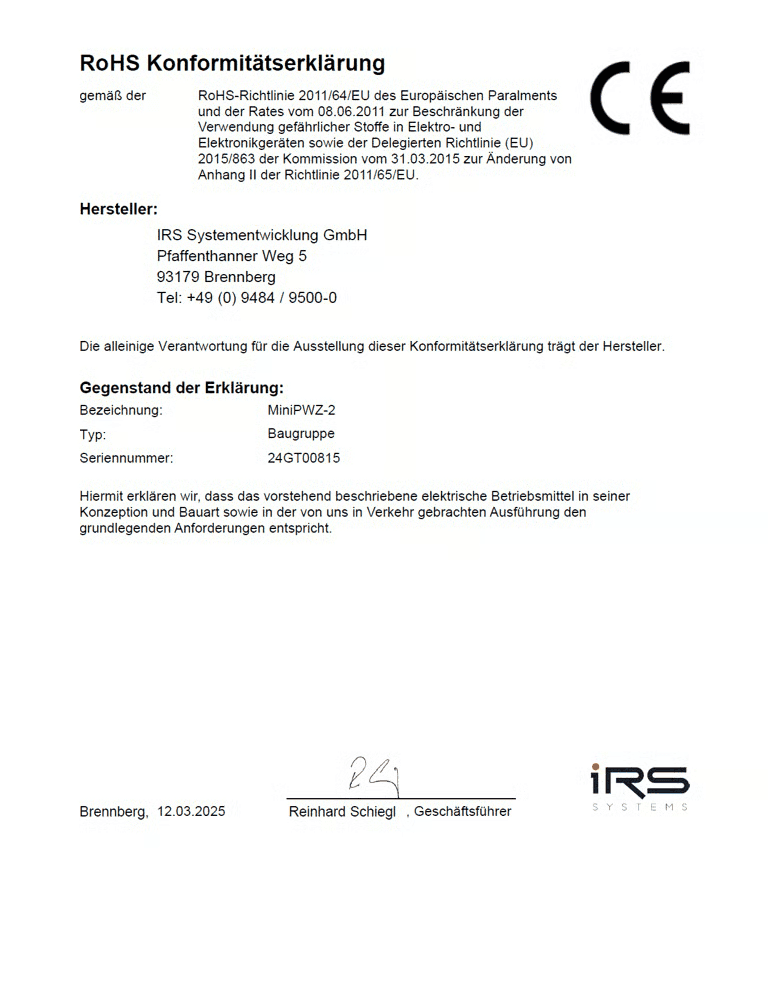
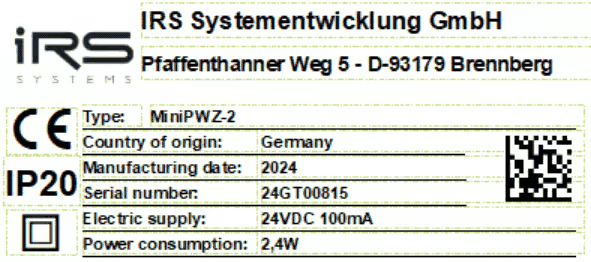
Type Plate