See chapters predefined sequences, order of execution and process model for a better understanding.
In LTT terminology an operation mode is a sequence of operations, which is executed under certain conditions. Those conditions can be different voltage levels, temperatures or DUT states (sleep, normal).
A LTT sequence file contains some predefined sequences, together with various other arbitrary sequences and so called operation mode sequences. An operation mode sequence's name need to start with the prefix OPMODE or OM.
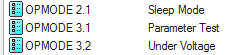
You can think of an operation mode sequence as the main entry point for that operation mode. From there on it calls other sequences to do whatever the operation mode should do.
There is, however, a main entry point for the whole LTT sequence file. This entry point is called MainSequence and is responsible for switching to one of the defined operation mode sequences, depending on the current temperature chamber contact state (TCC) and the configuration you made in GUI's F10 dialog.
Do not make any changes to the MainSequence.
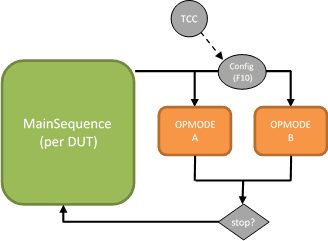
The MainSequence will call an operation mode in a continuous cycle, which only exits as a result of a stop condition.
If there is no operation mode defined for the current TCC value, the testplan will execute a fallback sequence which does nothing but displaying a status in GUI, that there is no valid operation mode mapping.

Parameters
Although not mandatory it is common for an operation mode to have parameters.
Operation mode parameters are defined as FileGlobal variables in TestStand.
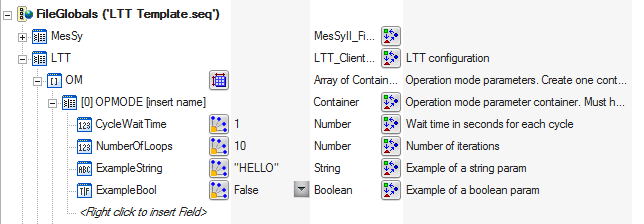
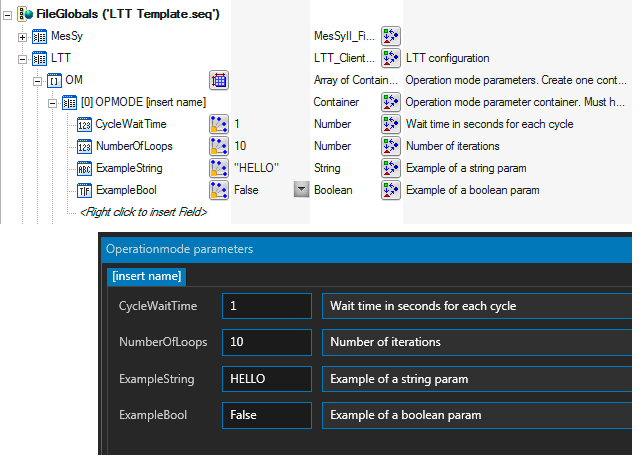
The FileGlobals.LTT.OM structure is an array of containers. Each container represents the parameters for a single operation mode sequence. The container must be named exactly like the operation mode sequence itself. Within each operation mode parameter container you can add as many variables as needed. Only variables of type string, bool and numeric are supported.
For each operation mode parameter variable you set a name, a default value and a description (as variable comment). When the testplan is loaded in GUI you can see a list of all operation modes with their parameters in F10 dialog. There you can modify individual parameters, even during the testplan is running. The default parameter values entered in TestStand remain untouched. If you run without GUI you work with the default parameters. You need to change the values in TestStand if they do not fit your current need.