The CMM-xCH modules (CMM-2CH and CMM-3CH) are equipped with an Ethernet-CAN-Gateway and independent microcontrollers for each measurement channel. Both variants share the GUI, the firmware and the CAN protocol; they differ in current range, current paths and backplane pinning (see Datasheet CMM-2CH and Datasheet CMM-3CH).
Getting started

Download IRS-CMM-xCH-GUI
You can download the latest GUI on the download page.
IP address
At delivery the IP address of the module is set to 192.168.222.1. You can configure the IP address in a limited range with the DIP switch on the PCB. The switches are treated as a binary number and marked with their place value (1, 2, 4). Depending on the set binary number an IP address between 192.168.222.1 and 192.168.222.7 is used. If all three switches are "off" the default IP address is used.
You can change the default IP address of the module with Tools -> DiscoveryTool in the IRS-CMM-xCH GUI. See GUI Manual for details.
Setup CAN-Bus
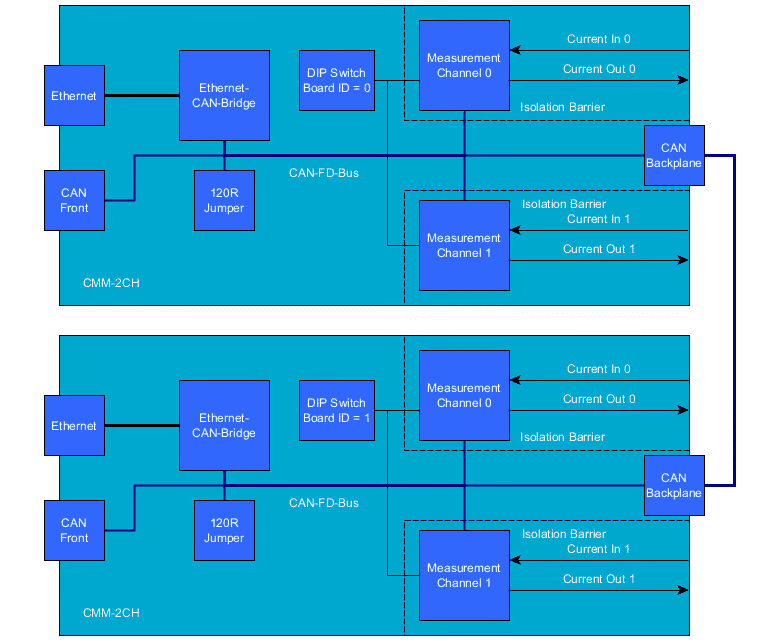
The Ethernet-CAN-Gateway and the two Channels are connected via CAN-FD. At delivery the CAN-FD is configured to 1000 kBit/s without bit rate switching. If necessary, the baudrate settings can be changed in the IRS-CMM-xCH-GUI. The settings can be reset to their default values with the "CAN default jumper". See GUI Manual for more details. A single termination resistor is installed on the board and is activated with the "CAN 120R jumper". This single termination resistor is sufficient for one single CMM-2CH without bit rate switching. If you want to connect multiple CMM-2CH or use bit rate switching a proper external termination of the CAN bus with two resistors at both ends of the CAN harness is highly recommended. Without proper termination a reliable communication between the Gateway and the Channels may not be possible.
Configure board and channel
Multiple CMM-xCH boards can be connected via CAN bus. To address the individual boards, each board needs to be configured with a unique Board ID. The configuration of the Board ID is done with the DIP switch on the board marked with "CAN ID". The switches are treated as a binary number and marked with their place value (1, 2, 4, ...). The switches are read at power up. So after changing the Board ID a power cycle is required.
How to read measured current values
Use the CMM-xCH-GUI
In the GUI switch to the tab "Measurement" and either use the Button "MIN/AVG/MAX" or enable cyclic messages. For details see GUI Manual.
Use the MesSy CMM API
If the CMM-2CH is connected to a MesSy-II or MesSy-II-FD you can use the integrated MesSy CMM API to read min, max and average values. For details see MesSy documentation.
Directly send and receive CAN messages
You can either query min, max and average values with a CAN message or enable cyclic messages. You can use the IsoTP protocol which is known from CMM III and CMM IV or a new protocol which is based on CAN-FD. For the details of the new protocol see Documentation of CAN messages; we can send you a DBC or SYM file on request.
GUI Manual
1.1Introduction
The CMM-xCH modules are equipped with an Ethernet-CAN-Gateway and independent microcontrollers for each measurement channel. CAN-FD is used to communicate between the gateway and the channels.
The CMM-xCH modules can be connected via Ethernet or with a direct connection to the internal CAN Bus.
For CAN-FD communication a DBC file is available on request. For communication via Ethernet the tool "IRS.CMM-xCH" can be used. It can be downloaded from the download page. Alternatively the "IRS.CMM-xCH.Shared.dll" can be used to integrate the CMM-xCH modules into your Software.
1.2Using the IRS.CMM-xCH GUI
1.2.1Connecting the module
To connect to the module, enter the IP address of the module and click connect. If you do not know the IP address of the module you can use Tools -> DiscoveryTool to detect connected modules.
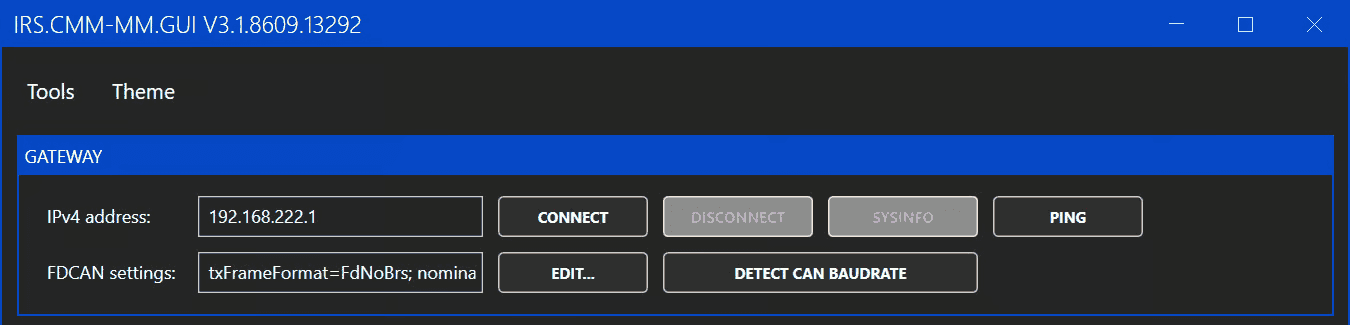
The FDCAN settings are used for the internal communication and normally the default setting can be used. If the settings were changed before, the "EDIT" button can be used to select the changed settings. If the settings are unknown the "DETECT CAN BAUDRATE" button can be used.
1.2.2Changing the IP address
To change the IP address of the module, use Tools -> DiscoveryTool. In the DiscoveryTool first click "START DISCOVER". After 10 seconds a list of all connected modules is shown. Select the module you want to change and click "ETHERNET CONFIG". In the following window you can enter the new IP address and click "UPDATE". You need to power cycle the module to apply the new IP address.
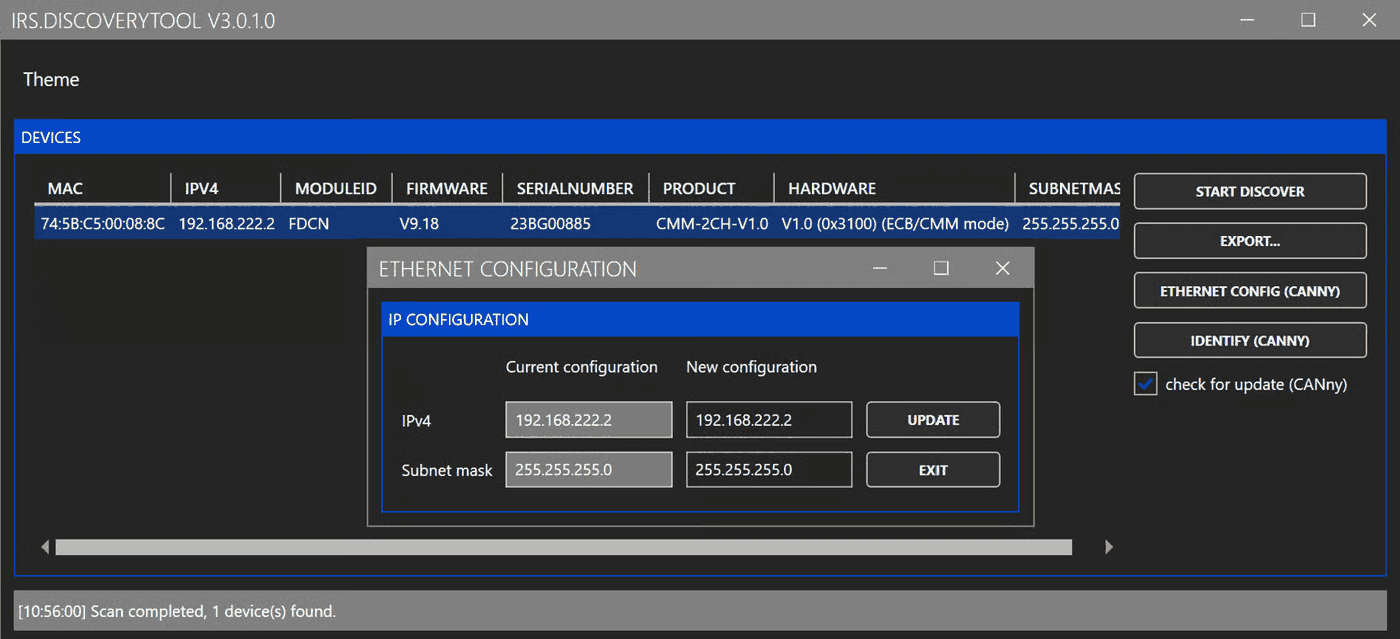
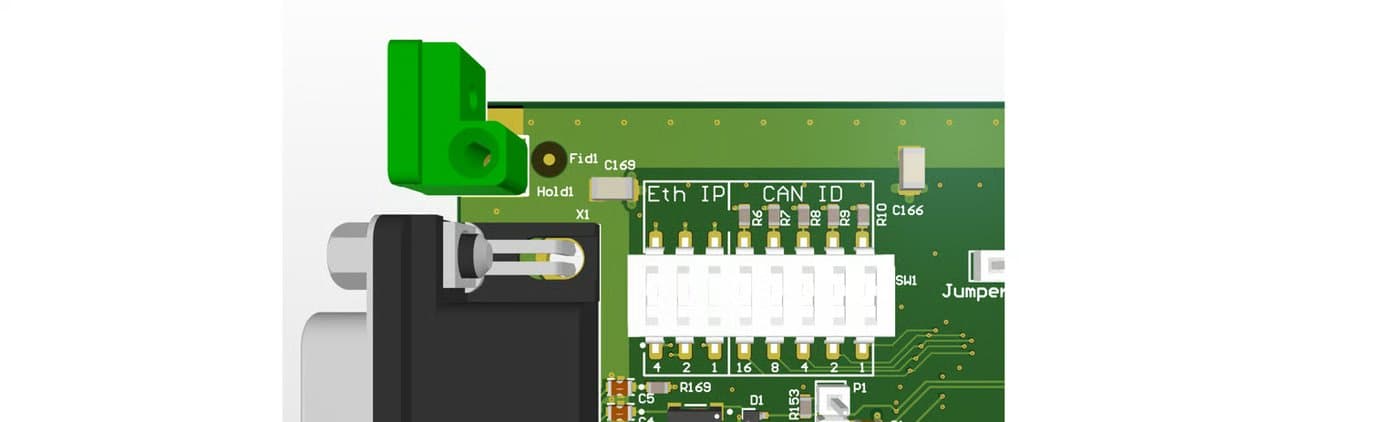
As an alternative you can configure the IP address in a limited range with the DIP switch on the PCB. The switches are treated as a binary number and marked with their place value (1, 2, 4). Depending on the set binary number an IP address between 192.168.222.1 and 192.168.222.7 is used. If all three switches are "off" the IP address configured with the DiscoveryTool is used. The switches are read at power up. So after changing the switches a power cycle is required.
1.2.3Updating the firmware
Ethernet-CAN-Gateway
To update the Ethernet-CAN-Gateway firmware, use Tools -> Bootloader Gateway. This opens the following window:
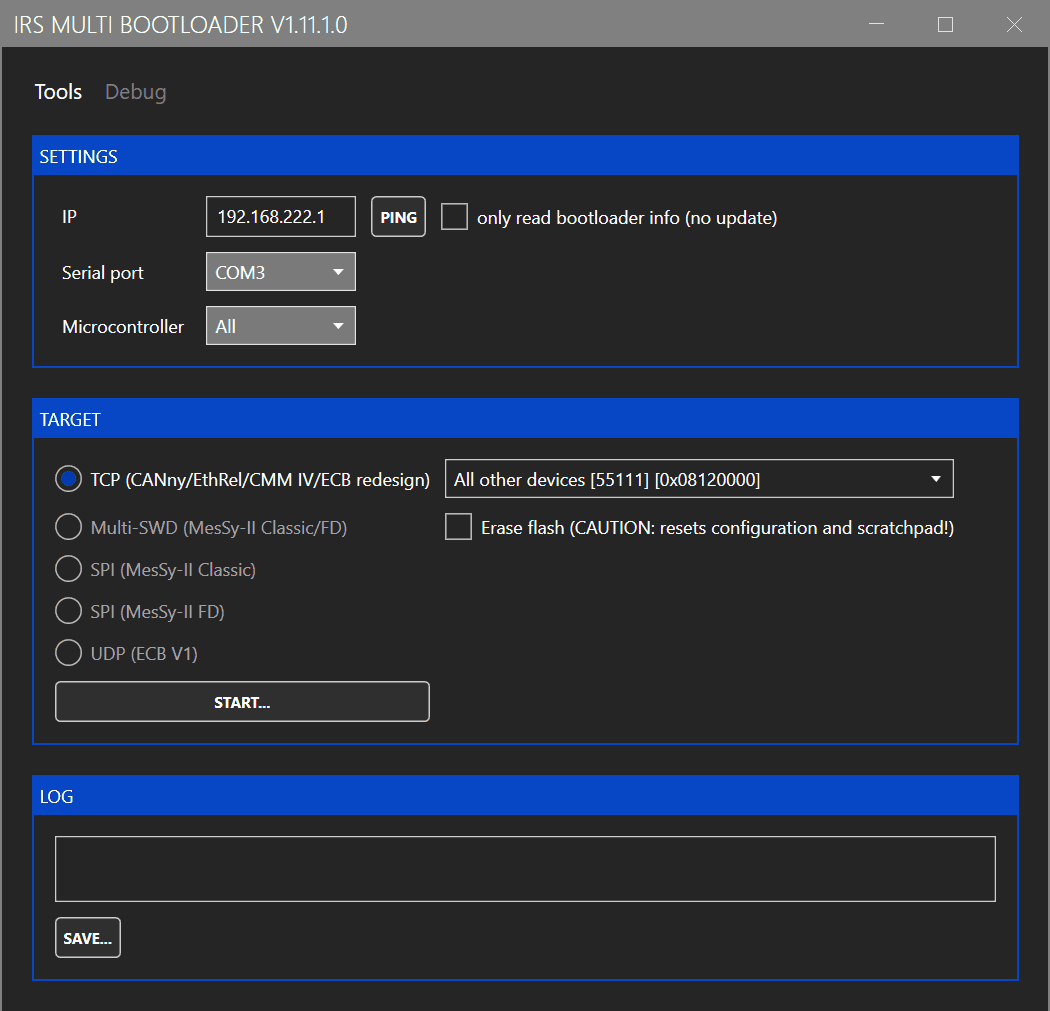
Enter the IP address and click on "START". Select the firmware image in the file selection dialog. The firmware image is included in the folder "firmware" of the GUI installation folder and named STM32H7-Gateway.tinyimg2.
Measurement channels
To update the firmware of the measurement channels, use Tools -> Bootloader CMM. This opens the following window:
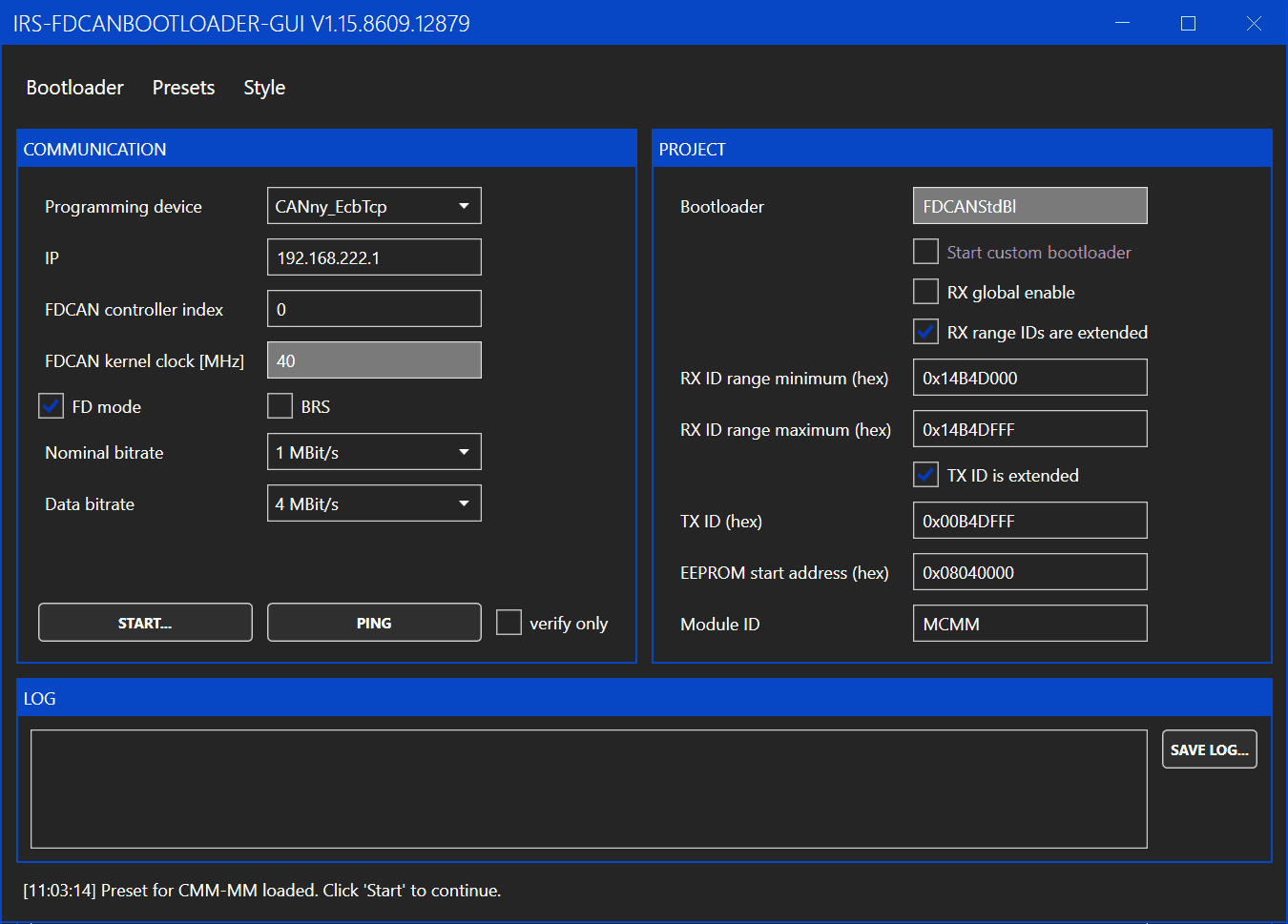
You only need to enter the IP address of the module and then click "START". The rest of the settings should be preset to the correct values. If the settings were changed, you can reload the default values by clicking Presets -> CMM-xCH.
After clicking on "START", select the firmware image in the file selection dialog. The firmware image is included in the folder "firmware" of the GUI installation folder and named STM32G4-Channel.tinyimg1.
1.2.4Configure board and channel
Multiple CMM-xCH boards can be connected via CAN bus. To address the individual boards, each board needs to be configured with a unique Board ID.
The configuration of the Board ID is done with the DIP switch on the board marked with "CAN ID". The switches are treated as a binary number and marked with their place value (1, 2, 4, ...). The switches are read at power up. So after changing the Board ID a power cycle is required.
When the Board IDs are set correctly, you can use the Ethernet-CAN-Gateway of any board to communicate with all connected boards. In the GUI click the dropdown menu under "BOARD/CHANNEL" to see a list of all detected channels and to select the channel which shall be used. The channel IDs are fixed to 0 and 1 and can not be changed. The channels are marked on the PCB with "Channel 0" and "Channel 1".

1.2.5Configuring internal CAN bus
CAN baudrates and the uses of bitrate switching can be configured under "CAN CONFIGURATION".

CAN configuration can only be set for all connected channels not for individual channels. Otherwise communication between the channels could get broken, if different baudrates are set.
If the CAN configuration of connected boards is messed up and a configuration with the GUI is not possible you can use the jumper marked with "CAN Default" to reset the CAN configuration of the boards. The CMM-2CH needs to be power-cycled while the jumper is connected to reset the CAN configuration to its default value.
1.2.6Configuring measurement behavior
The channels of the CMM-xCH can send a cyclic CAN message with the measured values. Under "CHANNEL CONFIGURATION" the interval of these cyclic CAN messages can be adjusted. If the interval is set to zero, no cyclic CAN messages are sent.
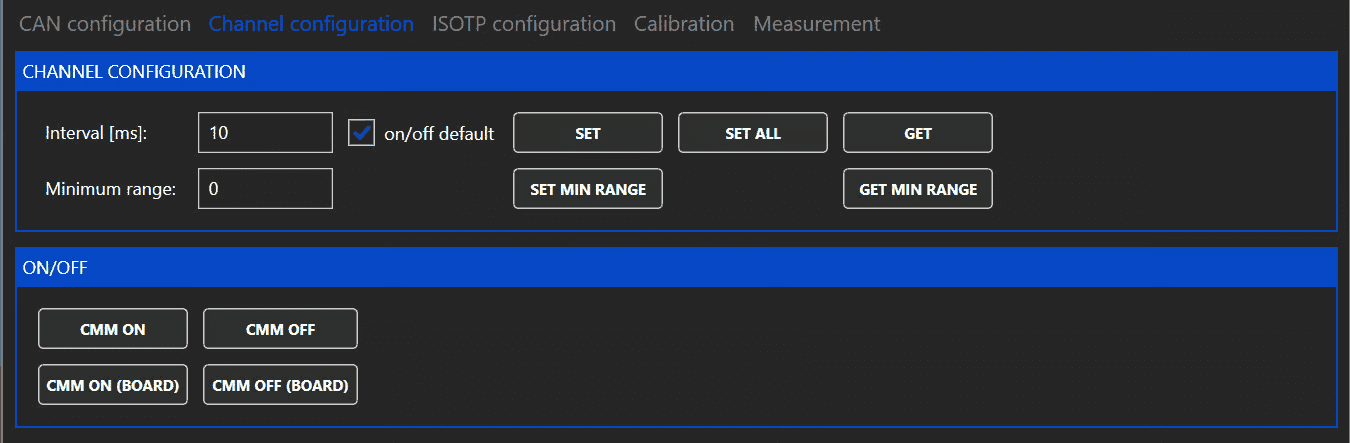
Furthermore the default state after power up of each measurement channel can be configured. If the default state is "off" the button "CMM ON" can be used to switch the measurement channel on.
The CMM-xCH modules automatically switch between ranges without interrupting the current flow in the measurement path. If however this switching is not desired, a minimum range can be set. The minimum range is reset to zero when rebooting the CMM-xCH.
A maximum range can not be set because it could easily lead to accidentally exceeding the maximum allowed current of the selected range.
1.2.7Reading measured values
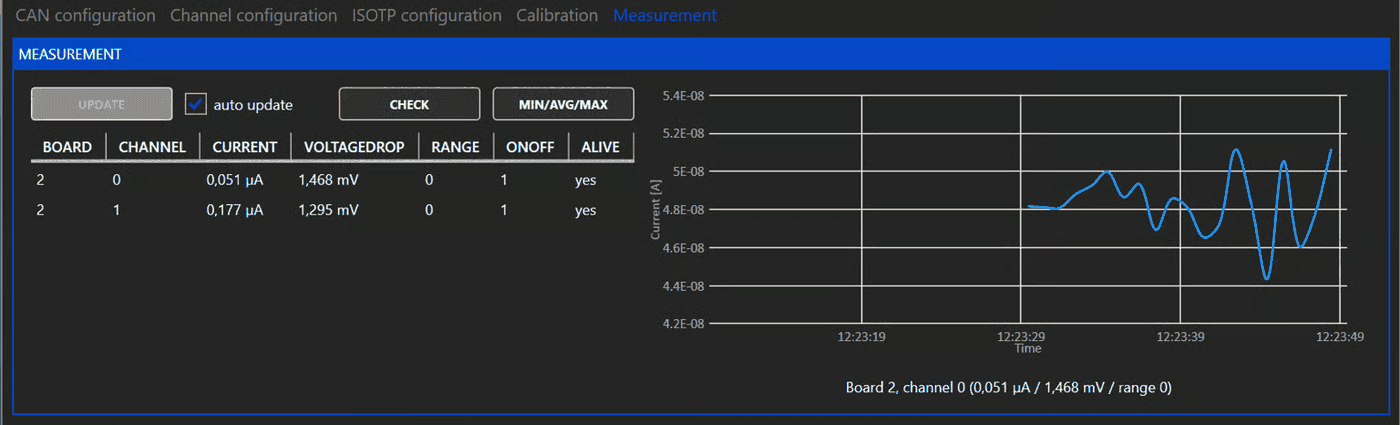
To read the measured values, the button "MIN/AVG/MAX" and "MEASUREMENT" can be used. A pop up window opens, which shows the measured values since the last use of the button.
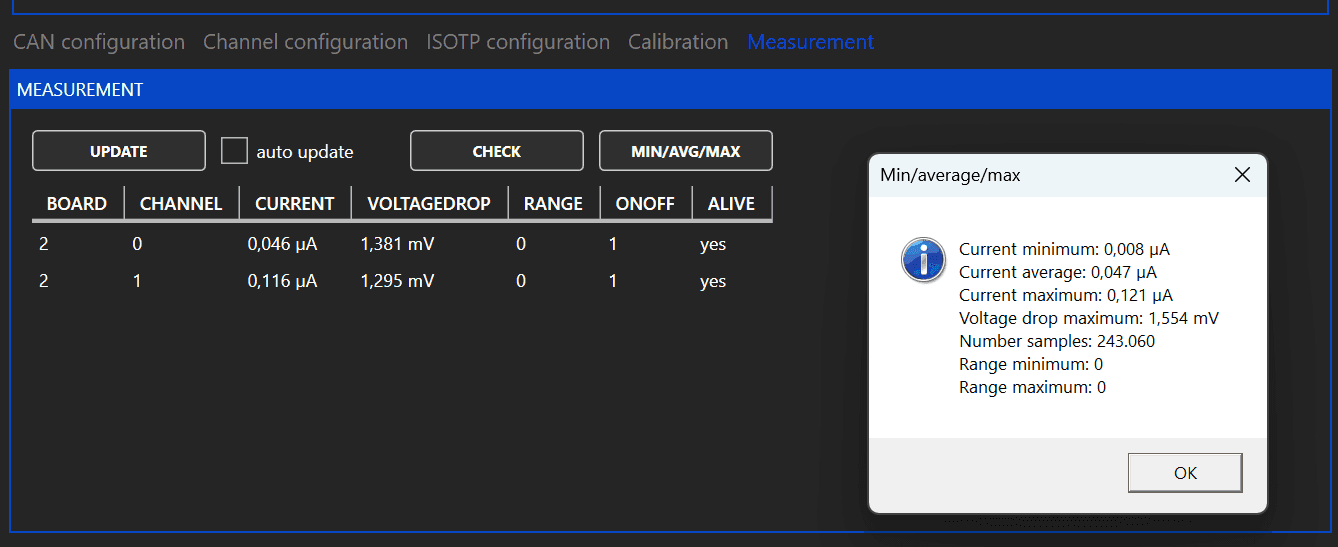
For continuous monitoring of the measured values the cyclic messages can be used. To use the cyclic messages an interval different from zero must be set under "CHANNEL CONFIGURATION". The cyclic message can be read by clicking the button "UPDATE" or by enabling the checkbox "auto update".
If auto update is enabled the chart on the right shows the current of the channel selected under "BOARD/CHANNEL".
1.2.8Using legacy IsoTP communication
The CMM-xCH supports a legacy IsoTP communication mode to be compatible with software using the IsoTP communication of CMM-III. The IDs for the IsoTP interface can be configured in the GUI. For further information please contact IRS.
Datasheet CMM-2CH
CMM-2CH-10A60V
2.1Description
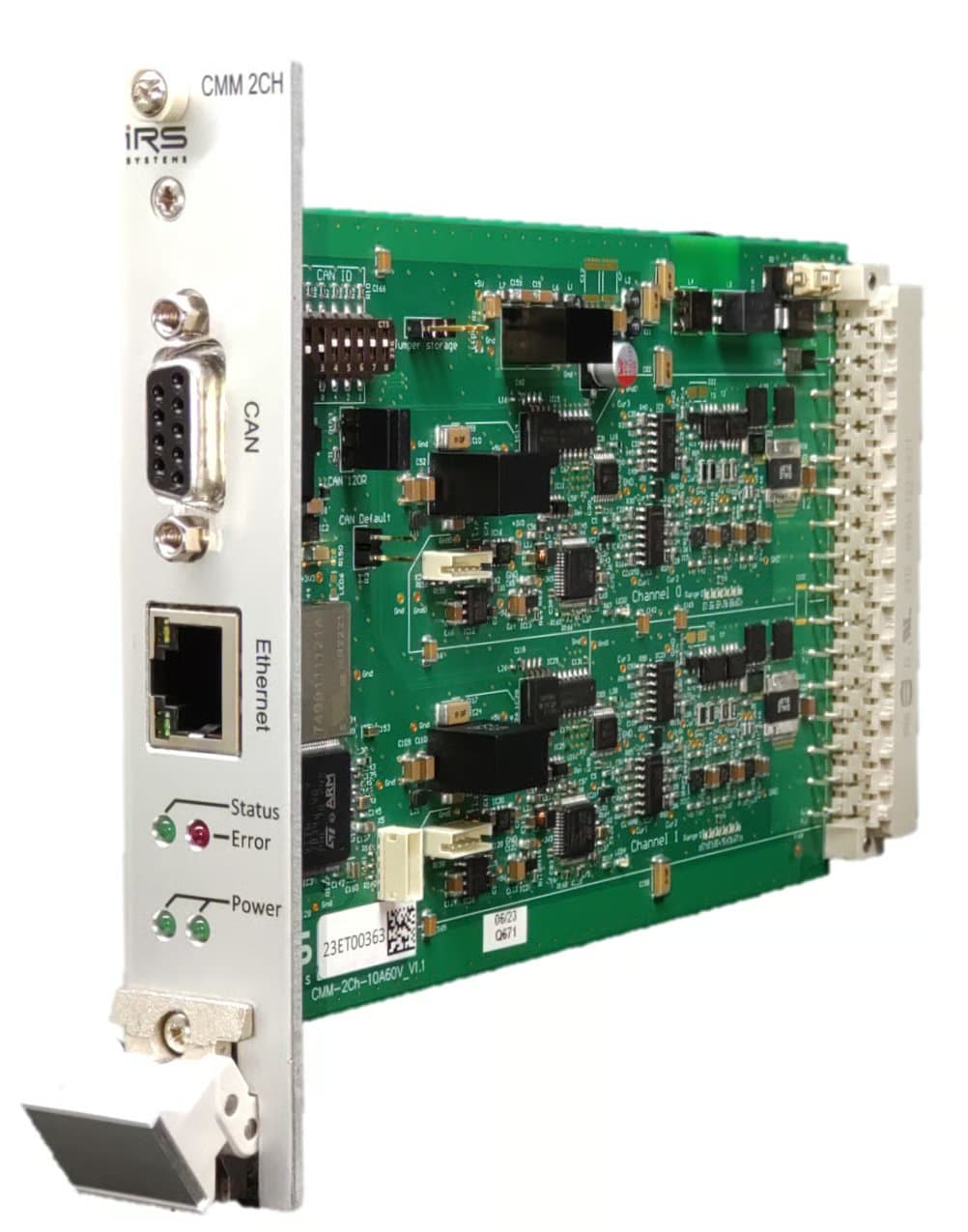
This module offers two separately isolated channels for current measurements over a wide range from 1µA to 10A. Ethernet and CAN-FD are available for communication. Current is measured in six automatically selected ranges as listed in the table below:
| Range | Lower End | Upper End | Lower Threshold | Upper Threshold |
|---|---|---|---|---|
| 0 | 1µA | 100µA | - | 110µA |
| 1 | 100µA | 1mA | 90µA | 1.1mA |
| 2 | 1mA | 10mA | 0.9mA | 11mA |
| 3 | 10mA | 100mA | 9mA | 110mA |
| 4 | 100mA | 1A | 90mA | 1.1A |
| 5 | 1A | 15A | 900mA |
The module samples the currents with a sample rate of 10 kSa/s. Depending on the method used to read the current values, the actual sample rate for the user can be lower. If for example cyclic CAN messages are used to output the current values, the minimal update interval is 1 ms and therefore the actual sample rate is 1 kSa/s.
2.2Mechanical details
| Item | Value |
|---|---|
| Module dimensions | 160mm x 100mm (Eurocard) |
| 19” specification | 5 TE x 3 HE |
2.3Ambient conditions
| Item | Value |
|---|---|
| Ambient operating temperature | 5…50°C |
| Storage temperature | -20…70°C |
| Humidity | 5…80% noncondensing |
2.4Current paths
| Item | Min | Typ | Max | Unit | Remarks |
|---|---|---|---|---|---|
| DC current | 10 | A | |||
| Worst case DC current | 15 | A | 25° Ambient Temperature with airflow >2m/s | ||
| Maximum measurable current | 15 | A | |||
| Single pulse current | 50 | A | max. 100ms | ||
| DC Current per pin on backplane connector | 6 | A | |||
| Voltage across current in/out when module is off | 60 | V | |||
| Leakage current @ OFF | 100 | µA | 60V across module, temperature 25°C | ||
| Isolation rating | -150 | 150 | V | Maximum allowed voltage difference between module supply and current path | |
| Reverse current continuous | 4 | A | |||
| Reverse current single pulse | 30 | A | Max. 100ms |
2.5Module supply
Connect the power supply between +24V-CON and GND-CON. It is strongly recommended not to use the DUT power supply to power the CMM. Please note that the current path is interrupted when the module is unpowered.
| Item | Min | Typ | Max | Unit | Remarks |
|---|---|---|---|---|---|
| Supply voltage | 20 | 24 | 26 | V | +24V-CON to GND-CON |
| Supply current (Ethernet port active) | 110 | mA | Supply voltage = 24V | ||
| Supply current (Ethernet port inactive) | 95 | mA | Supply voltage = 24V | ||
| Supply inrush current | 3 | A | Inrush current for < 1ms @ dU/dt ~ 20V/ms, 24V supply |
2.5.1Typical inrush current waveform

2.6DC accuracy and resolution
The module’s accuracy is verified for DC currents during in-house calibration. The module may of course be re-calibrated. See Calibration recommendation for more info.
| Item | Typ | Max | Unit | Remarks |
|---|---|---|---|---|
| Accuracy uncalibrated | 0,5 | 2 | % | % of respective range’s maximum current |
| Accuracy calibrated | 0,2 | 1 | % | % of respective range’s maximum current |
| Resolution range 0 | 40,4 | nA | ||
| Resolution range 1 | 404 | nA | ||
| Resolution range 2 | 4,04 | µA | ||
| Resolution range 3 | 40,3 | µA | ||
| Resolution range 4 | 403 | µA | ||
| Resolution range 5 | 4,03 | mA |
2.7DC voltage drop
The following table lists the voltage across the module’s current input and output pins for specific current values. These are typical values, measured at room temperature at the connector pins of one channel.
| Item | Typ | Unit | Remarks |
|---|---|---|---|
| Drop @ 100µA | 50 | mV | Range 0 |
| Drop @ 1mA | 50 | mV | Range 1 |
| Drop @ 10mA | 55 | mV | Range 2 |
| Drop @ 100mA | 60 | mV | Range 3 |
| Drop @ 1A | 60 | mV | Range 4 |
| Drop @ 10A | 110 | mV | Range 5 |
| Drop @ 15A | 170 | mV | Range 5 |
2.8Ethernet
The module supports 10Mbit/s and 100Mbit/s Ethernet on the RJ45 front connector. Default IP: 192.168.222.1
2.9CAN-FD
The module provides a CAN-FD interface on the front via a 9-pin D-Sub connector as well as on the backplane connector.
| Item | Value |
|---|---|
| Supported nominal bit rates | 500 kbit/s, 1 Mbit/s |
| Supported data bit rates | 1 Mbit/s, 2 Mbit/s, 4 Mbit/s |
| Default settings | 1 Mbit/s nominal, 4 Mbit/s data, no bit rate switch |
120 Ohm on-board termination is available via jumper. On-board termination is only recommended if a single module is used without further devices connected via CAN. If multiple devices are connected via CAN, it is recommended to use external termination on both ends of the CAN harness. This avoids problems when modules are swapped or replaced.
2.10Backplane connector
Connector type: Harting 09041326921. Please make sure you use all connector pins for current in / current out. A backplane-pcb is available for easy connection with just two pins per current measurement channel.
| Pin | Signal | Pin | Signal |
|---|---|---|---|
| A2 | +24V module supply | C2 | 0V module supply |
| A4 | CAN Low | C4 | CAN High |
| A6 | Channel 0 Current In | C6 | Channel 0 Current In |
| A8 | Channel 0 Current In | C8 | Channel 0 Current In |
| A10 | Channel 0 Current In | C10 | Channel 0 Current In |
| A12 | Channel 0 Current Out | C12 | Channel 0 Current Out |
| A14 | Channel 0 Current Out | C14 | Channel 0 Current Out |
| A16 | Channel 0 Current Out | C16 | Channel 0 Current Out |
| A18 | Channel 0 Current Out | C18 | Channel 0 Current Out |
| A20 | Channel 1 Current In | C20 | Channel 1 Current In |
| A22 | Channel 1 Current In | C22 | Channel 1 Current In |
| A24 | Channel 1 Current In | C24 | Channel 1 Current In |
| A26 | Channel 1 Current Out | C26 | Channel 1 Current Out |
| A28 | Channel 1 Current Out | C28 | Channel 1 Current Out |
| A30 | Channel 1 Current Out | C30 | Channel 1 Current Out |
| A32 | Channel 1 Current Out | C32 | Channel 1 Current Out |
2.11Calibration recommendation
IRS recommends a recalibration within 2 years.
The calibration should be performed for each channel at multiple calibration points for all 6 ranges. IRS recommends measuring at least the following currents.
| Range | Calibration Points |
|---|---|
| 100 uA | 1uA, 20 uA, 40 uA, 60 uA, 80 uA, 100 uA |
| 1 mA | 0.1 mA, 0.2mA, 0.4 mA, 0.6 mA, 0.8 mA, 1 mA |
| 10 mA | 1 mA, 2mA, 4 mA, 6 mA, 8 mA, 10 mA |
| 100 mA | 10 mA, 20mA, 40 mA, 60 mA, 80 mA, 100 mA |
| 1 A | 0.1 A, 0.2A, 0.4 A, 0.6 A, 0.8 A, 1 A |
| 10 A | 1 A, 3 A, 5 A, 8 A, 12 A, 15A |
Current values should be captured with the function (IRS.CMM-xCH.Shared.Gateway).GetMinMaxAverage.
This function returns the value averaged since last read.
Before capturing a valid value, enable the calibration current, perform a dummy read and wait 100 ms.
The fluctuations of the power source used should not exceed 0.1% of the nominal value.
Datasheet CMM-3CH
CMM-3CH-5A60V
3.1Description
This module offers two separately isolated channels for current measurements over a wide range from 1µA to 5A. Ethernet and CAN-FD are available for communication. Current is measured in six automatically selected ranges as listed in the table below:
| Range | Lower End | Upper End | Lower Threshold | Upper Threshold |
|---|---|---|---|---|
| 0 | 1µA | 100µA | - | 110µA |
| 1 | 100µA | 1mA | 90µA | 1.1mA |
| 2 | 1mA | 10mA | 0.9mA | 11mA |
| 3 | 10mA | 100mA | 9mA | 110mA |
| 4 | 100mA | 1A | 90mA | 1.1A |
| 5 | 1A | 15A | 900mA |
3.2Mechanical details
| Item | Value |
|---|---|
| Module dimensions | 160mm x 100mm (Eurocard) |
| 19” specification | 5 TE x 3 HE |
3.3Ambient conditions
| Item | Value |
|---|---|
| Ambient operating temperature | 5…50°C |
| Storage temperature | -20…70°C |
| Humidity | 5…80% noncondensing |
3.4Current paths
| Item | Min | Typ | Max | Unit | Remarks |
|---|---|---|---|---|---|
| DC current | 5 | A | |||
| Worst case DC current | 8 | A | 25° Ambient Temperature with airflow >2m/s | ||
| Maximum measurable current | 15 | A | |||
| Single pulse current | 25 | A | max. 100ms | ||
| DC Current per pin on backplane connector | 6 | A | |||
| Voltage across current in/out when module is off | 60 | V | |||
| Leakage current @ OFF | 100 | µA | 60V across module, temperature 25°C | ||
| Isolation rating | -150 | 150 | V | Maximum allowed voltage difference between module supply and current path | |
| Reverse current continuous | 3 | A | |||
| Reverse current single pulse | 25 | A | Max. 100ms |
3.5Module supply
Connect the power supply between +24V-CON and GND-CON. It is strongly recommended not to use the DUT power supply to power the CMM. Please note that the current path is interrupted when the module is unpowered.
| Item | Min | Typ | Max | Unit | Remarks |
|---|---|---|---|---|---|
| Supply voltage | 20 | 24 | 26 | V | +24V-CON to GND-CON |
| Supply current (Ethernet port active) | 110 | mA | Supply voltage = 24V | ||
| Supply current (Ethernet port inactive) | 95 | mA | Supply voltage = 24V | ||
| Supply inrush current | 3 | A | Inrush current for < 1ms @ dU/dt ~ 20V/ms, 24V supply |
3.5.1Typical inrush current waveform
3.6DC accuracy and resolution
The module’s accuracy is verified for DC currents during in-house calibration. The module may of course be re-calibrated. See Calibration recommendation for more info.
| Item | Typ | Max | Unit | Remarks |
|---|---|---|---|---|
| Accuracy uncalibrated | 0,5 | 2 | % | % of respective range’s maximum current |
| Accuracy calibrated | 0,2 | 1 | % | % of respective range’s maximum current |
| Resolution range 0 | 40,4 | nA | ||
| Resolution range 1 | 404 | nA | ||
| Resolution range 2 | 4,04 | µA | ||
| Resolution range 3 | 40,3 | µA | ||
| Resolution range 4 | 403 | µA | ||
| Resolution range 5 | 4,03 | mA |
3.7DC voltage drop
The following table lists the voltage across the module’s current input and output pins for specific current values. These are typical values, measured at room temperature at the connector pins of one channel.
| Item | Typ | Unit | Remarks |
|---|---|---|---|
| Drop @ 100µA | 50 | mV | Range 0 |
| Drop @ 1mA | 50 | mV | Range 1 |
| Drop @ 10mA | 55 | mV | Range 2 |
| Drop @ 100mA | 60 | mV | Range 3 |
| Drop @ 1A | 60 | mV | Range 4 |
| Drop @ 10A | 110 | mV | Range 5 |
| Drop @ 15A | 170 | mV | Range 5 |
3.8Ethernet
The module supports 10Mbit/s and 100Mbit/s Ethernet on the RJ45 front connector. Default IP: 192.168.222.1
3.9CAN-FD
The module provides a CAN-FD interface on the front via a 9-pin D-Sub connector as well as on the backplane connector.
| Item | Value |
|---|---|
| Supported nominal bit rates | 500 kbit/s, 1 Mbit/s |
| Supported data bit rates | 1 Mbit/s, 2 Mbit/s, 4 Mbit/s |
| Default settings | 1 Mbit/s nominal, 4 Mbit/s data, no bit rate switch |
120 Ohm on-board termination is available via jumper. On-board termination is only recommended if a single module is used without further devices connected via CAN. If multiple devices are connected via CAN, it is recommended to use external termination on both ends of the CAN harness. This avoids problems when modules are swapped or replaced.
3.10Backplane connector
Connector type: Harting 09041326921. Please make sure you use all connector pins for current in / current out. A backplane-pcb is available for easy connection with just two pins per current measurement channel.
| Pin | Signal | Pin | Signal |
|---|---|---|---|
| A2 | +24V module supply | C2 | 0V module supply |
| A4 | CAN Low | C4 | CAN High |
| A6 | Channel 0 Current In | C6 | Channel 0 Current In |
| A8 | C8 | ||
| A10 | C10 | ||
| A12 | Channel 0 Current Out | C12 | Channel 0 Current Out |
| A14 | Channel 1 Current In | C14 | Channel 1 Current In |
| A16 | Channel 1 Current Out | C16 | Channel 1 Current Out |
| A18 | C18 | ||
| A20 | C20 | ||
| A22 | C22 | ||
| A24 | Channel 2 Current In | C24 | Channel 2 Current In |
| A26 | Channel 2 Current Out | C26 | Channel 2 Current Out |
| A28 | C28 | ||
| A30 | C30 | ||
| A32 | C32 |
3.11Calibration recommendation
IRS recommends a recalibration within 2 years.
The calibration should be performed for each channel at multiple calibration points for all 6 ranges. IRS recommends measuring at least the following currents.
| Range | Calibration Points |
|---|---|
| 100 uA | 1uA, 20 uA, 40 uA, 60 uA, 80 uA, 100 uA |
| 1 mA | 0.1 mA, 0.2mA, 0.4 mA, 0.6 mA, 0.8 mA, 1 mA |
| 10 mA | 1 mA, 2mA, 4 mA, 6 mA, 8 mA, 10 mA |
| 100 mA | 10 mA, 20mA, 40 mA, 60 mA, 80 mA, 100 mA |
| 1 A | 0.1 A, 0.2A, 0.4 A, 0.6 A, 0.8 A, 1 A |
| 10 A | 1 A, 3 A, 5 A, 8 A, 12 A, 15A |
Current values should be captured with the function (IRS.CMM-xCH.Shared.Gateway).GetMinMaxAverage.
This function returns the value averaged since last read.
Before capturing a valid value, enable the calibration current, perform a dummy read and wait 100 ms.
The fluctuations of the power source used should not exceed 0.1% of the nominal value.
Release Notes Firmware
V4.6 (2026-02-04)
- Changed: Config data is now only written to flash, if the config has changed. This shall improve flash endurance.
- Changed: Improved internal handling of warning register
V4.5 (2025-07-29)
- Changed: "ReadCurrent" now always returns full CAN-frames to avoid padding issues
- Fixed: Bug in command "ReadCurrent" which set all current values to zero
V4.4 (2025-02-19)
- Added: Support for CMM-3CH variant
V4.3 (2024-06-18)
- Changed: Updated GCC compiler version
- Changed: Default values are now active directly after the command was used. No need for a reset.
- Fixed: Bug which sets wrong data baudrate when IsoTP is used to set baudrates
V4.0 (2023-11-28)
- Fixed: Bug which can result in all gates switched off, when CMM is switched on
V3.14 (2023-10-18)
- Added: Command "ReadCurrent"
- Added: Commands "SetTime" and "GetTime"
- Added: Timestamp in command "ReadCurrent"
- Added: IsoTp command "GetSerialNumber"
- Changed: Rename project to IRS-CMM-xCH-FW
V3.12 (2023-10-09)
- Added: FIFO for IsoTP RX messages
- Fixed: Bug which rejected padded IsoTP messages
V3.10 (2023-09-12)
- Added: Legacy mode for cyclic message
- Added: Command LegacyConfig to make ID for legacy mode configurable
- Added: FDCAN command RestoreDefault
- Changed: Rename command IsoTpConfig to LegacyConfig
- Fixed: Bug in SaveConfiguration()
- Fixed: Added missing flag in "send cyclic message"
- Fixed: Bug in deserialization functions
V3.7 (2023-06-26)
- First public release
Possible Problems when Using CMMs as Load Switch
5.1The CMMs are NOT designed to be used as load switches
The CMMs are designed as sensitive measurement devices which can measure currents as low as 1µA. Therefore they offer little protection against voltage spikes and have no integrated freewheeling diode or other protective circuitry, because this circuitry would add unwanted measurement errors.
If you need to switch DUTs on and off, you should use a suitable load switch like a relay. A recommendation for two DUTs which are powered from the same power supply is illustrated in the image below. IRS can help you to find a suitable solution for your application and offers a load switch which can be directly connected to the CMM-3CH. Please contact IRS for further information.

If you really need to use the CMM as a switch there are at least two possible problems which should be considered:
5.2Max voltage rating could be exceeded when inductive loads are switched off
If an inductive load is switched off, the energy stored in the load is released. This energy can cause a voltage spike which can exceed the maximum voltage rating of the CMM. The following image illustrates the problem:

If you need to switch the CMM while an inductive load is connected, you must always connect a freewheeling diode to the load to protect the CMM. Our recommendation is NOT to use the CMM as a load switch. Use a suitable load switch instead.
5.3Negative spike when power supply is switched off while CMM is "open"
The CMMs have a built-in capacitor to smoothen current measurements. If a CMM is open, either because it is not powered or because it is switched to the "open" state, the capacitor is charged to the supply voltage. If the supply voltage is then switched off, while the CMM is still open, the capacitor remains charged and a negative voltage is seen by the DUT.
The following images illustrate the problem:


This problem mainly occurs with DUTs which have a high input impedance (for example a DUT in sleep mode) and therefore cannot discharge the capacitor quickly. The negative voltage could either damage the DUT or a connected measurement device like the MesSy-II.
Documentation of CAN Messages
CMM-2CH and CMM-3CH can be controlled via CAN-FD. Each measurement channel has its own microcontroller. The nominal baudrate is 1 MBit/s, the data baudrate is 4 MBit/s. A DBC file is available on the download page.
6.1Structure of CAN-IDs
The CAN IDs are built with the following scheme.
| Bit | Mask | Content | Comment |
|---|---|---|---|
| 28 | 0x10000000 | Direction | 0: PC to uC, 1: uC to PC |
| 27-20 | 0x0FF00000 | Command-ID | 0...255 see section Commands |
| 19-12 | 0x000FF000 | Module-ID | "M" = 0x4D |
| 11-4 | 0x00000FF0 | Board-ID | 0...31 (Can be set via DIP switch on CMM-2CH), 255 = 0xFF = broadcast to all boards |
| 3-0 | 0x0000000F | Channel-ID | 0...2 (Is hardwired on CMM-xCH), 15 = 0xF = broadcast to all channels |
The highest value of board (0xFF) and channel (0xF) is used as broadcast.
For example the ID 0x 0 00 4D 01 F is the command "SetOnOff" (= 0x01) for all channels on board 1.
6.2List of CAN-commands
Physical values are always transmitted as float (32 Bit / Single Precision / LSB first) and in the base unit (V / A / sec / °C / ... ).
6.2.1CAN-IDs to set and get register style values
Get-ID and Response-ID are the same, because they already differ in the direction bit 28. The command values in the following table include the direction bit, to make this clear.
| Set-ID | Get-ID | Response-ID | Command | DLC | Data |
|---|---|---|---|---|---|
| - | - | 0x140 | CommandResponse | 2 | StatusCode (U8), Command (U8) |
0x001 | 0x041 | 0x141 | OnOff | 1 | OnOff [0/1] (U1) |
0x002 | - | - | OnOffSelected | 1 | EnableMask_Board (U8) |
0x003 | 0x043 | 0x143 | MinRange | 1 | MinRange (U8) |
0x004 | 0x044 | 0x144 | MinMaxAvg | 24 | CurrentMin [A] (float), CurrentAvg [A] (float), CurrentMax [A] (float), VoltageDropMax [V] (float), NoOfSamples (U32), RangeMin (U8), RangeMax (U8) |
0x005 | 0x045 | 0x145 | ChannelConfig | 5 | OnOffDefaultValue [0/1] (U1), MeasuredValuesInterval [sec] (float) |
0x006 | 0x046 | 0x146 | CanConfig | 3 | TxFrameFormat [Enum] (U8), NominalBaudrate [Enum] (U8), DataBaudrate [Enum] (U8) |
0x007 | 0x047 | 0x147 | LegacyConfig | 16 | LocalId (U32), LocalIdIsExt (U1), RemoteId (U32), RemoteIdIsExt (U1), LegacyCyclicId (U32), LegacyCyclicIdIsExt (U1), LegacyCyclicMessageEnable (U1) |
| - | 0x048 | 0x148 | Version | 12 | HardwareType (U8), FirmwareVersion (U16), CompileTimestamp (U32), WarningRegister (U16), HardwareVersion (U8) |
| - | 0x049 | 0x149 | SerialNumber | 12 | SerialNumber (String 12 Bytes) |
0x00A | - | - | RestoreDefault | 0 | - |
0x00D | 0x04D | 0x14D | DisableCalibration | 1 | DisableCalibration [0/1] (U1) |
6.2.2Status codes
| Code | Description |
|---|---|
0xA0 | Success |
0xE0 | Unknown command |
0xE1 | Invalid DLC |
0xE2 | Parameter out of range |
0xE3 | Flash error |
0xE4 | Flash verify error |
0xE5 | Command not allowed |
0xE6 | Firmware hardware mismatch |
0xE7 | File not found |
6.2.3Values in WarningRegister
| Name | Value |
|---|---|
| WARNING_CANRXFIFOFULL | 0x0001 |
| WARNING_CANTXFIFOFULL | 0x0002 |
| WARNING_CANBUSOFF | 0x0004 |
| WARNING_INVALIDCALIBRATION | 0x0008 |
| WARNING_DISABLEDCALIBRATION | 0x0010 |
| WARNING_ISOTPRXFIFOFULL | 0x0020 |
6.3Cyclic CAN-IDs uC -> PC
Physical values are always transmitted as float (32 Bit / Single Precision / LSB first) and in the base unit (V / A / sec / °C / ... ).
| Command-ID | Name | DLC | Data |
|---|---|---|---|
0x180 | MeasuredValues | 12 | Current [A] (float), Range (U8), VoltageDrop [V] (float), OnOff [0/1] (U1) |
0x18E | ErrorHandler | 48 | ErrorType (U8), FileNumber (U8), LineNumber (U16), more info |
Documents and downloads
Further documents and files for your IRS product are available on myIRS.