Diese Seite gibt es noch nicht auf Deutsch, daher wird die englische Fassung angezeigt.
The similarity analysis shows linear relationships between at least two measurements. For this purpose the correlation coefficients are calculated according to Karl Pearson and displayed in a matrix. The correlation factors have values between -1.0 (direct negative correlation, red) and 1.0 (direct positive correlation, green). The cells are colored with a gradient based on their value. The stronger the correlation deviates from 0 (transparent), the stronger the cell is colored.
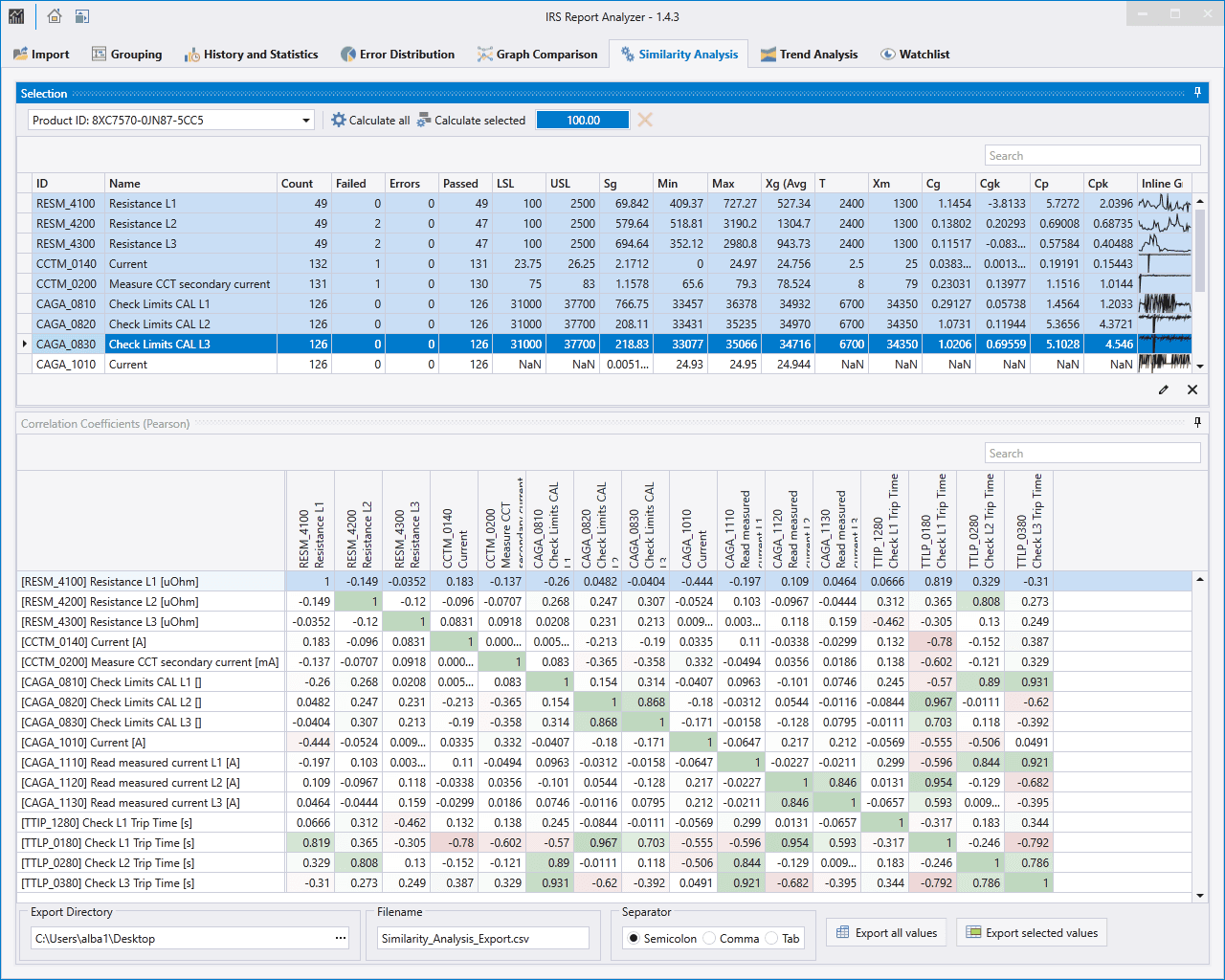
The correlation can be calculated for a selected group between selected or all measurements. The selected measurements are plotted as columns. For each existing measurement the factors are then calculated in one row. The selection therefore only affects the columns. The rows are always created over all measurements.
Export
- Export All Values: All visible results are written to the selected file in CSV format according to the settings
- Export Selected Values: Only the selected rows of the result table(!) are written to the selected file in CSV format according to the settings
Dokumente und Downloads
Weitere Dokumente und Dateien zu Ihrem IRS-Produkt finden Sie auf myIRS.