# LabVIEW Project and FPGA
URL: https://irs.systems/en/docs/resolver-simulation/labview-project-and-fpga
## LabVIEW project
### General
The project contains the complete software for the target:
- FPGA
- Real Time System: RT_ResSi & RT_RVDT
- Computer: PC_ResSi & PC_RVDT
The targets cRIO-9074, cRIO-9075 and sbRIO-9602 are already predefined and precompiled for one channel, but it’s easy to add further targets and/or channels to the project.
Note 1: The PC software is for demonstration purposes only.
Note 2: The RT system is not necessary required but recommended. The FPGA can also be directly controlled by a computer, but this manual will only handle the recommended way (FPGA <-> RT <-> Network Shared Variables <-> PC).
### Adding a new RIO target
Adding a new RIO target is very simple. Following a short description:
1. Create a new target device
- Right click on project -> New -> Targets and Devices…
- Select the target
- The new target is appears in project explorer
2. Copy required elements from old targets to the same location in the new target
- Folders: RT, RT_ResSi, RT_RVDT
- Add the FPGA target (Right click on new Chassis -> New -> FPGA Target)
- Copy FPGA Elements: “[0]_ResSi” (Folder & Device), “FPGA”, “Memory”, “SPI_Resolver_Clock”
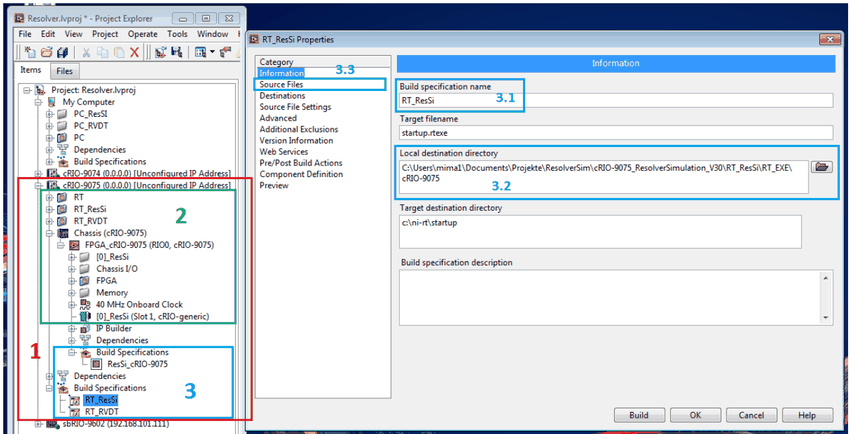
3. Create new build specifications for FPGA, RT_ResSi and RT_RVDT by using the old ones as templates (modify just the “Name” [1], “Target Directory” [2] and update the “Source Files” [3])
4. Build the FPGA build specification and wait until finish (takes some time) -> Bit File
5. Add the new bit file to “RT_ResSi/RT_OpenFPGA.vi”:
- Duplicate Subdiagram
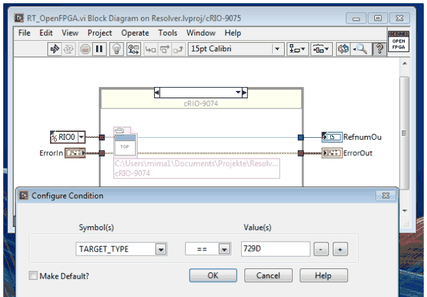
- Set the Symbol to “DeviceCode” and the value to the target device code, then hit “OK” (to get the device code right click on new target -> Properties -> Conditional Disable Symbols -> DeviceCode)
- Configure the “Open FPGA VI Reference” to point to the new generated FPGA bit file
6. Build the required RT build specification (“Run as startup”)
Figure 13: Add a new RIO target (Step: 1-3)Figure 14: Add a new RIO target (Step: 5)
## FPGA
This part handles the code for the FPGA. It’s setup for one device on slot 1 (channel 0) and is already prepared for extending with further channels.
### Top VI & FPGA interface
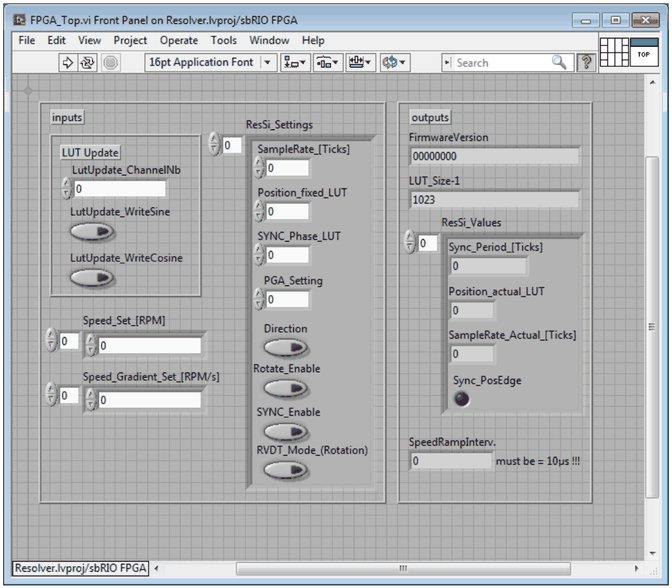
The top vi includes all input and output variables which are needed for operation.
Figure 15: FPGA Top VI
#### Inputs
**LUT Update Section** (see: [Sine & Cosine lookup tables](/en/docs/resolver-simulation/labview-project-and-fpga#sine-cosine-lookup-tables))
Controls for updating the sine and cosine lookup tables. Use DMA_FIFO for writing new values.
| Parameter | Description |
| --- | --- |
| LutUpdate_ChannelNb | Channel number for LUT write (only channel 0 is predefined) |
| LutUpdate_WriteSine | Set to start writing to sine LUT (DMA_FIFO). |
| LutUpdate_WriteCosine | Set to start writing to cosine LUT (DMA_FIFO). |
**ResSi_Settings[x], Speed_Set_[RPM][x], Speed_Gradient_Set_[RPM/s][x]**
Resolver simulation control values (Arrays where index **x** represents the channels number).
| Parameter | Description |
| --- | --- |
| SampleRate_[Ticks] | **ResSi Mode:** Update rate of the output samples to define the rotating speed. When **RPM** is the desired speed in rounds per minute: `SampleRate[Ticks] = (40^6 * 60) / (RPM * 1024)`. **RVDT Mode:** Angle changing speed rate. When `[delta_phi/sec]` is the desired angle changing rate per second: `SampleRate[Ticks] = (abs(phi_max) * 40^6) / ([delta_phi/sec] * (1023 >> 1))` |
| Position_fixed_LUT | Sets a constant position of the simulation. The value is in the range 0…1023. **ResSi Mode:** `Range = 0° … 360°`. **RVDT Mode:** `Range = -phi_max … 0° … phi_max` (0° -> Position = 1023>>1 = 511) |
| SYNC_Phase_LUT | **ResSi Mode:** Sets the 0° simulation value, relative to the positive edge of the SYNC input signal. The value is in the range 0…1023, representing an angle of 0…360°. `SYNC_Phase_LUT = Angle * 1024/360` |
| PGA_Setting | Maximum transformation ratio when sine/cosine LUT is defined to full scale (Amplitude 100%). `Û_OUT = 0.078125 * 2^PGA * Û_LUT` where PGA = 0…7. **Set this value to “2” for hardware version 1.3!** |
| Direction | **ResSi Mode:** Sets sense of rotation. FALSE: Left. TRUE: Right |
| Rotate_Enable | **ResSi Mode:** TRUE: a rotating machine is simulated. FALSE: a fixed position is simulated |
| SYNC_Enable | **ResSi Mode:** TRUE: rotating speed derived from the SYNC input frequency. FALSE: rotating speed derived from the Sample_Rate[Ticks] input |
| RVDT_Mode_(Rotation) | TRUE: RVDT mode. FALSE: Resolver simulation mode (default) |
| Speed_Set_[RPM] | **ResSi Mode:** Speed ramp target speed in RPM |
| Speed_Gradient_Set_[RPM/s] | **ResSi Mode:** Speed change rate in RPM per second, take new speed immediately, when 0. Otherwise 1 RPM/s up to 16e6 RPM/s |
#### Outputs
- **LUT_Size-1:** Constant: The value represents the last index of the sinus and cosine lookup tables.
- **FirmwareVersion:** Constant: FPGA Firmware versions date (HEX-Format: yyyymmdd)
- **ResSi_Values[x]:** Resolver simulation status values (Array where index **x** represents the channels number).
| Parameter | Description |
| --- | --- |
| Sync_Period_[Ticks] | **ResSi Mode:** Number of ticks between two positive edges on SYNC input (Ticks of 25ns) |
| Position_actual_LUT | Actual position of the simulation (see: “Position_fixed_LUT”). |
| SampleRate_Actual_[Ticks] | **ResSi Mode:** Current update rate of the output samples defining the rotating speed. |
| Sync_PosEdge | **ResSi Mode:** Sync external speed signal to positive edge. |
### Sine & Cosine lookup tables
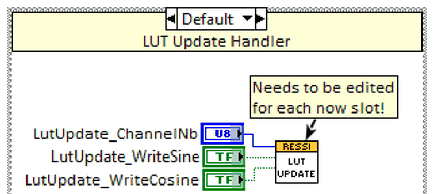
The output waveforms are saved in two lookup tables with 1024 16-bit signed integer elements each. One LUT is responsible for the sine output and the second one for the cosine output. These tables can (should) be updated by the user. For this purpose there are three controls and one DMA available.
For updating, the developer can use “RT_PC_LUT_Write.vi” located in “RT_Share”. It does the following steps:
- Write the desired channel number to “LutUpdate_ChannelNb”. In default state there is just one channel available.
- Set “LutUpdate_WriteSine” or “LutUpdate_WriteCosine” to true to initiate a new transfer.
- Write 1024 values to the DMA “DMA_FIFO” and wait some milliseconds after.
- Reset the binary write value to false.
Figure 16: FPGA_Top.vi - LUT Update
### Adding a new channel
- Create a new slot
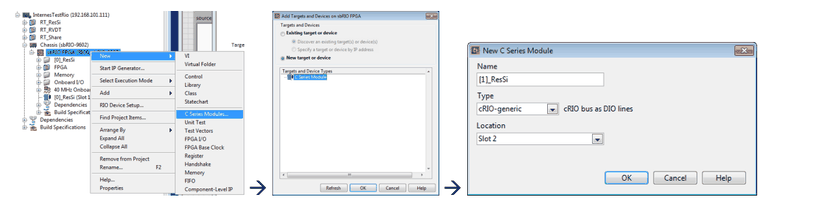
- Right click on the FPGA target -> New -> C Series Module -> New target or device -> C Series Module
- Name: “[x]_ResSi” where x = channel number (in this example x = 1)
- Type: cRIO-generic. Remark: If this option is not available, the following line must be added to the LabVIEW.ini file (LabVIEW must be closed): `cRIO_FavoriteBrand=generic`
- Location: Slot number
Figure 17: Create a new channel on FPGA
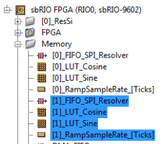
- Create a copy of all memories except DMA_FIFO (Change the name of each memory to represent the new channel number, in this case 1).
Figure 18: Copy FPGA memories
- The following changes needs to be made:
- **FPGA_Top.vi -> SPI Handlers:** Duplicate frame and set the new port pins (“[1]_ResSi/...” in this case).
- **FPGA_Top.vi -> Speed Ramp Generator:** Increase array size of the two input variables by one (in this case to 2): Right click on variable -> Properties -> Size -> Fixed. Duplicate frame, set the new memory (“[1]_RampSampleRate_[Ticks]” in this case) and connect the vi to the next array elements (by extending the “Index Array” elements)
- **FPGA_LutUpdate.vi:** Duplicate case element and update the memories (“[1]_LUT_Sine” and “[1]_LUT_Cosine” in this case).
- **FPGA_ResolverSim.vi:** Increment the size of “ResSi-Settings” by one (in this case to 2) and repeat this step also on the top vi. Duplicate frame and update all constants (“[1]_...” in this case). Connect the input and output variable to the new array entry.
- Rebuild the FPGA target
- If you use the real time system, you need to create a copy of the network variables for the new channel. For further information see [Real Time System – Adding a new channel](/en/docs/resolver-simulation/real-time-system#adding-a-new-channel).