# Hardware
URL: https://irs.systems/en/docs/resolver-simulation/hardware
The following chapter highlights the hardware of the module.
## Block diagram
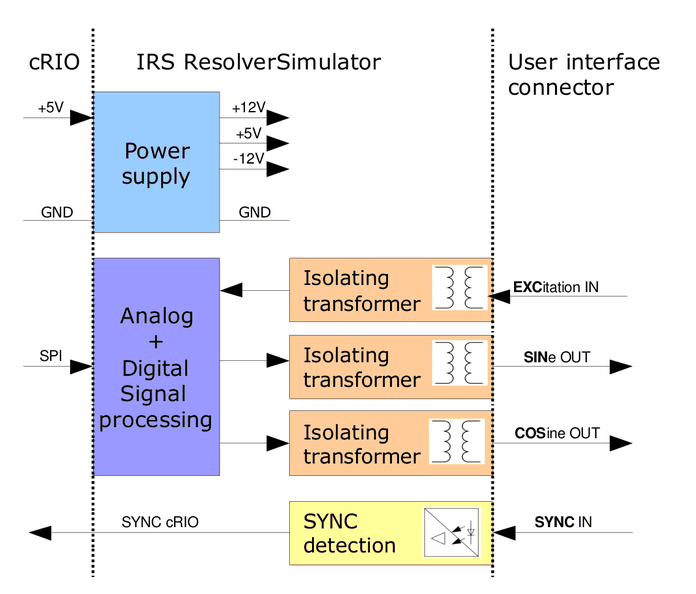
The following figure shows the block diagram of the module. The signals on the right are accessible to the user. The signals on the left represent the Compact-RIO interface and are not described in detail in this manual.
Figure 5: Block diagram
All input and output signals are isolated from the Compact-RIO. The Excitation reference input, sine and cosine outputs are isolated by means of transformers. The SYNC input is digitally isolated by means of optocoupler.
## Interfaces
The user interface Signals have the following functionality. Every signal has a positive and negative terminal.
- **Excitation reference In**:
- Input signal from the power converter to be tested
- Typical sine wave signal of about 10Vpp is applied
- **Sine / Cosine Out**:
- Output signals from the simulation, which is an Amplitude-modulated representation of the excitation signal. Modulation is performed by software.
- In **RVDT** mode the output signal is taken between Sin+ and Cos+ (Sin- and Cos- needs to be tied together) -> Difference output signal:
- **SYNC input (ResSi only)**:
- This signal can be used to synchronize the modulation frequency of sine and cosine outputs to a speed signal (not used in RVDT mode).
- I.e. RPM (speed) of the motor can be applied here.

## Pin out
The following table shows the pin out of the front connector.
| Pin | Description |
| --- | --- |
| 0 | SYNC + |
| 1 | SYNC - |
| 2 | Sine OUT - |
| 3 | Sine OUT + |
| 4 | - |
| 5 | Cosine OUT - |
| 6 | Cosine OUT + |
| 7 | - |
| 8 | Excitation reference IN - |
| 9 | Excitation reference IN + |
*Table 4: Pin out front connector*

An input sine wave will be modulated depending on the requested sense of rotation and motor speed. The modulated signals will be output as a damped sine wave and a damped (and phase shifted) cosine wave. The attenuation can be configured by software.
It is also possible to set a static rotor angle.
Furthermore a synchronization input is available which can be used to measure an external frequency for example.
## Technical data
| Signal | Item | Min | Typical | Max | Unit |
| --- | --- | --- | --- | --- | --- |
| Supply voltage | Supply voltage (provided by cRIO chassis, no external voltage required) | 4,5 | | 5,5 | V |
| Supply voltage | Power consumption (provided by cRIO chassis) | | 50 | | mA |
| Excitation reference input | Excitation reference voltage range | | | 20 | Vpp |
| Excitation reference input | Excitation reference input resistance (@10 kHz, inductive) | | 2000 | | Ohm |
| Excitation reference input | Excitation reference input frequency | 2 | 10 | 20 | kHz |
| SYNC input | SYNC input voltage range (peak voltage) | 5 | | 50 | Vpeak |
| SYNC input | SYNC input detection threshold | | 3 | | V |
| SYNC input | SYNC input frequency | 1 | | 200 | Hz |
| SYNC input | SYNC input current (U > 3V ) | 2 | | 7 | mA |
| Sine / Cosine output | Sine/ Cosine Output level (depends on software settings) | 0 | | 20 | Vpp |
| Sine / Cosine output | Output resistance (@2,5 … 10 kHz ) | 5 | 7 | 20 | Ohm |
*Table 5: Technical data*
## Example waveforms (Resolver)
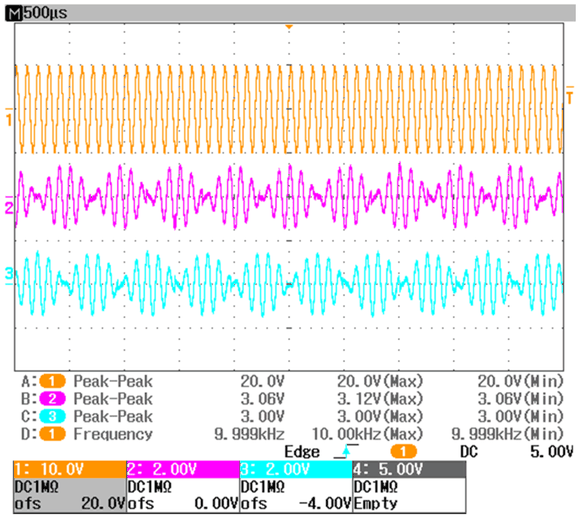
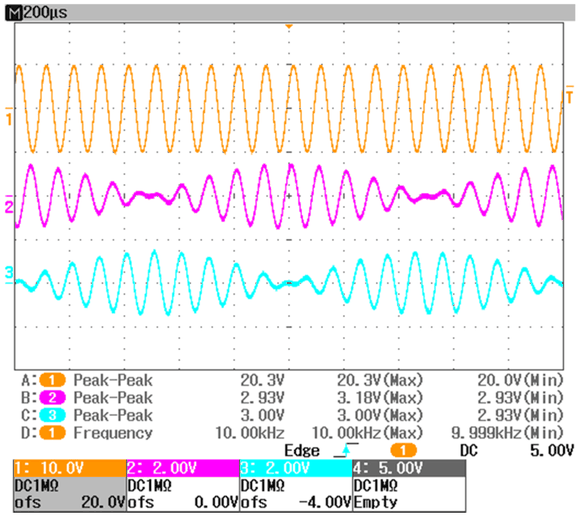
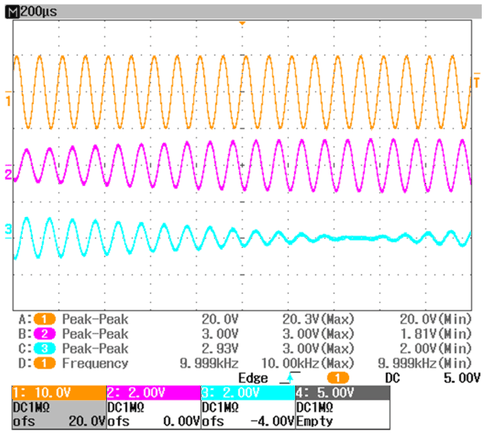
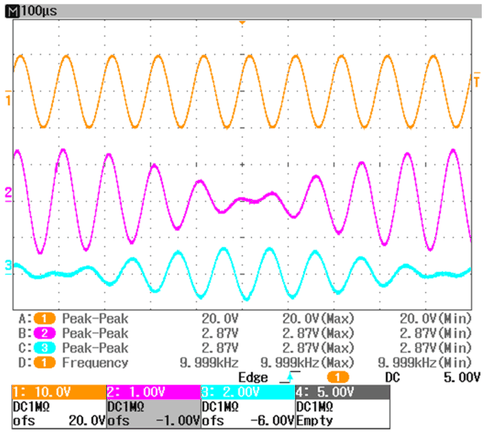
The next screenshots illustrate the functionality (channel 1: excitation, channel 2: sine output, channel 3: cosine output).
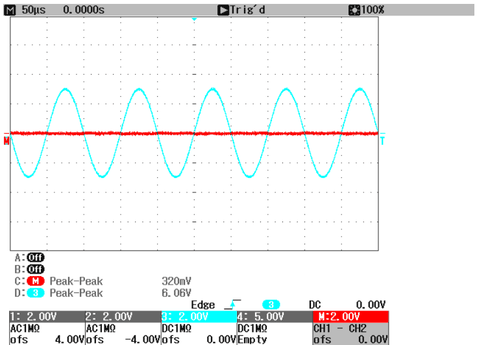
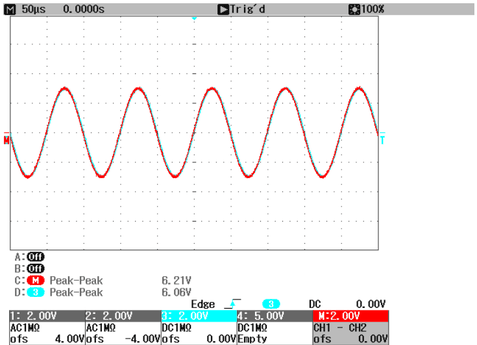
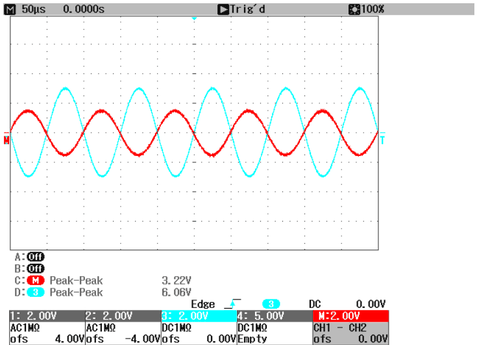
Figure 6: Input and output signals at 10000 rpmFigure 7: Input and output signals at 4000 rpmFigure 8: Input and output signals at 1000 rpmFigure 9: Details on switching point
## Example waveforms (RVDT)
The next screenshots illustrate the functionality (channel 3: excitation; channel M: differential output signal; max. angle (setup): 30°).
Figure 10: RVDT input and differential output signal at 0°Figure 11: RVDT input and differential output signal at +30° (max.)Figure 12: RVDT input and differential output signal at -15°