# Functional Description
URL: https://irs.systems/en/docs/mini-pwz-ii/functional-description
With the Mini PWZ II, you can synchronize asynchronous switching signals to a reference signal to switch them at an adjustable phase angle: The (asynchronous) digital inputs can be activated at any time, for example by a PLC. The (synchronous) digital outputs are switched the next time the reference signal reaches the set phase angle.
## Operating Modes
The exact behavior of the outputs depends on the mode that is set:
| Mode | Description |
| --- | --- |
| Disabled | Channel disabled |
| 1 | The input signal is passed directly to the output; angles are not taken into account |
| 2 | Only the switch-on angle is active; the output switches off with the falling edge of the input signal |
| 3 | Switch-on and switch-off angles active |
| 4 | Switch-on and switch-off angles active, no input signal required, switching takes place in every period |
## Examples
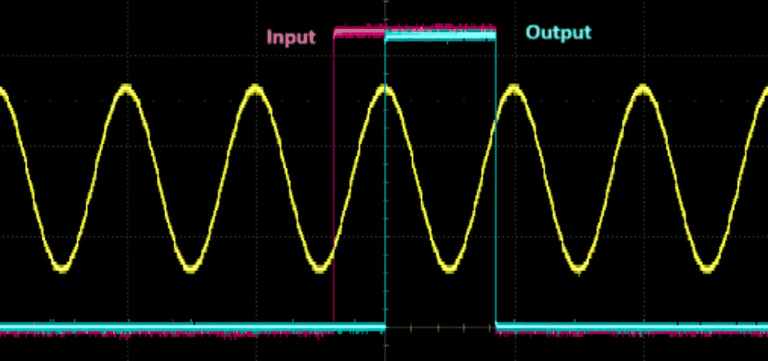
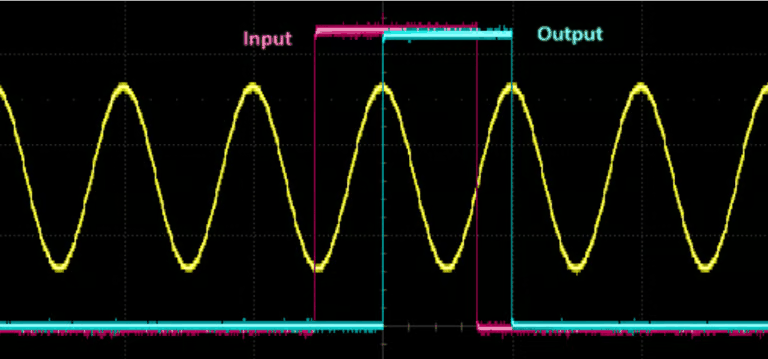
The behavior of the outputs depends on the state of the inputs when the set phase angle is reached. If, for example, the switch-on angle is set to 90°, the module checks, when the phase angle reaches 90°, whether the input is set, and if so, it switches the output on. If the output is already switched on, it stays switched on.
Example 1: Mode , switch-on angle 90°Example 2: Mode 3, switch-on angle 90°, switch-off angle 90°
## Channels
The Mini PWZ II has 4 independent channels, each with its own digital input and its own digital output. The assignment of the channels to the inputs and outputs is static. This means that Input0 and Output0 belong to Channel0, Input1 and Output1 belong to Channel1, and so on.
For each channel, you can set the mode and the switch-on and switch-off angles independently of the other channels. For details on the configuration, see the section [WebServer](/en/docs/mini-pwz-ii/webserver).
## Enable Signal
You can connect an enable signal from the PLC to Input4. The input logic of the enable signal is inverted. If nothing is connected to Input4 or the signal level of the PLC is 0 V, all outputs behave as configured in the WebServer. If the PLC applies 24 V to Input4, all outputs of the Mini PWZ II are deactivated.
## Status Signals
The Mini PWZ II outputs the following signals via the WebServer:
**Signal Detected:**
The time since the last positive zero crossing is monitored.
If this time exceeds 100 ms, the signal is set to *false*.
**Frequency Ok:**
The current input frequency is calculated from the positive zero crossings.
If the measured value is between 44 and 66 Hz, the signal is *true*.
**SPLL Is Locked:**
The current phase angle is derived from an internal reference signal. The internal reference signal is coupled to the input signal by a phase-locked loop (software PLL = SPLL). If the deviation between the internal and the external signal becomes too large, the signal "Is Locked" is set to *false*.
## Status Output
In addition, the Mini PWZ II outputs a status signal at Output4. The output level is 24 V if all of the signals above are *true*, and 0 V if one of the signals above is *false*.