# Hardware
URL: https://irs.systems/en/docs/cmm-iv/hardware
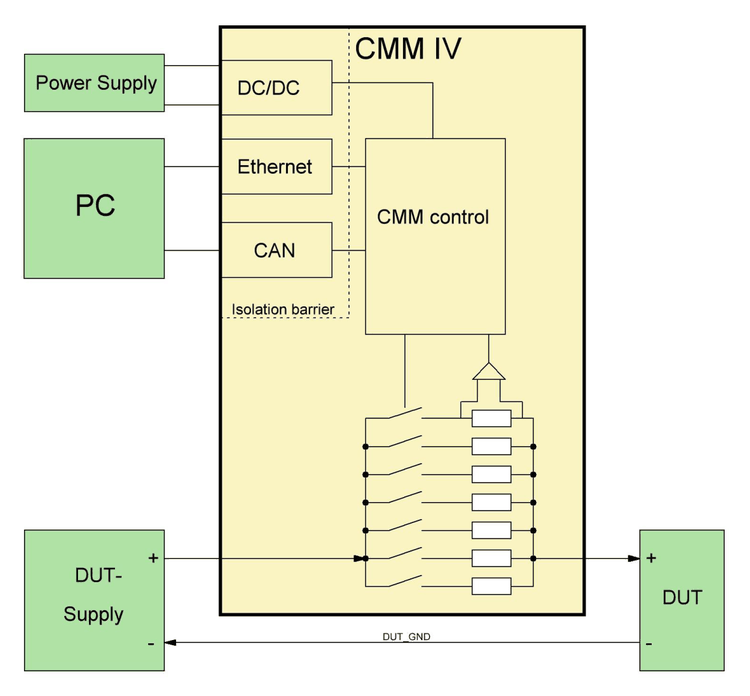
The following figure shows a block diagram of CMM-IV and its external connections
Figure 1: CMM-IV HW Overview
General setup:
- CMM-IV needs 12…24V power supply on PWR-CON/GND-CON
- The CMM-IV current path must be connected in series to the DUT as illustrated in figure 1.
The measurement values can be read using one of the following possibilities:
- Ethernet TCP-Connection
- Continuous High-Speed-Streaming with 125 kS/s
- Text-Based-Protocol with Init-, Trigger- and Fetch-Command
- CAN
- Cyclic Message (configurable ID and period) which contains the average value
- ISO-TP-Protocol to read average, minimum and maximum value
Additional features are:
- The module can be configured via ethernet (CMM-IV-GUI or DLL) or CAN (ISO-TP protocol)
- Permanent parameter storage of the configuration in flash memory
- Calculation of average, minimum and maximum values
- The current path is electrically isolated from electronics supply and digital IO (up to 150V)
- Detection of reverse current
## Connector Pinning
### System connector
| Interface | Signal | Pin | Recommended wire | Remarks |
| --- | --- | --- | --- | --- |
| Module Power | PWR-CON | C13 | 0.14 … 0.5mm² | |
| Module Power | GND-CON | A13, A14, A16, A17, A18, A19, A20 | 0.14 … 0.5mm² | Connect at least 1 pin |
| On/Off | On/Off | A15 | 0.14 … 0.5mm² | |
| CAN | CAN_L | B14 | 0.14 … 0.5mm², twisted pair | Wire with ~120 Ohm impedance |
| CAN | CAN_H | C14 | 0.14 … 0.5mm², twisted pair | Wire with ~120 Ohm impedance |
| Current Path | Curr_In | 4x High current pin: A1-A12, B1-B12, C1-C12 | 1…4 x 10mm² | Depending on applied currents use 1 to 4 wires with appropriate diameter for both input and output, respectively. For currents above 60A use all 4 pins both for input and output. |
| Current Path | Curr_Out | 4x High current pin: A21-A32, B21-B32, C21-C32 | 1…4 x 10mm² | Depending on applied currents use 1 to 4 wires with appropriate diameter for both input and output, respectively. For currents above 60A use all 4 pins both for input and output. |
### CAN Front Connector
The CAN front connector is a standard female D-Sub 9 (DE-9) connector.
| Interface | Signal | Pin | Recommended wire | Remarks |
| --- | --- | --- | --- | --- |
| CAN | CAN-L | 2 | 0.14 … 0.5mm² | |
| CAN | CAN-H | 7 | 0.14 … 0.5mm² | |
| CAN | GND-EXT | 3 | 0.14 … 0.5mm² | |
### Ethernet Front Connectors
The CMM-IV has two Ethernet ports and an integrated switch. This allows easy wiring without the need of an additional switch. Use CAT5e or CAT6 cables for wiring.
### Mating system connector
The following components may be used for the mating connector on the test system. One connector with 8 high current pins is needed. Different versions for crimping or soldering from two manufacturers can be found in the following table.
| Item | Quantity | Order Number | Manufacturer | Remarks |
| --- | --- | --- | --- | --- |
| DIN41612 Type M 24+8 | 1 | `09 03 224 6804` | Harting | |
| DIN41612 Type M 24+8 | 1 | `354 116` | ERNI | |
| High current pin | 8 | `09 03 000 6115` | Harting | Crimp version |
| High current pin | 8 | `09 03 000 6103` | Harting | Solder version |
| High current pin | 8 | `594 182` | ERNI | Crimp version |
| High current pin | 8 | `594 176` | ERNI | Solder version |
### Dimensions
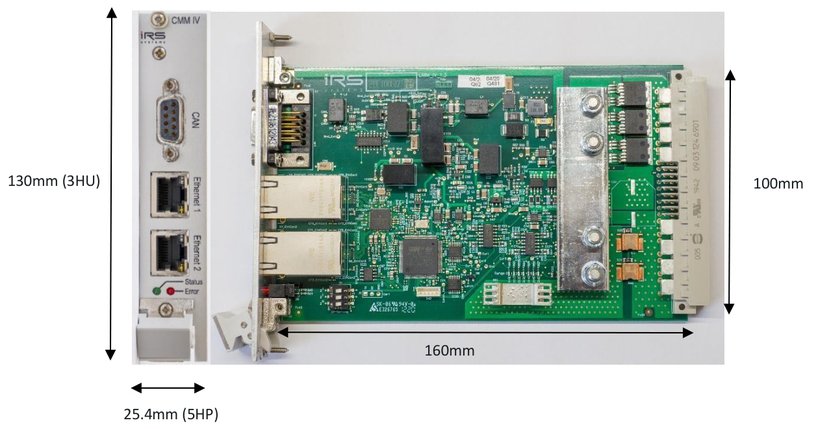
CMM-IV is designed on a 160mm x 100mm Euro card, including front cover with a width of 25.4mm (5HP) and a standard DIN41612 connector. With these dimensions it fits in standard 19” / 3HU carriers and racks.
Figure 2: CMM-IV Dimensions
## Technical data
### Ambient conditions
| Item | Value |
| --- | --- |
| Ambient operating temperature | 5…50°C |
| Storage temperature | -20…70°C |
| Humidity | 5…80% noncondensing |
### Current Path
Depending on the applied currents, the measurement current path must be wired with a low resistance to maintain low voltage drops. I.e. use short wires and as many high-current pins as possible – both for current input and current output.
Each high-current pin may carry up to 40A DC maximum. The more high-current pins (with wires of high diameter) are used, the lower the voltage drop and temperature of CMM-IV.
| Item | Min | Typ | Max | Units | Remarks |
| --- | --- | --- | --- | --- | --- |
| DC current | 0 | | 100 | A | operation under following conditions: - 25°C ambient temperature without airflow - 50° Ambient Temperature with airflow ~2m/s |
| Worst case DC current | | | 160 | A | 25° Ambient Temperature with airflow >6m/s on power devices and connector |
| DC current per high-current pin | | | 40 | A | 50° maximum ambient temperature |
| Measurement range | | | 190 | A | Max. 3 seconds |
| Single pulse current | | | 300 | A | Max. 100ms |
| CMM-IV Voltage @ OFF | | | 36 | V | Module disconnects current path when PWR_Ext is below 5 V, or ON/Off is at low level |
| Leakage current @ OFF | 0 | | 20 | µA | @ 36V |
| Voltage difference between GND-CON/GND-EXT and current path | -150 | | 150 | V | Limit is restricted by distance of wiring on the PCB. Electronic components are specified at least 250V |
| Reverse current detection threshold | 50 | | 1000 | mA | Depending on temperature and components |
| Reverse current continuous | 0 | | 30 | A | |
| Reverse current single pulse | | | 200 | A | Max. 1 second. |
> **NOTE: Maximum voltage, applied at the DUT**
> When the CMM-IV is switched off (i.e. no external power applied or On/Off-control input is at low level) the DUT supply voltage is applied fully across CMM-IV, which can handle up to 36V in OFF-state! **To avoid damaging the module please make sure that CMM-IV is always turned ON when higher voltages than 36V are used for the DUT!**
### Module Supply
Connect the power supply for CMM-IV between PWR-CON and GND-CON. It is strongly recommended **not** to use the DUT power supply to power the CMM-IV.
Note that the current path is disconnected, when no power is applied.
| Item | Min | Typ | Max | Units | Remarks |
| --- | --- | --- | --- | --- | --- |
| Supply voltage | 11 | | 26 | V | PWR-CON to GND-CON |
| Supply DC current | | 130 | | mA | Supply Voltage = 24 V, 1 Ethernet port active |
| Supply inrush current | | 1.0 | | A | Inrush current for approx.1ms @ dU/dt = 20V/ms |
#### Typical current consumption
| Supply Voltage | 12 V | 24 V |
| --- | --- | --- |
| No Ethernet port active | 210 mA | 100 mA |
| 1 Ethernet port active | 280 mA | 130 mA |
| 2 Ethernet ports active | 350 mA | 160 mA |
> **Please note**
> It is recommended to avoid the use of wall-plug adapters to provide the supply voltage of CMM-module since the output of these devices usually carries massive common-mode voltages which can couple to the measurement path. This can have negative impact on the measurement of low currents. We therefore recommend to use only power supplies with an earthed powerline connector.
### DC Accuracy
Accuracy of the module is verified for DC currents. Each module passes a calibration procedure at IRS. The module may of course be re-calibrated. See [Calibration Recommendation](/en/docs/cmm-iv/calibration-recommendation) for recommendations.
| Item | Min | Typ | Max | Units | Remarks |
| --- | --- | --- | --- | --- | --- |
| Accuracy uncalibrated | | 0.5 | 2 | % of range | Max in % of respective range |
| Accuracy calibrated | | 0.2 | 1 | % of range | Max in % of respective range |
| Resolution range 0 | | | 100 | nA | Limited by output data format |
| Resolution range 1 | | | 404 | nA | |
| Resolution range 2 | | | 4.04 | µA | |
| Resolution range 3 | | | 40.3 | µA | |
| Resolution range 4 | | | 403 | µA | |
| Resolution range 5 | | | 4.03 | mA | |
| Resolution range 6 | | | 46.8 | mA | |
### DC Voltage Drop
Voltage drop is the voltage between current input and output, measured on the module connector. The drop on the mating power connector pins and the wiring is not included in the following values.
| Item | Min | Typ | Max | Units | Remarks |
| --- | --- | --- | --- | --- | --- |
| Drop @ 100µA | | 70 | 80 | mV | Range 0 |
| Drop @ 1mA | | 70 | 80 | mV | Range 1 |
| Drop @ 10mA | | 70 | 80 | mV | Range 2 |
| Drop @ 100mA | | 70 | 80 | mV | Range 3 |
| Drop @ 1A | | 90 | 100 | mV | Range 4 |
| Drop @ 10A | | 100 | 120 | mV | Range 5 |
| Drop @ 40A | | 45 | 60 | mV | Range 6 |
| Drop @ 100A | | 120 | 150 | mV | Range 6 |
| Drop @ 160A | | 200 | 230 | mV | Range 6 |
### On/Off Interface
The digital input On/Off can be used to switch the current path of the CMM-IV on or off.
| Item | Min | Typ | Max | Units | Remarks |
| --- | --- | --- | --- | --- | --- |
| On/Off Control – Low = OFF | -0.7 | | 1.2 | V | |
| On/Off Control – High = ON | 3.0 | | 25 | V | |
| On/Off Control Input Resistance | | 150 | | kOhm | 0…3.3V |
| On/Off Control Input Resistance | 50 | | 150 | kOhm | 3.3…25V |
> **NOTE: Maximum voltage, applied at the DUT**
> When the CMM-IV is switched off (i.e. no external power applied or On/Off-control input is at low level) the DUT supply voltage is applied fully across CMM-IV, which can handle up to 36V in OFF-state! **To avoid damaging the module please make sure that CMM-IV is always turned ON when higher voltages than 36V are used for the DUT!**
### LED Range Indicator
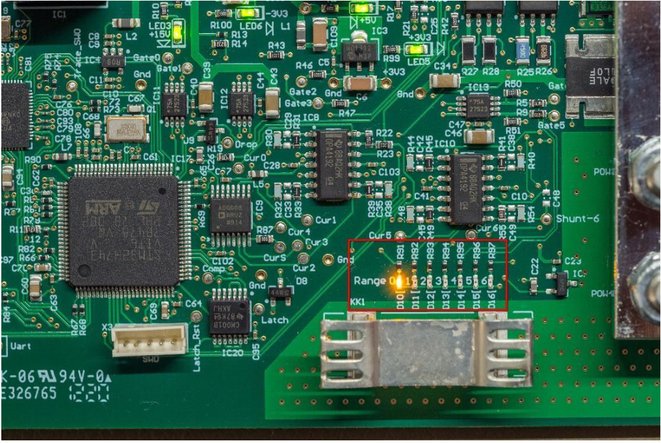
The CMM-IV (version of 1.3 and above) is equipped with a LED range indicator which is located close to the heat sink on the component side of the CMM-IV. See Figure 3 for details.
Figure 3: Location of LED range indicator
### CAN Interface
The integrated CAN interface is a High-Speed CAN interface with FD-Support.
| Item | Min | Typ | Max | Units | Remarks |
| --- | --- | --- | --- | --- | --- |
| Voltage at CAN_H or CAN_L | -14 | | 14 | V | Against GND-EXT |
| Dominant output level on CAN_H | 2.45 | | 3.3 | V | |
| Dominant output level on CAN_L | 0.5 | | 1.25 | V | |
| Recessive output level on CAN_H & CAN_L | | 1.85 | | V | |
| Nominal baud rate | 100 | 1000 | 1000 | kbit/s | |
| Data baud rate | 1000 | 1000 | 4000 | kbit/s | |
For further details, see datasheet of TCAN332 and [System Integration – CAN](/en/docs/cmm-iv/hardware#can).
### Ethernet-Interface
The CMM-IV is equipped with a 3-port Gigabit-Ethernet Switch. Two ports of the switch are connected to RJ45 jacks on the front panel. The third switch is connected to the microcontroller of the CMM IV. The connection between the switch and the microcontroller is limited to 100 Mbit/s.
| Item | Min | Typ | Max | Units | Remarks |
| --- | --- | --- | --- | --- | --- |
| Datarate of switch (from one port to the other) | | | 1000 | MBit/s | |
| Datarate of the microcontroller | | | 100 | MBit/s | |
For further details, see datasheet of KSZ9893RNX and [System Integration – Ethernet connection](/en/docs/cmm-iv/hardware#ethernet-connection).
## System Integration
The following section describes hardware prerequisites of the communication interfaces. For integration of the current path and the power supply, see the remarks in the [technical data](/en/docs/cmm-iv/hardware#technical-data).
### CAN
The High-speed CAN interface may be used to read measurement data.
Any High-Speed CAN interface from any vendor may be applied as counterpart for data acquisition. Make sure that termination of the entire bus is implemented properly with two 120 Ohm resistors at the respective far ends of the bus. No other termination resistors are included.
It is recommended to use a twisted pair with an impedance of 120 Ohm. Do not forget the GND connection. It is recommended to use the front D-Sub 9 connector for CAN communication because it uses GND-EXT which is directly connected to the CAN transceiver. GND-CON on the system connector is connected to GND-EXT and the CAN transceiver through an EMI filter which can lead to signal integrity problems especially at high baud rates.
Every CMM on the bus must run at the same baud rate and use different CAN IDs. CAN ID and baud rate may be configured via TCP-Text-Protocol or via CAN ISOTP and are stored permanently in flash memory.
For integration as a single module in a test system setup, please add a CAN counterpart with a termination resistor of 120 Ohm. CMM-IV includes 120 Ohm -termination which can be enabled or disabled by software.
If several CMM-IV are connected to the same CAN interface the termination resistor of each CMM-IV must be disabled. A single termination must be included at the far end of the CAN bus.
### Ethernet connection
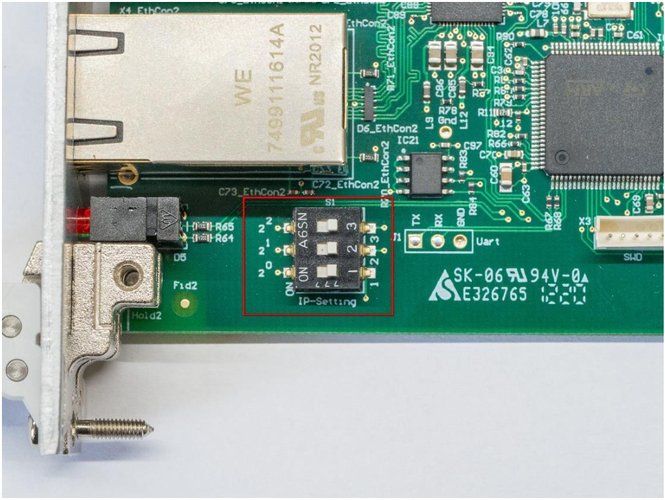
The IP address can be configured in the GUI described in [Configuration tool CMM-IV-GUI](/en/docs/cmm-iv/functional-description#configuration-tool-cmm-iv-gui). Furthermore, the IP can be modified with a dip switch on the CMM-IV (see Figure 4). An offset between 0 and 6 is added, depending on the position of the switch. If all three switches are in the ON position the CMM IV uses its default IP which is `192.168.222.21`.
> **The default IP address has changed in firmware version V2.5.**
> Older versions use default IP address: `192.168.200.1`
Examples:
| IP set in the GUI | Switch 2^0 | Switch 2^1 | Switch 2^2 | Offset | Resulting IP |
| --- | --- | --- | --- | --- | --- |
| 192.168.200.1 | OFF | OFF | OFF | 0 | 192.168.200.1 |
| 192.168.200.1 | ON | OFF | OFF | 1 | 192.168.200.2 |
| 192.168.200.3 | OFF | ON | ON | 6 | 192.168.200.9 |
| 192.168.200.10 | ON | ON | ON | Use default IP | 192.168.222.21 |
Figure 4: Switch for modification of IP address