# Functional Description
URL: https://irs.systems/en/docs/cmm-iv/functional-description
The following section describes the internal measurement and gives a detailed description of the interfaces.
## Current measurement
### Measurement procedure
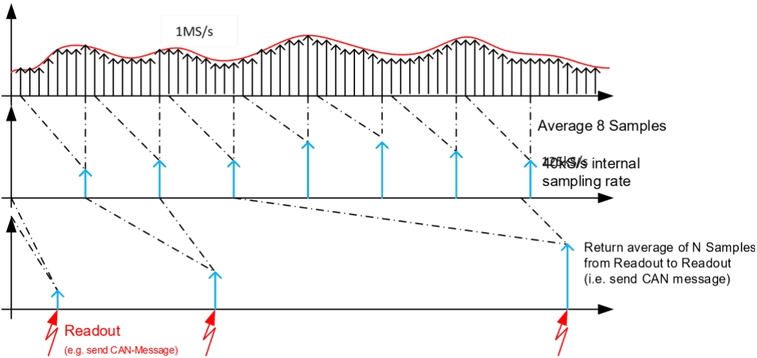
The current is measured internally at a sampling rate of 1MS/s, where 8 samples are averaged to 1 internal sample. Thus, a “real” internal sampling rate of 125kS/s is achieved. This “real” internal sampling rate can be streamed to a PC via Ethernet. The internal sampling rate can be further reduced in the CMM-IV-GUI. Possible values are 125, 50, 10 and 1 kS/s.
The current range is selected automatically, when the CMM is switched on. Large current steps can result in short-time voltage drops of a few hundred millivolts across the module. See [Dynamic behavior](/en/docs/cmm-iv/functional-description#dynamic-behavior) for dynamic behavior.
The CMM-IV transmits the average of the current for a configurable period via CAN. The standard value for this period is 5 ms.
Additionally, the average, the minimum and the maximum current can be read via CAN-Iso-TP. The calculation of the average, the minimum and the maximum value is reset with every readout. The following figure illustrates the averaging.
Figure 5: Measurement procedure
### Reverse current detection
Reverse currents cannot be measured, but a flag signals when a current of several 100mA is applied in reverse direction. The output data is set to zero if reverse current is detected. The flag can be read via IsoTP-protocol and the TCP-Streaming mode.
### Dynamic behavior
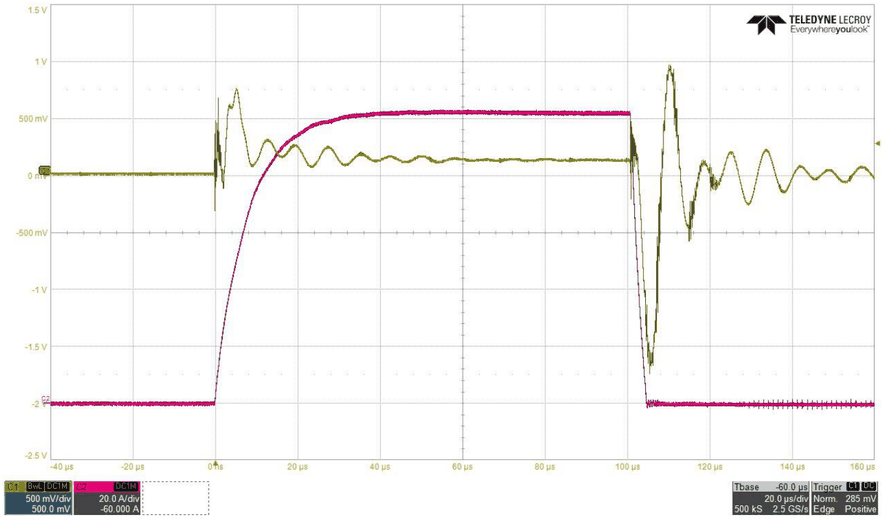
Switching between the ranges occurs very fast from low current range to high current ranges within less than 1µs (500ns typical) after the current range has been exceeded. This is significantly faster than the current can rise due to wiring inductance even with short wires.
The following figure shows the current (red) through the CMM and the voltage drop (yellow) across the CMM for a load current step from 0 to 100 A. The ringing on the voltage drop is caused by the wiring inductance.
Figure 6: Dynamic switching behavior
## ON/Off control
CMM-IV may be switched on or off by a hardware input or by software. The following parameters can be adjusted by configuration:
- Active level (high or low) of the hardware input
- Priority of hardware or software on/off-control
Configuration may be changed in the CMM-IV-GUI, by the command `OnOffMode = x` via Text-Based Ethernet-Protocol or CAN using ISO-TP protocol, while x one of the following numbers 0…7:
| ID | Name | HW input | SW setting | Description |
| --- | --- | --- | --- | --- |
| 0 | ONOFF_Mode_ExtHighActive | YES | NO | CMM is ON, when high level is applied at HW input, SW setting ignored |
| 1 | ONOFF_Mode_ExtLowActive | YES | NO | CMM is ON, when low level is applied at HW input, SW setting ignored |
| 2 | ONOFF_Mode_Int | NO | YES | CMM is only controlled by SW |
| 3 | ONOFF_Mode_ExtHighActiveAndInt | YES | YES | CMM is ON when HW input is high **AND** SW setting is ON. |
| 4 | ONOFF_Mode_ExtLowActiveAndInt | YES | YES | CMM is ON when HW input is low **AND** SW setting is ON. |
| 5 | ONOFF_Mode_ExtHighActiveOrInt | YES | YES | CMM is ON when HW input is high **OR** SW setting is ON. |
| 6 | ONOFF_Mode_ExtLowActiveOrInt | YES | YES | CMM is ON when HW input is low **OR** SW setting is ON. |
| 7 | ONOFF_Mode_AlwaysOn | NO | NO | CMM is always ON. |
## CAN data output
CAN data is sent cyclically on a specified CAN ID. This CAN ID is adjustable via text-based Ethernet-Protocol or CAN using ISO-TP protocol.
| Value | Min | Typical | Max | Unit | Remarks |
| --- | --- | --- | --- | --- | --- |
| CAN Type | - | High Speed | - | - | CAN transceivers are always active. No sleep mode is applied. |
| CAN Termination | | 120 | | Ohm | Termination resistor is switchable via software command. |
| CAN nominal Baud rate | 100 | 1000 | 1000 | kBit/s | Default baud rate is 1MBit/s |
| CAN-FD data Baud rate | 1000 | 4000 | 4000 | kBit/s | Default baud rate is 0, which means Classic CAN is used |
| CAN ID | | 0x1C2 | | Hex | Identifier may be adjusted by software command |
| Extended ID | | No | | | 11-Bit or 29-Bit identifier may be adjusted by software command |
| CAN transmit interval | 1 | 5 | 30000 | ms | Transmit interval may be adjusted by software command |
| CAN data length | | 5 | | | 4 Bytes for current and 1 Byte for range |
| CAN data resolution | | 100 | | nA | One bit of the returned current represents 100nA of real measured current |
Content of the transmitted CAN message is as follows:
| Byte | Content | Value |
| --- | --- | --- |
| Byte 0 | Current Bit 7..0 | 0x00000000 … approx. 0x7270 E000 |
| Byte 1 | Current Bit 15..8 | 0x00000000 … approx. 0x7270 E000 |
| Byte 2 | Current Bit 23..16 | 0x00000000 … approx. 0x7270 E000 |
| Byte 3 | Current Bit 31..24 | 0x00000000 … approx. 0x7270 E000 |
| Byte 4 | Range | 0 … 6 |
| Byte 5 | Flags | 0…0x07 |
| Byte 6...7 | Padding | 0 |
The CAN Message has a DLC (Data Length Code) of 8. Only Bytes 0 – 5 are used, Bytes 6 – 7 are padded with 0. Current is returned as 32 Bit unsigned long value in steps of 100nA split into the first 4 bytes of the CAN message. When CMM-IV is in off state, the returned value is zero. When CMM-IV is in on state, but reverse current is applied, the returned value is zero and “Negative Current Flag” (0x01) is set.
Flags:
- 0x01: Negative Current
- 0x02: Drop Voltage
- 0x04: Ringbuffer Warning
- 0x08: Cmm Off (0 = On; 1 = Off)
## Configuration tool CMM-IV-GUI
The tool CMM-IV-GUI can be used to configure a CMM-IV and can also trigger measurements or stream all measured values to a PC. The current version of the CMM-IV-GUI can be downloaded from:
[myIRS – Downloads](https://my.irs.systems/downloads?group=5&latest=1)
After installation the installation folder contains (among others) the following subfolders and files:
| File/Folder | Description |
| --- | --- |
| `IRS.CMM-IV.GUI.exe` | The configuration tool |
| `IRS.CMM-IV.Lib.dll` | A C# library which can be used to include the CMM into your software |
| `Examples` | Containing an example NI TestStand sequence which illustrates the use of important functions |
| `LabVIEW` | Containing the NI LabVIEW VIs which are used by the example test sequence |
| `Firmware` | Contains a firmware image which can be used to update the microcontroller on the CMM-IV |
### Connect and update a CMM-IV
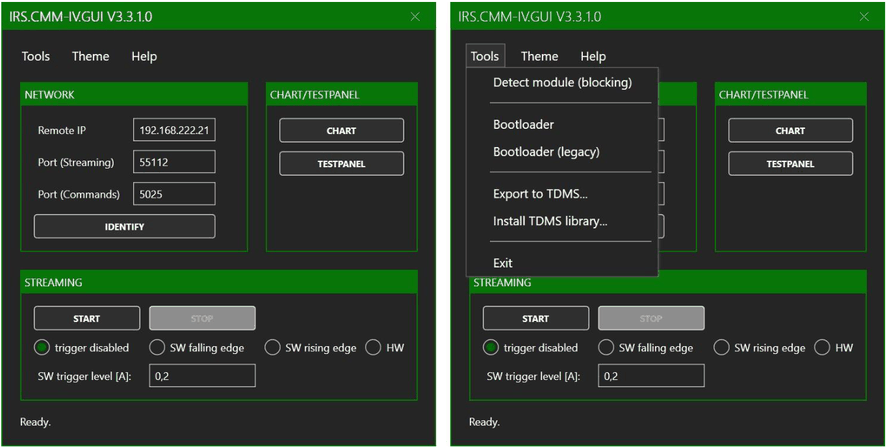
The CMM-IV-GUI uses Ethernet and TCP/IP to communicate with the CMM-IV. Therefore, it is necessary to enter the IP-address of CMM-IV into the GUI. The default IP-address is `192.168.222.21`. See [Ethernet connection](/en/docs/cmm-iv/hardware#ethernet-connection) for details on IP configuration. If you do not know the IP-address of the CMM-IV, you can use *Tools -> Detect module*.
Figure 7: Find IP address of CMM-IV in CMM-IV-GUI
If “Detect module” does not find an IP address, make sure that the subnet mask of your network card is configured correctly and check your firewall settings.
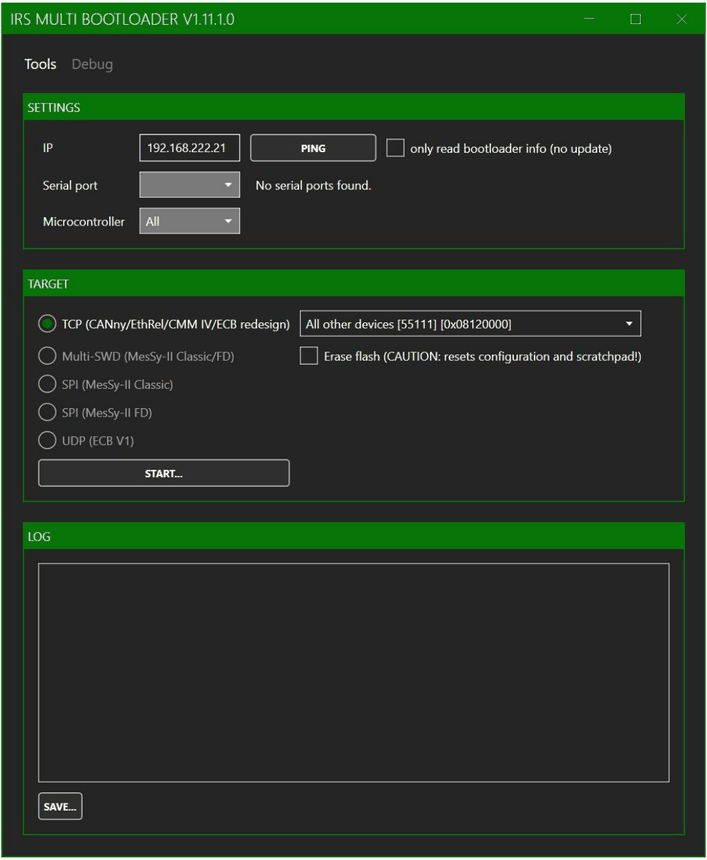
After entering the IP address under “Remote IP” you can check the connection with “IDENTIFY”. This button opens a window which lists information about the connected CMM-IV. This information includes the serial number and the firmware version of the connected CMM-IV. If the firmware version is outdated, you can update the microcontroller under *Tools -> Bootloader*. The latest firmware version can be found with *Help -> Check for update*.
Figure 8: User interface of the bootloader
The bootloader is simple to use. Just enter the IP address of the CMM IV and click “START…”. Then select the firmware image from the installation folder mentioned above.
### Use the test panel to configure the CMM-IV and to get current measurements
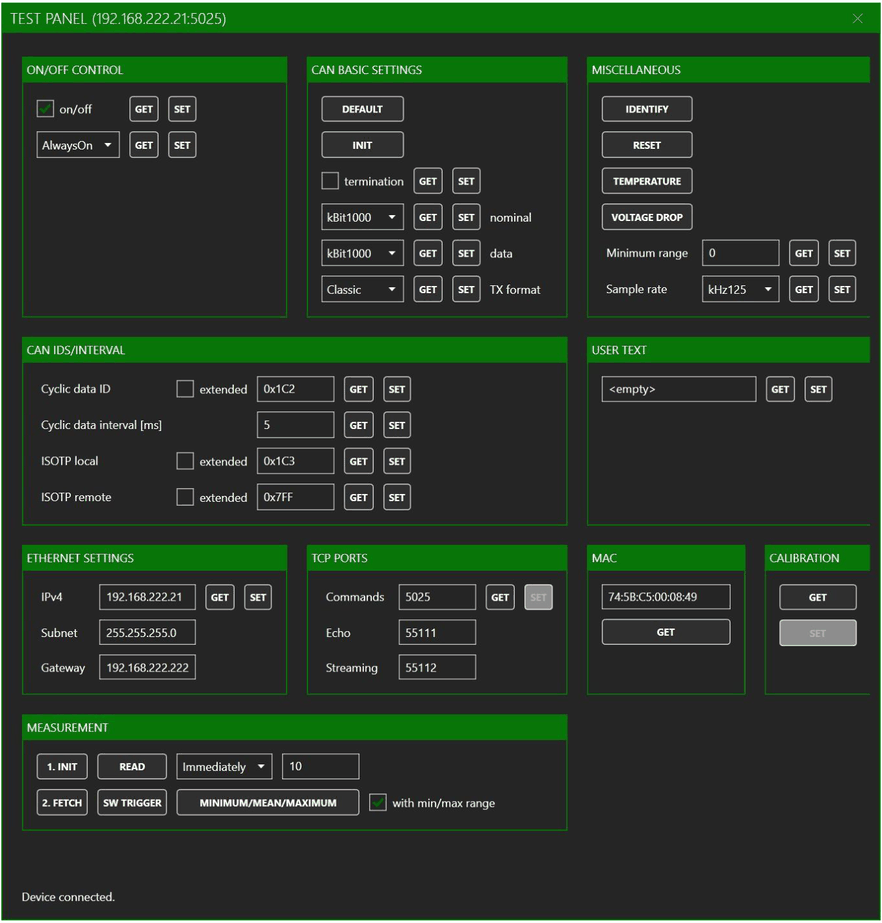
The test panel can be opened by clicking “TESTPANEL” in the main window. It can be used to configure the different communication interfaces and the measurement behavior of the CMM-IV.
“ON/OFF CONTROL” can be used to select the modes described in [ON/Off control](/en/docs/cmm-iv/functional-description#on-off-control).
Figure 9: Test panel of the CMM-IV-GUI
There are three different methods of getting measurement values.
The first method simply uses the “READ” button. This immediately returns the requested number of current samples. With this method up to 100000 samples can be read. The maximum number of samples is reduced to 10000 if the maximum sample rate of 125 kS/s is used.
The second method is more advanced and uses the Buttons “INIT”, “SW TRIGGER” and “FETCH”. The button “INIT” sets the trigger method selected in the dropdown menu and the number of samples that shall be read. The number of samples for this method is limited to 100. The button “SW TRIGGER” must be used to trigger the measurement if trigger mode “Internal” is selected. In “External” trigger mode the measurement is triggered by a positive edge on the ON/OFF pin and in mode “Immediately“ no trigger is needed and measurement starts immediately after “INIT”. The button “FETCH” returns the configured number of current samples when the measurement is completed.
The third method uses the button “MINIMUM/MEAN/MAXIMUM”. A click on this button returns the minimum, mean and maximum current since the last use of this button.
The test panel offers two possibilities to configure the measurement behavior under “MISCELLANEOUS”.
“Minimum range” can be used to avoid undesired switching between ranges. The minimum range is reset to zero when rebooting the CMM-IV. A maximum range can not be set because it could easily lead to accidentally exceeding the maximum allowed current of the selected range.
“Sample rate” can be used to reduce the sample rate of the CMM IV. This could especially be helpful to reduce the size of the saved data, when using streaming of measurement values for longer time periods.
### Streaming of measured values
Streaming of measured values can be started in the main window of the CMM-IV-GUI. When “trigger disabled” is selected, streaming starts with a click on “START” and ends with a click on “STOP”. When “SW falling edge” or “SW rising edge” is selected, streaming starts but no data is saved until the selected edge is detected. The level for the edge detection can be configured under “SW trigger level [A]”. When an edge is detected 12500 samples before and 12500 samples after the edge are saved. With the default sample rate of 125 kS/s this results in 100 ms before and after the trigger event. In trigger mode “HW” a rising edge on the ON/OFF pin is used as trigger. After the click on “START” the microcontroller on the CMM-IV is set in a waiting mode and only starts streaming after the rising edge on pin ON/OFF is detected.
> **Note**
> Technically the streaming to the cmm4 file starts with a click on “START” and the trigger event is saved as a marker in this file. The values which are more than 12500 samples before the trigger event are removed in the export to TDMS.
The streamed measurement data is saved in the proprietary “cmm4” format. This is a binary format which unloads the PC from data conversion and therefore allows streaming from multiple CMM-IV in parallel. The conversion to the TDMS format from National Instruments can be done from the menu (*Tools -> Export to TDMS*). To use the export function, you first need to install a TDMS library from National Instruments (*Tools -> Install TDMS library*).
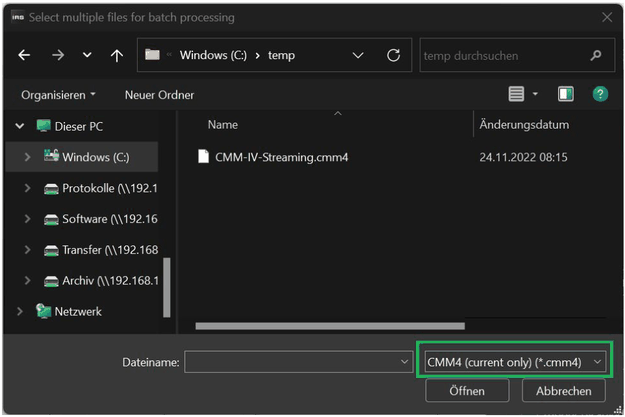
Figure 10: Dialogue Window for TDMS export
“Export to TDMS” opens the dialogue window shown in Figure 10. In this window you can select the cmm4 file which should be converted to TDMS format. The TDMS file is saved with the same name as cmm4 file. The marked selection offers three possibilities. “CMM4 (current only)” exports only the measured current values. “CMM4 (all channels)” also includes the drop voltage, range and flags. “CMM4 (ignore trigger event)” exports all data from the click on “START” until the end of the cmm4 file which is 12500 samples after the trigger event. This is possible because all data is stored in the cmm4 file (including the trigger event) and the trigger is only used when exporting to TDMS.
### Live view of measured values
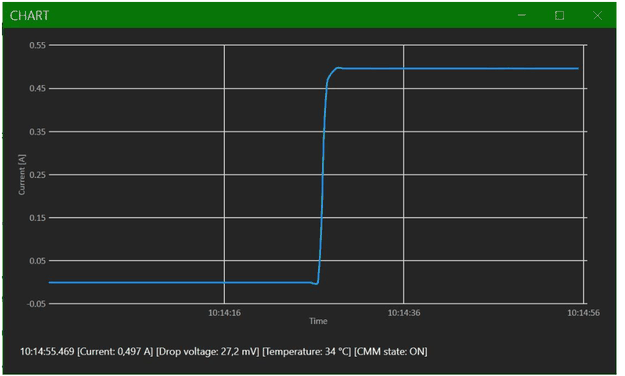
A click on “CHART” in the main window opens the window shown in Figure 11. The measured values are updated every second and displayed in the chart.
Figure 11: Live view of measured values
## Text-Based Ethernet-Protocol
The following sections describe the text-based Ethernet-protocol which is used by the CMM-IV-GUI and the C#-DLL. It is recommended to use the CMM-IV-GUI or the C#-DLL (which is part of the CMM-IV-GUI download package, see [Configuration tool CMM-IV-GUI](/en/docs/cmm-iv/functional-description#configuration-tool-cmm-iv-gui) for details).
The protocol is based on TCP and uses 0-terminated strings. This means the last character of each command has to be NUL (= `0x00`).
### Commands to measure currents, voltage drop and temperature of CMM IV
The text-based Ethernet protocol supports two different methods of reading currents. The first method is to simply use the `ReadCurrent` command with TriggerMode `IMM`. This immediately returns the requested number of current samples. The second method is more advanced and uses the commands `InitCurrent`, `TriggerCurrent` and `FetchCurrent`. `InitCurrent` sets the trigger method and the number of samples that shall be read. `TriggerCurrent` is used to trigger the measurement if trigger mode `INT` is selected. `FetchCurrent` returns the requested number of current samples when the measurement is completed.
The following commands can be sent as strings on TCP port `5025` and must be finished with the NUL-character (`0x00`). Erroneous commands are answered by an error message, see [Error messages](/en/docs/cmm-iv/functional-description#error-messages) for details.
| Command | Parameters | Description | Remarks |
| --- | --- | --- | --- |
| `ReadCurrent =` | 1 … 100000, INT/EXT/IMM | Sets the number of samples and the trigger source. Values are sent directly after the measurement. | Trigger sources: INT: Wait for command “TriggerCurrent”; EXT: Wait for rising edge on Pin On/Off; IMM: Start measurement immediately |
| `InitCurrent =` | 1 … 100, INT/EXT/IMM | Sets the number of samples and the trigger source. Values are sent after the measurement has been completed and command “FetchCurrent” was received. | Trigger sources: INT: Wait for command “TriggerCurrent”; EXT: Wait for rising edge on Pin On/Off; IMM: Start measurement immediately |
| `TriggerCurrent` | | Must be used to trigger the measurement if trigger source “INT” is selected. | |
| `FetchCurrent` | | Returns the measured values when the measurement is completed | Response: `0.0005027 A`, `0.0005031 A` …; If negative Current is detected, the response is: `-0.0000001 A` |
| `Voltage?` | | Queries the current drop voltage value in µV | Response: `Voltage = 30156 µV` |
| `Temperature?` | | Reads out current module temperature in °C | Response: `Temperature = 26 °C` |
| `MinMaxMean?` | | Returns min, max and mean current since last use of this command. | Response: `Min = 0.0005027 A`, `Mean = 0.0005031 A`, `Max = 0.0005034 A`, `Samples = 12756` |
### Commands to query configuration parameters
The following commands can be sent as strings on TCP port `5025` and must be finished with the NUL-character (`0x00`). Erroneous commands are answered by an error message, see [Error messages](/en/docs/cmm-iv/functional-description#error-messages) for details.
| Command | Description | Response | Remarks |
| --- | --- | --- | --- |
| `Identify?` | Queries the name, HW-Revision, SW-Revision and Serial Number of the device | `IRS CMM IV; HW Revision: 3; SW Version: 1.2; Serial Number: 20BG00001` | |
| `CanCyclicInterval?` | Queries the current CAN transmission interval in milliseconds | `CanCyclicInterval = 5 ms` | Default return value is 5ms |
| `CanBaudrate?` | Queries the CAN nominal baudrate in kBit/s | `CanBaudrate = 1000 kBits` | Default nominal baudrate is 1000 kBit/s |
| `CanDataBaudrate?` | Queries the CAN-FD data baudrate in kBit/s | `CanDataBaudrate = 4000 kBits` | Default data baudrate is 1000 kBit/s |
| `TxFrameFormat?` | Queries the format in which CAN messages are sent by the CMM | `TxFrameFormat = 0` | 0: Classic CAN frame; 1: CAN FD frame without BRS; 2: CAN FD frame with BRS |
| `CanCyclicId?` | Queries the CAN ID for cyclic messages | `CanCyclicId = 0x1C2` | “EXT” is added for extended IDs; Default Can ID is 0x1C2 |
| `Temperature?` | Reads out current module temperature in °C | `Temperature = 26 °C` | |
| `OnOffMode?` | Queries the On/Off control configuration | `OnOffMode = 0…7` | See [ON/Off control](/en/docs/cmm-iv/functional-description#on-off-control) for description of OnOffMode?. |
| `OnOff?` | Queries the ON/Off state of the device | `OnOff = 0/1` (0 => Off / 1 => On) | This state is the result of the OnOffMode, the hardware input and the software on/off setting. |
| `IsoTpLocalId?` | Queries local CANID for ISO-TP | `IsoTpLocalId = 0x7FF` | Local ID is sent by CMM; Default is 0x1C3; “EXT” is added for extended IDs |
| `IsoTpRemoteId?` | Queries remote CAN-ID for ISO-TP | `IsoTpRemoteId = 0x1C3` | Remote ID is sent by system; Default is 0x7FF; “EXT” is added for extended IDs |
| `CanTermination?` | Queries state of switchable CAN termination | `CanTermination =0/1` | Default is 0 (CAN termination off) |
| `IpSettings?` | Queries the IP settings of the device | `IP = 192.168.200.1`, `Mask = 255.255.255.0`, `Gateway = 192.168.200.10` | These are the default IP settings. IP can be reset by hardware switch (see [Ethernet connection](/en/docs/cmm-iv/hardware#ethernet-connection)). |
| `Ports?` | Queries the TCP ports | `Port TcpCommands = 5025`, `Port TcpEcho = 55111`, `Port TcpStreaming = 55112` | These are the default port settings. |
| `MacSettings?` | Queries the MAC address of the device | `MAC = 74:5B:C5:00:00:01` | |
| `CalDate?` | Queries the calibration date | `CalDate = 2020-06-18` | |
| `MinRange?` | Queries the minimal range set by the user | `MinRange = 0` | See corresponding command in following section for details |
| `UserText?` | Queries the string previously stored with the command “UserText =“ | UserText =<string> | |
| `SampleRate?` | Queries the sample rate (details in [Measurement procedure](/en/docs/cmm-iv/functional-description#measurement-procedure)) | `SampleRate = 0` | 0: 125 kS/s; 1: 50 kS/s; 2: 10 kS/s; 3: 1 kS/s |
### Commands to set configuration parameters
The following commands can be sent as strings on TCP port `5025` and must be finished with the NUL-character (`0x00`). Erroneous commands are answered by an error message, see [Error messages](/en/docs/cmm-iv/functional-description#error-messages) for details. If a command uses multiple parameters, the parameters must be separated by a whitespace. Optional parameters are noted in square brackets.
| Command | Parameters | Description | Response | Remarks |
| --- | --- | --- | --- | --- |
| `Reset` | | Reboots CMM IV | Ok | Reboot of CMM IV may take up to 10 seconds |
| `Default =` | CAN | Restore default settings for CAN interface | Ok | |
| `CanCyclicInterval =` | 1 ms … 1 000 000 ms | Sets the current CAN transmission interval in milliseconds | Ok | Max. interval is 1 000 sec = 1 000 000 ms |
| `CanBaudrate =` | 100 kBits … 1000 kBits | Sets the CAN nominal baud rate in kBit/s | Ok | First parameter must be a value between 100 and 1000. Second parameter must be “kBits” |
| `CanDataBaudrate =` | 1000 kBits … 4000 kBits | Sets the CAN-FD data baud rate in kBit/s | Ok | First parameter must be a value between 1000 and 4000. Second parameter must be “kBits”. |
| `TxFrameFormat =` | 0, 1 or 2 | Sets the format in which CAN messages are sent by the CMM | Ok | 0: Classic CAN frame; 1: CAN FD frame without BRS; 2: CAN FD frame with BRS |
| `InitCan` | | Reinitializes CAN interface | Ok | Reinitialization of CAN interface is necessary if baudrate was changed |
| `CanCyclicId =` | 0x0 … 0x7EF [EXT] | Sets the CAN ID for cyclic messages | Ok | Optional parameter EXT must be used for extended IDs; Max. extended ID is 0x1FFFFFEF |
| `OnOffMode =` | 0 … 7 | Sets the On/Off control configuration | Ok | See [ON/Off control](/en/docs/cmm-iv/functional-description#on-off-control) for description of OnOffMode. |
| `OnOff =` | 0 … 1 | Sets the software ON/Off state of the device | Ok | Depending on the OnOffMode this setting is used or ignored. See [ON/Off control](/en/docs/cmm-iv/functional-description#on-off-control) for details. |
| `IsoTpLocalId =` | 0x0 … 0x7FF [EXT] | Sets local CAN-ID for ISO-TP | Ok | Optional parameter EXT must be used for extended IDs; Max. extended ID is 0x1FFFFFEF |
| `IsoTpRemoteId =` | 0x0 … 0x7FF [EXT] | Sets remote CAN-ID for ISO-TP | Ok | Optional parameter EXT must be used for extended IDs; Max. extended ID is 0x1FFFFFEF |
| `CanTermination =` | 0 … 1 | Sets state of switchable CAN termination | Ok | |
| `IpSettings =` | Example: `192.168.200.1 255.255.255.0 192.168.200.10` | Sets the IP settings of the device | Ok | Ip, Mask and Gateway must be separated by whitespaces. |
| `Ports =` | Example: `5025 55111 55112` | Sets the TCP ports | Ok | Port numbers must be separated by whitespaces. |
| `MinRange =` | 0…6 | Sets the minimal range, the CMM IV can switch to | Ok | This command can be used to minimize switching with dynamic signals. Internal MinRange value is reset to 0 before the CMM is switched on by software or hardware pin. |
| `UserText =` | <string> | The user can permanently store a string of up to 64 Bytes in the CMMs storage. | Ok | This could for example be used to store the date of the next calibration, an inventory number or anything else. |
| `SampleRate =` | 0 … 3 | Sets the sample rate (details in [Measurement procedure](/en/docs/cmm-iv/functional-description#measurement-procedure)) | | 0: 125 kS/s; 1: 50 kS/s; 2: 10 kS/s; 3: 1 kS/s |
### Error messages
Erroneous commands are answered by one of the following strings (where it is appropriate, the error message contains the received string to simplify debugging):
- `!Incorrect number of arguments: `
- `!This command is not supported: `
- `!This action is not supported: `
- `!Values out of range: `
- `!FRAM write failed.`
- `!No data available, maybe there was no trigger.`
- `!Error: `
- `!Waiting for reset to complete, commands are ignored.`
## CAN configuration
Configuration of CMM may be performed using the CAN interface. For this configuration ISO-TP protocol is applied, according to ISO 15765-2. Normal addressing mode is used.
Configuration is performed by sending commands to CMM. Every command is acknowledged by a response.
By default, CMM IV uses the following IDs for ISO-TP:
- CMM IV listens on Local-ID (TPLID) for **Commands**: `0x1C3`
- CMM IV sends **Responses** on Remote-ID (TPRID): `0x7FF`
### ISO TP Header
#### Single frame commands
Most commands and responses fit into a single CAN message. I.e. single frames according to ISO-15765-2 may be used. The respective CAN message carries the following data:
| CAN ID | Data_1 | Data_2 (Command Header) | Data_3 (Command Header) | Data_4 (Command Header) | Data_5 (Command Header) | Data_6 | Data_7 | Data_8 |
| --- | --- | --- | --- | --- | --- | --- | --- | --- |
| TPLID (command), TPRID (response) | SF_N_PCI = Length, 0x04…0x07 | Command | Action | Error-Code | Reserved | *Command dependent data* | *Command dependent data* | *Command dependent data* |
#### Multiple frame commands
If more than one message is necessary for a command, first frames, flow-control and consecutive frames are used in the following order from top to bottom:
| CAN ID | Frame | Data_1 | Data_2 | Data_3 | Data_4 | Data_5 | Data_6 | Data_7 | Data_8 |
| --- | --- | --- | --- | --- | --- | --- | --- | --- | --- |
| TPLID (Command) | First Frame | FF_N_PCI ID+(Length MSB): 0x10 | (Length LSB): Length | Command | Action | Error-Code | Reserved | *Command dependent data* | *Command dependent data* |
| TPRID (Response) | Flow control | FC_N_PCI: 0x30 | BS: Block size = 0 | ST_min: Separation time = 0 | | | | | |
| TPLID (Command) | Consecutive frame | CF_N_PCI: 0x20 | *Command dependent data* | *Command dependent data* | *Command dependent data* | *Command dependent data* | *Command dependent data* | *Command dependent data* | *Command dependent data* |
| TPLID (Command) | Consecutive frame | CF_N_PCI: 0x21 | *Command dependent data* | *Command dependent data* | *Command dependent data* | *Command dependent data* | *Command dependent data* | *Command dependent data* | *Command dependent data* |
| TPLID (Command) | Consecutive frame | : | : | : | : | : | : | : | : |
If the multiple frame message is a response, exchange the CAN-IDs TPRID and TPLID.
#### Data Byte 1/2 xx_N_PCI
Data byte 1 contains frame type and data length information according to ISO 15765-2.
For Single frames the values 0x04…0x07 are valid, which represent the number of following data bytes. 4 bytes minimum for Command, Action, Error-code, and Reserved - 7 bytes maximum including 3 command dependent data bytes.
For first frames 0x10 in byte 1 is added to the command length, which can be found in byte 2.
For consecutive frames 0x20 is added to a message counter in byte 1.
### Command Header
#### Data Byte 2/3 Command
Byte 2 for single frames, byte 3 for multiple frames
| Command ID | Command | Description |
| --- | --- | --- |
| 0x00 | CAN_Cmd_NOOPR | No operation |
| 0x01 | CAN_Cmd_RESET | Resets the CMM internal microcontroller (Reboot of CMM IV may take up to 10 seconds) |
| 0x02 | CAN_Cmd_SWVER | Reads out software version |
| 0x03 | CAN_Cmd_DEFLT | All configuration parameters will be set to their default values |
| 0x04 | CAN_Cmd_ONMOD | Queries or sets the On/Off control configuration |
| 0x05 | CAN_Cmd_CMMON | Queries or sets the state of the internal ON/Off state |
| 0x06 | CAN_Cmd_GLVAL | Queries the latest values min, max and average |
| 0x07 | CAN_Cmd_TEMPR | Reads out current module temperature in °C |
| 0x08 | CAN_Cmd_SINTV | Queries or sets the serial transmission interval in milliseconds |
| 0x09 | CAN_Cmd_CANBD | Queries or sets the CAN baud rate in kBit/s |
| 0x0A | CAN_Cmd_CIDIN | Queries or sets both CAN identifier and interval (combines commands CANBD and CANID of serial configuration) |
| 0x0B | CAN_Cmd_TPLID | Queries or sets both CAN identifier and Extended-flag of Identifier (combines commands TPLID and TPLXT of serial configuration) |
| 0x0C | CAN_Cmd_TPRID | Queries or sets both CAN identifier and Extended-flag of Identifier (combines commands TPLID and TPLXT of serial configuration) |
| 0x0D | CAN_Cmd_INITC | Initializes CAN interface |
| 0x0E | SerialNumber | Queries the serial number. |
| 0x0F | CalDate | Queries the calibration date |
| 0x10 | CanTermination | Queries or sets the state of the switchable CAN termination resistor. |
| 0x11 | IpSettings | Queries or sets the IP, Mask and Gateway for the Ethernet connection |
| 0x12 | PortSettings | Queries or sets the ports for the Ethernet connection |
| 0x13 | MacSettings | Queries the MAC address of the Ethernet connection |
| 0x14 | HwVersion | Queries the hardware revision |
| 0x15 | CanDataBaudrate | Queries or sets the CAN-FD data baud rate in kBit/s. |
| 0x16 | TxFrameFormat | Queries or sets in which CAN messages are sent; 0: Classic CAN frame; 1: CAN FD frame without BRS; 2: CAN FD frame with BRS |
| 0x20 | UserText | The user can permanently store a string of 64 Bytes in the CMMs storage. |
| 0x30 | TCP-ISOTP-Bridge | Encapsulates TCP commands into ISOTP frames |
#### Data Byte 3/4 Action
Byte 3 for single frames, byte 4 for multiple frames
| Command ID | Command | Valid for Direction | Description |
| --- | --- | --- | --- |
| 0x00 | CAN_Action_Get | Command to CMM | Query operation to read data from CMM |
| 0x01 | CAN_Action_Set | Command to CMM | Set operation |
| 0x02 | CAN_Action_Exe | Command to CMM | Execute without data read or write. |
| 0x03 | CAN_Action_Ret | Response from CMM | |
#### Data Byte 4/5 Error-code
Byte 4 for single frames, byte 5 for multiple frames. This data byte is only valid for responses from CMM. In commands to CMM this byte should always be 0x00 = No error.
| Command ID | Command | Description |
| --- | --- | --- |
| 0x00 | CAN_Error_None | Command has been accepted, no error |
| 0x01 | CAN_Error_HeaderLength | Header Bytes 1..4 were not complete |
| 0x02 | CAN_Error_DataLength | Number of data bytes did not fit to command |
| 0x03 | CAN_Error_UnknownCmd | Unknown command |
| 0x04 | CAN_Error_Action | Action not supported for this command |
| 0x05 | CAN_Error_VOOR | Value out of range (an invalid parameter has been passed) |
| 0x06 | CAN_Error_InvalidHeader | Errorcode or ReservedByte of Command Header were not 0. |
| 0x07 | FRAM_Error_WriteFailed | Writing to the FRAM storage on the CMM failed |
| 0x08 | CMM_Error_WaitingForReset | Commands are locked while a reset is pending. |
#### Data Byte 5/6 Reserved
Byte 5 for single frames, byte 6 for multiple frames. This byte is reserved for future use.
### Command overview
The following commands are available:
| Command | Length | Command ID | Action | Error-code | Reserved | Command dependent data |
| --- | --- | --- | --- | --- | --- | --- |
| CAN_Cmd_NOOPR | 4 | 0x00 | 0x02 (Exe) | 0x00 | 0x00 | |
| CAN_Cmd_RESET | 4 | 0x01 | 0x02 (Exe) | 0x00 | 0x00 | |
| CAN_Cmd_SWVER | 4 | 0x02 | 0x00 (Get) | 0x00 | 0x00 | |
| CAN_Cmd_DEFLT | 4 | 0x03 | 0x02 (Exe) | 0x00 | 0x00 | |
| CAN_Cmd_ONMOD | 4 | 0x04 | 0x00 (Get) | 0x00 | 0x00 | |
| CAN_Cmd_ONMOD | 5 | 0x04 | 0x01 (Set) | 0x00 | 0x00 | OnMode = 0…7 |
| CAN_Cmd_CMMON | 4 | 0x05 | 0x00 (Get) | 0x00 | 0x00 | |
| CAN_Cmd_CMMON | 5 | 0x05 | 0x01 (Set) | 0x00 | 0x00 | 0 / 1 |
| CAN_Cmd_GLVAL | 4 | 0x06 | 0x00 (Get) | 0x00 | 0x00 | |
| CAN_Cmd_TEMPR | 4 | 0x07 | 0x00 (Get) | 0x00 | 0x00 | |
| CAN_Cmd_CANBD | 4 | 0x09 | 0x00 (Get) | 0x00 | 0x00 | |
| CAN_Cmd_CANBD | 6 | 0x09 | 0x01 (Set) | 0x00 | 0x00 | CAN nominal Baud rate kBit/s (Bit 7..0, Bit 15..8) |
| CanDataBaudrate | 4 | 0x15 | 0x00 (Get) | 0x00 | 0x00 | |
| CanDataBaudrate | 6 | 0x15 | 0x01 (Set) | 0x00 | 0x00 | CAN data Baud rate kBit/s (Bit 7..0, Bit 15..8) |
| CAN_Cmd_INITC | 4 | 0x0D | 0x02 (Exe) | 0x00 | 0x00 | |
Please note, that only command header and command dependent data is shown. ISO 15765 header must be added and messages have to be split into several messages, if necessary.
> **PLEASE NOTE**
> Changing CAN baud-rate may cause bus errors. CMM should be restarted afterwards.
| Command | Length | Command ID | Action | Error-code | Reserved | Command dependent data |
| --- | --- | --- | --- | --- | --- | --- |
| CAN_Cmd_CIDIN | 4 | 0x0A | 0x00 (Get) | 0x00 | 0x00 | |
| CAN_Cmd_CIDIN | 12 | 0x0A | 0x01 (Set) | 0x00 | 0x00 | CAN ID, Xtended, CAN Interval [ms] |
| Byte | Command dependent data | Bits |
| --- | --- | --- |
| Byte 0 … 4 | CAN ID | Bit 7…0, Bit 15..8, Bit 23…16, Bit 30…24 |
| Byte 0 … 4 | Xtended = 0 / 1 | Bit 31 |
| Byte 5…8 | CAN Interval [ms] | 0.. … 31 |
| Command | Length | Command ID | Action | Error-code | Reserved | Command dependent data |
| --- | --- | --- | --- | --- | --- | --- |
| CAN_Cmd_TPLID | 4 | 0x0B | 0x00 (Get) | 0x00 | 0x00 | |
| CAN_Cmd_TPLID | 8 | 0x0B | 0x01 (Set) | 0x00 | 0x00 | Byte 0 … 4: CAN ID (Bit 7…0, 15..8, 23…16, 30…24), Xtended = 0 / 1 (Bit 31) |
| CAN_Cmd_TPRID | 4 | 0x0C | 0x00 (Get) | 0x00 | 0x00 | |
| CAN_Cmd_TPRID | 8 | 0x0C | 0x01 (Set) | 0x00 | 0x00 | Byte 0 … 4: CAN ID (Bit 7…0, 15..8, 23…16, 30…24), Xtended = 0 / 1 (Bit 31) |
| SerialNumber | 4 | 0x0E | 0x00 (Get) | 0x00 | 0x00 | |
| CalDate | 4 | 0x0F | 0x00 (Get) | 0x00 | 0x00 | |
| CanTermination | 4 | 0x10 | 0x00 (Get) | 0x00 | 0x00 | |
| CanTermination | 5 | 0x10 | 0x01 (Set) | 0x00 | 0x00 | 0/1 |
| IpSettings | 4 | 0x11 | 0x00 (Get) | 0x00 | 0x00 | |
| IpSettings | 16 | 0x11 | 0x01 (Set) | 0x00 | 0x00 | Ip, Mask, Gateway |
| Byte | Command dependent data | Example |
| --- | --- | --- |
| Byte 0…3 | Ip | 192 168 200 1 |
| Byte 4…7 | Mask | 255 255 255 0 |
| Byte 8…11 | Gateway | 192 168 200 10 |
| Command | Length | Command ID | Action | Error-code | Reserved | Command dependent data |
| --- | --- | --- | --- | --- | --- | --- |
| PortSettings | 4 | 0x12 | 0x00 (Get) | 0x00 | 0x00 | |
| PortSettings | 10 | 0x12 | 0x01 (Set) | 0x00 | 0x00 | Port Commands, Port Echo, Port Streaming |
| Byte | Command dependent data | Bits |
| --- | --- | --- |
| Byte 0…1 | Port Commands (5025) | Bit 7…0, Bit 15…8 |
| Byte 2…3 | Port Echo (55111) | Bit 7…0, Bit 15…8 |
| Byte 4…6 | Port Streaming (55112) | Bit 7…0, Bit 15…8 |
| Command | Length | Command ID | Action | Error-code | Reserved | Command dependent data |
| --- | --- | --- | --- | --- | --- | --- |
| MacSettings | 4 | 0x13 | 0x00 (Get) | 0x00 | 0x00 | |
| HwVersion | 4 | 0x14 | 0x00 (Get) | 0x00 | 0x00 | |
| TxFrameFormat | 4 | 0x16 | 0x00 (Get) | 0x00 | 0x00 | |
| TxFrameFormat | 5 | 0x16 | 0x01 (Set) | 0x00 | 0x00 | 0 … 2 (0: Classic CAN, 1: CAN FD without BRS, 2: CAN FD with BRS) |
| UserText | 4 | 0x20 | 0x00 (Get) | 0x00 | 0x00 | |
| UserText | 68 | 0x20 | 0x01 (Set) | 0x00 | 0x00 | Byte 0 … 63: UserText string |
| TCP-ISOTP-Bridge | ???? | 0x30 | 0x00 (Get) | 0x00 | 0x00 | Byte 0 … ????: TCP command (from PC) |
### Response overview
Every command is acknowledged by a response.
Most commands are executed first and a response is sent after execution. Exceptions from this rule are as follows:
- RESET:
- The response is sent immediately.
- Reset is performed afterwards.
- Reboot of CMM IV may take up to 10 seconds
- TPLID, TPRID:
- The response is sent with the previous CAN ID.
- Respective CAN ID for ISO-TP is changed after the response has been sent.
- CANBD:
- Baud rate is changed after response has been sent.
- Please note that bus errors may occur after baud rate has been changed. CMM should be restarted afterwards.
#### Negative Responses
Negative responses are returned when a failure has occurred. I.e. the command was invalid and has been rejected.
| Response to Command | Length | Command ID | Action | Error-code | Reserved |
| --- | --- | --- | --- | --- | --- |
| *Any* | 4 | 0xXX | 0x03 (Ret) | 0xYY (see [Data Byte 4/5 Error-code](/en/docs/cmm-iv/functional-description#data-byte-4-5-error-code)) | 0x00 |
#### Positive Responses
Positive responses to the respective commands are as follows. Please note that only command header and command dependent data is shown. ISO-TP header must be added and messages have to be split into several messages, if necessary.
| Response to Command | Length | Command ID | Action | Error-code | Reserved | Command dependent data |
| --- | --- | --- | --- | --- | --- | --- |
| CAN_Cmd_NOOPR | 4 | 0x00 | 0x03 (Ret) | 0x00 | 0x00 | |
| CAN_Cmd_RESET | 4 | 0x01 | 0x03 (Ret) | 0x00 | 0x00 | |
| CAN_Cmd_SWVER | 18 | 0x02 | 0x03 (Ret) | 0x00 | 0x00 | *SW Version ASCII string (14 Bytes)* |
| CAN_Cmd_DEFLT | 4 | 0x03 | 0x03 (Ret) | 0x00 | 0x00 | |
| CAN_Cmd_ONMOD | 5 | 0x04 | 0x03 (Ret) | 0x00 | 0x00 | OnMode = 0…7 |
| CAN_Cmd_CMMON | 5 | 0x05 | 0x03 (Ret) | 0x00 | 0x00 | 0 / 1 |
| CAN_Cmd_TEMPR | 4 | 0x07 | 0x03 (Ret) | 0x00 | 0x00 | Temperature [°C] (Bit 0…7, 8…15) |
| CAN_Cmd_CANBD | 6 | 0x09 | 0x03 (Ret) | 0x00 | 0x00 | CAN nominal Baud rate kBit/s (Bit 7…0, 15..8) |
| CanDataBaudrate | 6 | 0x15 | 0x03 (Ret) | 0x00 | 0x00 | CAN-FD data Baud rate kBit/s (Bit 7…0, 15..8) |
| CAN_Cmd_INITC | 4 | 0x0D | 0x03 (Ret) | 0x00 | 0x00 | |
| Response to Command | Length | Command ID | Action | Error-code | Reserved | Command dependent data |
| --- | --- | --- | --- | --- | --- | --- |
| CAN_Cmd_GLVAL | 23 | 0x06 | 0x03 (Ret) | 0x00 | 0x00 | CMMON, Negative, Range, Average, Min, Max, Nr Samples |
| Byte | Command dependent data | Value / Bits |
| --- | --- | --- |
| Byte 0 | CMMON | 0/1 |
| Byte 1 | Negative | 0/1 |
| Byte 2 | Range | 0…6 |
| Byte 3…6 | Average [100nA steps] | Bit 7…0, 15..8, 23…16, 31…24 |
| Byte 7…10 | Min [100nA steps] | 0.. … 31 |
| Byte 11…14 | Max [100nA steps] | 0.. … 31 |
| 15…18 | Nr Samples | 0.. … 31 |
| Command | Length | Command ID | Action | Error-code | Reserved | Command dependent data |
| --- | --- | --- | --- | --- | --- | --- |
| CAN_Cmd_CIDIN | 12 | 0x0A | 0x03 (Ret) | 0x00 | 0x00 | CAN ID, Xtended, CAN Interval [ms] |
| Byte | Command dependent data | Bits |
| --- | --- | --- |
| Byte 0 … 4 | CAN ID | Bit 7…0, Bit 15..8, Bit 23…16, Bit 30…24 |
| Byte 0 … 4 | Xtended = 0 / 1 | Bit 31 |
| Byte 5…8 | CAN Interval [ms] | 0.. … 31 |
| Response to Command | Length | Command ID | Action | Error-code | Reserved | Command dependent data |
| --- | --- | --- | --- | --- | --- | --- |
| CAN_Cmd_TPLID | 8 | 0x0B | 0x03 (Ret) | 0x00 | 0x00 | Byte 0 … 4: CAN ID (Bit 7…0, 15..8, 23…16, 30…24), Xtended = 0 / 1 (Bit 31) |
| CAN_Cmd_TPRID | 8 | 0x0C | 0x03 (Ret) | 0x00 | 0x00 | Byte 0 … 4: CAN ID (Bit 7…0, 15..8, 23…16, 30…24), Xtended = 0 / 1 (Bit 31) |
| SerialNumber | 20 | 0x0E | 0x03 (Ret) | 0x00 | 0x00 | Serial Number as ASCII String |
| Byte | Command dependent data | Example |
| --- | --- | --- |
| Byte 0…15 | **Serial Number as ASCII String** (padded with space characters) | 2 0 E T 0 0 1 2 3 |
| Response to Command | Length | Command ID | Action | Error-code | Reserved | Command dependent data |
| --- | --- | --- | --- | --- | --- | --- |
| CalDate | 8 | 0x0F | 0x03 (Ret) | 0x00 | 0x00 | Byte 0 … 3: Year (uint16) (Bit 7…0, 15..8), Month (uint8) (Bit 7…0), Day (uint8) (Bit 7…0) |
| CanTermination | 5 | 0x10 | 0x03 (Ret) | 0x00 | 0x00 | 0 / 1 |
| IpSettings | 17 | 0x11 | 0x03 (Ret) | 0x00 | 0x00 | Ip, Mask, Gateway, Default |
| Byte | Command dependent data | Example |
| --- | --- | --- |
| Byte 0…3 | Ip | 192 168 200 1 |
| Byte 4…7 | Mask | 255 255 255 0 |
| Byte 8…11 | Gateway | 192 168 200 10 |
| Byte 12 | Default | 0/0xDF |
| Response to Command | Length | Command ID | Action | Error-code | Reserved | Command dependent data |
| --- | --- | --- | --- | --- | --- | --- |
| PortSettings | 17 | 0x12 | 0x03 (Ret) | 0x00 | 0x00 | Port Commands, Port Echo, Port Streaming |
| Byte | Command dependent data | Bits |
| --- | --- | --- |
| Byte 0…1 | Port Commands (5025) | Bit 7…0, Bit 15…8 |
| Byte 2…3 | Port Echo (55111) | Bit 7…0, Bit 15…8 |
| Byte 4…6 | Port Streaming (55112) | Bit 7…0, Bit 15…8 |
| Response to Command | Length | Command ID | Action | Error-code | Reserved | Command dependent data |
| --- | --- | --- | --- | --- | --- | --- |
| MacSettings | 10 | 0x13 | 0x03 (Ret) | 0x00 | 0x00 | Byte 0 … 5: MAC-Address, Octet 1 … 6: 0x74 0x5B 0xC5 0x00 0x00 0x01 |
| HwVersion | 9 | 0x14 | 0x03 (Ret) | 0x00 | 0x00 | Byte 0 … 4: Hw-Version (Bit 7…0), Silicon Revision of Microcontroller (Bit 7…0, 15..8, 23…16, 31…24) |
| TxFrameFormat | 5 | 0x16 | 0x03 (Ret) | 0x00 | 0x00 | Byte 0: 0 … 2 (0: Classic CAN, 1: CAN FD without BRS, 2: CAN FD with BRS) |
| UserText | 68 | 0x20 | 0x03 (Ret) | 0x00 | 0x00 | Byte_0 … 63: UserText string |
| TCP-ISOTP-Bridge | ???? | 0x30 | 0x03 (Ret) | 0x00 | 0x00 | Byte_0 … ????: TCP response (from CMM IV) |
### Example CAN traces
The following CAN traces should help understand the tables above. The command and responses are marked in the last column: Command / Response. Please note, that flow control frames are integrated in the respective command or response, but they are sent by the respective counterpart.
**CMMON: switch ON**
| Time | CAN ID | Data | Command / Response |
| --- | --- | --- | --- |
| 2014.12.11 - 13:52:21.724 | `0x1C3` | `0x05 0x05 0x01 0x00 0x00 0x01 0x00 0x00` | Command |
| 2014.12.11 - 13:52:21.724 | `0x7FF` | `0x04 0x05 0x03 0x00 0x00 0x00 0x00 0x00` | Response |
**CMMON: switch OFF**
| Time | CAN ID | Data | Command / Response |
| --- | --- | --- | --- |
| 2014.12.11 - 13:52:29.924 | `0x1C3` | `0x05 0x05 0x01 0x00 0x00 0x00 0x00 0x00` | Command |
| 2014.12.11 - 13:52:29.924 | `0x7FF` | `0x04 0x05 0x03 0x00 0x00 0x00 0x00 0x00` | Response |
**SWVER (Read SW Version)**
| Time | CAN ID | Data | Command / Response |
| --- | --- | --- | --- |
| 2014.12.11 - 13:53:59.118 | `0x1C3` | `0x05 0x02 0x00 0x00 0x00 0x00 0x00 0x00` | Command |
| 2014.12.11 - 13:53:59.118 | `0x7FF` | `0x10 0x12 0x02 0x03 0x00 0x00 0x43 0x4D` | Response |
| 2014.12.11 - 13:53:59.122 | `0x1C3` | `0x30 0x00 0x00 0x00 0x00 0x00 0x00 0x00` | Response |
| 2014.12.11 - 13:53:59.122 | `0x7FF` | `0x21 0x4D 0x5F 0x49 0x49 0x49 0x5F 0x56` | Response |
| 2014.12.11 - 13:53:59.122 | `0x7FF` | `0x22 0x5F 0x31 0x5F 0x32 0x00 0x00 0x00` | Response |
**SINTV (set serial interval)**
| Time | CAN ID | Data | Command / Response |
| --- | --- | --- | --- |
| 2014.12.11 - 13:56:46.436 | `0x1C3` | `0x10 0x08 0x08 0x01 0x00 0x00 0x80 0x00` | Command |
| 2014.12.11 - 13:56:46.437 | `0x7FF` | `0x30 0x00 0x01 0x00 0x00 0x00 0x00 0x00` | Command |
| 2014.12.11 - 13:56:46.440 | `0x1C3` | `0x21 0x00 0x00 0x00 0x00 0x00 0x00 0x00` | Command |
| 2014.12.11 - 13:56:46.442 | `0x7FF` | `0x04 0x08 0x03 0x00 0x00 0x00 0x00 0x00` | Response |